
DropdownButton
An subclass of UIButton, which shows a dropdown list when tapped. Based on iOSDropDown.
Install / Use
/learn @alexanderkorus/DropdownButtonREADME
DropdownButton



Example
To run the example project, clone the repo, and run pod install from the Example directory first.
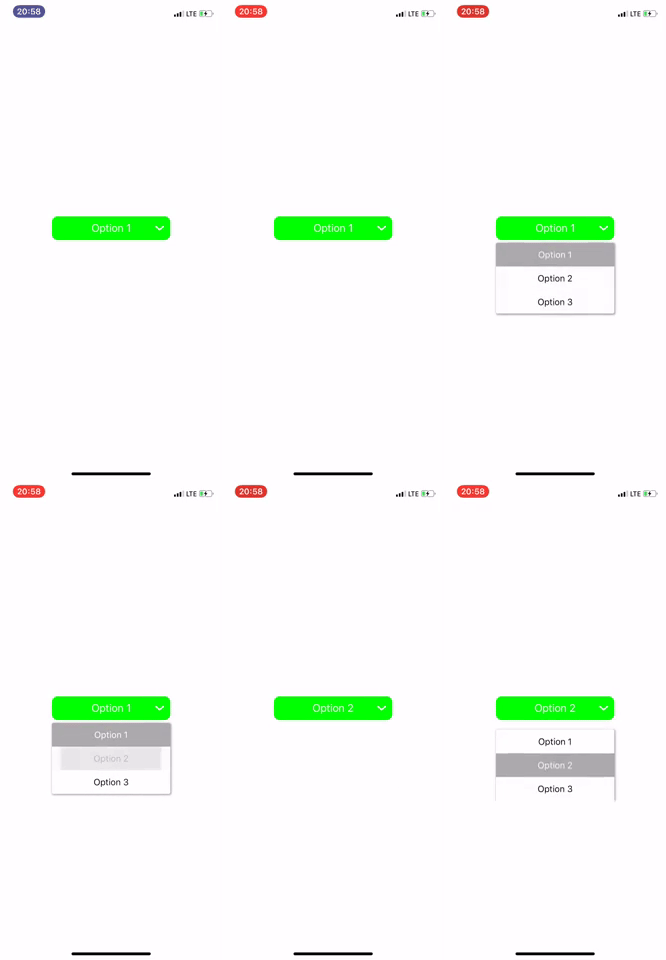
Requirements
Installation
DropdownButton is available through CocoaPods. To install it, simply add the following line to your Podfile:
pod 'DropdownButton'
Basic usage
// Defining dropdown button like a UIbutton and configure it
let dropDownButton: DropdownButton = {
    let button: DropdownButton = DropdownButton()
    button.layer.cornerRadius = 10
    button.backgroundColor = .green
    button.setTitleColor(.white, for: .normal)
    button.selectedRowColor = .lightGray
    button.selectedRowTextColor = .white
    button.rowHeight = 40
    return button
}()

// The the Closure returns Selected Index and String
dropDownButton.didSelect { (selectedText , index ,id) in
        self.valueLabel.text = "Selected String: \(selectedText) \n index: \(index)"
}

// seting options
let options = ["Option 1", "Option 2", "Option 3"]
let ids = [0, 1, 2]

dropDownButton.setOptions(options: options, optionIds: ids, selectedIndex: 0)
Other Options
Actions
dropDownButton.expandList()  // To show the Drop Down Menu
dropDownButton.collapseList() // To hide the Drop Down Menu
Closures
listWillAppear() {
//You can Do anything when Dropdown menu willAppear
}

listDidAppear() {
//You can Do anything when Dropdown menu listDidAppear
}

listWillDisappear() {
//You can Do anything when Dropdown menu listWillDisappear
}

listDidDisappear() {
//You can Do anything when Dropdown menu listDidDisappear
}
Customize DropdownButton
You can customize these properties of the drop down:
hideOptionsWhenSelect: This option to hide the list when click option one item. Default value istrueselectedRowColor: Color of selected Row item in DropDown Default value is.cyanrowBackgroundColor: Color of DropDown Default value is.whitelistHeight: The maximum Height of of List. Default value is150rowHeight: The Height of of List in the List. Default value is30selectedIndex: For preSelection of any of item in list
Note :
1.If you are using Multiple Drop Downs in a Single ViewController, Must Kept reverse order on StoryBoard or addSubview() to avoid Overlaying
Author
Alexander Korus, alexander.korus@svote.io, based on iOSDropDown Library by jriosdev.
License
DropdownButton is available under the MIT license. See the LICENSE file for more info.
Related Skills
node-connect
344.4kDiagnose OpenClaw node connection and pairing failures for Android, iOS, and macOS companion apps
frontend-design
99.2kCreate distinctive, production-grade frontend interfaces with high design quality. Use this skill when the user asks to build web components, pages, or applications. Generates creative, polished code that avoids generic AI aesthetics.
openai-whisper-api
344.4kTranscribe audio via OpenAI Audio Transcriptions API (Whisper).
qqbot-media
344.4kQQBot 富媒体收发能力。使用 <qqmedia> 标签,系统根据文件扩展名自动识别类型(图片/语音/视频/文件)。
