imgaug
This python library helps you with augmenting images for your machine learning projects.
It converts a set of input images into a new, much larger set of slightly altered images.



<table>
<tr>
<th> </th>
<th>Image</th>
<th>Heatmaps</th>
<th>Seg. Maps</th>
<th>Keypoints</th>
<th>Bounding Boxes,<br>Polygons</th>
</tr>
<!-- Line 1: Original Input -->
<tr>
<td><em>Original Input</em></td>
<td><img src="https://raw.githubusercontent.com/aleju/imgaug-doc/master/readme_images/small_overview/noop_image.jpg?raw=true" height="83" width="124" alt="input images"></td>
<td><img src="https://raw.githubusercontent.com/aleju/imgaug-doc/master/readme_images/small_overview/noop_heatmap.jpg?raw=true" height="83" width="124" alt="input heatmaps"></td>
<td><img src="https://raw.githubusercontent.com/aleju/imgaug-doc/master/readme_images/small_overview/noop_segmap.jpg?raw=true" height="83" width="124" alt="input segmentation maps"></td>
<td><img src="https://raw.githubusercontent.com/aleju/imgaug-doc/master/readme_images/small_overview/noop_kps.jpg?raw=true" height="83" width="124" alt="input keypoints"></td>
<td><img src="https://raw.githubusercontent.com/aleju/imgaug-doc/master/readme_images/small_overview/noop_bbs.jpg?raw=true" height="83" width="124" alt="input bounding boxes"></td>
</tr>
<!-- Line 2: Gauss. Noise + Contrast + Sharpen -->
<tr>
<td>Gauss. Noise<br>+ Contrast<br>+ Sharpen</td>
<td><img src="https://raw.githubusercontent.com/aleju/imgaug-doc/master/readme_images/small_overview/non_geometric_image.jpg?raw=true" height="83" width="124" alt="non geometric augmentations, applied to images"></td>
<td><img src="https://raw.githubusercontent.com/aleju/imgaug-doc/master/readme_images/small_overview/non_geometric_heatmap.jpg?raw=true" height="83" width="124" alt="non geometric augmentations, applied to heatmaps"></td>
<td><img src="https://raw.githubusercontent.com/aleju/imgaug-doc/master/readme_images/small_overview/non_geometric_segmap.jpg?raw=true" height="83" width="124" alt="non geometric augmentations, applied to segmentation maps"></td>
<td><img src="https://raw.githubusercontent.com/aleju/imgaug-doc/master/readme_images/small_overview/non_geometric_kps.jpg?raw=true" height="83" width="124" alt="non geometric augmentations, applied to keypoints"></td>
<td><img src="https://raw.githubusercontent.com/aleju/imgaug-doc/master/readme_images/small_overview/non_geometric_bbs.jpg?raw=true" height="83" width="124" alt="non geometric augmentations, applied to bounding boxes"></td>
</tr>
<!-- Line 3: Affine -->
<tr>
<td>Affine</td>
<td><img src="https://raw.githubusercontent.com/aleju/imgaug-doc/master/readme_images/small_overview/affine_image.jpg?raw=true" height="83" width="124" alt="affine augmentations, applied to images"></td>
<td><img src="https://raw.githubusercontent.com/aleju/imgaug-doc/master/readme_images/small_overview/affine_heatmap.jpg?raw=true" height="83" width="124" alt="affine augmentations, applied to heatmaps"></td>
<td><img src="https://raw.githubusercontent.com/aleju/imgaug-doc/master/readme_images/small_overview/affine_segmap.jpg?raw=true" height="83" width="124" alt="affine augmentations, applied to segmentation maps"></td>
<td><img src="https://raw.githubusercontent.com/aleju/imgaug-doc/master/readme_images/small_overview/affine_kps.jpg?raw=true" height="83" width="124" alt="affine augmentations, applied to keypoints"></td>
<td><img src="https://raw.githubusercontent.com/aleju/imgaug-doc/master/readme_images/small_overview/affine_bbs.jpg?raw=true" height="83" width="124" alt="affine augmentations, applied to bounding boxes"></td>
</tr>
<!-- Line 4: Crop + Pad -->
<tr>
<td>Crop<br>+ Pad</td>
<td><img src="https://raw.githubusercontent.com/aleju/imgaug-doc/master/readme_images/small_overview/cropandpad_image.jpg?raw=true" height="83" width="124" alt="crop and pad augmentations, applied to images"></td>
<td><img src="https://raw.githubusercontent.com/aleju/imgaug-doc/master/readme_images/small_overview/cropandpad_heatmap.jpg?raw=true" height="83" width="124" alt="crop and pad augmentations, applied to heatmaps"></td>
<td><img src="https://raw.githubusercontent.com/aleju/imgaug-doc/master/readme_images/small_overview/cropandpad_segmap.jpg?raw=true" height="83" width="124" alt="crop and pad augmentations, applied to segmentation maps"></td>
<td><img src="https://raw.githubusercontent.com/aleju/imgaug-doc/master/readme_images/small_overview/cropandpad_kps.jpg?raw=true" height="83" width="124" alt="crop and pad augmentations, applied to keypoints"></td>
<td><img src="https://raw.githubusercontent.com/aleju/imgaug-doc/master/readme_images/small_overview/cropandpad_bbs.jpg?raw=true" height="83" width="124" alt="crop and pad augmentations, applied to bounding boxes"></td>
</tr>
<!-- Line 5: Fliplr + Perspective -->
<tr>
<td>Fliplr<br>+ Perspective</td>
<td><img src="https://raw.githubusercontent.com/aleju/imgaug-doc/master/readme_images/small_overview/fliplr_perspective_image.jpg" height="83" width="124" alt="Horizontal flip and perspective transform augmentations, applied to images"></td>
<td><img src="https://raw.githubusercontent.com/aleju/imgaug-doc/master/readme_images/small_overview/fliplr_perspective_heatmap.jpg?raw=true" height="83" width="124" alt="Horizontal flip and perspective transform augmentations, applied to heatmaps"></td>
<td><img src="https://raw.githubusercontent.com/aleju/imgaug-doc/master/readme_images/small_overview/fliplr_perspective_segmap.jpg?raw=true" height="83" width="124" alt="Horizontal flip and perspective transform augmentations, applied to segmentation maps"></td>
<td><img src="https://raw.githubusercontent.com/aleju/imgaug-doc/master/readme_images/small_overview/fliplr_perspective_kps.jpg?raw=true" height="83" width="124" alt="Horizontal flip and perspective transform augmentations, applied to keypoints"></td>
<td><img src="https://raw.githubusercontent.com/aleju/imgaug-doc/master/readme_images/small_overview/fliplr_perspective_bbs.jpg?raw=true" height="83" width="124" alt="Horizontal flip and perspective transform augmentations, applied to bounding boxes"></td>
</tr>
</table>
More (strong) example augmentations of one input image:
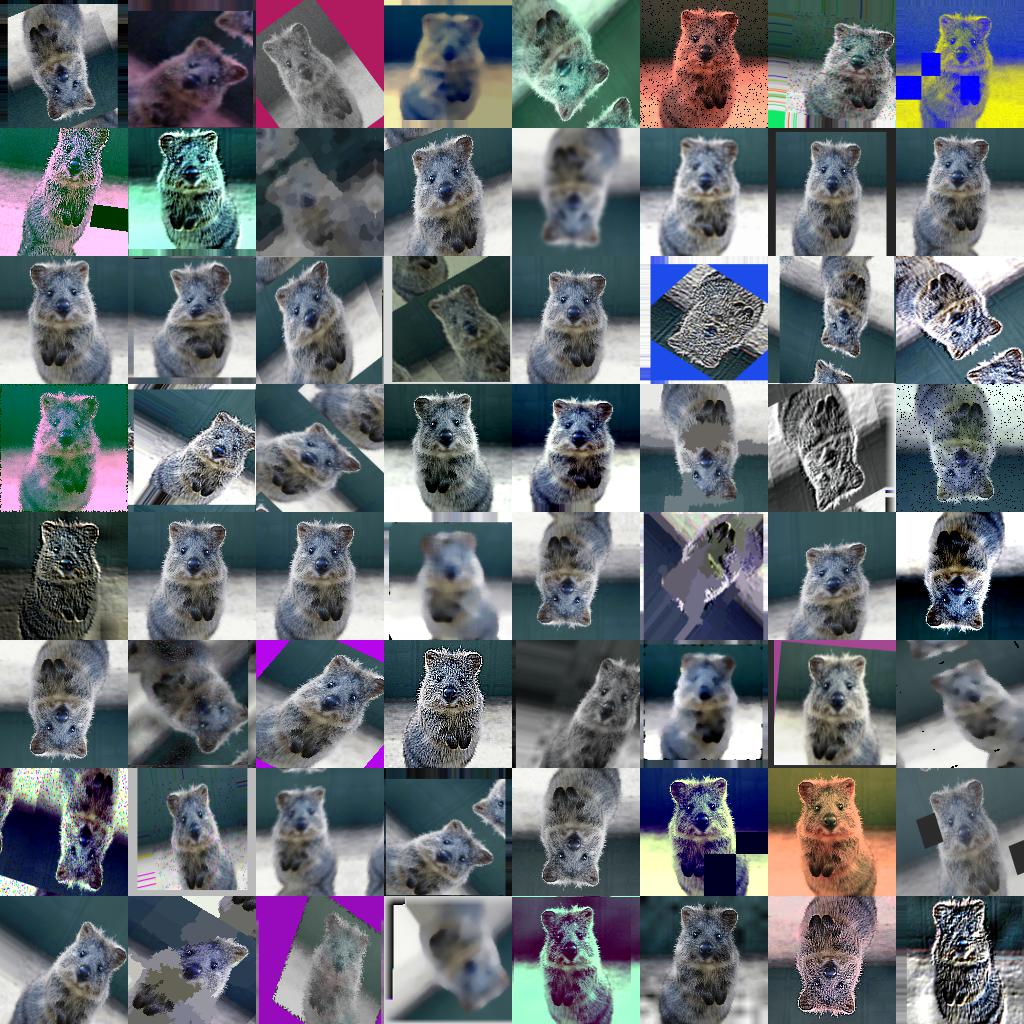
Table of Contents
- Features
- Installation
- Documentation
- Recent Changes
- Example Images
- Code Examples
- Citation
<a name="features"/>
Features
- Many augmentation techniques
- E.g. affine transformations, perspective transformations, contrast changes, gaussian noise, dropout of regions, hue/saturation changes, cropping/padding, blurring, ...
- Optimized for high performance
- Easy to apply augmentations only to some images
- Easy to apply augmentations in random order
- Support for
- Images (full support for uint8, for other dtypes see documentation)
- Heatmaps (float32), Segmentation Maps (int), Masks (bool)
- May be smaller/larger than their corresponding images. No extra lines of code needed for e.g. crop.
- Keypoints/Landmarks (int/float coordinates)
- Bounding Boxes (int/float coordinates)
- Polygons (int/float coordinates)
- Line Strings (int/float coordinates)
- Automatic alignment of sampled random values
- Example: Rotate image and segmentation map on it by the same value sampled from
uniform(-10°, 45°). (0 extra lines of code.)
- Probability distributions as parameters
- Example: Rotate images by values sampled from
uniform(-10°, 45°).
- Example: Rotate images by values sampled from
ABS(N(0, 20.0))*(1+B(1.0, 1.0))", where ABS(.) is the absolute function, N(.) the gaussian distribution and B(.) the beta distribution.
- Many helper functions
- Example: Draw heatmaps, segmentation maps, keypoints, bounding boxes, ...
- Example: Scale segmentation maps, average/max pool of images/maps, pad images to aspect
ratios (e.g. to square them)
- Example: Convert keypoints to distance maps, extract pixels within bounding boxes from images, clip polygon to the image plane, ...
- Support for augmentation on multiple CPU cores
<a name="installation"/>
Installation
The library supports python 2.7 and 3.4+.
Installation: Anaconda
To install the library in anaconda, perform the following commands:
conda config --add channels conda-forge
conda install imgaug
You can deinstall the library again via conda remove imgaug.
Installation: pip
Then install imgaug either via pypi (can lag behind the github version):
pip install imgaug
or install the latest version directly from github:
pip install git+https://github.com/aleju/imgaug.git
For more details, see the install guide
To deinstall the library, just execute pip uninstall imgaug.
<a name="documentation"/>
Documentation
Example jupyter notebooks:

