
Iskan
Kubernetes Native, Runtime Container Image Scanning
Install / Use
/learn @alcideio/IskanREADME




iSKan | Kubernetes Native Image Scanning
<img src="iskan.png" alt="iskan" width="120"/>Harness your existing Container Image Vulnerability Scanning information to your Kubernetes Cluster. iskan enables you to:
- [x] Plug one or more container image vulnerability providers such as ECR, GCR, Azure, Harbor and others
- [x] Analyse the running Pods and their containers for known vulnerabilities.
- [x] Control the scan scope to certain namespaces
- [x] Filter scan results by: Severity, CVSS Score, Fixable CVEs, and even snooze specific CVEs.
- [x] AWS ECR
- [x] GCP GCR
- [x] Azure ACR (Preview)
- [x] Rapid7 InsightVM (Preview)
- [x] Harbor - v2.0 API
- [x] Inline Local Scanner - Trivy (Experimental)
Install
Download the latest from the release page
curl https://raw.githubusercontent.com/alcideio/iskan/master/download.sh | bash
Usage
Scan Your Cluster
iskan --cluster-context mycluster --api-config myconfig.yaml
  Get vulnerabilities information on the presently running containers

  Usage:
    iskan cluster [flags]

  Aliases:
    cluster, scan-cluster

  Flags:
    -c, --api-config string          The Vulnerability API configuration file name
        --cluster-context string     Cluster Context .use 'kubectl config get-contexts' to list available contexts
        --filter-cvss float32        Include CVEs with CVSS score greater or equal than the specified number. Valid values: 0.0-10.0
        --filter-fixable-only        Include CVEs with which are fixable
        --filter-severity string     Select which severities to include. Comma seperated MINIMAL,LOW,MEDIUM,HIGH,CRITICAL
    -f, --format string              Output format. Supported formats: json | yaml | html (default "json")
    -h, --help                       help for cluster
        --namespace-exclude string   Namespaces to exclude from the scan (default "kube-system")
        --namespace-include string   Namespaces to include in the scan (default "*")
    -o, --outfile string             Output file name. Use '-' to output to stdout (default "alcide-iskan.report")
    -r, --report-config string       The Report configuration file name
        --scan-api-burst int32       Maximum burst for throttle (default 100)
        --scan-api-qps float32       Indicates the maximum QPS to the vuln providers (default 30)

  Global Flags:
    -v, --v Level   number for the log level verbosity
providers:
  - kind: "gcr"
    repository: "gcr.io/yourproject"
    creds:
      gcr: |
        {
          "type": "service_account",
          "project_id": "yourproject",
          "private_key_id": "XXX",
          "private_key": "",
          "client_email": "imagevulreader@yourproject.iam.gserviceaccount.com",
          "client_id": "666",
          "auth_uri": "https://accounts.google.com/o/oauth2/auth",
          "token_uri": "https://oauth2.googleapis.com/token",
          "auth_provider_x509_cert_url": "https://www.googleapis.com/oauth2/v1/certs",
          "client_x509_cert_url": "https://www.googleapis.com/robot/v1/metadata/x509/imagevulreader%40yourproject.iam.gserviceaccount.com"
        }
  - kind: "ecr"
    repository: "yourawsaccount.dkr.ecr.us-west-2.amazonaws.com/iskan"
    creds:
      ecr:
        accessKeyId: AWSKEY
        secretAccessKey: AWSSECRET
        region: us-west-2
  - kind: "acr"
    repository: "alcide.azurecr.io/iskan"
    creds:
      acr:
        tenantId: mytenantid
        subscriptionId: subscrrptionId
        clientId: clientId
        clientSecret: clientsecret
        cloudName: "AZUREPUBLICCLOUD"
  - kind: "trivy"
    # Use "*" for a capture all images
    repository: "*"
    creds:
      trivy:
        debugMode: false

  - kind: "harbor"
    repository: "core.harbor.domain"
    creds:
      harbor:
        host: "core.harbor.domain"
        username: admin
        password: Harbor12345
        insecure: false

  - kind: "insightvm"
    repository: "alcide/iskan"
    creds:
      insightvm:
        apikey: "your-api-key"
        region: "us"
Vulnerabilities Provider API References
| Provider | References | |----------|-----------------------| | ECR | ECR Policies, ECR Image Scanning | | GCR | Enabling the Container Scanning API | | ACR | Azure Defender, Vulnerability Assessment in Azure| | InsightVM | InsightVM Container Security| | Harbor | Harbor Administration| | Trivy | Trivy on GitHub|
Scan Image
The primary use case for this is to test your vulnerability provider api configuration
Get vulnerabilities information for a given container image

Usage:
  iskan image [flags]

Aliases:
  image, scan-image, i, container, scan-container

Examples:
iskan image --image="gcr.io/myproj/path/to/myimage:v1.0" --api-config myconfig.yaml -f table --filter-severity CRITICAL,HIGH

Flags:
  -c, --api-config string        The Vulnerability API configuration file name
      --filter-cvss float32      Include CVEs with CVSS score greater or equal than the specified number. Valid values: 0.0-10.0
      --filter-fixable-only      Include CVEs with which are fixable
      --filter-severity string   Select which severities to include. Comma seperated MINIMAL,LOW,MEDIUM,HIGH,CRITICAL
  -f, --format string            Output format. Supported formats: json | yaml | table (default "json")
  -h, --help                     help for image
  -i, --image string             container image for which vulnerabilities information should be obtained

Global Flags:
  -v, --v Level   number for the log level verbosity
Milestones
<details> <summary>Click To See List</summary>- [x] Multiple Vulnerability API Providers (ECR, GCR)
- [x] Coverage Report
- [x] E2E
- [x] Binary Release
- [x] Scope & Exception Configuration
- [x] Docker Images
- [x] Cluster Scan CronJob (Helm Install)
- [x] Public image scan support using inline scan engine
- [x] Report export to 3rd party integrations (Slack, Webhook, ...)
- [x] Report formats (json, yaml)
- [x] Fancy HTML report
- [x] Examples & Documentation
- [ ] Running in watch mode
- [ ] kubectl iskan plugin
Contributing
Bugs
If you think you have found a bug please follow the instructions below.
- Please spend a small amount of time giving due diligence to the issue tracker. Your issue might be a duplicate.
- Open a new issue if a duplicate doesn't already exist.
Features
If you have an idea to enhance iskan follow the steps below.
- Open a new issue.
- Remember users might be searching for your issue in the future, so please give it a meaningful title to helps others.
- Clearly define the use case, using concrete examples.
- Feel free to include any technical design for your feature.
Pull Requests
- Your PR is more likely to be accepted if it focuses on just one change.
- Please include a comment with the results before and after your change.
- Your PR is more likely to be accepted if it includes tests.
- You're welcome to submit a draft PR if you would like early feedback on an idea or an approach.
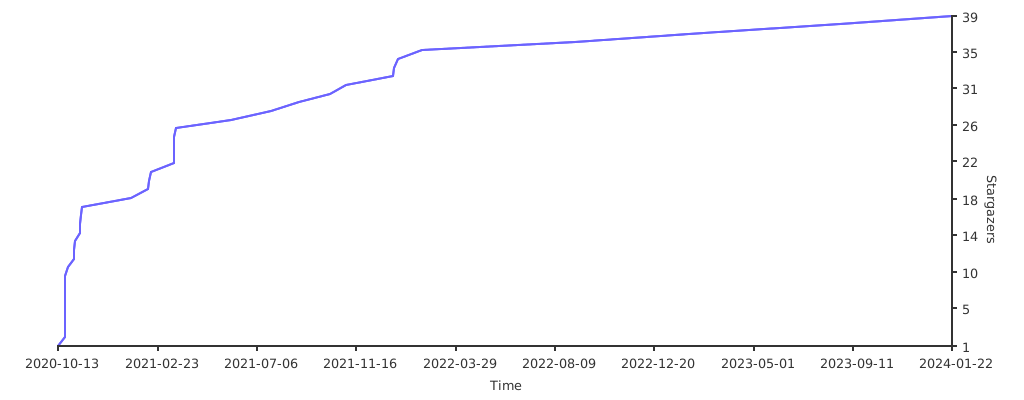
Related Skills
node-connect
334.1kDiagnose OpenClaw node connection and pairing failures for Android, iOS, and macOS companion apps
frontend-design
82.1kCreate distinctive, production-grade frontend interfaces with high design quality. Use this skill when the user asks to build web components, pages, or applications. Generates creative, polished code that avoids generic AI aesthetics.
openai-whisper-api
334.1kTranscribe audio via OpenAI Audio Transcriptions API (Whisper).
commit-push-pr
82.1kCommit, push, and open a PR
