
amigent
Complete remote control for a real Amiga, by AI or manually: an MCP server for AI agents and a remote desktop like TeamViewer, tuned for slow Amigas and slow networks. AmigaOS 2.04 and up, any CPU from the 68000, Windows, macOS and Linux.
Install / Use
claude mcp add akustikrausch -- npx -y github:akustikrausch/amigentIf the server publishes to npm under a different name, use that package instead — check the repo README.
MCP Server
Model Context Protocol server
Quality Score
Category
Development & EngineeringSupported Platforms
Tags
Our assessment of amigent
amigent scores 79/100 on our quality scale, 3602nd of 4,624 Development & Engineering skills we index.
Its MCP Server is 6.1 KB long, well organised into 8 sections with 1 code example: a thorough specification that gives an agent plenty to work with.
It has 10 GitHub stars, so there is little community track record yet; judge it on its content.
Maintenance, license and trust
- The repository was last updated 2 days ago, so amigent is actively maintained.
- It is released under the MIT license, a permissive license that allows use, modification and commercial use with attribution.
- Its trust signals score 97/100, with no cautions. These come from repository metadata, not a code audit — read the skill file before letting an agent act on it.
amigent compared with similar skills
All 4 of these similar skills score higher than amigent; compare them before choosing.
| Skill | Score | Stars | Updated | Format |
|---|---|---|---|---|
| amigent (this skill)by akustikrausch | 79 | 10 | 2d ago | MCP Server |
| taste-skillby Leonxlnx | 100 | 110.1k | today | CLAUDE.md |
| Agent-Reachby Panniantong | 100 | 108.9k | today | CLAUDE.md |
| headroomby headroomlabs-ai | 100 | 78.9k | today | CLAUDE.md |
| ai-job-searchby ai-job-search-dev | 100 | 69.6k | 1d ago | CLAUDE.md |
Frequently asked questions
- How do I install amigent?
- Run
claude mcp add akustikrausch -- npx -y github:akustikrausch/amigent. The install tabs above show the steps for each supported agent. - Which AI agents does amigent work with?
- It is written for Claude Code, Claude Desktop and OpenAI Codex, as a MCP Server file. Other agents that read the same format can often use it too.
- Is amigent safe to use?
- It is MIT-licensed and scores 97/100 on trust signals. Skills are instructions an agent will follow, so read the file before installing it and do not approve commands you do not understand.
- Is amigent still maintained?
- The repository was last updated 2 days ago, so amigent is actively maintained.
Skill content
View source on GitHub _____ .__ __
/ _ \ _____ |__| ____ ____ ____ _/ |_
/ /_\ \ / \ | | / ___\ _/ __ \ / \ \ __\
/ | \| Y Y \| | / /_/ >\ ___/ | | \ | |
\____|__ /|__|_| /|__| \___ / \___ >|___| / |__|
\/ \/ /_____/ \/ \/
complete remote control for a real Amiga, by AI or manually
tuned for slow Amigas and slow networks
Amigent connects your PC or Mac to your real Amiga over the home network. Then you can:
- let an AI agent do the work, for example Claude Code or Codex: install software, update programs, change settings, copy files, click through programs. Just tell it what you want.
- use the Amiga yourself from your computer, as a remote desktop like TeamViewer or VNC: a window with the live screen, your own mouse and keyboard, file transfer and a shared clipboard.
- and both of these quickly, even on a slow machine. Amigent is tuned for slow Amigas and slow networks: a 7 MHz 68000 sends its whole screen in under a second, and over a plipbox a click shows its result in a fraction of a second. How it stays fast.
Both at the same time: you see every click the agent makes and can take over at any moment.
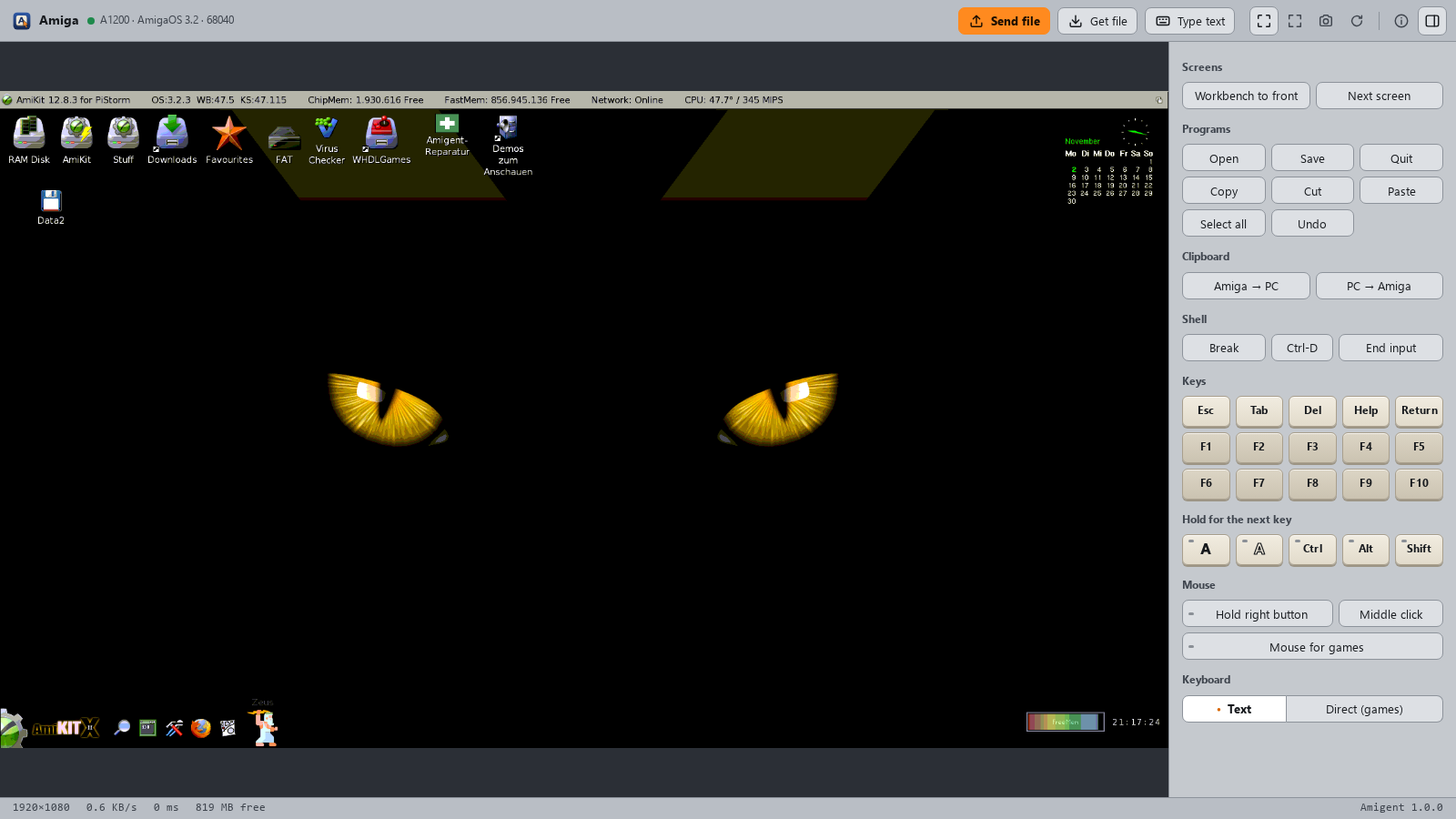
Installation
On the Amiga
1. Copy amigentd to the Amiga (amigentd.000 on a
68000), or unpack the archive from the
releases.
2. Start it with amigentd SETUP in a Shell, or double-click its icon.
On the PC or Mac
3. Paste this into your AI agent:
Install Amigent for me: run "pipx install amigent" (if pipx or Python 3.10
or newer is missing, install them first: Windows winget, macOS Homebrew,
Linux the package manager). Then run amigent-setup; it finds my Amiga on
the network by itself. Register the MCP server "amigent" with the command
amigent-server, and run amigent-viewer --install so the remote desktop
shows up as a program. Tell me if you need to be restarted.
The agent sets up the Amiga over the network; from then on amigentd starts with it.
Windows: Amigent appears in the Start menu. For an encrypted connection
openssl is needed, which comes with Git for Windows.
macOS: Amigent appears in ~/Applications. On its first start, allow it
access to the local network, or it cannot reach the Amiga. Cmd is the right
Amiga key.
Linux: there is no program entry; start the remote desktop with
amigent-viewer.
Without an AI agent: see the manual installation.
What you need
- An Amiga with AmigaOS 2.04 or newer, any CPU from the 68000 on, a network connection (a plipbox on the parallel port is enough) and a TCP/IP stack such as Roadshow.
- A PC or Mac with Windows, macOS or Linux and Python 3.10 or newer.
What you can ask for
"Check which programs on the Amiga are outdated."
"Install the game from my Downloads folder and add it to the Games menu."
"Copy the demo to the Amiga and start it."
"Open the remote desktop."
Made for slow machines and slow wires
Most of the work in Amigent went into making a slow Amiga on a slow network feel quick, for the AI agent and for you at the mouse:
- The screen travels as the Amiga keeps it. Chipset screens go out as bitplanes, graphics-card screens as small palette tiles, and only the tiles that changed, often as the difference to what you already have.
- Your input comes first. Mouse moves, clicks and keys are carried out even while a picture is still on its way, and the area around the pointer is sent before the rest.
- The Amiga keeps its time. While nothing happens, Amigent asks rarely and costs the Amiga only a few percent of its CPU.
- Files go in one go. Whole folders travel in a single stream, and files that are already there stay where they are.
Measured with a 640×256 Workbench screen:
| Amiga | whole screen | unchanged screen | CPU while watching | |---|---|---|---| | 68000, 7 MHz | 0.6–1.0 s | 80–95 ms | under 10 % | | A1200, 68020 at 14 MHz | 0.1 s | 15 ms | 2–3 % |
On a 1920×1080 graphics-card screen over a plipbox (about 50 KB/s):
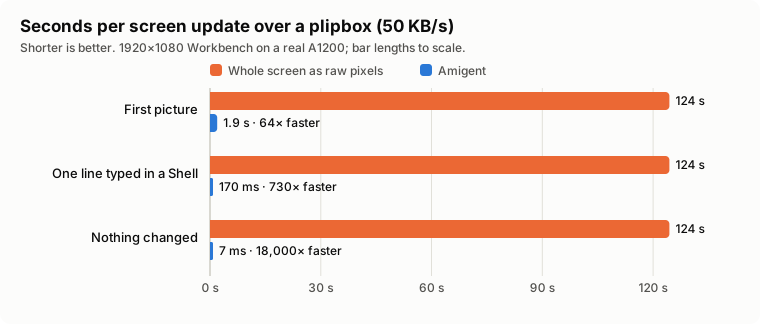
The orange bars are what moving the whole screen as raw 24-bit pixels costs on that wire, every time; the blue ones are Amigent, measured on a real A1200. All numbers, how they were taken and how to repeat them are in docs/PERFORMANCE.md.
Good to know
- New address after a restart? Amigent finds the Amiga again by itself. It takes only the one that proves to be yours.
- Several Amigas?
amigent-fleetshows them side by side with a preview. - After a big OS update,
amigent-repairputs back what the update removed. - Safe at home. A key keeps other computers on the network out, and the connection can be encrypted. Don't open the Amiga to the internet.
More in the guide and the FAQ.
License
MIT, see LICENSE. By Andreas Wendorf (Akustikrausch). Changes are in the changelog.
Related Skills
taste-skill
110.1kAgent skills that give coding agents taste: art direction, reference images and a browser check instead of generic AI pages
Agent-Reach
108.9kGive your AI agent eyes to see the entire internet. Read & search Twitter, Reddit, YouTube, GitHub, Bilibili, XiaoHongShu — one CLI, zero API fees.
headroom
78.9kCompress tool outputs, logs, files, and RAG chunks before they reach the LLM. 20% fewer tokens for coding agents, 60-95% fewer tokens for JSON, same answers. Library, proxy, MCP server.
ai-job-search
69.6kThe job search that runs on your machine. AI job application framework built on Claude Code: evaluate postings, tailor CVs, write cover letters, prep interviews. Fork it and own it.

Languages
Trust signals
From repository metadata: license, adoption, age and documentation. Not a code audit — see the Safety scan above for what the skill file itself contains.