
EasyJob
:hammer: EasyJob - keep and execute your PowerShell and BAT scripts from one interface
Install / Use
/learn @akshinmustafayev/EasyJobREADME
<img src="assets/icon.png" height="42" width="42"/> EasyJob
<a href="https://img.shields.io/github/license/akshinmustafayev/EasyJob"> <img src="https://img.shields.io/github/license/akshinmustafayev/EasyJob" alt="License" /> </a> <a href="https://img.shields.io/tokei/lines/github/akshinmustafayev/EasyJob"> <img src="https://img.shields.io/tokei/lines/github/akshinmustafayev/EasyJob" alt="Total lines" /> </a> <a href="https://img.shields.io/github/downloads/akshinmustafayev/EasyJob/total"> <img src="https://img.shields.io/github/downloads/akshinmustafayev/EasyJob/total" alt="Downloads" /> </a> <a href="https://img.shields.io/github/stars/akshinmustafayev/EasyJob?style=social"> <img alt="GitHub repo file count" src="https://img.shields.io/github/stars/akshinmustafayev/EasyJob?style=social"> </a> <a href="https://img.shields.io/github/contributors/akshinmustafayev/EasyJob"> <img alt="GitHub repo file count" src="https://img.shields.io/github/contributors/akshinmustafayev/EasyJob"> </a>:newspaper: Description
EasyJob - keep and execute your PowerShell and BAT scripts from one interface
:eye_speech_bubble: Overview


:abacus: Features
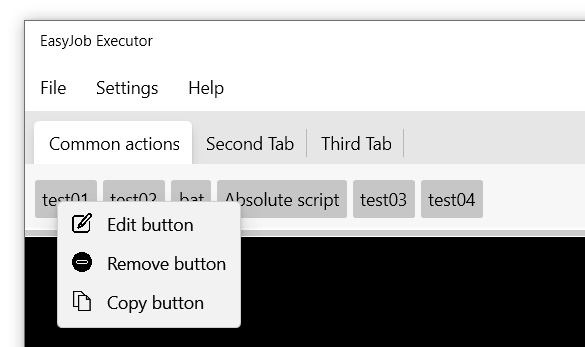
- Remove, Edit or Copy button from the GUI by right mouse click on it and then select item in the context menu. Settings are automatically will be saved to your config.json file.
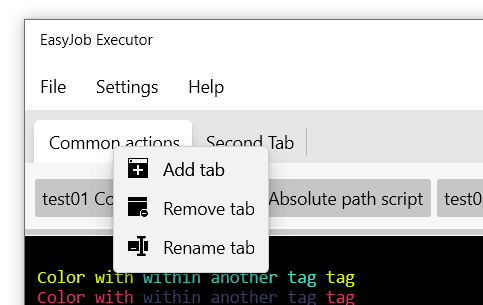
- Remove, Rename or Add tab from the GUI by right mouse click on it and then select Remove Tab in the context menu. Settings are automatically will be saved to your config.json file.
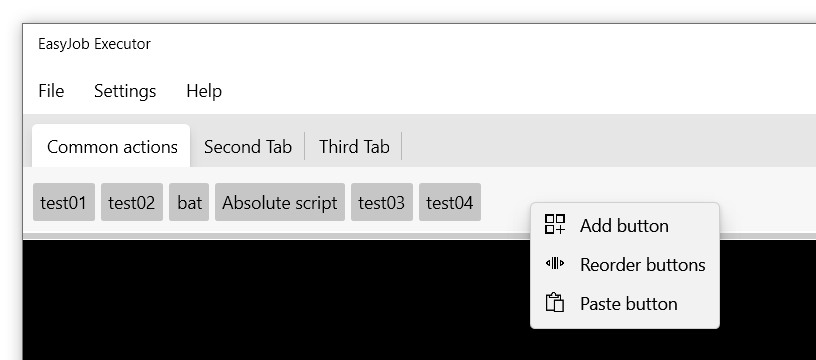
- Add or Paste button from the GUI by right mouse click on button bar.
- Reorder Tabs from the Settings->Workflow->Reorder tabs window
- Add Tabs from the Settings->Workflow->Add tab window
- Rename Tabs from the Settings->Workflow->Remove current tab window
- Remove Tabs from the Settings->Workflow->Rename current tab window
- Remove Add buttons from the Settings->Workflow->Add button to current tab window
- Reorder buttons from the Settings->Workflow->Reorder buttons in current tab window
- Change application settings from the Settings->Configuration window
- Colored console support
:red_circle: Color tags support
There are 14 available default tags which you may want to use
- <img src="ej/color_tags/tag01.png" style="height:18px;width:18px;"> \c01EJ Some text /c01EJ
Write-Host "\c01EJColor with tag 01/c01EJ"
- <img src="ej/color_tags/tag02.png" style="height:18px;width:18px;"> \c02EJ Some text /c02EJ
Write-Host "\c02EJColor with tag 02/c02EJ"
- <img src="ej/color_tags/tag03.png" style="height:18px;width:18px;"> \c03EJ Some text /c03EJ
Write-Host "\c03EJColor with tag 03/c03EJ"
- <img src="ej/color_tags/tag04.png" style="height:18px;width:18px;"> \c04EJ Some text /c04EJ
Write-Host "\c04EJColor with tag 04/c04EJ"
- <img src="ej/color_tags/tag05.png" style="height:18px;width:18px;"> \c05EJ Some text /c05EJ
Write-Host "\c05EJColor with tag 05/c05EJ"
- <img src="ej/color_tags/tag06.png" style="height:18px;width:18px;"> \c06EJ Some text /c06EJ
Write-Host "\c06EJColor with tag 06/c06EJ"
- <img src="ej/color_tags/tag07.png" style="height:18px;width:18px;"> \c07EJ Some text /c07EJ
Write-Host "\c07EJColor with tag 07/c07EJ"
- <img src="ej/color_tags/tag08.png" style="height:18px;width:18px;"> \c08EJ Some text /c08EJ
Write-Host "\c08EJColor with tag 08/c08EJ"
- <img src="ej/color_tags/tag09.png" style="height:18px;width:18px;"> \c09EJ Some text /c09EJ
Write-Host "\c09EJColor with tag 09/c09EJ"
- <img src="ej/color_tags/tag10.png" style="height:18px;width:18px;"> \c10EJ Some text /c10EJ
Write-Host "\c10EJColor with tag 10/c10EJ"
- <img src="ej/color_tags/tag11.png" style="height:18px;width:18px;"> \c11EJ Some text /c11EJ
Write-Host "\c11EJColor with tag 11/c11EJ"
- <img src="ej/color_tags/tag12.png" style="height:18px;width:18px;"> \c12EJ Some text /c12EJ
Write-Host "\c12EJColor with tag 12/c12EJ"
- <img src="ej/color_tags/tag13.png" style="height:18px;width:18px;"> \c13EJ Some text /c13EJ
Write-Host "\c13EJColor with tag 13/c13EJ"
- <img src="ej/color_tags/tag14.png" style="height:18px;width:18px;"> \c14EJ Some text /c14EJ
Write-Host "\c14EJColor with tag 14/c14EJ"
You can use tags inside other tags as well. Examples:
Write-Host "\c14EJColor with \c12EJsome inside tag/c12EJ tag 14/c14EJ"
Write-Host "\c02EJColor with \c09EJsome inside tag/c09EJ tag 14/c02EJ"
Write-Host "\c02EJAnother \c04EJexample/c04EJ with \c08EJsome/c08EJ other inner blocks/c02EJ"
If you dont want to use tags, you can use HTML code inside your Write-Host. Examples:
Write-Host "<span style=`"color:red;`">Some error alert!</span>"
Write-Host "<span style=`"color:#FF0008;`">Some other color!</span>"
Write-Host "<span style=`"color:#4CFF00;`">Some other color!</span>"
:hammer: EasyJobPSTools
EasyJobPSTools - is a PowerShell Module which enables Graphic features for your scripts.
You can read more about it Here
:gear: Configuration
Configuration could be done from config.json file located with the app executable.
Here is an example:
{
  "default_powershell_path": "C:\\Windows\\System32\\WindowsPowerShell\\v1.0\\powershell.exe",
  "default_cmd_path": "C:\\Windows\\System32\\cmd.exe",
  "powershell_arguments": "",
  "console_background": "Black",
  "console_foreground": "White",
  "console_ignore_color_tags": false,
  "clear_events_when_reload": true,
  "restrictions": {
    "block_tabs_remove": false,
    "block_buttons_remove": false,
    "block_tabs_add": false,
    "block_buttons_add": false,
    "block_buttons_reorder": false,
    "block_buttons_edit": false,
    "block_tabs_rename": false,
    "block_buttons_paste": false,
    "block_buttons_copy": false,
    "hide_menu_item_file_reload_config": false,
    "hide_menu_item_file_open_app_folder": false,
    "hide_menu_item_file_clear_events_list": false,
    "hide_menu_item_settings": false,
    "hide_menu_item_settings_workflow": false,
    "hide_menu_item_settings_workflow_reorder_tabs": false,
    "hide_menu_item_settings_workflow_add_tab": false,
    "hide_menu_item_settings_workflow_remove_current_tab": false,
    "hide_menu_item_settings_workflow_rename_current_tab": false,
    "hide_menu_item_settings_workflow_add_button_to_current_tab": false,
    "hide_menu_item_settings_workflow_reorder_buttons_in_current_tab": false,
    "hide_menu_item_settings_configuration": false,
    "hide_menu_item_help": false,
    "hide_menu_item_help_troubleshooting": false,
    "hide_menu_item_help_colortags": false,
    "hide_menu_item_help_about": false
  },
  "tabs": [
    {
      "ID": "2e5feab0-527c-451c-b83c-d838d22dacac",
      "header": "Common actions",
      "buttons": [
        {
          "Id": "01bf5871-442e-4f73-91a3-fa13855b609c",
          "text": "test01",
          "description": "Some test script",
          "script": "scripts\\common\\test01.ps1",
          "scriptpathtype": "relative",
          "scripttype": "powershell",
          "arguments": []
        },
        {
          "Id": "9cdc38fa-fc32-4a9d-be78-cd2bfe264422",
          "text": "Bat script",
          "description": "Some BAT script",
          "script": "scripts\\test02.bat",
          "scriptpathtype": "relative",
          "scripttype": "bat",
          "arguments": []
        },
        {
          "Id": "5ec086d9-7987-43ef-84fb-1d8481b05aea",
          "text": "Absolute path script",
          "description": "",
          "script": "C:\\scripts\\absolute_script.ps1",
          "scriptpathtype": "absolute",
          "scripttype": "powershell",
          "arguments": []
        },
        {
          "Id": "c28abef3-494c-48f5-96d8-a5788ced1a23",
          "text": "test04",
          "description": "Some test 04 script with arguments",
          "script": "scripts\\common\\test04.ps1",
          "scriptpathtype": "relative",
          "scripttype": "powershell",
          "arguments": [
            {
              "argument_question": "What is your name?",
              "argument_answer": ""
            },
            {
              "argument_question": "What is your surname",
              "argument_answer": ""
            },
            {
              "argument_question": "No, really what is your name?",
              "argument_answer": ""
            }
          ]
        }
      ]
    },
    {
      "ID": "42f71e1a-32b9-4c16-8c7d-256cd589c52e",
      "header": "Second Tab",
      "buttons": [
        {
          "Id": "3476554c-77b1-4abd-914e-ab1db866fc5f",
          "text": "And this is button too",
          "description": "no description",
          "script": "scripts\\some_button_script.ps1",
          "scriptpathtype": "relative",
          "scripttype": "powershell",
          "arguments": []
        }
      ]
    }
  ]
}
_Note 1: Do not specify ar
Related Skills
node-connect
340.5kDiagnose OpenClaw node connection and pairing failures for Android, iOS, and macOS companion apps
frontend-design
84.2kCreate distinctive, production-grade frontend interfaces with high design quality. Use this skill when the user asks to build web components, pages, or applications. Generates creative, polished code that avoids generic AI aesthetics.
openai-whisper-api
340.5kTranscribe audio via OpenAI Audio Transcriptions API (Whisper).
commit-push-pr
84.2kCommit, push, and open a PR
