
Ble.sh
Bash Line Editor―a line editor written in pure Bash with syntax highlighting, auto suggestions, vim modes, etc. for Bash interactive sessions.
Install / Use
/learn @akinomyoga/Ble.shREADME
[ Languages: English | 日本語 (Japanese) ]
<h1 align="center"><ruby>ble.sh<rp> (</rp><rt>/blɛʃ/</rt><rp>)</rp></ruby> ―Bash Line Editor―</h1> <p align="center"> [ <b>README</b> | <a href="https://github.com/akinomyoga/ble.sh/wiki/Manual-%C2%A71-Introduction">Manual</a> | <a href="https://github.com/akinomyoga/ble.sh/wiki/Q&A">Q&A</a> | <a href="https://github.com/akinomyoga/blesh-contrib"><code>contrib</code></a> | <a href="https://github.com/akinomyoga/ble.sh/wiki/Recipes">Recipes</a> ] </p>Bash Line Editor (ble.sh<sup><a href="#discl-pronun">†1</a></sup>) is a command line editor written in pure Bash<sup><a href="#discl-pure">†2</a></sup> which replaces the default GNU Readline.
The current devel version is 0.4.
This script supports Bash 3.0 or higher although we recommend using ble.sh with release versions of Bash 4.0 or higher.
The POSIX standard utilities are also required.
Currently, only UTF-8 encoding is supported for non-ASCII characters.
This script is provided under the BSD License (3-clause BSD license).
Quick instructions
<!-- In macOS, you might additionally need to install `gawk`, `nawk`, or `mawk` since macOS `/usr/bin/awk` (awk-32 and later) seems to have a problem with some multibyte charsets. -->There are two ways to get ble.sh: to get the source using git and build
ble.sh, or to download the nightly build using curl or wget.
See Sec 1.1 and Sec 1.2 for the details of trial and installation.
See Sec 1.3 for the details of the setup of your ~/.bashrc.
<details open><summary><b>Download source using <code>git</code> and make <code>ble.sh</code></b></summary>[!NOTE] If you want to use fzf with
ble.sh, you need to check Sec 2.8 to avoid compatibility problems.
This requires the commands git, make (GNU make), and gawk (GNU awk)<sup><a href="#discl-pronun">†3</a></sup>.
In the following, please replace make with gmake if your system provides GNU make as gmake (such as in BSD).
# TRIAL without installation

git clone --recursive --depth 1 --shallow-submodules https://github.com/akinomyoga/ble.sh.git
make -C ble.sh
source ble.sh/out/ble.sh

# Quick INSTALL to BASHRC (If this doesn't work, please follow Sec 1.3)

git clone --recursive --depth 1 --shallow-submodules https://github.com/akinomyoga/ble.sh.git
make -C ble.sh install PREFIX=~/.local
echo 'source -- ~/.local/share/blesh/ble.sh' >> ~/.bashrc
The build process integrates multiple Bash script files into a single Bash script ble.sh with pre-processing.
It also places other module files in appropriate places and strips code comments for a shorter initialization time.
The build process does not involve any C/C++/Fortran compilations and generating binaries, so C/C++/Fortran compilers are not needed.
This requires the commands curl, tar (with the support for the J flag), and xz (XZ Utils).
# TRIAL without installation

curl -L https://github.com/akinomyoga/ble.sh/releases/download/nightly/ble-nightly.tar.xz | tar xJf -
source ble-nightly/ble.sh

# Quick INSTALL to BASHRC (If this doesn't work, please follow Sec 1.3)

curl -L https://github.com/akinomyoga/ble.sh/releases/download/nightly/ble-nightly.tar.xz | tar xJf -
bash ble-nightly/ble.sh --install ~/.local/share
echo 'source -- ~/.local/share/blesh/ble.sh' >> ~/.bashrc
After the installation, the directory ble-nightly can be removed.
This requires the commands wget, tar (with the support for the J flag), and xz (XZ Utils).
# TRIAL without installation

wget -O - https://github.com/akinomyoga/ble.sh/releases/download/nightly/ble-nightly.tar.xz | tar xJf -
source ble-nightly/ble.sh

# Quick INSTALL to BASHRC (If this doesn't work, please follow Sec 1.3)

wget -O - https://github.com/akinomyoga/ble.sh/releases/download/nightly/ble-nightly.tar.xz | tar xJf -
bash ble-nightly/ble.sh --install ~/.local/share
echo 'source -- ~/.local/share/blesh/ble.sh' >> ~/.bashrc
After the installation, the directory ble-nightly can be removed.
This only requires the corresponding package manager.
- AUR (Arch Linux)
blesh-git(devel),blesh(stable 0.3.4) - NixOS (nixpkgs)
blesh(devel) - Guix
blesh(devel)
# UPDATE (in a ble.sh session)

ble-update

# UPDATE (outside ble.sh sessions)

bash /path/to/ble.sh --update
Since ble.sh is just a set of shell scripts and do not contain any binary (i.e., "noarch"),
you may just download the pre-built tarball from a release page and put the extracted contents in e.g. /tmp/blesh-package/usr/local.
Nevertheless, if you need to build the package from the source, please use the following commands.
Note that the git repository (.git) is required for the build.
# BUILD & PACKAGE (for package maintainers)

git clone --recursive https://github.com/akinomyoga/ble.sh.git
make -C ble.sh install DESTDIR=/tmp/blesh-package PREFIX=/usr/local
For a detailed control of the install locations of the main files, the license files, and the documentation files, please also check the later sections Install and Package.
If you want to tell ble.sh the way to update the package for ble-update,
you can place _package.bash at ${prefix}/share/blesh/lib/_package.bash.
Please check _package.bash for the details.
# ${prefix}/share/blesh/lib/_package.bash

_ble_base_package_type=XXX
function ble/base/package:XXX/update {
  update-the-package-in-a-proper-way
}
Features
- Syntax highlighting: Highlight command lines input by users as in
fishandzsh-syntax-highlighting. Unlike the simple highlighting inzsh-syntax-highlighting,ble.shperforms syntactic analysis to enable the correct highlighting of complex structures such as nested command substitutions, multiple here documents, etc. Highlighting colors and styles are fully configurable. - Enhanced completion:
Extend completion
by syntax-aware completion, completion with quotes and parameter expansions in prefix texts, ambiguous candidate generation, etc.
Also, menu-complete
supports the selection of candidates in the menu (candidate list) by cursor keys, <kbd>TAB</kbd>, and <kbd>S-TAB</kbd>.
The feature auto-complete
supports the automatic suggestion of completed texts as in
fishandzsh-autosuggestions(with Bash 4.0+). The feature menu-filter integrates automatic filtering of candidates into menu completion (with Bash 4.0+). There are other functionalities such as dabbrev and sabbrev like zsh abbreviations orzsh-abbr. - Vim editing mode: Enhance
readline's vi editing mode available withset -o vi. Vim editing mode supports various vim modes such as char/line/block visual/select mode, replace mode, command mode, operator pending mode as well as insert mode and normal mode. Vim editing mode supports various operators, text objects, registers, keyboard macros, marks, etc. It also providesvim-surroundas an option. - Other interesting features include status line, history share, right prompt, transient prompt, xterm title, etc.
Note: ble.sh does not provide specific settings of the prompt, aliases, functions, etc.
ble.sh provides a more fundamental infrastructure so that users can set up their own prompt, aliases, functions, etc.
Of course ble.sh can be used in combination with other Bash configurations such as bash-it and oh-my-bash.
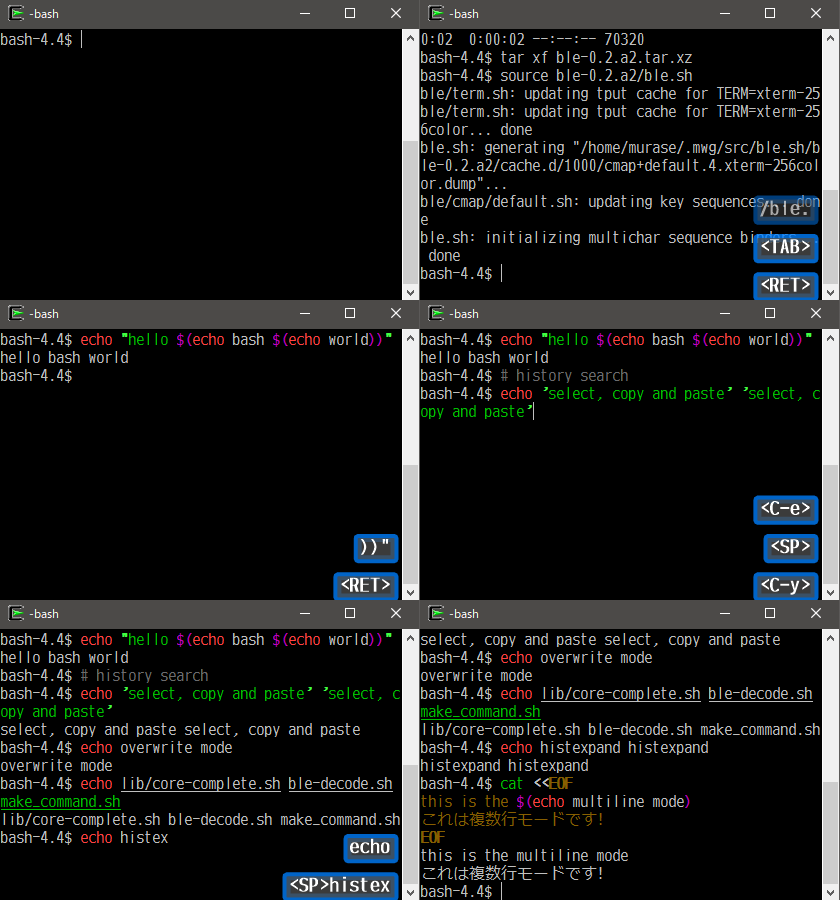
Demo (version 0.2)
History and roadmap
My little experiment took place in one corner of my bashrc at the end of May 2013 after I enjoyed an
