
Svgo
Go Language Library for SVG generation
Install / Use
/learn @ajstarks/SvgoREADME
SVGo: A Go library for SVG generation
The library generates SVG as defined by the Scalable Vector Graphics 1.1 Specification (http://www.w3.org/TR/SVG11/). Output goes to the specified io.Writer.
Supported SVG elements and functions
Shapes, lines, text
circle, ellipse, polygon, polyline, rect (including roundrects), line, text
Paths
general, arc, cubic and quadratic bezier paths,
Image and Gradients
image, linearGradient, radialGradient,
Transforms
translate, rotate, scale, skewX, skewY
Animation
animate, animateMotion, animateTranslate, animateRotate, animateScale, animateSkewX, animateSkewY
Filter Effects
filter, feBlend, feColorMatrix, feColorMatrix, feComponentTransfer, feComposite, feConvolveMatrix, feDiffuseLighting, feDisplacementMap, feDistantLight, feFlood, feGaussianBlur, feImage, feMerge, feMorphology, feOffset, fePointLight, feSpecularLighting, feSpotLight,feTile, feTurbulence
Metadata elements
desc, defs, g (style, transform, id), marker, mask, pattern, title, (a)ddress, link, script, use
Building and Usage
See svgdef.[svg|png|pdf] for a graphical view of the function calls
Usage: (assuming GOPATH is set)
go get github.com/ajstarks/svgo
go install github.com/ajstarks/svgo/...
You can use godoc to browse the documentation from the command line:
$ go doc github.com/ajstarks/svgo
a minimal program, to generate SVG to standard output.
package main

import (
	"github.com/ajstarks/svgo"
	"os"
)

func main() {
	width := 500
	height := 500
	canvas := svg.New(os.Stdout)
	canvas.Start(width, height)
	canvas.Circle(width/2, height/2, 100)
	canvas.Text(width/2, height/2, "Hello, SVG", "text-anchor:middle;font-size:30px;fill:white")
	canvas.End()
}
Drawing in a web server: (http://localhost:2003/circle)
package main

import (
	"log"
	"github.com/ajstarks/svgo"
	"net/http"
)

func main() {
	http.Handle("/circle", http.HandlerFunc(circle))
	err := http.ListenAndServe(":2003", nil)
	if err != nil {
		log.Fatal("ListenAndServe:", err)
	}
}

func circle(w http.ResponseWriter, req *http.Request) {
  w.Header().Set("Content-Type", "image/svg+xml")
  s := svg.New(w)
  s.Start(500, 500)
  s.Circle(250, 250, 125, "fill:none;stroke:black")
  s.End()
}
You may view the SVG output with a browser that supports SVG (tested on Chrome, Opera, Firefox and Safari), or any other SVG user-agent such as Batik Squiggle.
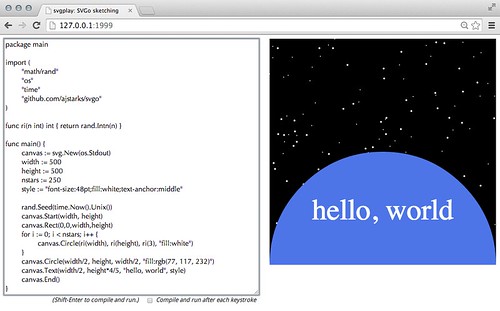
Graphics Sketching with SVGo and svgplay
Combined with the svgplay command, SVGo can be used to "sketch" with code in a browser.
To use svgplay and SVGo, first go to a directory with your code, and run:
$ svgplay
2014/06/25 22:05:28 ☠ ☠ ☠ Warning: this server allows a client connecting to 127.0.0.1:1999 to execute code on this computer ☠ ☠ ☠
Next open your browser to the svgplay server you just started. svgplay only listens on localhost, and uses port 1999 (guess which year SVG was first introduced) by default
http://localhost:1999/
Enter your code in the textarea, and when you are ready to run press Shift--Enter. The code will be compiled, with the results on the right. To update, change the code and repeat. Note that compilation errors are shown in red under the code. In order for svgplay/SVGo to work, make sure that the io.Writer specified with the New function is os.Stdout.
If you want to sketch with an existing file, enter its URL:
http://localhost:1999/foo.go
SVGo Papers and presentations
-
SVGo paper from SVGOpen 2011 http://www.svgopen.org/2011/papers/34-SVGo_a_Go_Library_for_SVG_generation
-
Programming Pictures with SVGo https://speakerdeck.com/u/ajstarks/p/programming-pictures-with-svgo
-
SVGo Workshop https://speakerdeck.com/u/ajstarks/p/svgo-workshop
Tutorial Video
A video describing how to use the package can be seen on YouTube at http://www.youtube.com/watch?v=ze6O2Dj5gQ4
Package contents
- svg.go: Library
- newsvg: Coding template command
- svgdef: Creates a SVG representation of the API
- animate: Animation demo
- am: Animate motion demo
- amt: Animate transformation demo
- android: The Android logo
- bubtrail: Bubble trails
- bulletgraph: Bullet Graphs (via Stephen Few)
- colortab: Display SVG named colors with RGB values
- compx: Component diagrams
- flower: Random "flowers"
- fontcompare: Compare two fonts
- f50: Get 50 photos from Flickr based on a query
- fe: Filter effects
- funnel: Funnel from transparent circles
- gradient: Linear and radial gradients
- html5logo: HTML5 logo with draggable elements
- imfade: Show image fading
- lewitt: Version of Sol Lewitt's Wall Drawing 91
- ltr: Layer Tennis Remixes
- marker: Test markers
- paths: Demonstrate SVG paths
- pattern: Test patterns
- planets: Show the scale of the Solar system
- pmap: Proportion maps
- randcomp: Compare random number generators
- richter: Gerhard Richter's 256 colors
- rl: Random lines (port of a Processing demo)
- skewabc: Skew ABC
- span: Text span
- stockproduct: Visualize product and stock prices
- svgopher: SVGo Mascot
- svgplay: SVGo sketching server
- svgplot: Plot data
- svgrid: Compose SVG files in a grid
- tsg: Twitter Search Grid
- tumblrgrid: Tumblr picture grid
- turbulence: Turbulence filter effect
- vismem: Visualize data from files
- webfonts: "Hello, World" with Google Web Fonts
- websvg: Generate SVG as a web server
Functions and types
Many functions use x, y to specify an object's location, and w, h to specify the object's width and height.
Where applicable, a final optional argument specifies the style to be applied to the object.
The style strings follow the SVG standard; name:value pairs delimited by semicolons, or a
series of name="value" pairs. For example: "fill:none; opacity:0.3" or fill="none" opacity="0.3" (see: http://www.w3.org/TR/SVG11/styling.html)
The SVG type:
type SVG struct {
    Writer   io.Writer
}
Most operations are methods on this type, specifying the destination io.Writer.
The Offcolor type:
type Offcolor struct {
	Offset  uint8
	Color   string
	Opacity float64
}
is used to specify the offset, color, and opacity of stop colors in linear and radial gradients
The Filterspec type:
type Filterspec struct {
	In string
	In2 string
	Result string
}
is used to specify inputs and results for filter effects
Structure, Scripting, Metadata, Transformation and Links
New(w io.Writer) *SVG
Constructor, Specify the output destination.
Start(w int, h int, attributes ...string)
begin the SVG document with the width w and height h. Optionally add additional elements (such as additional namespaces or scripting events) http://www.w3.org/TR/SVG11/struct.html#SVGElement
Startview(w, h, minx, miny, vw, vh int)
begin the SVG document with the width w, height h, with a viewBox at minx, miny, vw, vh. http://www.w3.org/TR/SVG11/struct.html#SVGElement
Startunit(w int, h int, unit string, ns ...string)
begin the SVG document, with width and height in the specified units. Optionally add additional elements (such as additional namespaces or scripting events) http://www.w3.org/TR/SVG11/struct.html#SVGElement
Startpercent(w int, h int, ns ...string)
begin the SVG document, with width and height in percent. Optionally add additional elements (such as additional namespaces or scripting events) http://www.w3.org/TR/SVG11/struct.html#SVGElement
StartviewUnit(w, h int, unit string, minx, miny, vw, vh int)
begin the SVG document with the width w, height h, in the specified unit, with a viewBox at minx, miny, vw, vh. http://www.w3.org/TR/SVG11/struct.html#SVGElement
End()
end the SVG document
Script(scriptype string, data ...string)
Script defines a script with a specified type, (for example "application/javascript"). if the first variadic argument is a link, use only the link reference. Otherwise, treat variadic arguments as the text of the script (marked up as CDATA). if no data is specified, simply close the script element. http://www.w3.org/TR/SVG/script.html
Style(scriptype string, data ...string)
Style defines a script with a specified type, (for example "text/css"). if the first variadic argument is a link, use only the link reference. Otherwise, treat variadic arguments as the text of the script (marked up as CDATA). if no data is specified, simply close the style element. https://www.w3.org/TR/SVG/styling.html#StyleElement
Group(s ...string)
begin a group, with arbitrary attributes http://www.w3.org/TR/SVG11/struct.html#GElement
Gstyle(s string)
begin a group, with the specified style. http://www.w3.org/TR/SVG11/struct.html#GElement
Gid(s string)
begin a group, with the specified id.
Gtransform(s string)
begin a group, with the specified transform, end with Gend(). http://www.w3.org/TR/SVG11/coords.html#TransformAttribute
Translate(x, y int)
begins coordinate translation to (x,y), end with Gend(). http://www.w3.org/TR/SVG11/coords.html#TransformAttribute
Scale(n float64)
scales the coordinate system by n, end with Gend(). http://www.w3.org/TR/SVG11/coords.html#TransformAttribute
ScaleXY(x, y float64)
scales the coordinate system by x, y. End with Gend(). http://www.w3.org/TR/SVG11/coords.html#TransformAttribute
SkewX(a float64)
SkewX skews the x coordinate system by angle a, end with Gend(). http://www.w3.org/TR/SVG11/coords.html#TransformAttribute
SkewY(a float64)
SkewY skews the y coordinate system by angle a, end with Gend(). http://www.w3.org/TR/SVG11/coords.html#TransformAttribute
SkewXY(ax, ay float64)
SkewXY skews x and y coordinate systems by ax, ay respectively, end with Gend(). http://www.w3.org/TR/SVG11/coords.html#TransformAttribute
Rotate(r float64)
