
Topline
A jQuery wrapper for ProPublica's Stateline library, adding some no-fuss tooltips, legends and source lines.
Install / Use
/learn @ajam/ToplineREADME
Topline
A jQuery wrapper for ProPublica's Stateline library, adding some no-fuss tooltips, legends and source lines.
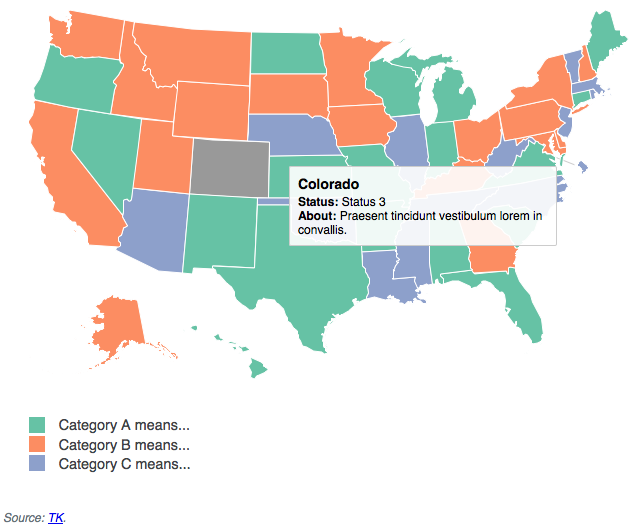
Usage
- Load the js and stylesheet files to get the correct tooltip and legend layout
- Make a
divclassedstateline-container, give it an id - Define the markup for your template in script tags, give it an id
- Call
stateline()on your map's containerdiv, passing it a dictionary of settings
<!-- Bring your own copy of jQuery/Underscore/Raphael here -->
<!-- To support IE < 9, include jQuery 1.x -->
<script src="js/thirdparty/underscore-min.js"></script>
<script src="js/thirdparty/jquery-2.1.1.min.js"></script>
<script src="js/thirdparty/raphael.js"></script>

<!-- Load the states package -->
<script src="js/thirdparty/states_packaged.js"></script>

<!-- Load Landline and Stateline -->
<script src="js/thirdparty/landline.js"></script>
<script src="js/thirdparty/landline.stateline.js"></script>
<script src="js/thirdparty/landline.stateline.topline.js"></script>

<div id="map-1" class="stateline-container"></div>

<script type="text/jst" id="map-1-tooltip-tmpl">
  <h2><%= n %></h2>
  <div class="stateline-tooltip-sub">
    <span class="stateline-tooltip-item">Status:</span> <%= detail1 %>
  </div>
  <div class="stateline-tooltip-sub">
    <span class="stateline-tooltip-item">About:</span> <%= detail2 %>
  </div>
</script>

<script>
  var mapData_1 =  {
	"01": { "state":"Alabama", "category":"A", "detail1":"Status 1", "detail2":"Lorem ipsum dolor sit amet, consectetur adipiscing elit. "},
	"02": { "state":"Alaska", "category":"B", "detail1":"Status2", "detail2":"Integer egestas fermentum neque vitae mattis. "},
	"04": { "state":"Arizona", "category":"C", "detail1":"Status 3", "detail2":"Fusce hendrerit ac enim a consequat. "},
	"05": { "state":"Arkansas", "category":"A", "detail1":"Status 1", "detail2":"Vivamus porta congue posuere. "}
	// ...
  }

  $('#map-1').stateline({
    data: mapData_1,
    tooltip: '#map-1-tooltip-tmpl',
    tooltipWidth: 250,
    legend: {
      "A": {
        color: "#66c2a5",
        description: 'Category A means...'
      },
      "B": {
        color: "#fc8d62",
        description: 'Category B means...'
      },
      "C": {
        color: "#8da0cb",
        description: 'Category C means...'
     }
    },
    source: '<a href="#" target="_blank">TK</a>'
  });
 </script>
Options
Most of these are self-explanatory. legend should have your different category values as keys followed by your desired color and description for the legend.
You can also set
hoverColor: The color when you hover over a statenullColor: The color when a category is in your data and not in your maptemplateHelpers: Is a dictionary of functions to use in formatting your tooltips. Topline comes with two functions out of the box,addCommasandtoCurrency.
They would be used like this:
<div class="stateline-tooltip-sub">
  <span class="stateline-tooltip-item">Population:</span> <%= addCommas(population) %>
  <span class="stateline-tooltip-item">Budget:</span> <%= toCurrency(budget, '$') %>
</div>
Adding your own would look like this:
<script>
	$('#map-1').stateline({
		data: mapData_1,
		tooltip: '#map-1-tooltip-tmpl',
		tooltipWidth: 250,
		legend: {
			"A": {
				color: "#66c2a5",
				description: 'Category A means...'
			},
			"B": {
				color: "#fc8d62",
				description: 'Category B means...'
			},
			"C": {
				color: "#8da0cb",
				description: 'Category C means...'
			}
		},
		source: '<a href="#" target="_blank">TK</a>',
		templateHelpers: {
			toUpperCase: function(input){
				var output = input.toUpperCase()
				return output;
			}
		}
<script>
State names
If your data doesn't include state names, they will automatically be added under the n key, which is what you see happening above (even though we included the state name data in this example for clarity).
