
Ais.Net.Receiver
A simple .NET AIS Receiver for capturing the Norwegian Coastal Administration AIS network data (available under Norwegian license for public data (NLOD)) and persisting in Microsoft Azure Blob Storage. Sponsored by endjin.
Install / Use
/learn @ais-dotnet/Ais.Net.ReceiverREADME
AIS.NET Projects
| Package | Status |
| ----------------------------------------------------------------- | ---------------------------------------------------------------------------------------------------------------------------------------------------- |
| Ais.Net |  |
| Ais.Net.Models |
|
| Ais.Net.Models |  |
| Ais.Net.Receiver |
|
| Ais.Net.Receiver |  |
| Ais.Net.Receiver.Storage.Azure.Blob |
|
| Ais.Net.Receiver.Storage.Azure.Blob |  |
|
The AIS.NET project contains a series of layers, from a low-level high performance NMEA AIS sentence decoder, to a rich high-level C# 9.0 models of AIS message types, a receiver component that can listen to TCP streams of NMEA sentences and expose them as an IObservable<string> of raw sentences or an decoded IObservable<IAisMessage>, and finally a Storage Client implementation to persisting the raw NMEA sentence stream to Azure Blob storage for future processing.
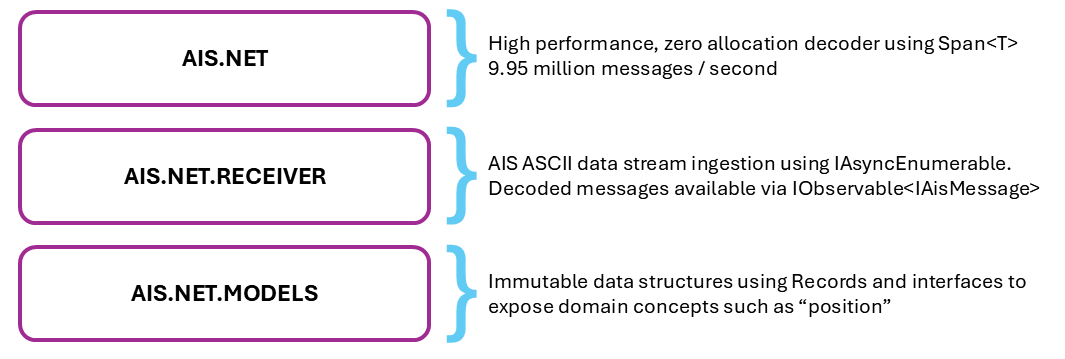
While Ais.Net aims for zero allocation, Ais.Net.Models and Ais.Net.Receiver aim for convenience of a higher level programming model, while still being efficient. Ais.Net.Receiver has run on a Raspberry Pi 4 as a systemd service robustly for many years, and uses very little CPU and Memory to ingest all the Norwegian Coastal Administration in real-time.
PID USER      PR  NI    VIRT    RES    SHR S  %CPU  %MEM     TIME+ COMMAND
679 root      20   0  287176  71536  43744 S   0.3   1.8  77:21.28 dotnet
:~ $ sudo systemctl status aisr
● aisr.service - aisr
   Loaded: loaded (/lib/systemd/system/aisr.service; enabled; vendor preset: enabled)
   Active: active (running) since Mon 2025-03-03 12:17:19 GMT; 6 days ago
 Main PID: 679 (dotnet)
    Tasks: 16 (limit: 4915)
   CGroup: /system.slice/aisr.service
           └─679 /home/pi/.dotnet/dotnet /home/pi/aisr/Ais.Net.Receiver.Host.Console.dll
It is also now available as a docker container for ease of install and management.
Ais.Net.Receiver
A simple .NET AIS Receiver for capturing the Norwegian Coastal Administration's marine Automatic Identification System (AIS) AIVDM/AIVDO NMEA message network data (available under Norwegian license for public data (NLOD)) and persisting in Microsoft Azure Blob Storage.
The Norwegian Coastal Administration provide a TCP endpoint (153.44.253.27:5631) for broadcasting their raw AIS AIVDM/AIVDO sentences, captured by over 50 base stations, and covers the area 40-60 nautical miles from the Norwegian coastline.
This project contains a NmeaReceiver which consumes the raw NetworkStream, a NmeaToAisMessageTypeProcessor, which can decode the raw sentences into IAisMessage, and ReceiverHost which manages the process and exposes an IObservable<string> for raw sentences and an IObservable<IAisMessage> for decoded messages. ReceiverHost can be hosted in a console application or other runtime environments like Polyglot Notebooks or even WASM.
The project also includes a demo console which shows how the various pieces can fit together, including subscribing to the IObservable<string> and IObservable<IAisMessage> streams and displaying the results or batch the AIVDM/AIVDO sentences and write them to Azure Blob Storage using the Append Blob feature, to create timestamped hour-long rolling logs.
The purpose of this application is to provide sample data for Ais.Net - the .NET Standard, high performance, zero allocation AIS decoder. The majority of raw AIS data is only available via commercial sources, and thus creating AIS datasets large enough to test / benchmark Ais.Net is almost impossible.
The Norwegian Coastal Administration TCP endpoint produces:
- ~2.9 KB per second
- ~10.3 MB per hour
- ~248 MB per day
- ~1.7 GB per week
- ~7 GB per month
- ~81.4 GB per year
Azure Blob Storage Taxonomy
The AIS data is stored using the following taxonomy
<USER DEFINED CONTAINER NAME>/raw/yyyy/MM/dd/yyyyMMddTHH.nm4
An example directory listing, with a user defined container name of nmea-ais would look as follows:
\---nmea-ais
    \---raw
        \---2021
            \---07
                +---12
                | 20210712T00.nm4 |
                | 20210712T01.mm4 |
                | 20210712T02.nm4 |
                | 20210712T03.nm4 |
                | 20210712T04.nm4 |
                | 20210712T05.nm4 |
                | 20210712T06.nm4 |
                | 20210712T07.nm4 |
                | 20210712T08.nm4 |
                | 20210712T09.nm4 |
                | 20210712T10.nm4 |
                | 20210712T11.nm4 |
                | 20210712T12.nm4 |
                | 20210712T13.nm4 |
                | 20210712T14.nm4 |
                | 20210712T15.nm4 |
                | 20210712T16.nm4 |
                | 20210712T17.nm4 |
                | 20210712T18.nm4 |
                | 20210712T19.nm4 |
                | 20210712T20.nm4 |
                | 20210712T21.nm4 |
                | 20210712T22.nm4 |
                | 20210712T23.nm4 |
                +---20210713
                | 20210713T00.nm4 |
To Run
Update the values in the settings.json file:
{
  "Ais": {
    "host": "153.44.253.27",
    "port": "5631",
    "retryAttempts": 5,
    "retryPeriodicity": "00:00:00:00.500"
  },
  "Storage": {
    "connectionString": "<YOUR AZURE STORAGE CONNECTION STRING>",
    "containerName": "nmea-ais",
    "writeBatchSize": 500
  }
}
From the command line: dotnet Ais.Net.Receiver.Host.Console.exe
Raspberry Pi
You have two options for running the AIS Receiver on a Raspberry Pi: using a Docker container or as a systemd service.
Installation
The combination of Windows Terminal, .NET and PowerShell make a Raspberry Pi a very productive environment for .NET Devs.
Install Windows Terminal. You can download Windows Terminal from the Microsoft Store or from the GitHub releases page.
Open Windows Terminal and use ssh pi@<Raspberry PI IP Address> to connect to your Pi.
Using Docker
These steps assume that you have configured passwordless authentication on your Raspberry Pi.
Set up the required environment variables on your Raspberry Pi:
ssh user@pi
nano ~/.bashrc
Add the following lines to the end of the file:
export AIS_NET_RECEIVER_AZURE_CONNECTION_STRING="<YOUR_CONNECTION_STRING>"
Save & Exit nano. To load the environment variables, then run:
source ~/.bashrc
Install Docker & Docker Composer on your Raspberry Pi:
curl -sSL https://get.docker.com | sh
sudo usermod -aG docker $USER
sudo reboot
sudo apt install docker-compose
mkdir aisr
sudo apt-get update && sudo apt-get upgrade && sudo apt autoremove
exit
On your host machine, open Windows Terminal:
cd ./Solutions/Ais.Net.Receiver.Host.Console.RaspberryPi
scp .\docker-compose.yml user@pi:~/aisr/
ssh user@pi
cd aisr
docker-compose up -d
This will automatically pull the latest image from Docker Hub and run the AIS Receiver using the Azure Storage Connection String you configured as an environment variable. Use Azure Storage Explorer to browse to where files are captured. You should see entries added within the first minute of the service starting.
Install as a systemd service
If you want to run the service as a daemon, you can use SystemD to manage the service.
Install .NET
Use the following commands to install .NET on your Pi.
curl -sSL https://dot.net/v1/dotnet-install.sh | bash /dev/stdin --channel Currentecho 'export DOTNET_ROOT=$HOME/.dotnet' >> ~/.bashrcecho 'export PATH=$PATH:$HOME/.dotnet' >> ~/.bashrcsource ~/.bashrcdotnet --version
Install PowerShell 7.x
Use the following commands to install PowerShell on your Pi.
- Download the latest package
wget https://github.com/PowerShell/PowerShell/releases/download/v7.5.0/powershell-7.5.0-linux-arm64.tar.gz
Related Skills
node-connect
352.5kDiagnose OpenClaw node connection and pairing failures for Android, iOS, and macOS companion apps
frontend-design
111.3kCreate distinctive, production-grade frontend interfaces with high design quality. Use this skill when the user asks to build web components, pages, or applications. Generates creative, polished code that avoids generic AI aesthetics.
openai-whisper-api
352.5kTranscribe audio via OpenAI Audio Transcriptions API (Whisper).
qqbot-media
352.5kQQBot 富媒体收发能力。使用 <qqmedia> 标签,系统根据文件扩展名自动识别类型(图片/语音/视频/文件)。
