
Icedata
IceData: Datasets Hub for the *IceVision* Framework
Install / Use
/learn @airctic/IcedataREADME
<div align="center">Note: We Need Your Help If you find this work useful, please let other people know by starring it, and sharing it. Thank you!







<!-- Not included in docs - start -->
Contributors


Installation
pip install icedata
For more installation options, check our extensive documentation.
Important: We currently only support Linux/MacOS.
<!-- Not included in docs - end -->Why IceData?
-
IceData is a dataset hub for the IceVision Framework
-
It includes community maintained datasets and parsers and has out-of-the-box support for common annotation formats (COCO, VOC, etc.)
-
It provides an overview of each included dataset with a description, an annotation example, and other helpful information
-
It makes end-to-end training straightforward thanks to IceVision's unified API
-
It enables practioners to get moving with object detection technology quickly
Datasets
The Datasets class is designed to simplify loading and parsing a wide range of computer vision datasets.
Main Features:
-
Caches data so you don't need to download it over and over
-
Lightweight and fast
-
Transparent and pythonic API
-
Out-of-the-box parsers convert common dataset annotation formats into the unified IceVision Data Format
IceData provides several ready-to-use datasets that use both common annotation formats such as COCO and VOC as well as other annotation formats such WheatParser used in the Kaggle Global Wheat Competition
Usage
Object detection datasets use multiple annotation formats (COCO, VOC, and others). IceVision makes it easy to work across all of them with its easy-to-use and extend parsers.
COCO and VOC compatible datasets
For COCO or VOC compatible datasets - especially ones that are not include in IceData - it is easiest to use the IceData COCO or VOC parser.
Example: Raccoon - a dataset using the VOC parser
# Imports
from icevision.all import *
import icedata


# WARNING: Make sure you have already cloned the raccoon dataset using the command shown here above
# Set images and annotations directories
data_dir = Path("raccoon_dataset")
images_dir = data_dir / "images"
annotations_dir = data_dir / "annotations"

# Define the class_map
class_map = ClassMap(["raccoon"])

# Create a parser for dataset using the predefined icevision VOC parser
parser = parsers.voc(
    annotations_dir=annotations_dir, images_dir=images_dir, class_map=class_map
)

# Parse the annotations to create the train and validation records
train_records, valid_records = parser.parse()
show_records(train_records[:3], ncols=3, class_map=class_map)
!!! info "Note" Notice how we use the predifined parsers.voc() function:
**parser = parsers.voc(
annotations_dir=annotations_dir, images_dir=images_dir, class_map=class_map
)**
Datasets included in IceData
Datasets included in IceData always have their own parser. It can be invoked with icedata.datasetname.parser(...).
Example: The IceData Fridge dataset
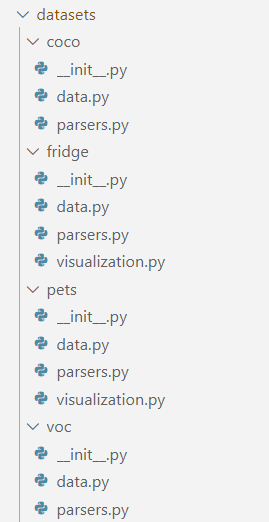
Please check out the fridge folder for more information on how this dataset is structured.
# Imports
from icevision.all import *
import icedata

# Load the Fridge Objects dataset
data_dir = icedata.fridge.load()

# Get the class_map
class_map = icedata.fridge.class_map()

# Parse the annotations
parser = icedata.fridge.parser(data_dir, class_map)
train_records, valid_records = parser.parse()

# Show images with their boxes and labels
show_records(train_records[:3], ncols=3, class_map=class_map)
!!! info "Note" Notice how we use the parser associated with the fridge dataset icedata.fridge.parser():
**parser = icedata.fridge.parser(data_dir, class_map)**
Datasets with a new annotation format
Sometimes, you will need to define a new annotation format for you dataset. Additional information can be found in the documentation. In this case, we strongly recommend you following the file structure and naming conventions used in the examples such as the Fridge dataset, or the PETS dataset.
Disclaimer
Inspired from the excellent HuggingFace Datasets project, icedata is a utility library that downloads and prepares computer vision datasets. We do not host or distribute these datasets, vouch for their quality or fairness, or claim that you have a license to use the dataset. It is your responsibility to determine whether you have permission to use the dataset under the its license.
If you are a dataset owner and wish to update any of the information in IceData (description, citation, etc.), or do not want your dataset to be included, please get in touch through a GitHub issue. Thanks for your contribution to the ML community!
If you are interested in learning more about responsible AI practices, including fairness, please see Google AI's Responsible AI Practices.
Related Skills
YC-Killer
2.7kA library of enterprise-grade AI agents designed to democratize artificial intelligence and provide free, open-source alternatives to overvalued Y Combinator startups. If you are excited about democratizing AI access & AI agents, please star ⭐️ this repository and use the link in the readme to join our open source AI research team.
API
A learning and reflection platform designed to cultivate clarity, resilience, and antifragile thinking in an uncertain world.
groundhog
398Groundhog's primary purpose is to teach people how Cursor and all these other coding agents work under the hood. If you understand how these coding assistants work from first principles, then you can drive these tools harder (or perhaps make your own!).
sec-edgar-agentkit
10AI agent toolkit for accessing and analyzing SEC EDGAR filing data. Build intelligent agents with LangChain, MCP-use, Gradio, Dify, and smolagents to analyze financial statements, insider trading, and company filings.
