
Zcomet
zcomet - Fast, Simple Zsh Plugin Manager
Install / Use
/learn @agkozak/ZcometREADME
zcomet - Fast, Simple Zsh Plugin Manager
<p align="center">
<img src="https://raw.githubusercontent.com/agkozak/zcomet-media/main/CometDonati.jpg">
</p>


zcomet is a Zsh plugin manager that gets you to the prompt quickly. Its goal is to be simple and convenient without slowing you down. It succeeds in keeping latencies down to the level you would expect if you were not even using a plugin manager:
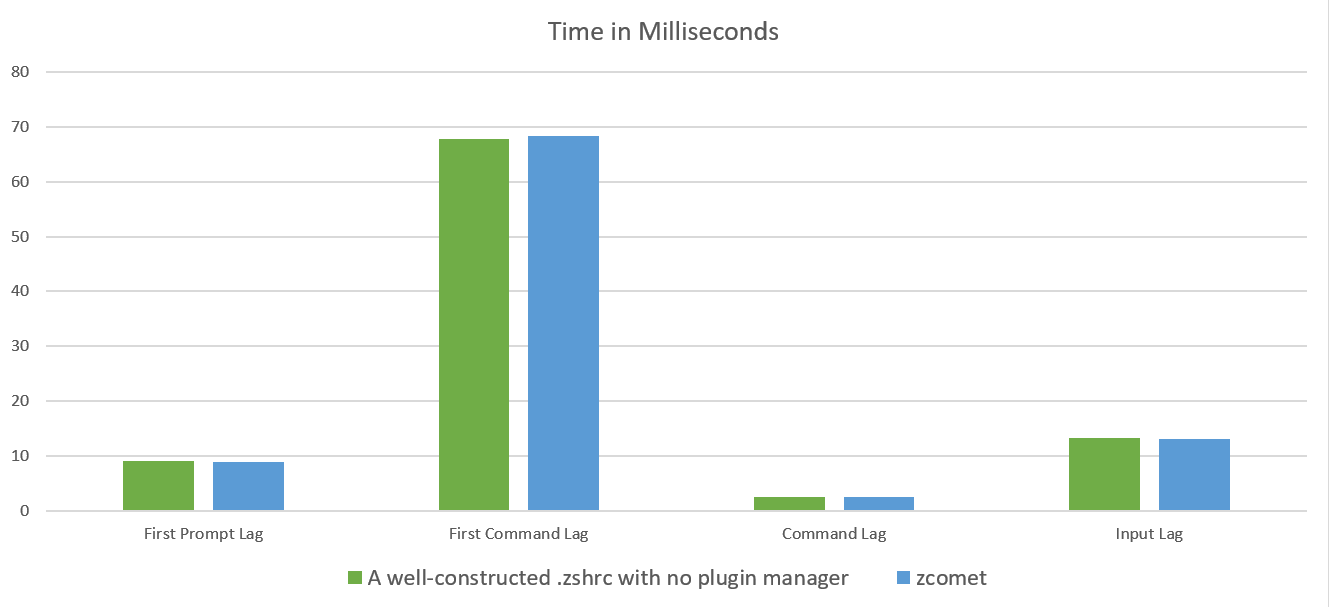
Many thanks to Roman Perepelitsa for sharing his zsh-bench benchmarking utility (see "Notes on Benchmarks").
The speed difference can be undetectable, but the improved convenience is noteworthy. A zcomet configuration can be as simple as:
source /path/to/zcomet.zsh

zcomet load author1/plugin1
zcomet load author2/plugin2
zcomet load author3/plugin3

zcomet compinit
Those lines will clone repositories, source scripts, update your FPATH and PATH, and load the Zsh completion system.
Table of Contents
- News
- Sample
.zshrc - Commands and Arguments
- Options
- Directory Customization
- Dynamic Named Directories
- FAQ
- Standards Compliance
- Notes on Benchmarks
- TODO
News
- December 7, 2024
zcomet loadnow first chooses a branch and then initializes and updates submodules.
- August 24, 2023
zcomet compileno longer expands aliases when compiling scripts.
- November 17, 2021
zcomet updateno longer re-sources loaded plugins and snippets, as doing so can have undesired consequences. Instead, it reminds the user toexec zshto refresh the system.
- November 16, 2021
- You can now refer to a GitHub repository by the full URL, if you prefer, e.g.
https://github.com/zsh-users/zsh-syntax-highlighting.gitinstead ofzsh-users/zsh-syntax-highlighting. Support for Git servers other than GitHub is coming soon. zcomet listnow displays triggers in a more abbreviated fashion.
- You can now refer to a GitHub repository by the full URL, if you prefer, e.g.
- October 21, 2021
zcometnow supports local plugins and snippets.
- October 13, 2021
- October 4, 2021
zcometnow fetches Git submodules by default. If you do not need them, be sure to save yourself time by using the--no-submodulesoption withload,fpath, ortrigger.
- September 30, 2021
zcometnow defers runningcompdefcalls until afterzcomet compinithas been run.
- September 28, 2021
zcometnow autoloads functions in afunctions/directory before sourcing a Prezto-style module.
- September 27, 2021
zcometnow looks for thebin/subdirectory in the root directory of the repository, not in the directory where the sources plugin files reside.
- September 21, 2021
- I have opted to have named directories assigned only at the repository level. Also, if there is more than one repository with the same name (e.g.,
author1/zsh-toolandauthor2/zsh-tool), neither directory is given a name (to prevent mistakes from happening).
- I have opted to have named directories assigned only at the repository level. Also, if there is more than one repository with the same name (e.g.,
- September 20, 2021
zcometplugins are now assigned dynamic named directories. This feature was inspired by Marlon Richert's Znap.
- September 18, 2021
zcometdirectories are now specified usingzstyle; see below.- The
loadcommand will now add a plugin'sbin/subdirectory, if it has one, to thePATH.
- September 17, 2021
zcommet triggernow always makes sure that the repository it needs has already been cloned, meaning that you will never have to wait for files to be downloaded when you use a defined trigger.
- September 16, 2021
zcomet listnow reflectsFPATHelements added using thefpathcommand.- New command:
zcomet compinitrunscompinitand compiles its cache for you.
- September 15, 2021
zcometwill store your plugins and snippets in${ZDOTDIR}, if you have set that variable and if${HOME}/.zcometdoes not already exist. Props to @mattjamesdev.
- September 13, 2021
- The
snippetcommand now supports any URL that points to raw Zsh code (not HTML) via HTTP or HTTPS. It will translategithub.comaddresses into theirraw.githubusercontent.comequivalents. You may still use theOMZ::shorthand for Oh-My-Zsh code.
- The
Sample .zshrc
# Clone zcomet if necessary
if [[ ! -f ${ZDOTDIR:-${HOME}}/.zcomet/bin/zcomet.zsh ]]; then
  command git clone https://github.com/agkozak/zcomet.git ${ZDOTDIR:-${HOME}}/.zcomet/bin
fi

source ${ZDOTDIR:-${HOME}}/.zcomet/bin/zcomet.zsh

# Load a prompt
zcomet load agkozak/agkozak-zsh-prompt

# Load some plugins
zcomet load agkozak/zsh-z
zcomet load ohmyzsh plugins/gitfast

# Load a code snippet - no need to download an entire repository
zcomet snippet https://github.com/jreese/zsh-titles/blob/master/titles.plugin.zsh

# Lazy-load some plugins
zcomet trigger zhooks agkozak/zhooks
zcomet trigger zsh-prompt-benchmark romkatv/zsh-prompt-benchmark

# Lazy-load Prezto's archive module without downloading all of Prezto's
# submodules
zcomet trigger --no-submodules archive unarchive lsarchive \
    sorin-ionescu/prezto modules/archive

# It is good to load these popular plugins last, and in this order:
zcomet load zsh-users/zsh-syntax-highlighting
zcomet load zsh-users/zsh-autosuggestions

# Run compinit and compile its cache
zcomet compinit
Commands and Arguments
load repository-name [subdirectory] [file1] [file2] ...
load is the most commonly used command; it clones a GitHub repository (if it has not already been downloaded), adds its root directory (or functions/ subdirectory, if it exists) to FPATH, adds any bin/ subdirectory to PATH, and sources a file or files. The simplest example is:
zcomet load agkozak/zsh-z
The common repositories ohmyzsh/ohmyzsh and sorin-ionescu/prezto can be abbreviated as ohmyzsh and prezto, respectively. zcomet uses simple principles to choose which init file to source (in this case, /path/to/agkozak/zsh-z/zsh-z.plugin.zsh is the obvious choice).
A subdirectory of a repository can be specified:
zcomet load ohmyzsh plugins/gitfast
loads Oh-My-Zsh's useful gitfast plugin. If a specific file or files in a subdirectory should be sourced, they can be specified:
zcomet load ohmyzsh lib git.zsh
zcomet load sindresorhus/pure async.zsh pure.zsh
If there are autoloadable functions in a Prezto-style functions/ directory, they will be automatically autoloaded.
A specific branch, tag, or commit of a repository can be checked out using the following syntax:
zcomet load author/repo@branch
(@tag and @commit are equally valid.)
load is the command used for loading prompts.
load also supports local plugins that do not need to be cloned. Just make sure that the plugin name starts with a slash or something that will expand to a slash, e.g.
zcomet load /path/to/plugin1
zcomet load ~/path/to/plugin2
zcomet load ${HOME}/path/to/plugin3
Relative directories cannot be used.
NOTE: If the repository that load is cloning has submodules, consider whether or not you really need them. Using the --no-submodules option after load can save a lot of time during installation and updating.
fpath repository-name [subdirectory]
fpath will clone a repository and add one of its directories to FPATH. Unlike load, it does not source any files. Also, you must be very specific about which subdirectory is to be added to FPATH; zcomet fpath does not try to guess. If you wanted to use the agkozak-zsh-prompt with promptinit, you could run
zcomet fpath agkozak/agkozak-zsh-prompt
autoload promptinit; promptinit
prompt agkozak-zsh-prompt
(But if you are not intending to switch prompts, it is much easier just to use zcomet load agkozak/agkozak-zsh-prompt.)
NOTE: If the repository that fpath is cloning has submodules, consider whether or not you really need them. Using the --no-submodules option after fpath can save a lot of time during installation and updating.
trigger trigger-name [arguments]
trigger lazy-loads plugins, saving time when you start the shell. If you specify a command name, a Git repository, and other optional arguments (the same arguments that get used for load), the plugin will be loaded and the command run only when the command is first used:
zcomet trigger zhooks agkozak/zhooks
for example, creates a function called zhooks that loa
