
CoPaw
Your Personal AI Assistant; easy to install, deploy on your own machine or on the cloud; supports multiple chat apps with easily extensible capabilities.
Install / Use
/learn @agentscope-ai/CoPawREADME
CoPaw













[Documentation] [中文 README] [日本語]
<p align="center"> <img src="https://img.alicdn.com/imgextra/i2/O1CN014TIqyO1U5wDiSbFfA_!!6000000002467-2-tps-816-192.png" alt="CoPaw Logo" width="120"> </p> <p align="center"><b>Works for you, grows with you.</b></p> </div>Your Personal AI Assistant; easy to install, deploy on your own machine or on the cloud; supports multiple chat apps with easily extensible capabilities.
Core capabilities:
Every channel — DingTalk, Feishu, QQ, Discord, iMessage, and more. One assistant, connect as you need.
Under your control — Memory and personalization under your control. Deploy locally or in the cloud; scheduled reminders to any channel.
Skills — Built-in cron; custom skills in your workspace, auto-loaded. No lock-in.
<details> <summary><b>What you can do</b></summary> <br></details>
- Social: daily digest of hot posts (Xiaohongshu, Zhihu, Reddit), Bilibili/YouTube summaries.
- Productivity: newsletter digests to DingTalk/Feishu/QQ, contacts from email/calendar.
- Creative: describe your goal, run overnight, get a draft next day.
- Research: track tech/AI news, personal knowledge base.
- Desktop: organize files, read/summarize docs, request files in chat.
- Explore: combine Skills and cron into your own agentic app.
News
[2026-03-18] We released v0.1.0! See the v0.1.0 Release Notes for the full changelog.
- [v0.1.0] Added: Multi-workspace architecture with agent selector; skill security scanner and destructive shell command detection; optional web authentication; WeCom and XiaoYi channels; DingTalk AI Card replies; Gemini, DeepSeek, MiniMax, and Kimi providers; console dark mode and multimodal chat; SSE-based chat streaming with reconnect; voice message transcription via Whisper;
view_imagetool for multimodal conversations; LobeHub, ModelScope, and zip archive skill import;glob_searchandgrep_searchbuilt-in tools; timezone selector;copaw updateCLI. - [v0.1.0] Improved: Graceful lifecycle management with zero-downtime agent reload; dynamic per-agent token counting; config loading protection; console internationalization with localized chat prompts; Windows desktop startup speed via bytecode pre-compilation; QQ channel reply logic with DM support.
- [v0.1.0] Fixed: Telegram thread replies, media handling, and auto-reconnect; Discord cross-channel message merging and debounce generalization; Feishu channel reload; Ollama/LM Studio context length and error messages; cron jobs in correct workspace; Windows cross-disk moves, AutoRun stderr, and GBK encoding.
- [v0.1.0] Contributors: Thanks to new contributors: @dipeshbabu, @sljeff, @octo-patch, @Alexxigang, @howyoungchen, @nphenix, @skyfaker, @hh0592821, @futuremeng, @toby1123yjh, @hiyuchang, @hanson-hex, @JackyMao1999, @mvanhorn, @yuanxs21, @aissac, @lcq225, @Justin-lu, @rowanchen-com, @pzlav, @mautops, @hikariming, @Vanlee0129, @JiwaniZakir, @EuanTop.
[2026-03-12] We released v0.0.7! See the v0.0.7 Release Notes for the full changelog.
[2026-03-09] We released v0.0.6! See the v0.0.6 Release Notes for the full changelog.
[2026-03-06] We released v0.0.5! See the v0.0.5 Release Notes for the full changelog.
[2026-03-02] We released v0.0.4! See the v0.0.4 Release Notes for the full changelog.
Table of Contents
Recommended reading:
- I want to run CoPaw in 3 commands: Quick Start → open Console in browser.
- I want to chat in DingTalk / Feishu / QQ: Configure channels in the Console.
- I don’t want to install Python: Script install handles Python automatically, or use ModelScope one-click for cloud deployment.
- News
- Quick Start
- API Key
- Local Models
- Documentation
- FAQ
- Roadmap
- Contributing
- Install from source
- Why CoPaw?
- Built by
- License
Quick Start
pip install
If you prefer managing Python yourself:
pip install copaw
copaw init --defaults
copaw app
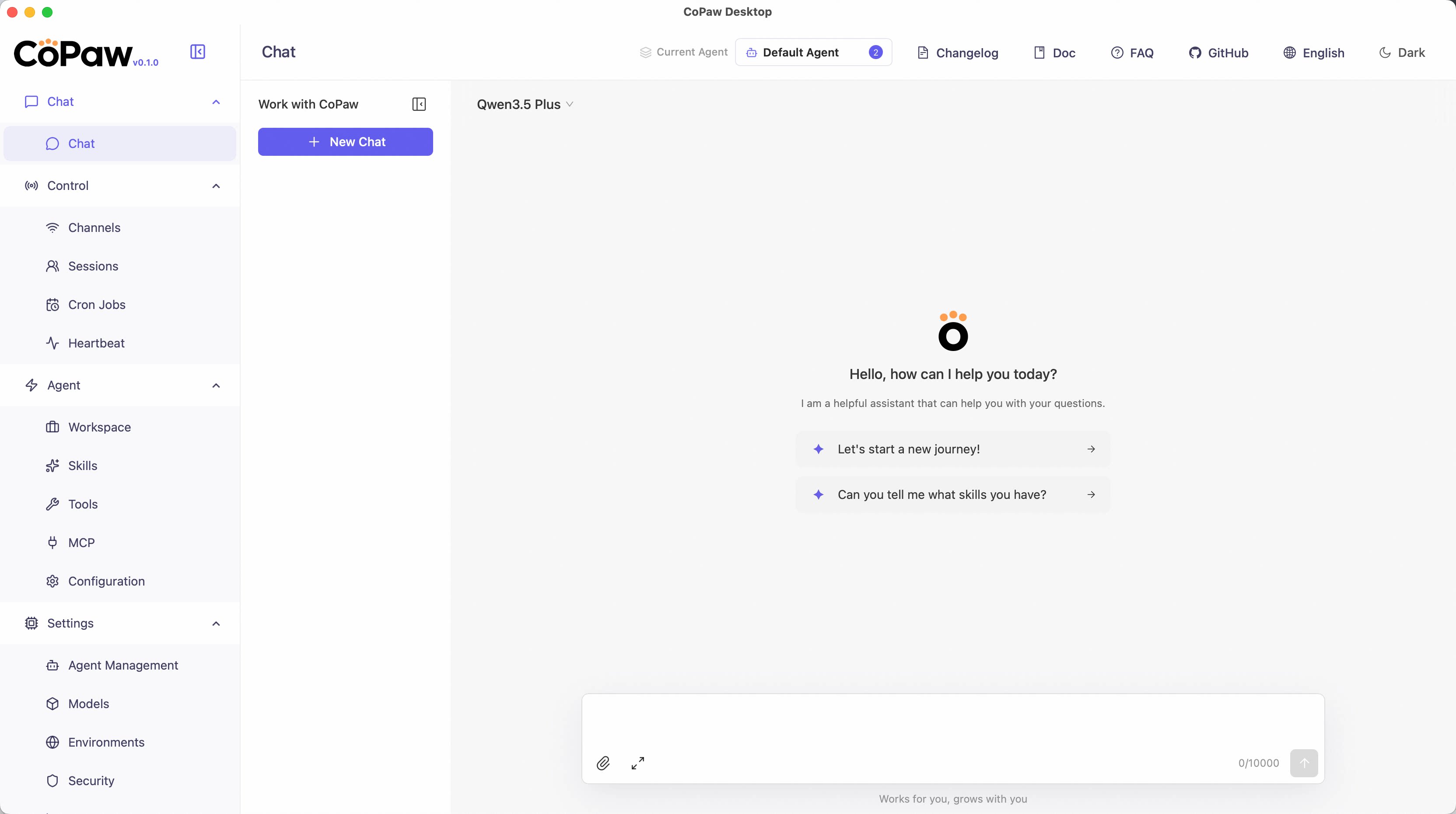
Then open http://127.0.0.1:8088/ in your browser for the Console (chat with CoPaw, configure the agent). To talk in DingTalk, Feishu, QQ, etc., add a channel in the docs.
Script install
No Python setup required, one command installs everything. The script will automatically download uv (Python package manager), create a virtual environment, and install CoPaw with all dependencies (including Node.js and frontend assets). Note: May not work in restricted network environments or corporate firewalls.
macOS / Linux:
curl -fsSL https://copaw.agentscope.io/install.sh | bash
To install with Ollama support:
curl -fsSL https://copaw.agentscope.io/install.sh | bash -s -- --extras ollama
To install with multiple extras (e.g., Ollama + llama.cpp):
curl -fsSL https://copaw.agentscope.io/install.sh | bash -s -- --extras ollama,llamacpp
Windows (CMD):
curl -fsSL https://copaw.agentscope.io/install.bat -o install.bat && install.bat
Windows (PowerShell):
irm https://copaw.agentscope.io/install.ps1 | iex
Note: The installer will automatically check the status of uv. If it is not installed, it will attempt to download and configure it automatically. If the automatic installation fails, please follow the on-screen prompts or execute
python -m pip install -U uv,
