
MySqlExpress
MySqlExpress get rows from MySQL table and convert it into Class Objects in C#. For saving data, Class Objects and be passed for executing INSERT or UPDATE. It can also performs INSERT/UPDATE by using Dictionary.
Install / Use
/learn @adriancs2/MySqlExpressREADME
MySqlExpress
MySqlExpress get rows from MySQL table and convert it into Class Objects in C#. For saving data, Class Objects and be passed for executing INSERT or UPDATE. It can also performs INSERT/UPDATE by using Dictionary. It simplifies the usage of MySQL in C#.
This class library aims to encourage rapid application development with MySQL.
Github: https://github.com/adriancs2/MySqlExpress
Nuget for MySqlConnector (MIT) - https://www.nuget.org/packages/MySqlExpress
PM> NuGet\Install-Package MySqlExpress
Nuget for MySql.Data (Oracle) - https://www.nuget.org/packages/MySqlExpress.MySql.Data
PM> NuGet\Install-Package MySqlExpress.MySql.Data
Download MySqlExpress Helper: https://github.com/adriancs2/MySqlExpress/releases
The Demo of MySqlExpress (Available in source code):
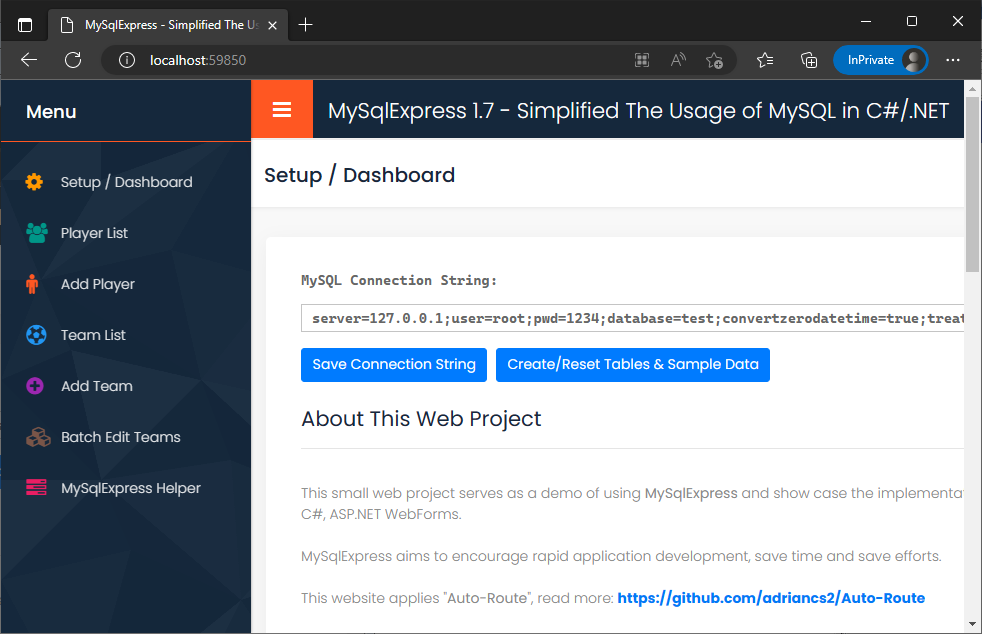
Introduction
MySqlExpress consists of 2 parts.
The first part is the C# class library of MySqlExpress. It introduces some "shortcuts" as to simplify the execution of tasks related to MySQL.
To begin with, download the source code and add the class file "MySqlExpress.cs" into your project,
or add the referrence of the project of MySqlExpress into your project,
or install the Nuget package of MySqlExpress into your project.
The second part is a software called "MySqlExpress Helper.exe". The main function of this software is to generate C# class objects, which will be explained in details below. I'll refer this small program as the "Helper App" for the rest of this article.
Download MySqlExpress Helper: https://github.com/adriancs2/MySqlExpress/releases
MySqlExpress is built on top of MySqlConnector (MIT) library. If you wish to use another connector or provider, you can download the source code and compile it with your favorite connector.
Before Start
As usual, to begin coding with MySQL, first add the following using statement to allow the usage of MySqlconnector (MIT) library.
using MySqlConnector;
In this article, let's assume that we store the MySQL connection string as a static field. For example:
public class config
{
    public static string ConnString =
        "server=localhost;user=root;pwd=1234;database=test;";
}
Hence, we can obtain the connection string anywhere in the project as below:
config.ConnString
Here is the standard MySQL connection code block:
using (MySqlConnection conn = new MySqlConnection(config.ConnString))
{
    using (MySqlCommand cmd = new MySqlCommand())
    {
        cmd.Connection = conn;
        conn.Open();

        // execute queries

        conn.Close();
    }
}
Declare a new MySqlExpress object to start using:
using (MySqlConnection conn = new MySqlConnection(config.ConnString))
{
    using (MySqlCommand cmd = new MySqlCommand())
    {
        cmd.Connection = conn;
        conn.Open();

        MySqlExpress m = new MySqlExpress(cmd);

        // perform queries

        conn.Close();
    }
}
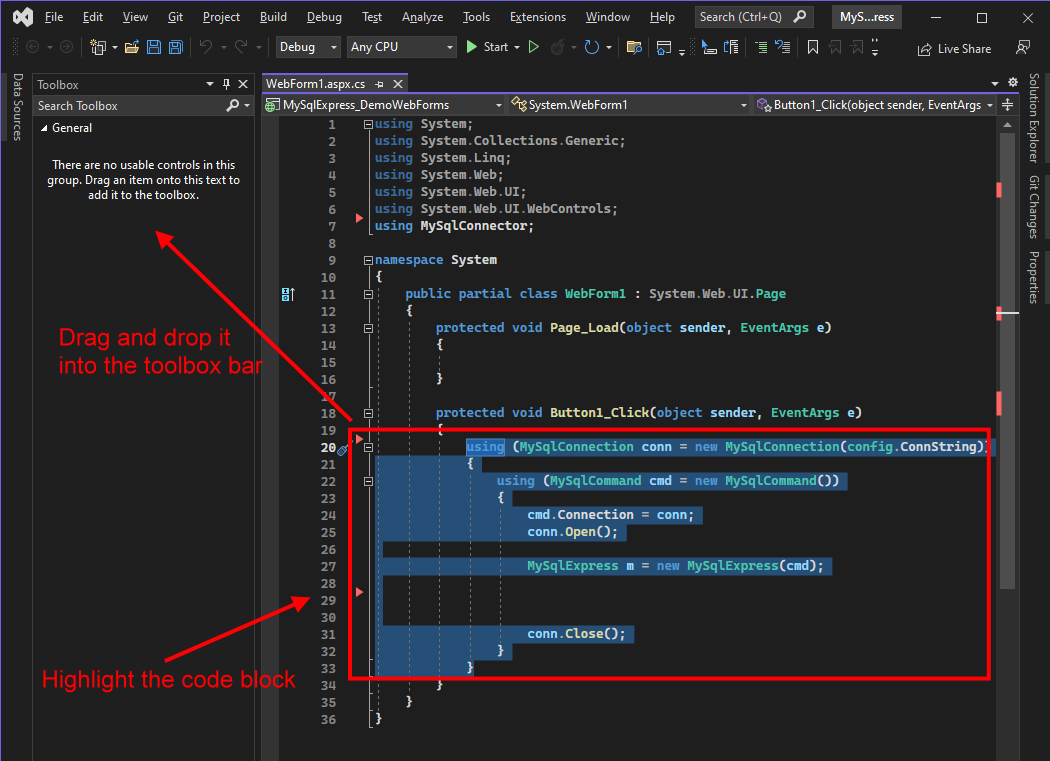
The standard MySQL connection code block shown above can be saved into Visual Studio toolbox bar. So, next time, whenever you need this code block, you can drag and drop from the toolbox bar.
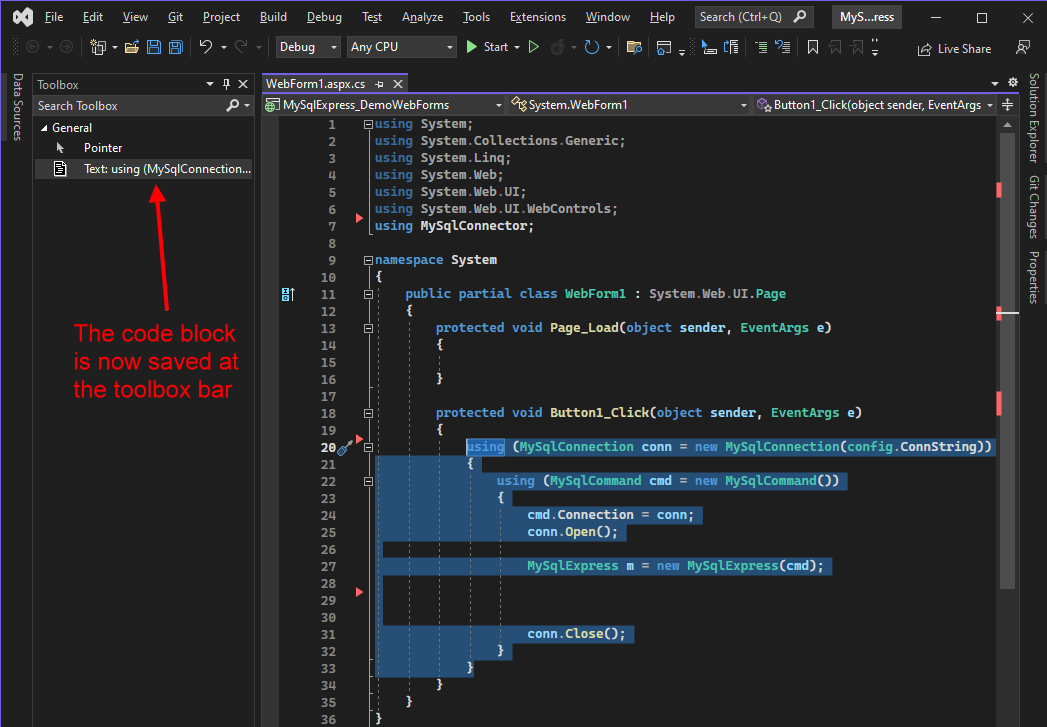
Now the code block is saved at the toolbox.
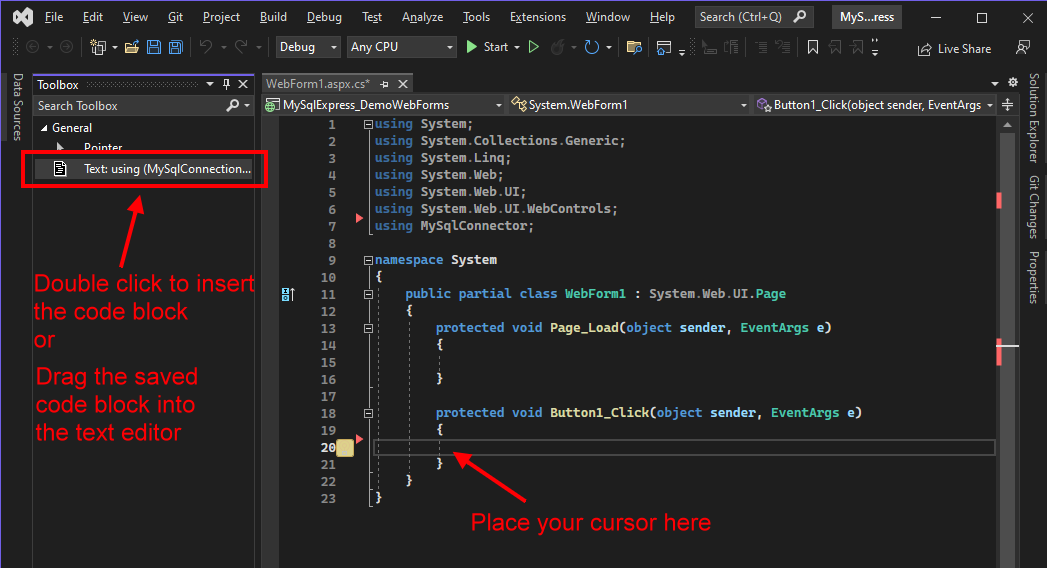
Next time, whenever you need the code block, just drag it from the toolbox into the text editor.
Let's Start - Using MySqlExpress
- Start Transaction, Commit, Rollback
- Getting Rows of Objects from MySQL Table
- Getting a Customized Object Structure
- Getting a single value (ExecuteScalar<T>)
- Save (v.17) - Saving Objects
- Insert Row (Save Data)
- Update Row (Update Data)
- Insert Update
- Generate Like String
- Execute a SQL statement
1. Start Transaction, Commit and Rollback
using (MySqlConnection conn = new MySqlConnection(config.ConnString))
{
    using (MySqlCommand cmd = new MySqlCommand())
    {
        cmd.Connection = conn;
        conn.Open();

        MySqlExpress m = new MySqlExpress(cmd);

        try
        {
            m.StartTransaction();

            // perform lots of queries
            // action success

            m.Commit();
        }
        catch
        {
            // Error occur

            m.Rollback();
        }

        conn.Close();
    }
}
There are a few benefits of using TRANSACTION in MySQL.
On a 7200 rpm HDD hard drive, the maximum I/O writes (numbers of SQL queries) that MySQL can executes is around 100 to 120 times.
Read more about MySQL Disk I/O Capacity at: https://dev.mysql.com/doc/refman/5.7/en/innodb-configuring-io-capacity.html
If you perform 1000 queries, they will be executed one by one, which will take around 4~7 seconds on HDD hard drive to complete.
By using TRANSACTION + COMMIT, all 1000 queries will all be executed at once. This saves a lots of disk operation time.
Sometimes, there are chains of operations which involves multiple tables and rows. Without transaction, if there is any bad thing or error occurs in the middle of the process, the whole operation will be terminated half way, resulting partial or incomplete data saving. Which would be a problematic to fix the data. Hence, TRANSACTION can prevent such thing happens. With transaction, the whole chain of operation will be cancelled.
ROLLBACK, means cancel. Discard all queries that sent during the TRANSACTION period.
Read more about transaction at here
2. Getting Rows of Objects from MySQL Table
Assume that, we have a MySQL table like this:
CREATE TABLE `player` (
`id` int unsigned NOT NULL AUTO_INCREMENT,
`code` varchar(10),
`name` varchar(300),
`date_register` datetime,
`tel` varchar(100),
`email` varchar(100),
`status` int unsigned,
PRIMARY KEY (`id`));
First, creates a new class.
public class obPlayer
{

}
The name of class. If the MySQL table's name is "player", you can name the class as "obPlayer".
"ob" means "object".
"obPlayer", an object of "Player".
But, anyway, you can name the class anything according to your personal flavor, of course.
Next, create the class object's fields or properties:
There are 3 modes of creating the fields or properties:
- Private Fields + Public Properties
- Public Properties
- Public Fields
Run the Helper app.
First Mode: Private Fields + Public Properties
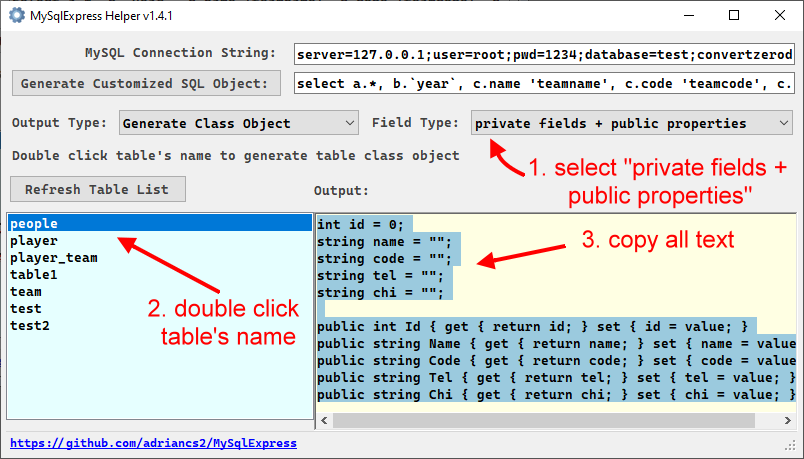
Paste the text into the class:
public class obPlayer
{
    int id = 0;
    string code = "";
    string name = "";
    DateTime date_register = DateTime.MinValue;
    string tel = "";
    string email = "";
    int status = 0;

    public int Id { get { return id; } set { id = value; } }
    public string Code { get { return code; } set { code = value; } }
    public string Name { get { return name; } set { name = value; } }
    public DateTime DateRegister { get { return date_register; } set { date_register = value; } }
    public string Tel { get { return tel; } set { tel = value; } }
    public string Email { get { return email; } set { email = value; } }
    public int Status { get { return status; } set { status = value; } }
}
The purpose using this combination (private fields + public properties):
Private fields are used to match the columns' name of MySQL table and map the data.
Public properties are used to convert the naming of the fields into C# Coding Naming Convertions, which is PascalCase:
Read more about C# Coding Naming Conventions
The MySQL column's naming conventions uses lower case and underscore to separate words.
Read more about MySQL Naming Conventions
The symbol of "_" (underscore) is considered less typing friendly than using just latin characters.
Therefore, converting the field name to PacalCase will align with the C# naming conventions and also increase the convenient and speed of coding.
Second Mode: Public Properties
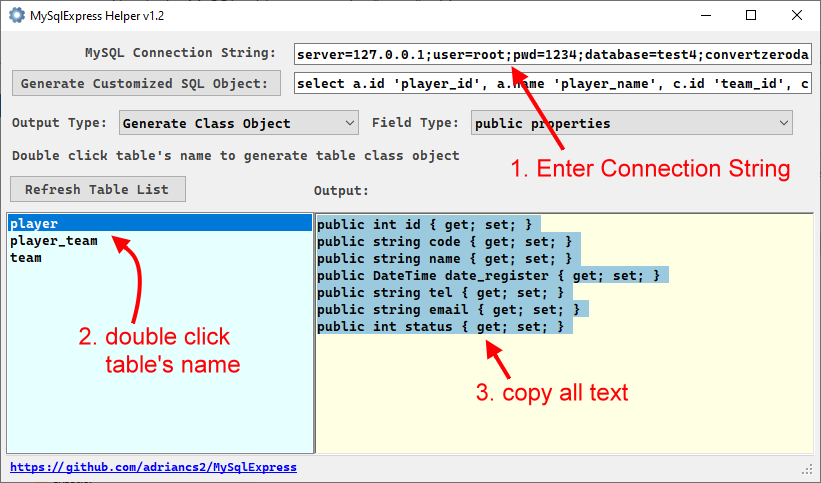
Then, paste all the copied text into the class:
public class obPlayer
{
    public int id { get; set; }
    public string code { get; set; }
    public string name { get; set; }
    public DateTime date_register { get; set; }
    public string tel { get; set; }
    public string email { get; set; }
    public int status { get; set; }
}
Third Mode: Public Fields
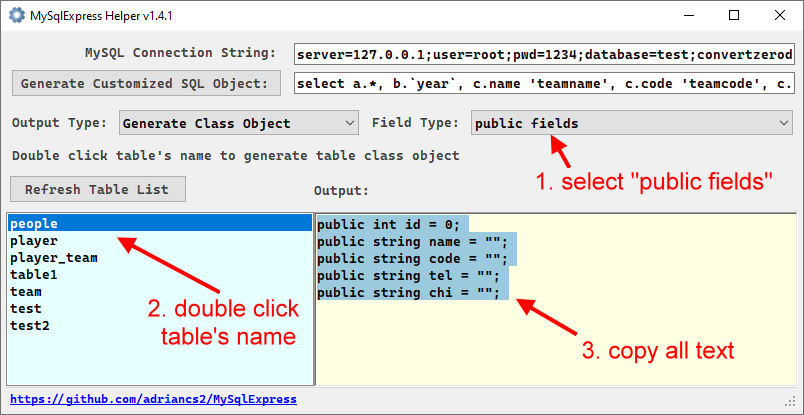
public class obPlayer
{
    public int id = 0;
    public string code = "";
    public string name = "";
    public DateTime date_register = DateTime.MinValue;
    public string tel = "";
    public string email = "";
    public int status = 0;
}
Getting a single row of "Player" object
Here's the code of getting a single row of "Player" object.
int id = 1;

// declare the object
obPlayer p = null;

using (MySqlConnection conn = new MySqlConnection(config.ConnString))
{
    using (MySqlCommand cmd = new MySqlCommand())
    {
        cmd.Connection = conn;
        conn.Open();

        MySqlExpress
Related Skills
feishu-drive
338.0k|
things-mac
338.0kManage Things 3 via the `things` CLI on macOS (add/update projects+todos via URL scheme; read/search/list from the local Things database)
clawhub
338.0kUse the ClawHub CLI to search, install, update, and publish agent skills from clawhub.com
yu-ai-agent
1.9k编程导航 2025 年 AI 开发实战新项目,基于 Spring Boot 3 + Java 21 + Spring AI 构建 AI 恋爱大师应用和 ReAct 模式自主规划智能体YuManus,覆盖 AI 大模型接入、Spring AI 核心特性、Prompt 工程和优化、RAG 检索增强、向量数据库、Tool Calling 工具调用、MCP 模型上下文协议、AI Agent 开发(Manas Java 实现)、Cursor AI 工具等核心知识。用一套教程将程序员必知必会的 AI 技术一网打尽,帮你成为 AI 时代企业的香饽饽,给你的简历和求职大幅增加竞争力。
