
mcp-client-cli
A simple CLI to run LLM prompt and implement MCP client.
Install / Use
claude mcp add adhikasp -- npx -y github:adhikasp/mcp-client-cliIf the server publishes to npm under a different name, use that package instead — check the repo README.
MCP Server
Model Context Protocol server
Quality Score
Category
AI & Machine LearningSupported Platforms
Tags
Our assessment of mcp-client-cli
mcp-client-cli scores 79/100 on our quality scale, 776th of 965 AI & Machine Learning skills we index.
Its MCP Server is 7.4 KB long, well organised into 18 sections with 10 code examples: a thorough specification that gives an agent plenty to work with.
It has 675 GitHub stars, a meaningful sign that others use it.
Maintenance, license and trust
- The repository was last updated about 11 months ago. That is recent enough to be usable, but agent tooling moves fast, so check the instructions against your agent's current version.
- Our last check on 2026-10-18 found the source still online.
- It is released under the MIT license, a permissive license that allows use, modification and commercial use with attribution.
- Its trust signals score 89/100, with 2 cautions from licensing, adoption, age or documentation. These come from repository metadata, not a code audit — read the skill file before letting an agent act on it.
Safety scan
No issues foundOur scan of the whole file found no instruction hijacking, hidden characters, credential access, data exfiltration or destructive commands. An AI review of the same text found nothing harmful.
AI review by kimi-k2.7-code on 2026-09-23. Automated pattern scan on 2026-09-24. It catches known dangerous patterns, not every risk — read a skill before letting an agent act on it.
mcp-client-cli compared with similar skills
All 4 of these similar skills score higher than mcp-client-cli; compare them before choosing.
| Skill | Score | Stars | Updated | Format |
|---|---|---|---|---|
| mcp-client-cli (this skill)by adhikasp | 79 | 675 | 11mo ago | MCP Server |
| claude-memby thedotmack | 100 | 113.5k | today | CLAUDE.md |
| Agent-Reachby Panniantong | 100 | 109.2k | today | CLAUDE.md |
| Understand-Anythingby Egonex-AI | 100 | 90.9k | 10d ago | CLAUDE.md |
| headroomby headroomlabs-ai | 100 | 78.9k | today | CLAUDE.md |
Frequently asked questions
- How do I install mcp-client-cli?
- Run
claude mcp add adhikasp -- npx -y github:adhikasp/mcp-client-cli. The install tabs above show the steps for each supported agent. - Which AI agents does mcp-client-cli work with?
- It is written for Claude Code and Claude Desktop, as a MCP Server file. Other agents that read the same format can often use it too.
- Is mcp-client-cli safe to use?
- Our scan of the whole file found no instruction hijacking, hidden characters, credential access, data exfiltration or destructive commands. An AI review of the same text found nothing harmful. It is MIT-licensed and scores 89/100 on trust signals. Skills are instructions an agent will follow, so read the file before installing it and do not approve commands you do not understand.
- Is mcp-client-cli still maintained?
- The repository was last updated about 11 months ago. That is recent enough to be usable, but agent tooling moves fast, so check the instructions against your agent's current version.
Skill content
View source on GitHubMCP CLI client
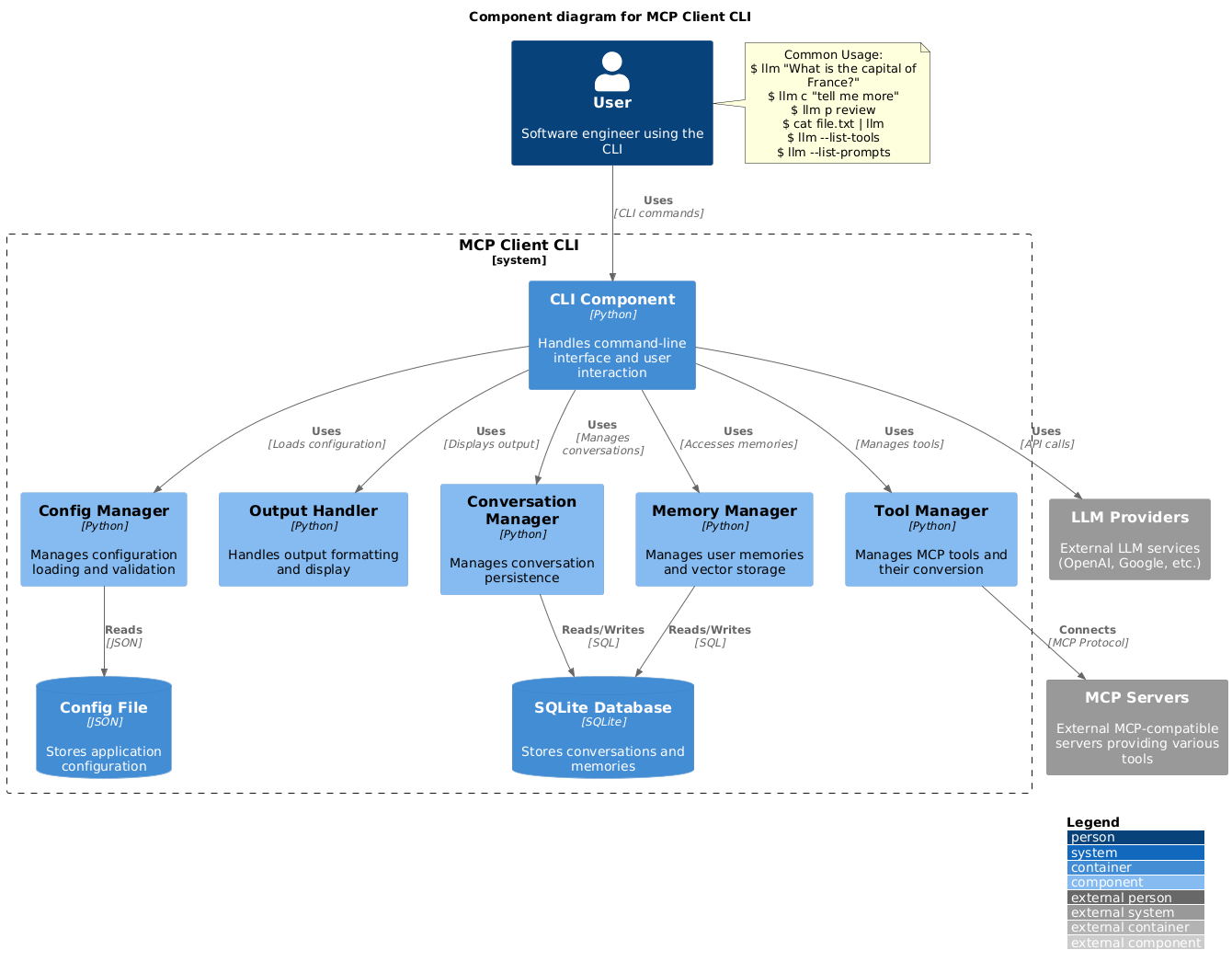
A simple CLI program to run LLM prompt and implement Model Context Protocol (MCP) client.
You can use any MCP-compatible servers from the convenience of your terminal.
This act as alternative client beside Claude Desktop. Additionally you can use any LLM provider like OpenAI, Groq, or local LLM model via llama.
Setup
-
Install via pip:
pip install mcp-client-cli -
Create a
~/.llm/config.jsonfile to configure your LLM and MCP servers:{ "systemPrompt": "You are an AI assistant helping a software engineer...", "llm": { "provider": "openai", "model": "gpt-4", "api_key": "your-openai-api-key", "temperature": 0.7, "base_url": "https://api.openai.com/v1" // Optional, for OpenRouter or other providers }, "mcpServers": { "fetch": { "command": "uvx", "args": ["mcp-server-fetch"], "requires_confirmation": ["fetch"], "enabled": true, // Optional, defaults to true "exclude_tools": [] // Optional, list of tool names to exclude }, "brave-search": { "command": "npx", "args": ["-y", "@modelcontextprotocol/server-brave-search"], "env": { "BRAVE_API_KEY": "your-brave-api-key" }, "requires_confirmation": ["brave_web_search"] }, "youtube": { "command": "uvx", "args": ["--from", "git+https://github.com/adhikasp/mcp-youtube", "mcp-youtube"] } } }Note:
- See CONFIG.md for complete documentation of the configuration format
- Use
requires_confirmationto specify which tools need user confirmation before execution - The LLM API key can also be set via environment variables
LLM_API_KEYorOPENAI_API_KEY - The config file can be placed in either
~/.llm/config.jsonor$PWD/.llm/config.json - You can comment the JSON config file with
//if you like to switch around the configuration
-
Run the CLI:
llm "What is the capital city of North Sumatra?"
Usage
Basic Usage
$ llm What is the capital city of North Sumatra?
The capital city of North Sumatra is Medan.
You can omit the quotes, but be careful with bash special characters like &, |, ; that might be interpreted by your shell.
You can also pipe input from other commands or files:
$ echo "What is the capital city of North Sumatra?" | llm
The capital city of North Sumatra is Medan.

$ echo "Given a location, tell me its capital city." > instructions.txt
$ cat instruction.txt | llm "West Java"
The capital city of West Java is Bandung.
Image Input
You can pipe image files to analyze them with multimodal LLMs:
$ cat image.jpg | llm "What do you see in this image?"
[LLM will analyze and describe the image]

$ cat screenshot.png | llm "Is there any error in this screenshot?"
[LLM will analyze the screenshot and point out any errors]
Using Prompt Templates
You can use predefined prompt templates by using the p prefix followed by the template name and its arguments:
# List available prompt templates
$ llm --list-prompts

# Use a template
$ llm p review  # Review git changes
$ llm p commit  # Generate commit message
$ llm p yt url=https://youtube.com/...  # Summarize YouTube video
Triggering a tool
$ llm What is the top article on hackernews today?

================================== Ai Message ==================================
Tool Calls:
  brave_web_search (call_eXmFQizLUp8TKBgPtgFo71et)
 Call ID: call_eXmFQizLUp8TKBgPtgFo71et
  Args:
    query: site:news.ycombinator.com
    count: 1
Brave Search MCP Server running on stdio

# If the tool requires confirmation, you'll be prompted:
Confirm tool call? [y/n]: y

================================== Ai Message ==================================
Tool Calls:
  fetch (call_xH32S0QKqMfudgN1ZGV6vH1P)
 Call ID: call_xH32S0QKqMfudgN1ZGV6vH1P
  Args:
    url: https://news.ycombinator.com/
================================= Tool Message =================================
Name: fetch

[TextContent(type='text', text='Contents [REDACTED]]
================================== Ai Message ==================================

The top article on Hacker News today is:

### [Why pipes sometimes get "stuck": buffering](https://jvns.ca)
- **Points:** 31
- **Posted by:** tanelpoder
- **Posted:** 1 hour ago

You can view the full list of articles on [Hacker News](https://news.ycombinator.com/)
To bypass tool confirmation requirements, use the --no-confirmations flag:
$ llm --no-confirmations "What is the top article on hackernews today?"
To use in bash scripts, add the --no-intermediates, so it doesn't print intermediate messages, only the concluding end message.
$ llm --no-intermediates "What is the time in Tokyo right now?"
Continuation
Add a c prefix to your message to continue the last conversation.
$ llm asldkfjasdfkl
It seems like your message might have been a typo or an error. Could you please clarify or provide more details about what you need help with?
$ llm c what did i say previously?
You previously typed "asldkfjasdfkl," which appears to be a random string of characters. If you meant to ask something specific or if you have a question, please let me know!
Clipboard Support
You can use content from your clipboard using the cb command:
# After copying text to clipboard
$ llm cb
[LLM will process the clipboard text]

$ llm cb "What language is this code written in?"
[LLM will analyze the clipboard text with your question]

# After copying an image to clipboard
$ llm cb "What do you see in this image?"
[LLM will analyze the clipboard image]

# You can combine it with continuation
$ llm cb c "Tell me more about what you see"
[LLM will continue the conversation about the clipboard content]
The clipboard feature works in:
- Native Windows/macOS/Linux environments
- Windows: Uses PowerShell
- macOS: Uses
pbpastefor text,pngpastefor images (optional) - Linux: Uses
xclip(required for clipboard support)
- Windows Subsystem for Linux (WSL)
- Accesses the Windows clipboard through PowerShell
- Works with both text and images
- Make sure you have access to
powershell.exefrom WSL
Required tools for clipboard support:
- Windows: PowerShell (built-in)
- macOS:
pbpaste(built-in) for textpngpaste(optional) for images:brew install pngpaste
- Linux:
xclip:sudo apt install xclipor equivalent
The CLI automatically detects if the clipboard content is text or image and handles it appropriately.
Additional Options
$ llm --list-tools                # List all available tools
$ llm --list-prompts              # List available prompt templates
$ llm --no-tools                  # Run without any tools
$ llm --force-refresh             # Force refresh tool capabilities cache
$ llm --text-only                 # Output raw text without markdown formatting
$ llm --show-memories             # Show user memories
$ llm --model gpt-4               # Override the model specified in config
Contributing
Feel free to submit issues and pull requests for improvements or bug fixes.
Related Skills
claude-mem
113.5kPersistent Context Across Sessions for Every Agent – Captures everything your agent does during sessions, compresses it with AI, and injects relevant context back into future sessions. Works with Claude Code, OpenClaw, Codex, Gemini, Hermes, Copilot, OpenCode + More
Agent-Reach
109.2kGive your AI agent eyes to see the entire internet. Read & search Twitter, Reddit, YouTube, GitHub, Bilibili, XiaoHongShu — one CLI, zero API fees.
Understand-Anything
90.9kGraphs that teach > graphs that impress. Turn any code into an interactive knowledge graph you can explore, search, and ask questions about. Works with Claude Code, Codex, Cursor, Copilot, Gemini CLI, and more.
headroom
78.9kCompress tool outputs, logs, files, and RAG chunks before they reach the LLM. 20% fewer tokens for coding agents, 60-95% fewer tokens for JSON, same answers. Library, proxy, MCP server.

Languages
Trust signals
From repository metadata: license, adoption, age and documentation. Not a code audit — see the Safety scan above for what the skill file itself contains.