
Curvature
Find roads that are the most curvy or twisty based on Open Street Map (OSM) data.
Install / Use
/learn @adamfranco/CurvatureREADME
Curvature
Find roads that are the most curved or twisty based on Open Street Map (OSM) data.
The goal of this program is to help those who enjoy twisty roads (such as motorcycle or driving enthusiasts) to find promising roads that are not well known. It works by calculating a synthetic "curvature" parameter for each road segment (known as a "way" in OSM parlance) that represents how twisty that segment is. These twisty segments can then be output as KML files that can be viewed in Google Earth or viewed in tabular form.
Project website and downloads: roadcurvature.com
About the "curvature" parameter:
The "curvature" of a way is determined by iterating over every set of three points in the line. Each set of three points form a triangle and that triangle has a circumcircle whose radius corresponds to the radius of the curve for that set. Since every line segment (between two points) is part of two separate triangles, the radius of the curve at that segment is considered to be the smaller, larger, or average of the radii for its member sets. Now that we have a curve radius for each segment we can categorize each segment into ranges of radii from very tight (short radius turn) to very broad or straight (long radius turn). Once each segment is categorized its length can be multiplied by a weight to increase the influence of the most curvy segments. By default a weight of 0 is given for straight segments, 1 for broad curves, and up to 2 for the tightest curves. The sum of all of the weighted lengths gives us a number for the curvature of the whole line that corresponds proportionally to the distance (in meters) that you will be in a turn.*
* If all weights are 1 then the curvature parameter will be exactly the distance in turns. The goal of this project however is to prefer tighter turns, so sharp corners are given an increased weight.
About & License
Author: Adam Franco
https://github.com/adamfranco/curvature
roadcurvature.com
Copyright 2012 Adam Franco
License: GNU General Public License Version 3 or later
Rendered Data
Rendered curvature files generated with this program can be dowloaded from kml.roadcurvature.com. Files are available for the entire world and are automatically updated approximately every two weeks.
Examples
Below are links to some example KML files generated with Curvature. Additional files can be found at kml.roadcurvature.com/.
-
Pre-processing the vermont-latest.osm.pbf file.
bin/curvature-collect -v --highway_types 'motorway,trunk,primary,secondary,tertiary,unclassified,residential,service,motorway_link,trunk_link,primary_link,secondary_link,service' vermont-latest.osm.pbf \ | bin/curvature-collect $verbose $input_file \ | bin/curvature-pp filter_out_ways_with_tag --tag surface --values 'unpaved,dirt,gravel,fine_gravel,sand,grass,ground,pebblestone,mud,clay,dirt/sand,soil' \ | bin/curvature-pp filter_out_ways_with_tag --tag service --values 'driveway,parking_aisle,drive-through,parking,bus,emergency_access' \ | bin/curvature-pp add_segments \ | bin/curvature-pp add_segment_length_and_radius \ | bin/curvature-pp add_segment_curvature \ | bin/curvature-pp filter_segment_deflections \ | bin/curvature-pp split_collections_on_straight_segments --length 2414 \ | bin/curvature-pp roll_up_length \ | bin/curvature-pp roll_up_curvature \ | bin/curvature-pp filter_collections_by_curvature --min 300 \ | bin/curvature-pp sort_collections_by_sum --key curvature --direction DESC \ > vermont.msgpack -
A basic KML file generated with a minimum curvature of 300 using the pre-processed vermont-latest.osm.pbf file (above).
This file includes all ways in the input file that have a curvature value greater than 300 and are not marked as unpaved. As mentioned above, a curvature of 300 this means that these ways have at least 150 meters of tight curves with a radius of less than 30 meters, 300 meters of gentle curves with a radius less than 175 meters, or a combination thereof.
In practice, a curvature of 300 is useful for finding roads that might be a bit fun in a sea of otherwise bland options. While more curvy roads will also be included, roads in the 300-600 range tend to be pleasant rather than exciting.
cat vermont.msgpack \ | bin/curvature-pp filter_collections_by_curvature --min 300 \ | bin/curvature-output-kml --min_curvature 300 --max_curvature 20000 \ > vermont.c_300.kmlAn additional note: Vermont has approximately 8,000 miles of dirt roads and only 6,000 miles of paved roads. At the time of this writing most of the dirt roads were not tagged as such in Open Street Map, leading to the inclusion of many dirt roads in the KML file above. I have tagged many of the roads in my region with appropriate 'surface' tags, but there is more to be done. Head to openstreetmap.org and help tag roads with appropriate surfaces so that we can better filter our results.
-
A basic KML file generated with a minimum curvature of 1000 using the pre-processed vermont-latest.osm.pbf file (above).
This file includes all ways in the input file that have a curvature value greater than 1000 and are not marked as unpaved. As mentioned above, a curvature of 1000 this means that these ways have at least 500 meters of tight curves with a radius of less than 30 meters, 1000 meters of gentle curves with a radius less than 175 meters, or a combination thereof.
In practice a minimum curvature of 1000 is useful for finding the best roads in a region. There will be many roads that are quite fun but don't quite make the cut, but all of the roads listed will be very curvy.
cat vermont.msgpack \ | bin/curvature-pp filter_collections_by_curvature --min 1000 \ | bin/curvature-output-kml --min_curvature 1000 --max_curvature 20000 \ > vermont.c_1000.kml -
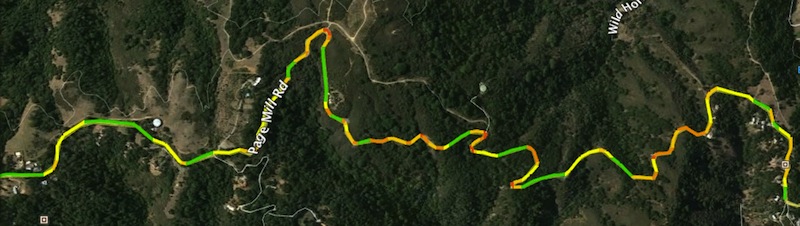
Multi-colored KML files generated with a minimum curvature of 1000 using the pre-processed vermont-latest.osm.pbf file (above).
This file colors the ways listed in the second example based on curve radius. Zoom on corners to see the shading. Green segments do not contribute to the 'curvature' value while yellow, orange, and red segments do.
cat vermont.msgpack \ | bin/curvature-pp filter_collections_by_curvature --min 1000 \ | bin/curvature-output-kml-curve-radius \ > vermont.c_1000.curves.kml -
All of the commands above, combined into a single script
processing_chains/adams_defaults.sh:mv vermont-latest.osm.pbf vermont.osm.pbf processing_chains/adams_defaults.sh -v vermont.osm.pbf -
More examples can be seen at roadcurvature.com
Installation
Prerequisites
Python This is a Python script, therefore you need a functional Python 3 or later environment on your computer. This program has been tested on Python 3.5. See http://python.org/
Boost.Python Boost is system for providing C++ libraries (like libosmium) to Python
libosmium http://osmcode.org/libosmium/manual.html#building-libosmium
The sparsehash package will also be needed for the following to work.
wget https://github.com/osmcode/libosmium/archive/v2.10.2.tar.gz
tar xzf v2.10.2.tar.gz
cd  libosmium-2.10.2/
mkdir build
cd build
cmake -g INSTALL_PROTOZERO ../
make && make install
pyosmium
After libosmium is available on your system, you should be able to use pip to
install the python osmium bindings.
pip install osmium
Issues: On my system (OS X 10.10.5 with most packages installed via MacPorts) I
had to take two additional steps to fix errors in building osmium with pip.
-
MacPorts put the boost.python installation in
/opt/local/include/boost/while osmium is looking for it in/opt/local/lib/boost/. Making a symbolic link solved this.cd /opt/local/lib ln -s ../include/boost boost -
I was seeing the following error:
 In file included from lib/osmium.cc:5:
 In file included from /usr/local/include/osmium/area/assembler.hpp:62:
 /usr/local/include/osmium/tags/filter.hpp:41:10: fatal error: 'boost/iterator/filter_iterator.hpp' file not found
 #include <boost/iterator/filter_iterator.hpp>
I fixed this by ensuring that a BOOST_PREFIX variable was in my shell environment
before running pip:
    export BOOST_PREFIX=/opt/local/
    pip install osmium
msgpack
curvature makes use of msgpack which you can find at
python.org and installed
with pip or easy_install:
pip install msgpack-python
Optional dependencies
psycopg2 Needed if you want to load Curvature output into a PostGIS database.
Curv
