
Lessmsi
A tool to view and extract the contents of an Windows Installer (.msi) file.
Install / Use
/learn @activescott/LessmsiREADME
lessmsi






This is a utility with a graphical user interface and a command line interface that can be used to view and extract the contents of an MSI file.
Usage
To extract from the command line:
lessmsi x <msiFileName> [<outputDir>]
For more command line usage see CommandLine.
Installation
Install via Chocolatey (or download a zip).
Features
Windows Explorer Integration
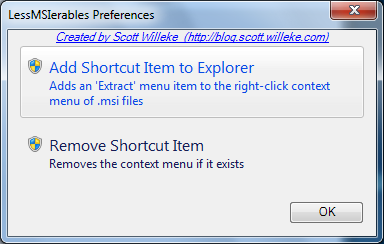
Lessmsi also integrates with Windows Explorer so that you can right-click on a Windows Installer file (.msi file) and select "Extract Files" to extract it into a folder right there:

Just select Preferences from the Edit menu to enable (or disable) the explorer integration:
GUI
In addition to allowing you to extract files from the command line and from inside Windows Explorer, lessmsi has a graphical user interface that allows you to view detailed information about any MSI file.

MSI Table Viewer
Windows Installer (.msi files) are based on an internal database of tables. Lessmsi features a viewer for those tables. Useful for people who work a lot with installers.

Suggestion? Problem? Comment?
If you have a problem please submit it by clicking in the Issue tracker and I'll look into it when I can.
Donate to Support Open Source Contributors of lessmsi
Please Donate via Tip4Commit to thank and encourage our contributors. Each new commit to this repository receives a percentage of the available balance.
Contributing
Pull requests are welcome! Just make sure the build passes and you run unit tests and I'll merge your contributions ASAP!
You Earn Bitcoin Tips for Contributing!
We tip contributors for their PRs with Bitcoin. Look over the issues in this repository, submit a PR to fix one, and when your fix merges we'll send you a tip via Tip4Commit.
If you are going to be working on an issue, please tag us (@activescott or @mega5800) and let us know how your plan goes if it is a non-trivial fix or a new feature. If you want some help or direction please ask. We're happy to help 🫡
Development Environment
To set up a Windows development environment that works with Lessmsi:
- Install VMWare Fusion Player (using free "Player" version, only needed if developing on MacOS - homebrew also has a vmware-fusion formula)
- Download a Virtual Machine for Windows development that Microsoft provides at https://developer.microsoft.com/en-us/windows/downloads/virtual-machines/. These VMs include virtual machine with the latest versions of Windows, the developer tools, SDKs, and samples ready to go.
- Install chocolatey as described at https://chocolatey.org/install
- Install some things using the "Command Prompt" (
cmdrather than "Power Shell"/ps) andwingethere):
# install git for windows (this also installs "bash" via "Git Bash")
$ winget install git.git

# install chocolatey (this is required to run the MSBuild script and create the chocolatey package that is deployed by CI)
$ winget install chocolatey

# NOTE: you'll need to close this window and open a new one to get the cpack and git on the path
Then you can switch to bash by typing "bash" in the start menu and selecting "Git Bash" and follow these steps:
# in Git Bash..., generate and ssh key for github:
$ ssh-keygen
# follow prompts...

# Print *public* ssh key to console, and register the printed value at github at https://github.com/settings/ssh/new by copying the key printed from the prior step into that box
$ cat ~/.ssh/id_ed25519.pub

# create directories for code and clone the repo:
$ mkdir /c/src
$ cd /c/src
$ git clone git@github.com:activescott/lessmsi.git
Now I switch back to a "Developer Command Prompt for Visual Studio" (i.e. cmd with helpful PATH) to do a build since it is more CI-like:
$ cd \src\lessmsi\src
$ .\build.bat

# I usually start with 0.0.1 when prompted for a version number...
Supported Windows Versions
The latest versions of Lessmsi should support the oldest version of Windows that Microsoft still officially supports according to https://learn.microsoft.com/en-us/windows/release-health/supported-versions-windows-client That means we need to also target a .NET Framework version that is included in the oldest version Windows that Microsoft still supports which can be found at https://en.wikipedia.org/wiki/.NET_Framework_version_history
For example as of 2024, Windows 10 is the oldest version of Windows still supported and according to the Wikipedia article, .NET Framework 4.8 is included in Windows 10 (some reasonably current update to Windows 10), so targeting .NET Framework 4.8 is ideal since any reasonably up-to-date version of Windows 10 will have .NET Framework 4.8. Going further, as of April 2024, we see that while .NET Framework 4.8.1 is also available, it is only included in Widnows 11, and not included in any Windows 10 version, so we should not target .NET Framework 4.8.1 as some of our Windows 10 users may not yet have 4.8.1 installed.
Deploying & Publishing New Versions
New versions are published to GitHub Releases and Chocolatey via semantic-release to consistently release semver-compatible versions. Only the master branch is deployed.
To trigger a release just commit (or merge) to the master branch. All commits in master should use the Conventional Commits following Angular Commit Message Conventions.
Then the CI script in the repo at /appveyor.yml should build, test the code and if the build & tests succeed deploy it first to github and then to Chocolatey. Release configuration via semantic-release is in /release.config.js and the semantic-release-*.cmd files in the /src/.build folder.
Originally from Scott Willeke's blog http://blogs.pingpoet.com/overflow and http://blog.scott.willeke.com. It was also called Less Msiérables as well as lessmsi.
Was featured in the book Windows Developer Power Tools as Less MSIérables.
Related Skills
docs-writer
99.0k`docs-writer` skill instructions As an expert technical writer and editor for the Gemini CLI project, you produce accurate, clear, and consistent documentation. When asked to write, edit, or revie
model-usage
335.4kUse CodexBar CLI local cost usage to summarize per-model usage for Codex or Claude, including the current (most recent) model or a full model breakdown. Trigger when asked for model-level usage/cost data from codexbar, or when you need a scriptable per-model summary from codexbar cost JSON.
pr
for a github pr, please respond in the following format - ## What type of PR is this? - [ ] 🍕 Feature - [ ] 🐛 Bug Fix - [ ] 📝 Documentation - [ ] 🧑💻 Code Refactor - [ ] 🔧 Other ## Description <!-- What changed and why? Optional: include screenshots or other supporting artifacts. --> ## Related Issues <!-- Link issues like: Fixes #123 --> ## Updated requirements or dependencies? - [ ] Requirements or dependencies added/updated/removed - [ ] No requirements changed ## Testing - [ ] Tests added/updated - [ ] No tests needed **How to test or why no tests:** <!-- Describe test steps or explain why tests aren't needed --> ## Checklist - [ ] Self-reviewed the code - [ ] Tests pass locally - [ ] No console errors/warnings ## [optional] What gif best describes this PR?
arscontexta
2.9kClaude Code plugin that generates individualized knowledge systems from conversation. You describe how you think and work, have a conversation and get a complete second brain as markdown files you own.
