
LauncherKiller
Are you using a Video Game Library Manager like Playnite or LaunchBox? Are you tired of closing the launchers (Steam, Origin, Epic Games, ...) manually, which just don't have an option to close itself after you've finished playing? Then this little tool is just right for you.
Install / Use
/learn @acealone/LauncherKillerREADME
LauncherKiller
Are you using a Video Game Library Manager like Playnite or LaunchBox? Are you tired of closing the launchers (Steam, Origin, Epic Games, ...) manually, which just don't have an option to close itself after you've finished playing? Then this little tool is just right for you. <br> This tool terminates processes and is still in the test phase. I am not responsible for any damage to your system.
Setup
- VERY IMPORTANT! if you don't want to remove the remaining icons yourself, open all launchers manually and make them always visible in the SystemTray.<br>
Before:<br>
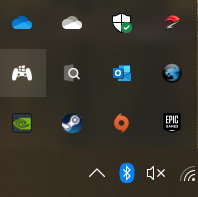 <br>
After:<br>
<br>
After:<br>
 <br>
2. Move the files to a folder of your choice.<br>
3. Open "LauncherKiller.exe", press "+" and add your launcher.<br>
<br>
2. Move the files to a folder of your choice.<br>
3. Open "LauncherKiller.exe", press "+" and add your launcher.<br>
Usage
There are two ways to use this tool.<br>
<h2>Normal mode:</h2> Keep LauncherKiller open while launching your games. It will detect when a fullscreen application is started. After you finished playing, LauncherKiller will terminate all open launcher which are in the list. You can use the checkbox to minimize LauncherKiller to tray.<br> <h2>Lite mode:</h2> You can use the script section in e.g. Playnite or LaunchBox to close all launchers in the list after done playing.<br> Batch:<br> Start C:\LauncherKiller\LauncherKiller.exe --liteRelated Skills
qqbot-channel
344.1kQQ 频道管理技能。查询频道列表、子频道、成员、发帖、公告、日程等操作。使用 qqbot_channel_api 工具代理 QQ 开放平台 HTTP 接口,自动处理 Token 鉴权。当用户需要查看频道、管理子频道、查询成员、发布帖子/公告/日程时使用。
docs-writer
99.8k`docs-writer` skill instructions As an expert technical writer and editor for the Gemini CLI project, you produce accurate, clear, and consistent documentation. When asked to write, edit, or revie
model-usage
344.1kUse CodexBar CLI local cost usage to summarize per-model usage for Codex or Claude, including the current (most recent) model or a full model breakdown. Trigger when asked for model-level usage/cost data from codexbar, or when you need a scriptable per-model summary from codexbar cost JSON.
Design
Campus Second-Hand Trading Platform \- General Design Document (v5.0 \- React Architecture \- Complete Final Version)1\. System Overall Design 1.1. Project Overview This project aims t

Security Score
Audited on Nov 23, 2025