Tran
🖥 Securely transfer and send anything between computers with TUI.
Install / Use
/learn @abdfnx/TranREADME
<p align="center">
<img src="https://raw.githubusercontent.com/abdfnx/tran/main/.github/assets/logo.svg" height="120px" />
</p>
<p align="center">
<img src="https://user-images.githubusercontent.com/64256993/152999023-fbbe04aa-a4b5-449c-b589-27e1169cf851.gif" />
</p>
<p align="center">
<img src="https://user-images.githubusercontent.com/64256993/153002664-9c3db89e-5c71-4555-afa0-3866e37f5339.gif" />
</p>
🖥️ Securely transfer and send anything between computers with TUI.
Installation
Using script
- Shell
curl -fsSL https://cutt.ly/tran-cli | bash
- PowerShell
iwr -useb https://cutt.ly/tran-win | iex
then restart your powershell
Homebrew
brew install abdfnx/tap/tran
GitHub CLI
gh extension install abdfnx/gh-tran
Usage
- Open Tran UI
tran
- Open with specific path
tran --start-dir $PATH
- Send files to a remote computer
tran send <FILE || DIRECTORY>
- Receive files from a remote computer
tran receive <PASSWORD>
- Authenticate with github
tran auth login
- Sync your tran config file
tran sync start
Tran Config file
tran config file is located at
~/.tran/tran.yml
config:
  borderless: false
  editor: vim
  enable_mousewheel: true
  show_updates: true
  start_dir: .
Flags
--start-dir string Starting directory for Tran
Shortkeys
- <kbd>tab</kbd>: Switch between boxes
- <kbd>up</kbd>: Move up
- <kbd>down</kbd>: Move down
- <kbd>left</kbd>: Go back a directory
- <kbd>right</kbd>: Read file or enter directory
- <kbd>V</kbd>: View directory
- <kbd>T</kbd>: Go to top
- <kbd>G</kbd>: Go to bottom
- <kbd>~</kbd>: Go to your home directory
- <kbd>/</kbd>: Go to root directory
- <kbd>.</kbd>: Toggle hidden files and directories
- <kbd>D</kbd>: Only show directories
- <kbd>F</kbd>: Only show files
- <kbd>E</kbd>: Edit file
- <kbd>ctrl+s</kbd>: Send files/directories to remote
- <kbd>ctrl+r</kbd>: Receive files/directories from remote
- <kbd>ctrl+f</kbd>: Find files and directories by name
- <kbd>q</kbd>/<kbd>ctrl+q</kbd>: Quit
Technologies Used in Tran
Special thanks
thanks to @ZinoKader for his awesome repo portal
License
tran is licensed under the terms of MIT license.
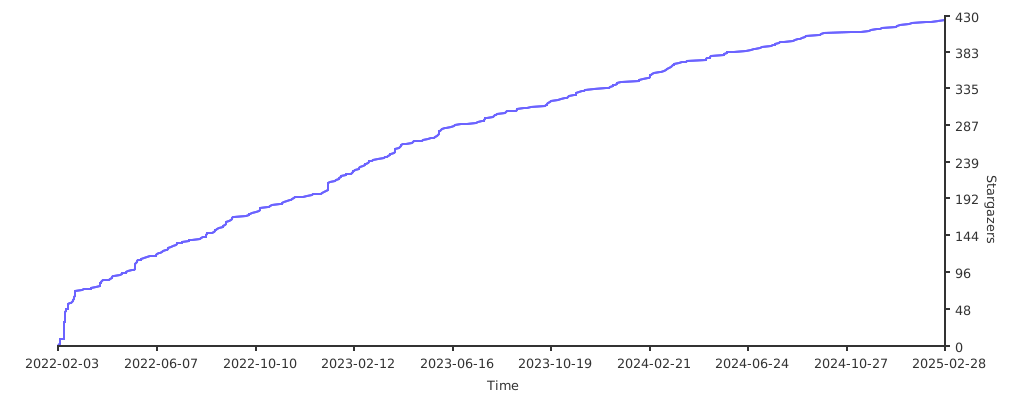
Stargazers over time