
SentryGuard
Free Real-time Tesla sentry security alerts via Telegram
Install / Use
/learn @abarghoud/SentryGuardREADME
SentryGuard




Real-time Tesla vehicle monitoring and security alerts via Telegram
💝 Free & Non-Profit Project
SentryGuard is currently 100% free and open-source. This project is run on a non-profit basis and relies entirely on community donations to cover operational costs (hosting, infrastructure, API fees).
🎯 Our Commitment:
- ✅ Currently free - no premium features, no paid tiers
- ✅ Transparent costs - detailed expense reports available on request
- ✅ Community-driven - funded by Tesla owners, for Tesla owners
- ✅ Open-source - audit the code, contribute, or self-host
⚠️ Sustainability Notice:
If donations no longer cover operational expenses, the service may close, become paid at actual cost (~$0.50/user), or be limited to current users. Your support keeps it free and open for everyone!Support the project:
Every contribution helps keep SentryGuard running and improves security monitoring for the entire Tesla community! 🙏

🚀 Join the Waitlist
Want to try SentryGuard? Visit sentryguard.org and log in with your Tesla account to join our waitlist!
We'll notify you as soon as access becomes available.
🎥 Demo Video
See SentryGuard in action! Watch our demo video to understand how the platform works.
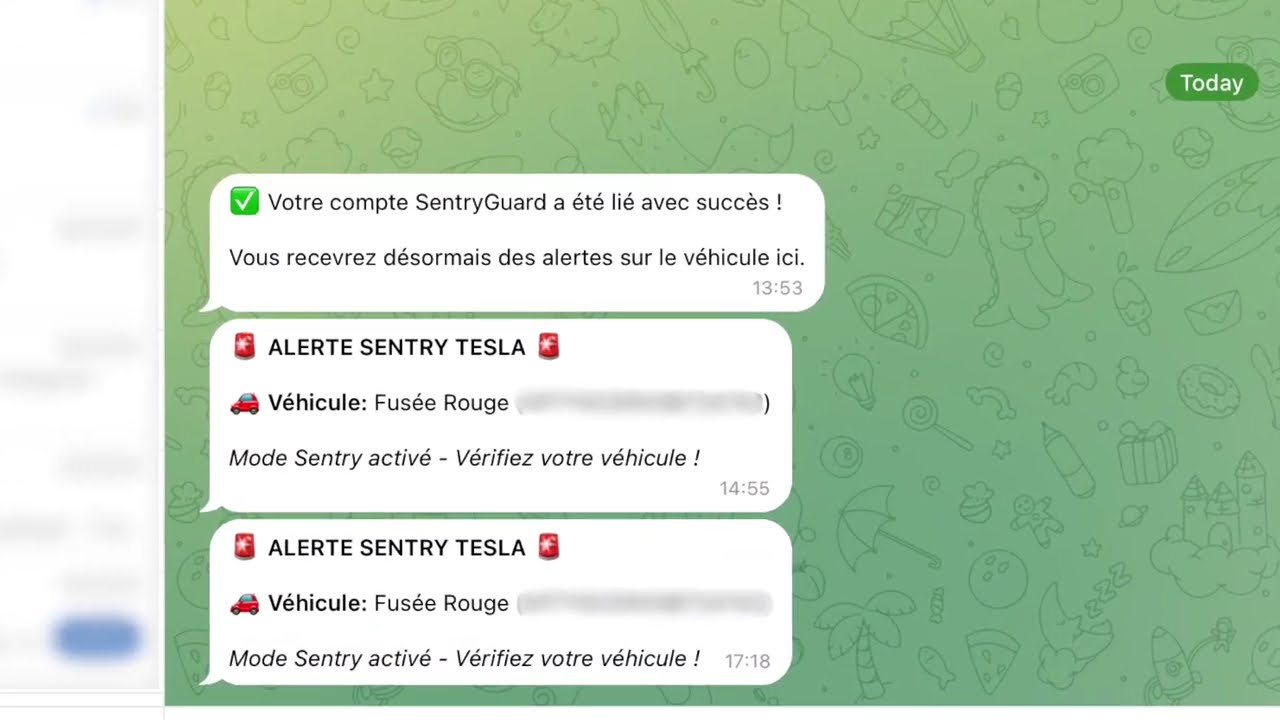
Click the image above to watch the demo video on YouTube
SentryGuard is a comprehensive security monitoring solution for Tesla vehicles. It tracks your vehicle's Sentry Mode status and sends instant Telegram notifications when suspicious activity is detected.
✨ Features
- 🔐 Tesla OAuth Authentication - Secure login with your Tesla account
- 📱 Telegram Integration - Instant alerts via deep linking (no manual chatId setup)
- 🚗 Multi-Vehicle Support - Monitor all your Tesla vehicles
- 📊 Real-time Telemetry - Track Sentry Mode, receive a real-time telegram notification when a security event occurs
- 🌐 SEO-Friendly WebApp - Next.js with server-side rendering
- 🔒 Secure by Design - Encrypted token storage, secure communication
- 🎨 Modern UI - Beautiful, responsive interface with Tailwind CSS
🏗️ Architecture
This is an Nx monorepo containing:
apps/api- NestJS backend API with TypeORM + PostgreSQLapps/webapp- Next.js 15 frontend with App Router (SEO-optimized)
Tech Stack
Backend:
- NestJS - Node.js framework
- TypeORM - ORM with PostgreSQL
- Telegraf - Telegram Bot API
- Tesla Fleet API - Official Tesla API
- Tesla Command Proxy
Frontend:
- Next.js 15 - React framework with SSR
- React 19 - UI library
- Tailwind CSS - Styling
- TypeScript - Type safety

📱 How to Use
1. Login with Tesla
- Visit the webapp and click "Login with Tesla"
- Authenticate with your Tesla account
- You'll be redirected to your dashboard
2. Configure Vehicles
- Go to the Vehicles page
- Your Tesla vehicles will be automatically synced
- Enable telemetry for each vehicle you want to monitor
3. Link Telegram
- Go to the Telegram page
- Click "Generate Telegram Link"
- Open the link in Telegram
- Your account is now linked!
- Test with "Send Test Message"
4. Receive Alerts
- When Sentry Mode is triggered, you'll receive an instant Telegram notification
🔧 Development
Run the API
npx nx serve api
Run the WebApp
npx nx serve webapp
Build for production
# API
npx nx build api

# WebApp
npx nx build webapp
Run tests
# API tests
npx nx test api

# WebApp tests
npx nx test webapp
Lint code
npx nx lint api
npx nx lint webapp
📊 Project Structure
SentryGuard/
├── apps/
│   ├── api/                    # NestJS Backend
│   │   ├── src/
│   │   │   ├── app/
│   │   │   │   ├── auth/       # Tesla OAuth
│   │   │   │   ├── telemetry/  # Vehicle telemetry
│   │   │   │   ├── telegram/   # Telegram bot
│   │   │   │   └── zmq/        # ZMQ service
│   │   │   ├── entities/       # TypeORM entities
│   │   │   ├── config/         # Configuration
│   │   │   └── common/         # Shared utilities
│   │   └── env.example
│   │
│   └── webapp/                 # Next.js Frontend
│       ├── src/
│       │   ├── app/            # Next.js pages (App Router)
│       │   │   ├── dashboard/  # Protected dashboard
│       │   │   └── callback/   # OAuth callback
│       │   ├── components/     # React components
│       │   └── lib/            # Utilities & hooks
│       └── tailwind.config.js
│
├── nx.json                     # Nx configuration
└── package.json
🗄️ Database Schema
Users
- Stores Tesla OAuth tokens (encrypted)
- User profile information
Vehicles
- Vehicle details (VIN, model, name)
- Telemetry configuration status
Telegram Configs
- Link tokens for deep linking
- Chat IDs for sending alerts
🔐 Security
- Token Encryption: All Tesla access tokens are encrypted before storage
- Secure Communication: HTTPS only in production
- Differentiated Rate Limiting: Endpoints protected with adaptive rate limits (30-200 req/min depending on sensitivity)
- Centralized configuration in
apps/api/src/config/throttle.config.ts - No magic numbers - all limits defined as named constants
- Centralized configuration in
- OAuth 2.0: Secure authentication flow with Tesla
- No Plaintext Secrets: All sensitive data encrypted
For detailed security information, see SECURITY.md
☁️ Cloudflare Integration
SentryGuard is designed to work seamlessly with Cloudflare's infrastructure:
Cloudflare as CDN/Proxy
- SSL/TLS: Cloudflare provides automatic HTTPS with flexible SSL options
- DDoS Protection: Built-in protection against DDoS attacks
- Rate Limiting: Additional edge-level rate limiting complements API-level controls
- Caching: Static assets cached at Cloudflare's edge network
- Analytics: Real-time analytics and insights
Setup with Cloudflare
- Add your domain to Cloudflare
- Configure DNS records:
api.yourdomain.com→ Your API server IPyourdomain.com→ Your webapp server IP
- Enable Cloudflare Proxy (orange cloud)
- SSL/TLS Settings: Set to "Full (strict)" mode
- Firewall Rules: Configure WAF rules for additional security
Cloudflare Project Alexandria
SentryGuard is part of the Cloudflare Project Alexandria program, supporting open-source projects with Cloudflare's enterprise features.
🤝 Contributing
Contributions are welcome! Please read our Contributing Guide and Code of Conduct before submitting a Pull Request.
📄 License
This project is licensed under the GNU Affero General Public License v3.0 - see the LICENSE file for details.
Why AGPL-3.0?
We chose AGPL-3.0 to ensure that:
- The software remains free and open source
- Any modifications or improvements are shared with the community
- Network usage (SaaS) requires source code disclosure
- The project benefits from community contributions
⚠️ Disclaimer
SentryGuard is not affiliated with, endorsed by, or connected to Tesla, Inc. Tesla and the Tesla logo are trademarks of Tesla, Inc.
Use this software at your own risk. The authors are not responsible for any damage or issues that may arise from using this software.
🆘 Support
- Issues: GitHub Issues
- Contributing: CONTRIBUTING.md
- Security: SECURITY.md
Note: A detailed setup guide with Docker support is coming soon!
🙏 Acknowledgments
- Tesla for the Fleet API
- Telegram for the Bot API
- Cloudflare for Project Alexandria support
- Nx team for the amazing monorepo tools
- NestJS and Next.js communities
- All our contributors
🌟 Star History
If you find SentryGuard useful, please consider giving it a star ⭐
📊 Project Status
- ✅ Active Development: Regular updates and improvements
- ✅ Community Driven: Open to contributions
- ✅ Production Ready: Used by real Tesla owners
- ✅ Well Documented: Comprehensive setup guides
Made with ❤️ for Tesla owners who care about their vehicle's security
