
tapp
Let coding agents prove UI changes on real iOS, Android, and web surfaces—with inspectable evidence, replayable journeys, and deterministic CI.
Install / Use
claude mcp add aarwitz -- npx -y github:aarwitz/tappIf the server publishes to npm under a different name, use that package instead — check the repo README.
MCP Server
Model Context Protocol server
Quality Score
Category
LegalSupported Platforms
Our assessment of tapp
tapp scores 83/100 on our quality scale, 147th of 217 Legal skills we index.
Its MCP Server is 27 KB long, well organised into 20 sections with 18 code examples: a thorough specification that gives an agent plenty to work with.
It has 3 GitHub stars, so there is little community track record yet; judge it on its content.
Maintenance, license and trust
- The repository was last updated 3 days ago, so tapp is actively maintained.
- It is released under the MIT license, a permissive license that allows use, modification and commercial use with attribution.
- Its trust signals score 92/100, with 1 caution from licensing, adoption, age or documentation. These come from repository metadata, not a code audit — read the skill file before letting an agent act on it.
tapp compared with similar skills
All 4 of these similar skills score higher than tapp; compare them before choosing.
| Skill | Score | Stars | Updated | Format |
|---|---|---|---|---|
| tapp (this skill)by aarwitz | 83 | 3 | 3d ago | MCP Server |
| Agent-Reachby Panniantong | 100 | 108.9k | 1d ago | CLAUDE.md |
| headroomby headroomlabs-ai | 100 | 78.9k | today | CLAUDE.md |
| CowAgentby zhayujie | 100 | 47.8k | 1d ago | CLAUDE.md |
| Scraplingby D4Vinci | 100 | 97.0k | today | MCP Server |
Frequently asked questions
- How do I install tapp?
- Run
claude mcp add aarwitz -- npx -y github:aarwitz/tapp. The install tabs above show the steps for each supported agent. - Which AI agents does tapp work with?
- It is written for Claude Code, Claude Desktop and Cursor, as a MCP Server file. Other agents that read the same format can often use it too.
- Is tapp safe to use?
- It is MIT-licensed and scores 92/100 on trust signals. Skills are instructions an agent will follow, so read the file before installing it and do not approve commands you do not understand.
- Is tapp still maintained?
- The repository was last updated 3 days ago, so tapp is actively maintained.
Skill content
View source on GitHubTapp








Tapp lets coding agents verify UI changes on real iOS, Android, and web surfaces, then turns reviewed proof into deterministic CI checks. It can inspect and drive screens, explore for technical failures, and save important journeys as replayable tests.
Exploration reports findings, coverage, evidence, and limits. Only the repository-connected gate
returns pass, fail, or inconclusive. Tapp does not turn an autonomous crawl into a subjective
"ship-ready" score.
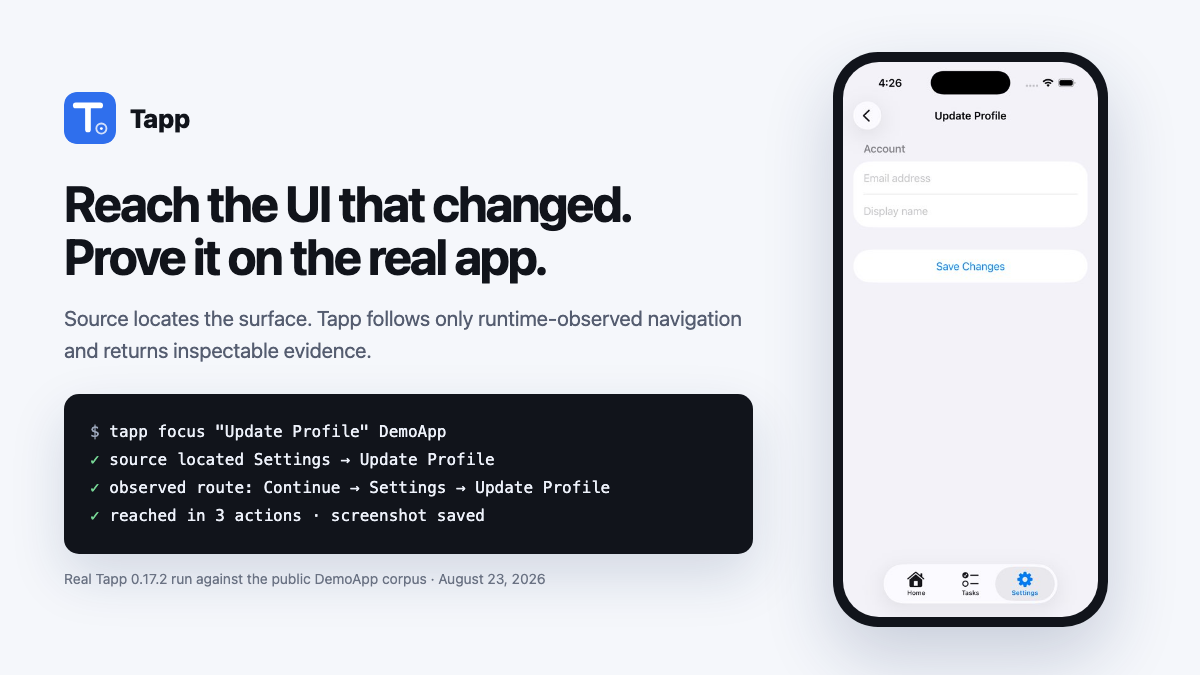
Real evidence, not a mock: this public DemoApp run reached the requested iOS surface in three observed route actions. Watch 45 seconds of autonomous exploration or inspect a complete sanitized web evidence report.
Supported targets:
| Target app | Runtime |
|---|---|
| iOS | Simulator on macOS with Xcode; driven through XCUITest and accessibility |
| Android | Connected emulator or device with adb; driven through UIAutomator |
| Web | Owned browser app in Playwright Chromium |
| macOS desktop | Any .app on a Mac, driven through the Accessibility API; needs the Accessibility permission (tapp doctor says how) |
| Windows desktop | WPF, WinForms, and WinUI apps through Windows UI Automation — early runs are set up through the pilot |
Windows hosts Android and web testing when their prerequisites are installed, and is the home of the Windows desktop target.
Give Tapp to your coding agent
After setup, the whole user prompt is:
Use Tapp to test this app.
The official skill teaches the agent to choose the smallest useful operation, handle repositories with multiple app targets, inspect visual evidence, and keep exploration observations separate from gate decisions.
Claude Code, Codex, Cursor, Copilot, and other Agent Skills clients (recommended):
npx -y skills add aarwitz/tapp --skill tapp
This installs the open Agent Skills workflow into the current project and lets the agent run the npm
CLI directly. Inspecting, focused evidence, autonomous exploration, deterministic replay, and gating
need no MCP server, plugin, account, API key, global Tapp install, or pasted prompt block. Add -g
for a user-wide install, or --agent claude-code, --agent codex, and similar selectors to constrain
the clients. Start or restart the agent from the application repository and use the short prompt
above.
Claude Code — optional enhanced skill and MCP tools:
claude plugin marketplace add aarwitz/tapp
claude plugin install tapp@tapp
The plugin bundles the same tapp Agent Skill with the matching npm-backed MCP server. Add it when
you want inline screenshot results or when the agent must interactively tap, type, and record an
arbitrary multi-step journey in one persistent session. It is not required for the core
skill-to-CLI workflow.
A live site, production, or a site you do not own: the agent uses tapp explore --read-only / tapp_explore {readOnly:true},
which renders and reads the page but never clicks, types or submits. Exploration is for apps and
environments you own.
No agent integration: run the npm package directly from an app repository in one line:
npx -y @aarwitz/tapp@latest init . --explore
VS Code: install Tapp from the Marketplace. It contributes the same cross-platform Agent Skill to Copilot plus focused iOS simulator tools and an auto-refreshing screenshot preview. The preview is not an embedded Simulator or video stream. Android and web remain available through the skill's CLI/MCP workflow.
Teams: Tapp's core stays MIT licensed. A small paid founding pilot is open for hands-on repository onboarding, important-journey setup, and CI integration in infrastructure you control. Apply without sharing private data.
you:    "Add a logout button to the settings screen"
agent:  *writes the Swift*
agent:  *tapp: finds Settings in source, follows its previously observed route, screenshots it*
agent:  "Done — and here it is working on the simulator: [screenshot]"
npm CLI quickstart
Requirements: Node ≥ 18. iOS needs macOS + Xcode; Android needs adb plus a connected
emulator/device (and JDK 17 when Tapp builds source rather than installing an existing APK); web
needs Playwright + Chromium. tapp doctor reports these separately.
From the app repository, ground Tapp once, then use the smallest operation for later checks:
npx -y @aarwitz/tapp@latest init . --explore # first run: detect/build, explore, and ground .tapp/ui-map.json
npx -y @aarwitz/tapp@latest look            # one current screen + screenshot
npx -y @aarwitz/tapp@latest explore --goal "Save storefront settings visible above keyboard" # source + observed-route fast path
npx -y @aarwitz/tapp@latest explore         # later broad exploration (observation, not a gate)
Source tells explore --goal where the requested UI likely lives; only a route already observed in
.tapp/ui-map.json authorizes navigation. If a fresh repository has no such route yet, Tapp returns
the source evidence instead of guessing through the app.
Claude Code can read the saved image with its file-reading tool; Codex can open it with
view_image. The agent should report what the screenshot proves, relay the exploration findings
as-is (an observation, not a merge decision — tapp ci gates that), and link the HTML evidence
report. No Tapp server, account, global install, API key, or bundle id is required for this loop.
The platform runtime still needs to be installed, and repository onboarding can write reviewed
configuration under .tapp/.
The product, executable, and package leaf are all Tapp: npm distributes it as
@aarwitz/tapp, while the installed command remains tapp.
To bootstrap maintained release infrastructure, preview the repository model and grounded plan before Tapp writes anything:
npx -y @aarwitz/tapp@latest init . --dry-run --json-out /tmp/tapp-init.json
# Build/start the detected web target, ground the first UI Map, then stop it.
npx -y @aarwitz/tapp@latest init . --explore --platform web
# Or build/install the detected Xcode target, ground the map, and persist the validated scheme.
npx -y @aarwitz/tapp@latest init . --explore --platform ios --target .
# Or connect to an already-running owned URL:
npx -y @aarwitz/tapp@latest init . --explore --platform web --url http://127.0.0.1:4173
# If the app has roles/accounts, bind names once; values stay in local/CI secrets.
npx -y @aarwitz/tapp@latest plan actor set alice . --role member --session isolated \
  --credential email=ALICE_EMAIL --credential password=ALICE_PASSWORD
# Review-only path: tapp init . → tapp plan show → tapp plan review --approve ...

# After approved drafts replay and are promoted, establish the selected target's baseline
# through the ordinary full gate, then generate the reviewable GitHub workflow.
npx -y @aarwitz/tapp@latest ci baseline . --platform web
npx -y @aarwitz/tapp@latest ci install .
Actor setup refuses to overwrite an existing actor. Repeat actor set with --replace only when
you intend to replace that actor's reviewed role, session, provisioning, or credential bindings.
In a repository containing multiple apps (for example, iOS plus web),
tapp init . --explore without an explicit target does not guess from detection order—even when a
prior choice is recorded. A human terminal gets a numbered
selector; a non-interactive CLI prints exact target-selection commands, while MCP also returns
structured choices. Neither builds or writes before the choice. After you choose one, the model
retains every detected target and records the choice as the default for the next bare tapp explore;
explicit init --explore continues to ask because it is the onboarding/refresh operation. Setup gaps
belonging only to unselected targets are shown as informational, not as failures of the selected run.
The baseline command writes only after exploration and every selected deterministic suite pass
conclusively. It stores .tapp/baselines/<platform>/<target-id>.json; the generated workflow
uses that exact target identity so two apps on the same platform never share a baseline. ci install writes .github/workflows/tapp.yml plus .tapp/ci.json, refuses unresolved build
configuration and existing-file collisions, and never commits, pushes, enables branch protection,
or creates GitHub resources. Review and pin the generated Tapp release reference to its immutable
commit SHA before production.
look and explore accept a repo directory, a path/to/App.app, a bundle id, or no target
(auto-detecting the repository or installed app):
npx -y @aarwitz/tapp@latest look [target]         # launch the app → screen summary + screenshot file
npx -y @aarwitz/tapp@latest look [target] --tree  # + the accessibility tree of the current screen
npx -y @aarwitz/tapp@latest look                  # no target on iOS: the booted simulator as it is right now
On iOS, look --tree inspects an installed app and never builds, uninstalls, or replaces it. With no
target, it uses the repository's recorded iOS target or the sole installed app. If the choice
is ambiguous, it lists the installed apps for you to select. Pass a bundle id to inspect a
specific sandbox build; run tapp_build (MCP) or init . --explore when you intend to replace it.
iOS Flow evidence includes flow-final.png on passing and failing replays, plus
flow-failure-N.png at a failed step, alongside the log, JSON report, and XCTest result bundle.
Web: npx -y @aarwitz/tapp@latest explore http://localhost:3000 (one-time setup:
npm i -g playwright && npx playwright install chromium). Add --watch to open Tapp's controlled,
isolated Chromium window and follow its clicks with an on-page pointer/action label. Tapp hides that
watch UI from saved evidence screenshots and does not automate your personal/default browser profile.
Focused web inspection waits briefly for loading states to settle. If a consent or location modal blocks the screen, dismiss it and wait for the content you care about in the same package-only call:
npx -y @aarwitz/tapp@latest look https://example.com --tap "Not now" --wait-for "Dashboard"
npx -y @aarwitz/tapp@latest look https://example.com --tree --tap "Not now" --wait-for "Dashboard" --json
Android:
npx -y @aarwitz/tapp@latest explore path/to/app-debug.apk --platform andr
Truncated for display — read the full file on GitHub.
Related Skills
Agent-Reach
108.9kGive your AI agent eyes to see the entire internet. Read & search Twitter, Reddit, YouTube, GitHub, Bilibili, XiaoHongShu — one CLI, zero API fees.
headroom
78.9kCompress tool outputs, logs, files, and RAG chunks before they reach the LLM. 20% fewer tokens for coding agents, 60-95% fewer tokens for JSON, same answers. Library, proxy, MCP server.
CowAgent
47.8kOpen-source personal AI assistant & Agent Harness. Plans tasks, runs tools and skills, self-evolves with memory and knowledge. Multi-agent, multi-model, multi-channel. Lightweight, extensible, one-line install.
Scrapling
97.0k🕷️ The BEST Web Scraping framework that handles everything from a single request to a full-scale crawl! Don't be shy, join here: https://discord.gg/EMgGbDceNQ and follow here for daily tips and tricks: https://x.com/Scrapling_dev

Languages
Trust signals
From repository metadata: license, adoption, age and documentation. Not a code audit — see the Safety scan above for what the skill file itself contains.