
Filegogo
A file transfer tool that can be used in the browser webrtc p2p
Install / Use
/learn @a-wing/FilegogoREADME
<h1 align="center">
<img src="./webapp/public/logo512.png" alt="Filegogo" width="200">
<br>Filegogo<br>
</h1>
<p align="center">
<a href="https://send.22333.fun">send.22333.fun</a>
</p>
<h4 align="center">A file transfer tool that can be used in the browser webrtc p2p</h4>
<p align="center">
<a href="https://github.com/a-wing/filegogo/actions">
<img src="https://github.com/a-wing/filegogo/workflows/ci/badge.svg" alt="Github Actions">
</a>
<img src="https://img.shields.io/github/go-mod/go-version/a-wing/filegogo">
<a href="https://goreportcard.com/report/github.com/a-wing/filegogo">
<img src="https://goreportcard.com/badge/github.com/a-wing/filegogo" alt="Go Report Card">
</a>
<a href="https://github.com/a-wing/filegogo/releases">
<img src="https://img.shields.io/github/release/a-wing/filegogo/all.svg" alt="GitHub Release">
</a>
<a href="https://github.com/a-wing/filegogo/blob/master/LICENSE">
<img src="https://img.shields.io/github/license/a-wing/filegogo.svg?maxAge=2592000" alt="License">
</a>
</p>
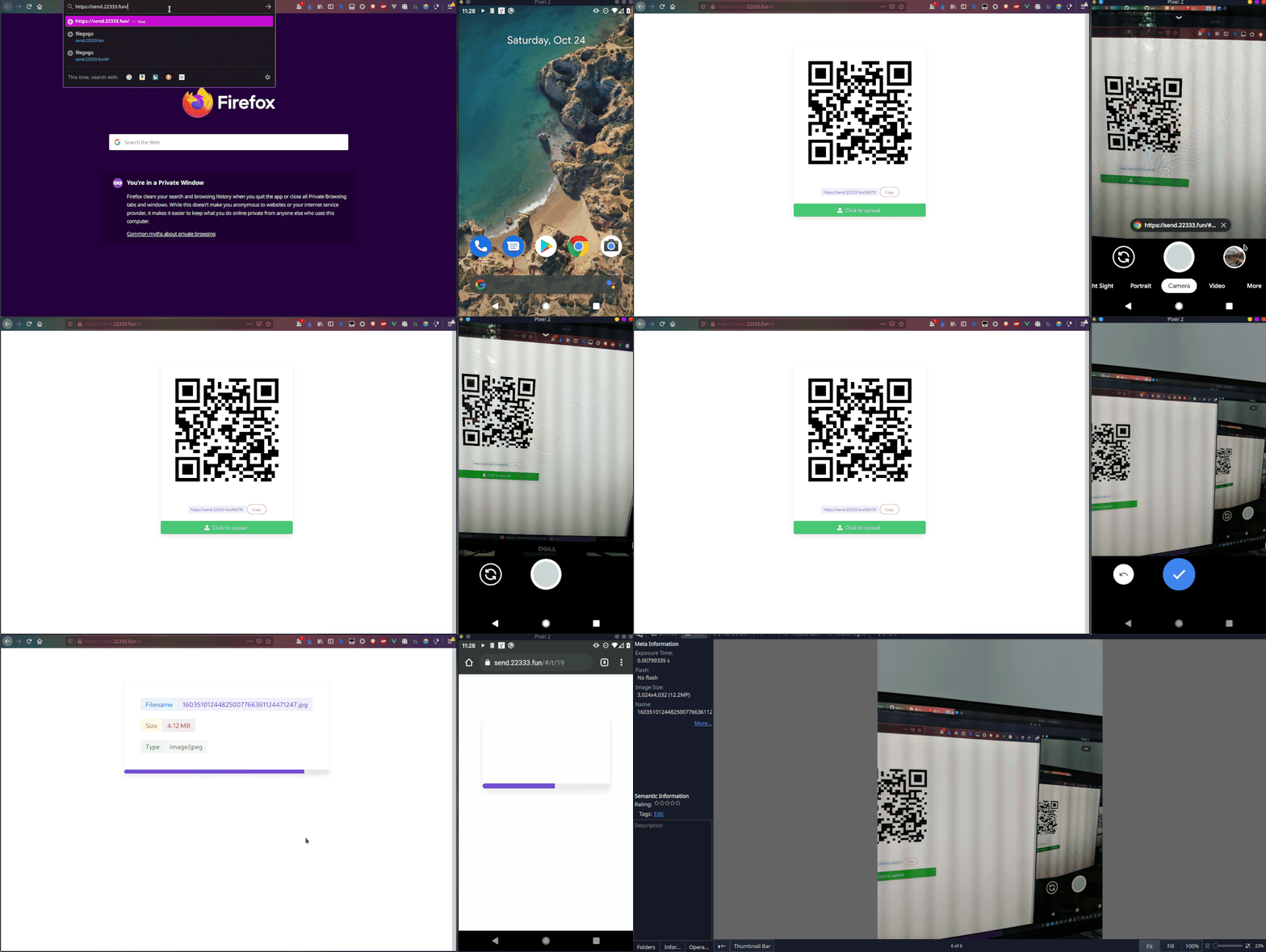
Deploy on your self server
docker run -p 8080:8080 ghcr.io/a-wing/filegogo:latest server
Architecture

Components
- app
- [x] server
- [x] webapp
- [ ] client-cli (current, have many problems)
- lib
- [ ] libfgg.js (only browser)
- [ ] libfgg.go
- [ ] libfgg.rs
Build && Install
make
Run Development
Webapp
npm install

# frontend
# Default Listen port: 3000
# Auto Proxy port: 8080
npm run dev
Server
# Default Listen port: 8080
go run ./main.go server
Client
run cli client. For example:
# send command
go run ./main.go send -s http://localhost:8080/6666 <file>

# recv command
go run ./main.go recv -s http://localhost:8080/6666 <file>
Config
Built-in turn server
# Enable Built-in turn server
[turn]

# if no set, use random user
user = "filegogo:filegogo"

realm = "filegogo"
listen = "0.0.0.0:3478"

# Public ip
# if aws, aliyun
publicIP = "0.0.0.0"
relayMinPort = 49160
relayMaxPort = 49200
iceServer Use Other
For example: coturn
Docker Deployment Coturn
docker run -d --network=host --name=coturn coturn/coturn:alpine \
           -n --log-file=stdout \
           --min-port=49160 --max-port=49200 \
           --lt-cred-mech --fingerprint \
           --no-multicast-peers --no-cli \
           --no-tlsv1 --no-tlsv1_1 \
           --realm=filegogo \
           --user=filegogo:filegogo \
           --external-ip='$(detect-external-ip)' \
           --relay-ip='$(detect-external-ip)' \
           --listening-ip='$(detect-external-ip)' \
           --listening-device=eth0
Test Deployment
# Test stun
turnutils_stunclient cn.22333.fun
turnutils_stunclient stun.22333.fun

# Test turn
turnutils_uclient -u filegogo -w filegogo -y cn.22333.fun
turnutils_uclient -u filegogo -w filegogo -y turn.22333.fun
Package Manager Deployment
apt install coturn
# /etc/turnserver.conf

listening-ip={YOUR_IP_ADDRESS}
relay-ip={YOUR_IP_ADDRESS}

# Public ip
# if aws, aliyun
external-ip={YOUR_IP_ADDRESS}

fingerprint
lt-cred-mech
user=filegogo:filegogo
realm=filegogo
Acknowledgments
Related Skills
node-connect
352.0kDiagnose OpenClaw node connection and pairing failures for Android, iOS, and macOS companion apps
frontend-design
111.1kCreate distinctive, production-grade frontend interfaces with high design quality. Use this skill when the user asks to build web components, pages, or applications. Generates creative, polished code that avoids generic AI aesthetics.
openai-whisper-api
352.0kTranscribe audio via OpenAI Audio Transcriptions API (Whisper).
qqbot-media
352.0kQQBot 富媒体收发能力。使用 <qqmedia> 标签,系统根据文件扩展名自动识别类型(图片/语音/视频/文件)。
