
ZFVimIM
vim输入法 / Vim Input Method by pure vim script, support: user word, dynamic word priority, cloud db files
Install / Use
/learn @ZSaberLv0/ZFVimIMREADME
introduction
Input Method by pure vim script, inspired by VimIM
Outstanding features / why another remake:
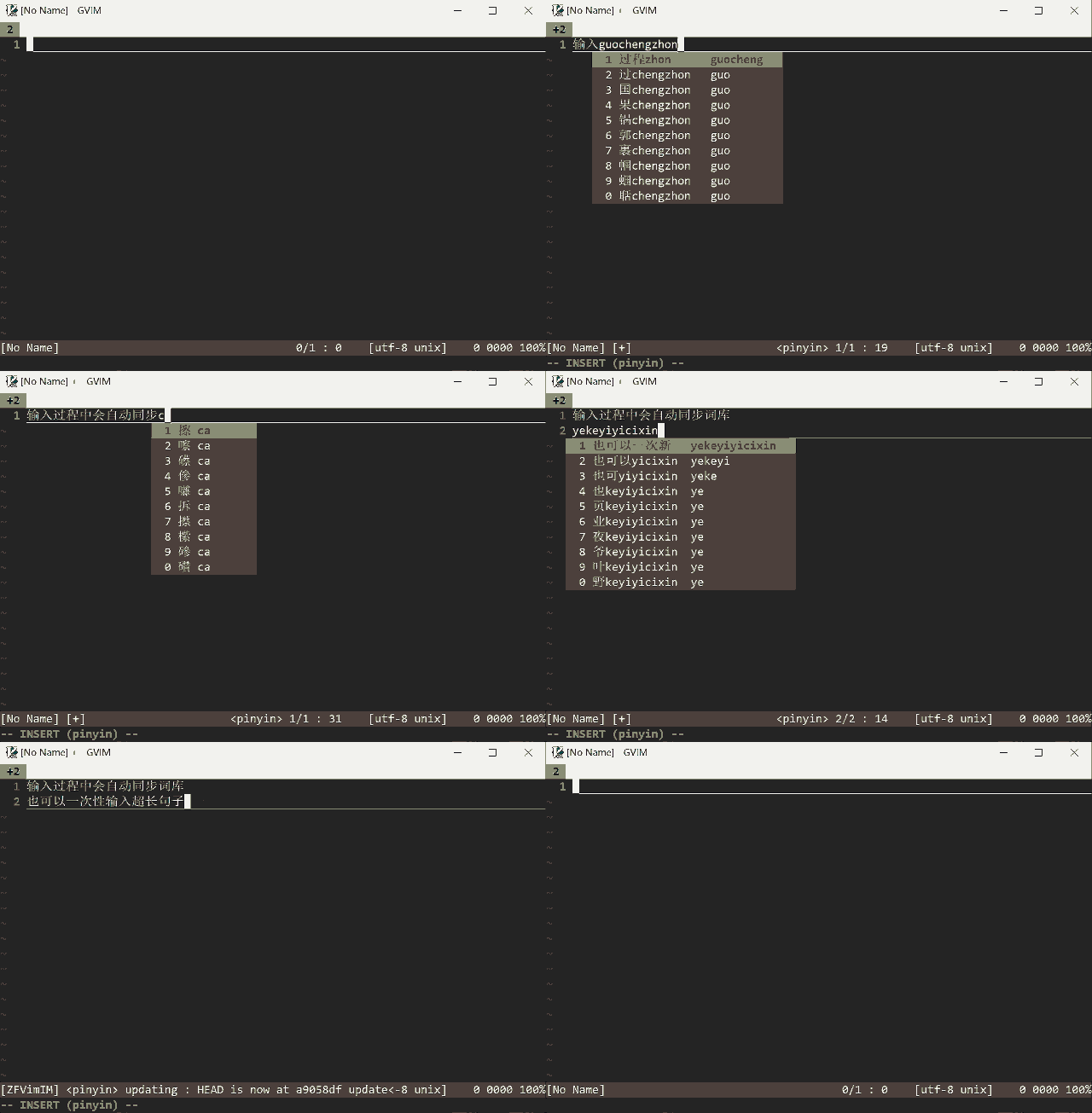
- more friendly long sentence match and better predict logic
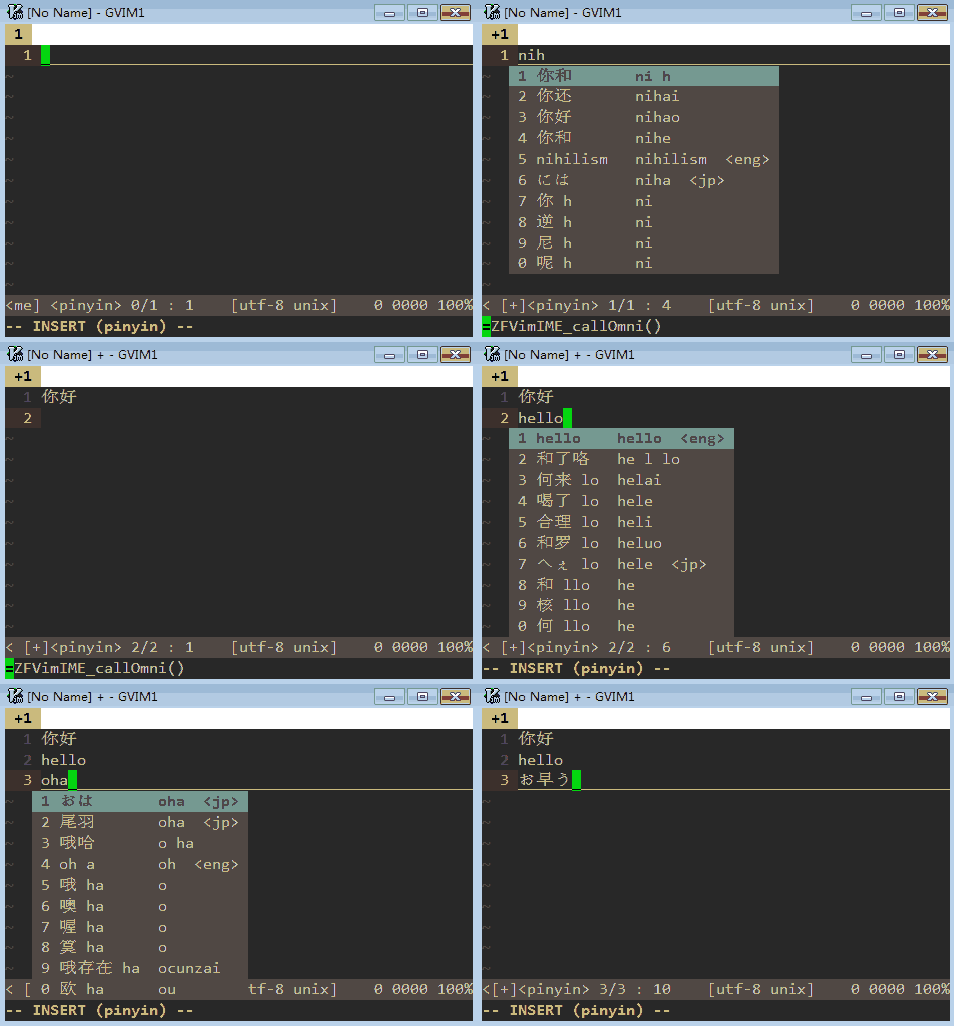
- predict from multiple db without switching dbs
- auto create user word and re-order word priority according to your input history
- cloud input, auto pull and push your db file from/to Github
- fetch words from 3rd openapi, asynchronously
- solve many VimIM's issues:
- better txt db load performance if
executable('python') - auto disable and re-enable complete engines when using input method
- sync input method state acrossing buffers
- better txt db load performance if
Why VimIM? Why not system IME?
- it's a pain to input CJK in ssh env
- I love
inoremap jk <esc>:)
if you like my work, check here for a list of my vim plugins, or buy me a coffee
how to use
minimal config (local db)
-
recommend env:
- (optional)
vim8withjoborneovim, for better db load performance - (optional)
executable('python')orexecutable('python3'), for better db load performance
- (optional)
-
use Vundle or any other plugin manager you like to install
Plugin 'ZSaberLv0/ZFVimIM' Plugin 'ZSaberLv0/ZFVimJob' " optional, for better db load performance -
prepare your db files, you may copy the txt db files from db samples to any location
-
config
function! s:myLocalDb()
    let db = ZFVimIM_dbInit({
                \   'name' : 'YourDb',
                \ })
    call ZFVimIM_cloudRegister({
                \   'mode' : 'local',
                \   'dbId' : db['dbId'],
                \   'repoPath' : '/path/to/repo', " path to the db
                \   'dbFile' : '/YourDbFile', " db file, relative to repoPath
                \   'dbCountFile' : '/YourDbCountFile', " optional, db count file, relative to repoPath
                \ })
endfunction
if exists('*ZFVimIME_initFlag') && ZFVimIME_initFlag()
    call s:myLocalDb()
else
    autocmd User ZFVimIM_event_OnDbInit call s:myLocalDb()
endif
recommend config (cloud db)
-
recommend env:
- (optional)
git, for db update - (optional)
vim8withjoborneovim, for better db load performance - (optional)
executable('python')orexecutable('python3'), for better db load performance
- (optional)
-
prepare your db repo according to db samples, or simply fork one of the db samples
-
go to access tokens to generate your Github access token, and make sure it has push permission to your db repo (check
repoinSelect scopes) -
config your access token according to your db repo, for example, for the db samples:
let g:zf_git_user_email='YourEmail'
let g:zf_git_user_name='YourUserName'
let g:zf_git_user_token='YourGithubAccessToken'
please check the README of each db repo for detail
-
use Vundle or any other plugin manager you like to install
Plugin 'ZSaberLv0/ZFVimIM'
Plugin 'ZSaberLv0/ZFVimJob' " optional, for better db load performance
Plugin 'ZSaberLv0/ZFVimGitUtil' " optional, cleanup your db commit history when necessary
Plugin 'YourUserName/ZFVimIM_pinyin_base' " your db repo
Plugin 'ZSaberLv0/ZFVimIM_openapi' " optional, 3rd IME using Baidu
how to use
- use
;;to toggle input method, and;:to switch db - scroll page by
-or= - input and choose word by
<space>or0~9 - choose head or tail word by
[or] - your input history would be recorded locally or
push to github automatically,
you may use
;,or:IMAddto add user word,;.or:IMRemoveto remove user word
some tips
-
you may want to add a IME status tip to your
:h 'statusline'let &statusline='%{ZFVimIME_IMEStatusline()}'.&statusline -
if it's hard to support async mode, you may also:
- pull and push manually by
:call ZFVimIM_download()and:call ZFVimIM_upload() - automatically ask you to input git info to push before exit vim,
by
let g:ZFVimIM_cloudSync_enable=1
- pull and push manually by
-
since db files are pretty personal, the default db only contains single word, words would be created during your usage, if you prefer other choices, see db samples
-
your db repo may contain many commits after long time usage, which may cause a huge
.gitdir, it's recommended to clean up it occasionally, by:- delete and re-create the repo
- if you have
push --forcepermission, search and see theg:ZFVimIM_cloudAsync_autoCleanupdetail config below
detailed
configs
-
let g:ZFVimIM_autoAddWordLen=3*4when you choose word and the word's byte length less than this value, we would add the word to db file automatically (ignored when
g:ZFVimIM_autoAddWordCheckeris set) -
let g:ZFVimIM_autoAddWordChecker=[]list of function to check whether need to add user word
function! MyChecker(userWord)
    let needAdd = ...
    return needAdd
endfunction
let g:ZFVimIM_autoAddWordChecker=[function('MyChecker')]
when any of checker returned
0, we won't add user word -
let g:ZFVimIM_symbolMap = {}used to transform unicode symbols during input
it's empty by default, typical config for Chinese:
let g:ZFVimIM_symbolMap = { \ ' ' : [''], \ '`' : ['·'], \ '!' : ['!'], \ '$' : ['¥'], \ '^' : ['……'], \ '-' : [''], \ '_' : ['——'], \ '(' : ['('], \ ')' : [')'], \ '[' : ['【'], \ ']' : ['】'], \ '<' : ['《'], \ '>' : ['》'], \ '\' : ['、'], \ '/' : ['、'], \ ';' : [';'], \ ':' : [':'], \ ',' : [','], \ '.' : ['。'], \ '?' : ['?'], \ "'" : ['‘', '’'], \ '"' : ['“', '”'], \ '0' : [''], \ '1' : [''], \ '2' : [''], \ '3' : [''], \ '4' : [''], \ '5' : [''], \ '6' : [''], \ '7' : [''], \ '8' : [''], \ '9' : [''], \ }-
if you want to change this setting at runtime, you should use
call ZFVimIME_stop() | call ZFVimIME_start()to restart to take effect, or, add autocmd toZFVimIM_event_OnEnableto setup this value -
it's recommended to add these configs to make vim recognize chinese chars
set encoding=utf-8
set fileencoding=utf-8
set fileencodings=utf-8,ucs-bom,chinese
-
-
keymaps:
-
let g:ZFVimIM_key_pageUp = ['-'] -
let g:ZFVimIM_key_pageDown = ['='] -
let g:ZFVimIM_key_chooseL = ['['] -
let g:ZFVimIM_key_chooseR = [']'] -
let g:ZFVimIM_keymap = 1, whether enable builtin keymaps:nnoremap <expr><silent> ;; ZFVimIME_keymap_toggle_n() inoremap <expr><silent> ;; ZFVimIME_keymap_toggle_i() vnoremap <expr><silent> ;; ZFVimIME_keymap_toggle_v() nnoremap <expr><silent> ;: ZFVimIME_keymap_next_n() inoremap <expr><silent> ;: ZFVimIME_keymap_next_i() vnoremap <expr><silent> ;: ZFVimIME_keymap_next_v() nnoremap <expr><silent> ;, ZFVimIME_keymap_add_n() inoremap <expr><silent> ;, ZFVimIME_keymap_add_i() xnoremap <expr><silent> ;, ZFVimIME_keymap_add_v() nnoremap <expr><silent> ;. ZFVimIME_keymap_remove_n() inoremap <expr><silent> ;. ZFVimIME_keymap_remove_i() xnoremap <expr><silent> ;. ZFVimIME_keymap_remove_v() cnoremap <expr><silent> ;, ZFVimIME_keymap_cmdinput()
-
-
let g:ZFVimIM_showKeyHint = 16whether show key hint after word
0: do not show1: show without length limit>1: show with specified length limit
-
let g:ZFVimIM_cachePath=$HOME.'/.vim_cache/ZFVimIM'cache path for temp files
-
let g:ZFVimIM_cloudAsync_outputTo={...}for async cloud input, output log to where (see ZFJobOutput), default:
let g:ZFVimIM_cloudAsync_outputTo = {
            \   'outputType' : 'statusline',
            \   'outputId' : 'ZFVimIM_c
Related Skills
openhue
350.1kControl Philips Hue lights and scenes via the OpenHue CLI.
sag
350.1kElevenLabs text-to-speech with mac-style say UX.
weather
350.1kGet current weather and forecasts via wttr.in or Open-Meteo
casdoor
13.3kAn open-source AI-first Identity and Access Management (IAM) /AI MCP & agent gateway and auth server with web UI supporting OpenClaw, MCP, OAuth, OIDC, SAML, CAS, LDAP, SCIM, WebAuthn, TOTP, MFA, Face ID, Google Workspace, Azure AD
