
Elastalert
Easy & Flexible Alerting With ElasticSearch
Install / Use
/learn @YelpArchive/ElastalertREADME
ElastAlert is no longer maintained. Please use ElastAlert2 instead.


ElastAlert - Read the Docs.
Easy & Flexible Alerting With Elasticsearch
ElastAlert is a simple framework for alerting on anomalies, spikes, or other patterns of interest from data in Elasticsearch.
ElastAlert works with all versions of Elasticsearch.
At Yelp, we use Elasticsearch, Logstash and Kibana for managing our ever increasing amount of data and logs. Kibana is great for visualizing and querying data, but we quickly realized that it needed a companion tool for alerting on inconsistencies in our data. Out of this need, ElastAlert was created.
If you have data being written into Elasticsearch in near real time and want to be alerted when that data matches certain patterns, ElastAlert is the tool for you. If you can see it in Kibana, ElastAlert can alert on it.
Overview
We designed ElastAlert to be reliable, highly modular, and easy to set up and configure.
It works by combining Elasticsearch with two types of components, rule types and alerts. Elasticsearch is periodically queried and the data is passed to the rule type, which determines when a match is found. When a match occurs, it is given to one or more alerts, which take action based on the match.
This is configured by a set of rules, each of which defines a query, a rule type, and a set of alerts.
Several rule types with common monitoring paradigms are included with ElastAlert:
- Match where there are at least X events in Y time" (
frequencytype) - Match when the rate of events increases or decreases" (
spiketype) - Match when there are less than X events in Y time" (
flatlinetype) - Match when a certain field matches a blacklist/whitelist" (
blacklistandwhitelisttype) - Match on any event matching a given filter" (
anytype) - Match when a field has two different values within some time" (
changetype) - Match when a never before seen term appears in a field" (
new_termtype) - Match when the number of unique values for a field is above or below a threshold (
cardinalitytype)
Currently, we have built-in support for the following alert types:
- JIRA
- OpsGenie
- Commands
- HipChat
- MS Teams
- Slack
- Telegram
- GoogleChat
- AWS SNS
- VictorOps
- PagerDuty
- PagerTree
- Exotel
- Twilio
- Gitter
- Line Notify
- Zabbix
Additional rule types and alerts can be easily imported or written.
In addition to this basic usage, there are many other features that make alerts more useful:
- Alerts link to Kibana dashboards
- Aggregate counts for arbitrary fields
- Combine alerts into periodic reports
- Separate alerts by using a unique key field
- Intercept and enhance match data
To get started, check out Running ElastAlert For The First Time in the documentation.
Running ElastAlert
You can either install the latest released version of ElastAlert using pip:
pip install elastalert
or you can clone the ElastAlert repository for the most recent changes:
git clone https://github.com/Yelp/elastalert.git
Install the module:
pip install "setuptools>=11.3"
python setup.py install
The following invocation can be used to run ElastAlert after installing
$ elastalert [--debug] [--verbose] [--start <timestamp>] [--end <timestamp>] [--rule <filename.yaml>] [--config <filename.yaml>]
--debug will print additional information to the screen as well as suppresses alerts and instead prints the alert body. Not compatible with --verbose.
--verbose will print additional information without suppressing alerts. Not compatible with --debug.
--start will begin querying at the given timestamp. By default, ElastAlert will begin querying from the present.
Timestamp format is YYYY-MM-DDTHH-MM-SS[-/+HH:MM] (Note the T between date and hour).
Eg: --start 2014-09-26T12:00:00 (UTC) or --start 2014-10-01T07:30:00-05:00
--end will cause ElastAlert to stop querying at the given timestamp. By default, ElastAlert will continue
to query indefinitely.
--rule will allow you to run only one rule. It must still be in the rules folder.
Eg: --rule this_rule.yaml
--config allows you to specify the location of the configuration. By default, it is will look for config.yaml in the current directory.
Third Party Tools And Extras
Kibana plugin
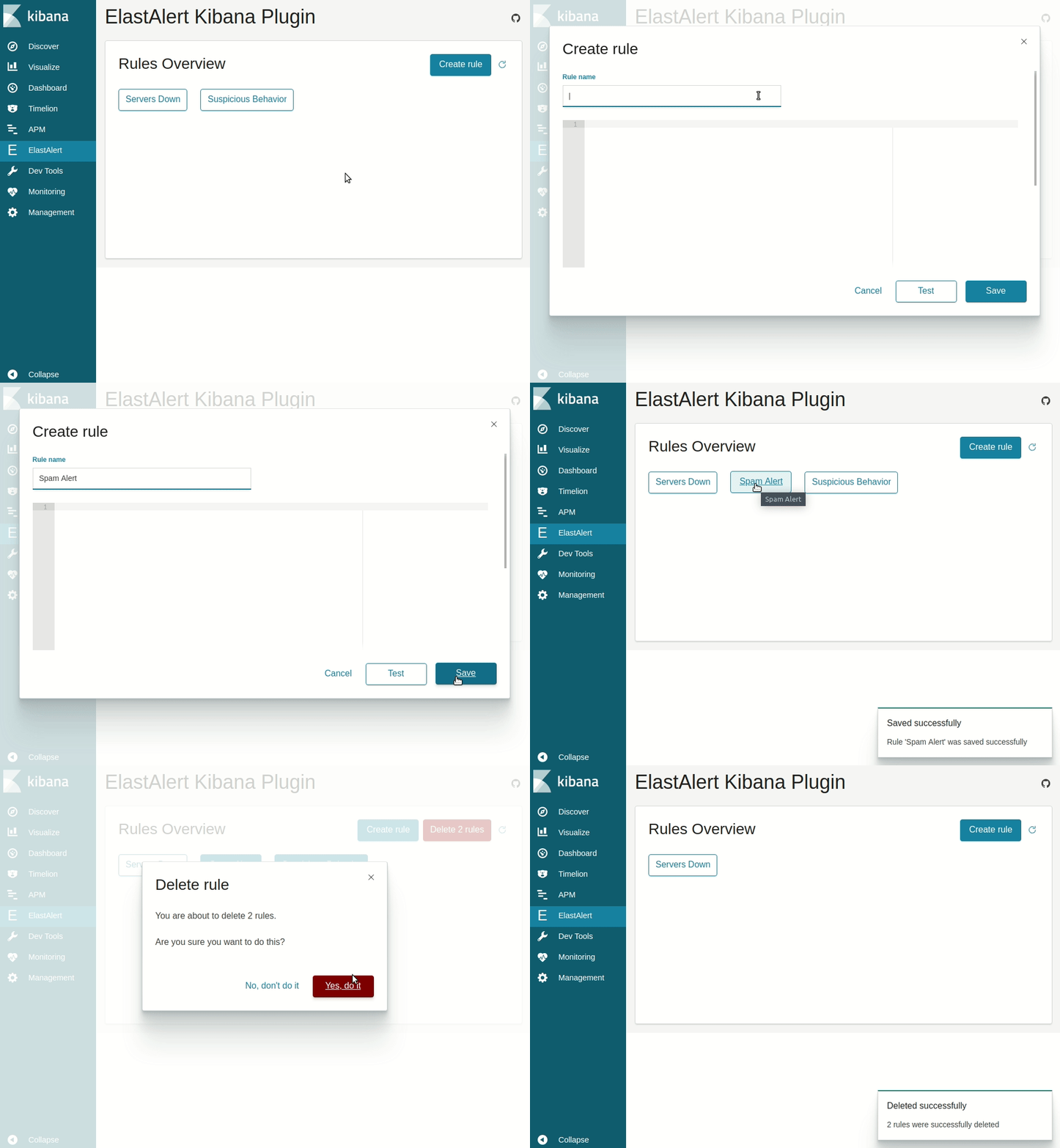 Available at the ElastAlert Kibana plugin repository.
Docker
A Dockerized version of ElastAlert including a REST api is build from master to bitsensor/elastalert:latest.
git clone https://github.com/bitsensor/elastalert.git; cd elastalert
docker run -d -p 3030:3030 \
    -v `pwd`/config/elastalert.yaml:/opt/elastalert/config.yaml \
    -v `pwd`/config/config.json:/opt/elastalert-server/config/config.json \
    -v `pwd`/rules:/opt/elastalert/rules \
    -v `pwd`/rule_templates:/opt/elastalert/rule_templates \
    --net="host" \
    --name elastalert bitsensor/elastalert:latest
Documentation
Read the documentation at Read the Docs.
To build a html version of the docs locally
pip install sphinx_rtd_theme sphinx
cd docs
make html
View in browser at build/html/index.html
Configuration
See config.yaml.example for details on configuration.
Example rules
Examples of different types of rules can be found in example_rules/.
-
example_spike.yamlis an example of the "spike" rule type, which allows you to alert when the rate of events, averaged over a time period, increases by a given factor. This example will send an email alert when there are 3 times more events matching a filter occurring within the last 2 hours than the number of events in the previous 2 hours. -
example_frequency.yamlis an example of the "frequency" rule type, which will alert when there are a given number of events occuring within a time period. This example will send an email when 50 documents matching a given filter occur within a 4 hour timeframe. -
example_change.yamlis an example of the "change" rule type, which will alert when a certain field in two documents changes. In this example, the alert email is sent when two documents with the same 'username' field but a different value of the 'country_name' field occur within 24 hours of each other. -
example_new_term.yamlis an example of the "new term" rule type, which alerts when a new value appears in a field or fields. In this example, an email is sent when a new value of ("username", "computer") is encountered in example login logs.
Frequently Asked Questions
My rule is not getting any hits?
So you've managed to set up ElastAlert, write a rule, and run it, but nothing happens, or it says 0 query hits. First of all, we recommend using the command elastalert-test-rule rule.yaml to debug. It will show you how many documents match your filters for the last 24 hours (or more, see --help), and then shows you if any alerts would have fired. If you have a filter in your rule, remove it and try again. This will show you if the index is correct and that you have at least some documents. If you have a filter in Kibana and want to recreate it in ElastAlert, you probably want to use a query string. Your filter will look like
filter:
- query:
    query_string:
      query: "foo: bar AND baz: abc*"
If you receive an error that Elasticsearch is unable to parse it, it's likely the YAML is not spaced correctly, and the filter is not in the right format. If you are using other types of filters, like term, a common pitfall is not realizing that you may need to use the analyzed token. This is the default if you are using Logstash. For example,
filter:
- term:
    foo: "Test Document"
will not match even if the original value for foo was exactly "Test Document". Instead, you want to use foo.raw. If you are still having trouble troubleshooting why your documents do not match, try running ElastAlert with --es_debug_trace /path/to/file.log. This will log the queries made to Elasticsearch in full so that you can see exactly what is happening.
I got hits, why didn't I get an alert?
If you got logs that had X query hits, 0 matches, 0 alerts sent, it depends on the type why you didn't get any alerts. If type: any, a match will occur for every hit. If you are using type: frequency, num_events must occur within timeframe of each other for a match to occur. Different rules apply for different rule types.
If you see X matches, 0 alerts sent, this may occur for several reasons. If you set aggregation, the alert will not be sent until after that time has elapsed. If you have gotten an alert for this same rule before, that rule may be silenced for a period of time. The default is one minute between alerts. If a rule is silenced, you will see Ignoring match for silenced rule in the logs.
If you see X alerts sent but didn't get any alert, it's probably related to the alert configuration. If you are using the --debug flag, you will not receive any alerts. Instead, the alert text will be written to the console. Use --verbose to achieve the same affects without preventing alerts. If you are using email alert, make sure you have it configured for an SMTP server. By default, it will connect to localhost on port 25. It will also use the wor
Related Skills
node-connect
338.7kDiagnose OpenClaw node connection and pairing failures for Android, iOS, and macOS companion apps
frontend-design
83.6kCreate distinctive, production-grade frontend interfaces with high design quality. Use this skill when the user asks to build web components, pages, or applications. Generates creative, polished code that avoids generic AI aesthetics.
openai-whisper-api
338.7kTranscribe audio via OpenAI Audio Transcriptions API (Whisper).
commit-push-pr
83.6kCommit, push, and open a PR
