
cityjson-mcp
MCP tools for inspecting, validating, transforming, and querying CityJSON models.
Install / Use
claude mcp add Yarroudh -- npx -y github:Yarroudh/cityjson-mcpIf the server publishes to npm under a different name, use that package instead — check the repo README.
MCP Server
Model Context Protocol server
Quality Score
Category
AI & Machine LearningSupported Platforms
Tags
Our assessment of cityjson-mcp
cityjson-mcp scores 80/100 on our quality scale, 757th of 955 AI & Machine Learning skills we index.
Its MCP Server is 34 KB long, well organised into 56 sections with 23 code examples: a thorough specification that gives an agent plenty to work with.
It has 3 GitHub stars, so there is little community track record yet; judge it on its content.
Maintenance, license and trust
- The repository was last updated about 2 months ago, so cityjson-mcp is actively maintained.
- Our last check on 2026-09-23 found the source still online.
- It is released under the MIT license, a permissive license that allows use, modification and commercial use with attribution.
- Its trust signals score 87/100, with 2 cautions from licensing, adoption, age or documentation. These come from repository metadata, not a code audit — read the skill file before letting an agent act on it.
Safety scan
No issues foundOur scan of the whole file found no instruction hijacking, hidden characters, credential access, data exfiltration or destructive commands (1 minor note below). An AI review of the same text found nothing harmful.
- noteInstalls by piping a downloaded script into a shellline 593
curl -fsSL https://ollama.com/install.sh | sh
AI review by kimi-k2.7-code on 2026-10-11. Automated pattern scan on 2026-10-11. It catches known dangerous patterns, not every risk — read a skill before letting an agent act on it.
cityjson-mcp compared with similar skills
All 4 of these similar skills score higher than cityjson-mcp; compare them before choosing.
| Skill | Score | Stars | Updated | Format |
|---|---|---|---|---|
| cityjson-mcp (this skill)by Yarroudh | 80 | 3 | 51d ago | MCP Server |
| claude-memby thedotmack | 100 | 102.1k | today | CLAUDE.md |
| Agent-Reachby Panniantong | 100 | 100.5k | 1d ago | CLAUDE.md |
| Understand-Anythingby Egonex-AI | 100 | 87.4k | today | CLAUDE.md |
| headroomby headroomlabs-ai | 100 | 77.0k | today | CLAUDE.md |
Frequently asked questions
- How do I install cityjson-mcp?
- Run
claude mcp add Yarroudh -- npx -y github:Yarroudh/cityjson-mcp. The install tabs above show the steps for each supported agent. - Which AI agents does cityjson-mcp work with?
- It is written for Claude Code and Claude Desktop, as a MCP Server file. Other agents that read the same format can often use it too.
- Is cityjson-mcp safe to use?
- Our scan of the whole file found no instruction hijacking, hidden characters, credential access, data exfiltration or destructive commands (1 minor note below). An AI review of the same text found nothing harmful. It is MIT-licensed and scores 87/100 on trust signals. Skills are instructions an agent will follow, so read the file before installing it and do not approve commands you do not understand.
- Is cityjson-mcp still maintained?
- The repository was last updated about 2 months ago, so cityjson-mcp is actively maintained.
Skill content
View source on GitHubCityJSON MCP
<p align="center"> <img src="web/favicon.svg" width="96" height="96" alt="CityJSON MCP logo"> </p> <p align="center"> <a href="LICENSE"><img src="https://img.shields.io/badge/license-MIT-blue.svg" alt="MIT license"></a> <img src="https://img.shields.io/badge/Node.js-20%2B-339933.svg" alt="Node.js 20 or newer"> <img src="https://img.shields.io/badge/CityJSON-2.0.2-e0a05b.svg" alt="CityJSON 2.0.2"> <img src="https://img.shields.io/badge/MCP_tools-37-5c6ac4.svg" alt="37 MCP tools"> <a href="https://hub.docker.com/r/yarroudh/cityjson-mcp"><img src="https://img.shields.io/badge/Docker-yarroudh%2Fcityjson--mcp-2496ed.svg" alt="Docker image"></a> <a href="https://doi.org/10.5281/zenodo.22151334"><img src="https://zenodo.org/badge/DOI/10.5281/zenodo.22151334.svg" alt="DOI"></a> <a href="https://github.com/Yarroudh/cityjson-mcp/wiki"><img src="https://img.shields.io/badge/docs-Wiki-181717.svg" alt="Wiki"></a> </p>CityJSON MCP provides a web chat application and an MCP server for CityJSON files. It supports inspection, queries, validation, transformations, export, CityGML conversion, and cjdb/PostGIS operations.
The Docker image includes:
cjiofor CityJSON transformations and export.cjvalfor syntax, schema, and structural validation.val3dityfor 3D geometry validation.citygml-toolsfor CityGML and CityJSON conversion.cjdbfor PostgreSQL/PostGIS import and export.
- Demo
- Quick start: Datum chat application
- Use the MCP server without Datum
- File and dataset handling
- Architecture
- Tool catalog
- Example prompts
- Configuration reference
- Run without Docker (not recommended)
- Security
- Contributing
- Next
- Tests
- Known limitations
- Issues and Feedback
- Upstream Projects
- Citation
- License
- About Developer
Demo
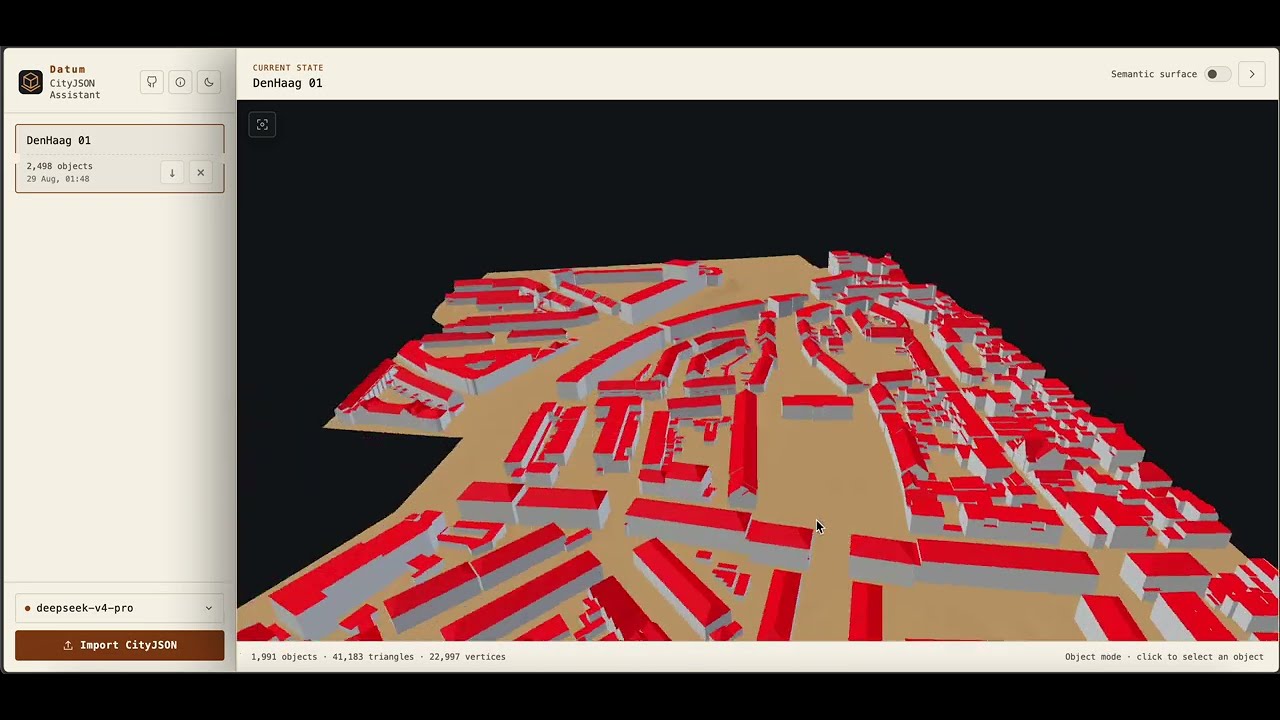
The following video is a demo of Datum, the chat application in this repository. It shows importing a CityJSON file, inspecting it, creating a subset, and downloading the derived dataset.
Quick start: Datum chat application
Datum is the official AI client provided with CityJSON MCP toolbox. It accepts CityJSON attachments in the browser, and lets a configured LLM model call the CityJSON tools to process datasets and answer user questions.
For a complete visual tour of the interface and its behavior, see the Datum guide.
For every supported setup path and environment option, see Installation and configuration.
Requirements
- Docker Desktop or Docker Engine with Docker Compose.
- Node.js 20 or newer.
- An API key for a cloud model that supports tool calls, or a local Ollama model.
Datum supports local Ollama models. However, for optimal performance and reliability, we recommend using a cloud model. Local models may encounter memory constraints, particularly with larger workloads, and have not yet been extensively tested.
1. Install the JavaScript dependencies
npm install
2. Create .env
Copy the example file:
cp .env.example .env
Set these values before starting Datum:
MODEL_PROVIDER=openrouter
MODEL_NAME=openrouter/free
MODEL_API_KEY=repl…[redacted]
MODEL_BASE_URL=https://openrouter.ai/api/v1
MODEL_TEMPERATURE=0.1
The model settings mean:
| Variable | Required | Description |
|---|---:|---|
| MODEL_PROVIDER | yes | Model service: ollama, openrouter, openai, or anthropic. Ollama, OpenRouter, and OpenAI-compatible services use the OpenAI Chat Completions format internally. |
| MODEL_NAME | yes | Exact model identifier sent to the provider, for example openrouter/free. The model must support tool calls. |
| MODEL_API_KEY | except Ollama | API credential issued by the model provider. Local Ollama needs no key. Do not commit .env. |
| MODEL_BASE_URL | yes | Base URL for the provider API. |
| MODEL_TEMPERATURE | no | Sampling temperature. Datum defaults to 0.1. |
| OLLAMA_CONTEXT_LENGTH | no | Ollama context window in tokens. Defaults to 16384; larger values use more RAM or VRAM. |
The .env model is the default model in Datum. Users can add other models from the model menu in the UI. Models added through the interface remain in server memory for up to eight hours. Their API keys are not returned to the browser or passed to MCP tools.
Cloud model providers
Datum supports OpenRouter, OpenAI-compatible APIs, and Anthropic as cloud providers. Credentials stay in the running application and are not passed to MCP tools. Datum runs a live tool-call check before accepting any model because catalog metadata alone does not guarantee reliable agent behavior.
Recommended free cloud models through OpenRouter
Create an OpenRouter API key, choose OpenRouter (cloud catalog) in Datum, and paste the key. Select Free Models Router at the top of the refreshed catalog. It uses the stable openrouter/free ID and automatically selects an available free model compatible with requested features such as tool calling.
To make it the default:
MODEL_PROVIDER=openrouter
MODEL_NAME=openrouter/free
MODEL_API_KEY=past…[redacted]
MODEL_BASE_URL=https://openrouter.ai/api/v1
MODEL_TEMPERATURE=0.1
This is Datum's recommended free-cloud configuration. It avoids depending on one free provider's capacity, but the selected model can vary between calls. Free usage is intended for experimentation and low-volume work, is rate-limited, and may be less predictable than paid inference. You can still select a specific :free model when model consistency matters more than automatic availability.
OpenAI GPT Nano
Use the OpenAI choice with an API key:
MODEL_PROVIDER=openai
MODEL_NAME=gpt-5-nano
MODEL_API_KEY=past…[redacted]
MODEL_BASE_URL=https://api.openai.com/v1
GPT-5 Nano supports function calling but the OpenAI API does not provide it on the free usage tier. It is inexpensive and useful for testing, although a stronger coding model may be more reliable for long CityJSON tool workflows.
Other OpenAI-compatible providers
For any service exposing an OpenAI-compatible Chat Completions endpoint, choose OpenAI-compatible API, then enter the provider's exact model ID, API key, and base URL. This covers services such as Gemini and DeepSeek without hard-coding a changing provider directory. Services requiring a different protocol, OAuth flow, or custom request headers are not automatically compatible.
MODEL_API_KEY takes precedence for the default model. Datum also recognizes OPENROUTER_API_KEY, OPENAI_API_KEY, and ANTHROPIC_API_KEY for their matching MODEL_PROVIDER. All of these model credentials are removed from the environment passed to the MCP subprocess.
Recommended cloud configurations
For free experimentation, use openrouter/free as shown above. OpenRouter chooses a currently available free model and filters for capabilities required by the request. Its free tier has limited request quotas and free-provider capacity can fluctuate.
For the best reliability and more demanding CityJSON tool workflows, use a paid Gemini or DeepSeek model through its OpenAI-compatible endpoint. Choose OpenAI / compatible API in Datum and enter the provider's model ID, API key, and base URL. Paid models avoid the tight shared-capacity limits of free endpoints and keep the model stable throughout a conversation.
Google API keys are managed in Google AI Studio; see Google's OpenAI compatibility guide and pricing. For DeepSeek, use its API documentation and pricing. Review each provider's data policy before sending confidential CityJSON datasets.
Local models with Ollama
Ollama is an optional companion service. A normal npm run chat enables it automatically only when .env has MODEL_PROVIDER=ollama. Cloud-model configurations start Datum without inspecting, pulling, or starting the Ollama image. The launcher prints the selected mode before it checks Docker images.
Override the automatic choice when needed:
# Keep Ollama available alongside a cloud default
npm run chat -- --with-ollama

# Start only Datum, even if .env currently selects Ollama
npm run chat -- --without-ollama
For a persistent setting, use CHAT_ENABLE_OLLAMA=true or CHAT_ENABLE_OLLAMA=false in .env. Command-line flags take precedence. If Ollama is enabled, no separate installation is required: the launcher first looks for native Ollama on macOS and otherwise pulls the official image when missing. Docker model downloads remain in the ollama-models volume.
To make an Ollama model the default, configure .env:
MODEL_PROVIDER=ollama
MODEL_NAME=qwen3:8b
MODEL_API_KEY=
MODE…[redacted]://ollama:11434/v1
MODEL_TEMPERATURE=0.1
OLLAMA_CONTEXT_LENGTH=16384
❗ Important: Always make sure to use a model that supports tool calls. For more information, please refer to: https://ollama.com/search?c=tools
When Ollama is enabled, you can select it in Datum and pull a model with the add button. npm run chat:stop stops the active containers without deleting downloaded models. Deleting a model from Datum removes only its saved configuration; it does not remove the downloaded model from Ollama. If you want the downloaded model deleted, please use the following command:
ollama rm <model-name>
Local model quality and memory requirements vary. Datum evaluates a model's metadata and actual call ou
Truncated for display — read the full file on GitHub.
Related Skills
claude-mem
102.1kPersistent Context Across Sessions for Every Agent – Captures everything your agent does during sessions, compresses it with AI, and injects relevant context back into future sessions. Works with Claude Code, OpenClaw, Codex, Gemini, Hermes, Copilot, OpenCode + More
Agent-Reach
100.5kGive your AI agent eyes to see the entire internet. Read & search Twitter, Reddit, YouTube, GitHub, Bilibili, XiaoHongShu — one CLI, zero API fees.
Understand-Anything
87.4kGraphs that teach > graphs that impress. Turn any code into an interactive knowledge graph you can explore, search, and ask questions about. Works with Claude Code, Codex, Cursor, Copilot, Gemini CLI, and more.
headroom
77.0kCompress tool outputs, logs, files, and RAG chunks before they reach the LLM. 20% fewer tokens for coding agents, 60-95% fewer tokens for JSON, same answers. Library, proxy, MCP server.

Languages
Trust signals
From repository metadata: license, adoption, age and documentation. Not a code audit — see the Safety scan above for what the skill file itself contains.