
DisCo
[CVPR2024] DisCo: Referring Human Dance Generation in Real World
Install / Use
/learn @Wangt-CN/DisCoREADME
DisCo: Disentangled Control for Realistic Human Dance Generation
<a href='https://disco-dance.github.io/'><img src='https://img.shields.io/badge/Project-Page-Green'></a> <a href='https://arxiv.org/abs/2307.00040'><img src='https://img.shields.io/badge/Paper-Arxiv-red'></a> <a href='https://b9652ca65fb3fab63a.gradio.live/'><img src='https://img.shields.io/badge/%F0%9F%A4%97%20Hugging%20Face-Spaces-blue'></a> 
 <a href='https://drive.google.com/file/d/1AlN3Thg46RlH5uhLK-ZAIivo-C8IJeif/view?usp=sharing/'><img src='https://img.shields.io/badge/Slides-GoogleDrive-yellow'></a>
Tan Wang*, Linjie Li*, Kevin Lin*, Yuanhao Zhai, Chung-Ching Lin, Zhengyuan Yang, Hanwang Zhang, Zicheng Liu, Lijuan Wang
Nanyang Technological University | Microsoft Azure AI | University at Buffalo
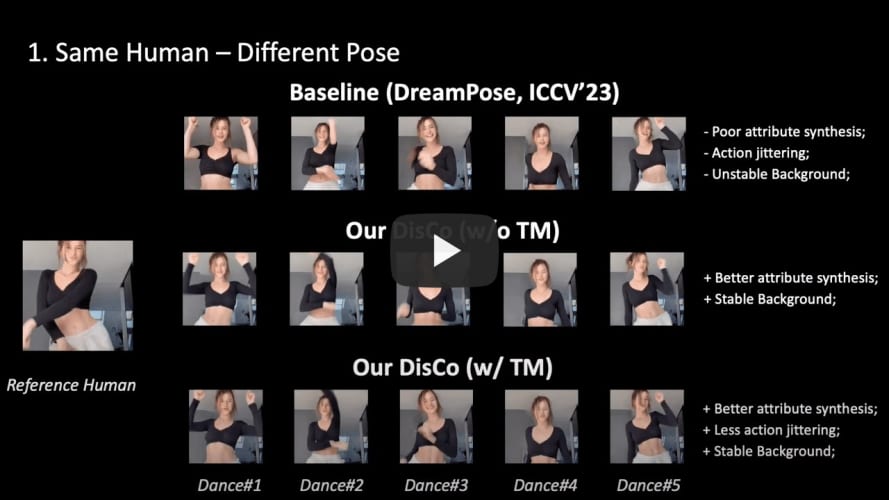
<br><br/>
:fire: News
- [2024.07.15] We present IDOL, an enhancement of DisCo that simultaneously generates video and depth, enabling realistic 2.5D video synthesis.
- [2024.04.08] DisCo has been accepted by CVPR24. Please check the latest version of paper on ArXiv.
- [2023.12.30] Update slides about introducing DisCo and summarizing recent works.
- [2023.11.30] Update DisCo w/ temporal module.
- [2023.10.12] Update the new ArXiv version of DisCo (Add temporal module; Synchronize FVD computation with MCVD; More baselines and visualizations, etc)
- [2023.07.21] Update the construction guide of the TSV file.
- [2023.07.08] Update the Colab Demo (make sure our code/demo can be run on any machine)!
- [2023.07.03] Provide the local demo deployment example code. Now you can try our demo on you own dev machine!
- [2023.07.03] We update the Pre-training tsv data.
- [2023.06.28] We have released DisCo Human Attribute Pre-training Code.
- [2023.06.21] DisCo Human Image Editing Demo is released! Have a try!
- [2023.06.21] We release the human-specific fine-tuning code for reference. Come and build your own specific dance model!
- [2023.06.21] Release the code for general fine-tuning.
- [2023.06.21] We release the human attribute pre-trained checkpoint and the fine-tuning checkpoint.
Other following projects you may find interesting:
- Animate Anyone, from Alibaba
- MagicAnimate, from TikTok
- MagicDance, from TikTok
Comparison of recent works:
<p align="center"> <img src="figures/compare.png" width="90%" height="80%"> </p> <br><br/>🎨 Gradio Demo
Launch Demo Locally (Video dance generation demo is on the way!)
-
Download the fine-tuning checkpoint model (our demo uses this checkpoint, you can also use your own model); Download the sd-image-variation via
git clone https://huggingface.co/lambdalabs/sd-image-variations-diffusers. -
Run the jupyter notebook file. All the required code/command are already set up. Remember to revise the pretrained model path
--pretrained_modeland--pretrained_model_path (sd-va)inmanual_args = [xxx]. -
After running, this jupyter will automatically launch the demo with your local dev GPU. You can visit the demo with the web link provided at the end of the notebook.
-
Or you can refer to our deployment with Colab
. All the code are deployed from scratch!<br><br/>
[Online Gradio Demo] (Temporal)
<p align="center"> <img src="figures/demo.gif" width="90%" height="90%"> </p><br><br/>
📝 Introduction
In this project, we introduce DisCo as a generalized referring human dance generation toolkit, which supports both human image & video generation with multiple usage cases (pre-training, fine-tuning, and human-specific fine-tuning), especially good in real-world scenarios.
✨Compared to existing works, DisCo achieves:
-
Generalizability to a large-scale real-world human without human-specific fine-tuning (We also support human-specific fine-tuning). Previous methods only support generation for a specific domain of human, e.g., DreamPose only generate fashion model with easy catwalk pose.
-
Current SOTA results for referring human dance generation.
-
Extensive usage cases and applications (see project page for more details).
-
An easy-to-follow framework, supporting efficient training (x-formers, FP16 training, deepspeed, wandb) and a wide range of possible research directions (pre-training -> fine-tuning -> human-specific fine-tuning).
🌟With this project, you can get:
- [User]: Just try our online demo! Or deploy the model inference locally.
- [Researcher]: An easy-to-use codebase for re-implementation and development.
- [Researcher]: A large amount of research directions for further improvement.
<br><br/>
🚀 Getting Started
Installation
## after py3.8 env initialization
pip install --user torch==1.12.1+cu113 torchvision==0.13.1+cu113 -f https://download.pytorch.org/whl/torch_stable.html
pip install --user progressbar psutil pymongo simplejson yacs boto3 pyyaml ete3 easydict deprecated future django orderedset python-magic datasets h5py omegaconf einops ipdb
pip install --user --exists-action w -r requirements.txt
pip install git+https://github.com/microsoft/azfuse.git


## for acceleration
pip install --user deepspeed==0.6.3
pip install -v -U git+https://github.com/facebookresearch/xformers.git@main#egg=xformers

## you may need to downgrade prototbuf to 3.20.x
pip install protobuf==3.20.0
Data Preparation
1. Human Attribute Pre-training
We create a human image subset (700K Images) filtered from existing image corpus for human attribute pre-training:
| Dataset | COCO (Single Person) | TikTok Style | DeepFashion2 | SHHQ-1.0 | LAION-Human | | -------- | :------------------: | :----------: | :----------: | :------: | :---------: | | Size | 20K | 124K | 276K | 40K | 240K |
The pre-processed pre-training data with the efficient TSV data format can be downloaded here (Google Drive).
Data Root
└── composite/
    ├── train_xxx.yaml  # The path need to be then specified in the training args
    └── val_xxx.yaml
    ...
└── TikTokDance/
    ├── xxx_images.tsv
    └── xxx_poses.tsv
    ...
└── coco/
    ├── xxx_images.tsv
    └── xxx_poses.tsv
2. Fine-tuning with Disentangled Control
We use the TikTok dataset for the fine-tuning.
We have already pre-processed the tiktok data with the efficient TSV format which can be downloaded here (Google Drive). (Note that we only use the 1st frame of each TikTok video as the reference image.)
The data folder structure should be like:
Data Root
└── composite_offset/
    ├── train_xxx.yaml  # The path need to be then specified in the training args
    └── val_xxx.yaml
    ...
└── TikTokDance/
    ├── xxx_images.tsv
    └── xxx_poses.tsv
    ...
*PS: If you want to use your own data resource but with our TSV data structure, please follow PREPRO.MD for reference.
<br><br/>
Human Attribute Pre-training
<p align="center"> <img src="figures/pretrain.gif" width="80%" height="80%"> </p>Training:
AZFUSE_USE_FUSE=0 QD_USE_LINEIDX_8B=0 NCCL_ASYNC_ERROR_HANDLING=0 pyt
