
Binario
Responsive card-based & code-light Hugo theme
Install / Use
/learn @Vimux/BinarioREADME
Binario
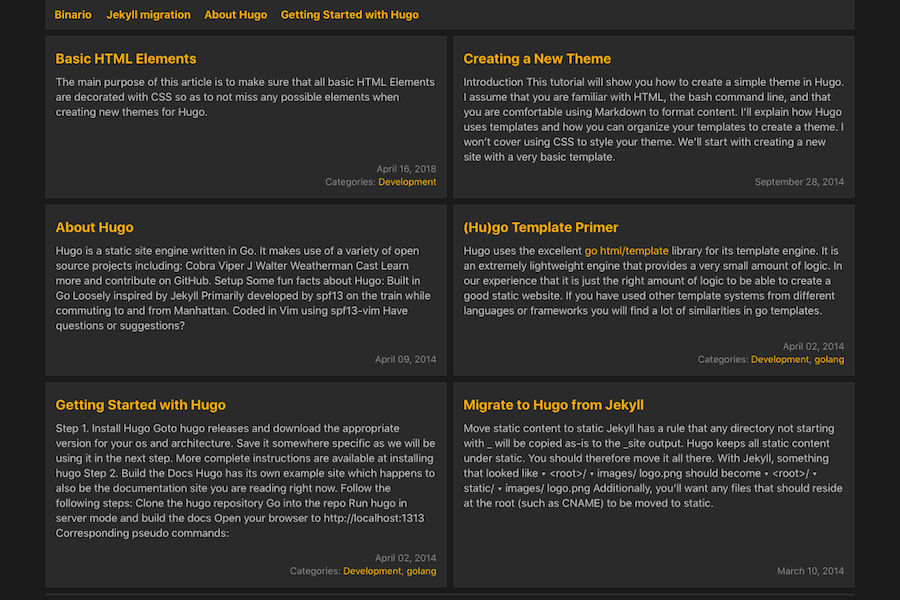
Binario is a responsive card-based & code-light Hugo theme.
Features:
- Responsive
- Card-based list layout
- Color themes
- Internal Hugo templates (Open Graph, Schema, Twitter Cards, Google Analytics, Disqus comments)
- Table of contents
- Related content
- MathJax
Table of Contents
Installation
First of all, you will need to install Hugo and create a new site. Also, you have git installed on your machine and you are familiar with basic git usage. After that, you ready to install Binario.
There are three different ways you can install Binario. Choose one of the installation methods listed below and follow the instructions.
For more information read the "Install and Use Themes".
Option A. Git clone
In your Hugo site directory, run:
git clone https://github.com/vimux/binario themes/binario
Next, edit your config.toml configuration file and add parameter:
theme = "binario"
Option B. Git submodule
In your Hugo site directory, run:
git submodule add https://github.com/vimux/binario themes/binario
Next, edit your config.toml configuration file and add parameter:
theme = "binario"
You can read the GitHub documentation for submodules or those found on Git's website for more information
Option C. Download ZIP and manual install
Download ZIP and extract to the themes/binario within your
Hugo website.
Next, edit your config.toml configuration file and add parameter:
theme = "binario"
You can run your site in Hugo server mode:
hugo server
Now you can go to localhost:1313 webpage and the Binario theme should be visible.
After you make sure that Binario works, you may start customizing the theme if it's needed. You can change number of columns, activate footer social icons, share buttons and much more.
Configuration
Hugo uses the config.toml, config.yaml, or config.json (if found in the site root) as the default site config
file. Here is Binario configuration example in TOML with all available theme-specific config params:
Config.toml example
baseurl = "/"
title = "Binario"
languageCode = "en-us"
paginate = "10" # Number of elements per page in pagination
theme = "binario"
disqusShortname = "" # DEPRECATED! Use .Services.Disqus.Shortname
googleAnalytics = "" # DEPRECATED! Use .Services.googleAnalytics.ID

[services.disqus]
  shortname = "" # Enable Disqus by entering your Disqus shortname
[services.googleAnalytics]
  ID = "" # Enable Google Analytics by entering your tracking ID

[Author] # Used in authorbox
  name = "John Doe"
  bio = "John Doe's true identity is unknown. Maybe he is a successful blogger or writer."
  avatar = "img/avatar.png"

[Params]
  description = "Responsive card-based & code-light Hugo theme" # Site Description. Used in meta description
  copyright = "Binario" # Copyright holder, otherwise will use .Site.Title
  opengraph = true # Enable OpenGraph if true
  schema = true # Enable Schema
  twitter_cards = true # Enable Twitter Cards if true
  columns = 2 # Set the number of cards columns. Possible values: 1, 2, 3
  mainSections = ["post"] # Set main page sections
  dateFormat = "January 02, 2006" # Change the format of dates
  colorTheme = "" # dark-green, dark-blue, dark-red, dark-violet
  customCSS = ["css/custom.css"] # Include custom CSS files
  customJS = ["js/custom.js"] # Include custom JS files
  mainMenuAlignment = "right" # Align main menu (desktop version) to the right side
  authorbox = true # Show authorbox at bottom of single pages if true
  comments = true # Enable comments for all site pages
  related = true # Enable Related content for single pages
  relatedMax = 5 # Set the maximum number of elements that can be displayed in related block. Optional
  mathjax = true # Enable MathJax for all site pages
  mathjaxPath = "https://cdnjs.cloudflare.com/ajax/libs/mathjax/2.7.6/MathJax.js" # Specify MathJax path. Optional
  mathjaxConfig = "TeX-AMS-MML_HTMLorMML" # Specify MathJax config. Optional
  hideNoPostsWarning = false # Don't show no posts empty state warning in main page, if true

[Params.Entry]
  meta = ["date", "categories", "tags"] # Enable meta fields in given order
  toc = true # Enable Table of Contents
  tocOpen = true # Open Table of Contents block. Optional

[Params.Featured]
  previewOnly = false # Show only preview featured image

[Params.Breadcrumb]
  enable = true # Enable breadcrumb block globally
  homeText = "Binario" # Home node text

[Params.Social]
  email = "example@example.com"
  facebook = "username"
  twitter = "username"
  telegram = "username"
  instagram = "username"
  pinterest = "username"
  vk = "username"
  linkedin = "username"
  github = "username"
  gitlab = "username"
  stackoverflow = "numberid"
  mastodon = "https://some.instance/@username"
  medium = "username"

[Params.Share] # Entry Share block
  facebook = true
  twitter = true
  reddit = true
  telegram = true
  linkedin = true
  vk = true
  pocket = true
  pinterest = true

# Web App Manifest settings
# https://www.w3.org/TR/appmanifest/
# https://developers.google.com/web/fundamentals/web-app-manifest/
[Params.Manifest]
  name = "Binario"
  shortName = "Binario"
  display = "browser"
  startUrl = "/"
  backgroundColor = "#2a2a2a"
  themeColor = "#1b1b1b"
  description = "Responsive card-based & code-light Hugo theme"
  orientation = "portrait"
  scope = "/"

[outputFormats]
  [outputFormats.MANIFEST]
    mediaType = "application/json"
    baseName = "manifest"
    isPlainText = true
    notAlternative = true

[outputs]
  home = ["HTML", "RSS", "MANIFEST"]
For more information about Hugo configuration files and all common configuration settings, please read "Configure Hugo" from Hugo official documentation.
Front Matter example
Hugo supports three formats for front matter: yaml, toml and json. Here is Front Matter example in YAML:
---
# Common-Defined params
title: "Example article title"
date: "2017-08-21"
lastmod: "2018-12-21"
description: "Example article description"
categories:
  - "Category 1"
  - "Category 2"
tags:
  - "Tag"
  - "Another tag"
menu: main # Add page to a menu. Options: main, footer

# Theme-Defined params
comments: true # Enable/disable Disqus comments for specific page
authorbox: true # Enable/disable Authorbox for specific page
toc: true # Enable/disable Table of Contents for specific page
tocOpen: true # Open Table of Contents block for specific page
mathjax: true # Enable/disable MathJax for specific page
related: true # Enable/disable Related content for specific page
meta:
  - date
  - categories
  - tags
featured:
  url: image.jpg # relative path of the image
  alt: A scale model of the Eiffel tower # alternate text for the image
  caption: Eiffel tower model # image caption
  credit: Unknown author # image credit
  previewOnly: false # show only preview image (true/false)
---
For more information about front matter variables and formats read "Hugo Front Matter" from Hugo official documentation.
Configuration options
Binario includes some customizable configuration options that may be useful.
Columns
By default, Binario works with two columns card layout (if it possible by screen size) for list pages, but you can also
use one or three columns layout. Change Params.columnsto preferable value (from 1 to 3). You can also change this
option for specific list pages in frontmatter params.
Custom CSS
If you want to include custom CSS files, you need to assign an array of references in site config file
(config.toml by default) like following:
[Params]
  customCSS = ["css/custom.css"]
Of course, you can reference as many CSS files as you want. Their paths need to be relative to the static folder of
your Hugo site:
[Params]
  customCSS = ["css/custom.css", "css/another.css"]
All custom CSS files will be added in the head section of a baseof.html right after the built-in CSS file.
Custom JS
You can add custom JavaScript files by assigning an array of references in site config file (config.toml by default)
like following:
[Params]
  customJS = ["js/custom.js"]
And of course, just like with
Related Skills
node-connect
353.3kDiagnose OpenClaw node connection and pairing failures for Android, iOS, and macOS companion apps
frontend-design
111.7kCreate distinctive, production-grade frontend interfaces with high design quality. Use this skill when the user asks to build web components, pages, or applications. Generates creative, polished code that avoids generic AI aesthetics.
openai-whisper-api
353.3kTranscribe audio via OpenAI Audio Transcriptions API (Whisper).
qqbot-media
353.3kQQBot 富媒体收发能力。使用 <qqmedia> 标签,系统根据文件扩展名自动识别类型(图片/语音/视频/文件)。
