
VATextureKit
Texture (AsyncDisplayKit) library wrapper.
Install / Use
/learn @VAndrJ/VATextureKitREADME
VATextureKit




 VATextureKitSpec

 VATextureKit

 VATextureKitRx

 VATextureKitCombine
Texture library wrapper with some additions.
Also, take a look at this package with helper macro: VATextureKitMacro
- Installation
- Layout Specs
- Modifiers
- Nodes
- Containers
- Wrappers
- Animations
- Themes
- Extensions
- Previews
- Property wrappers
- Experiments
Installation
CocoaPods
Add the following to your Podfile:
pod 'VATextureKitRx'    // includes additional wrappers.
or
pod 'VATextureKit'      // includes Texture node wrappers.
or
pod 'VATextureKitSpec'  // includes only Layout Spec wrappers.
In the project directory in the Terminal:
pod install
Or try the example project:
pod try 'VATextureKit'
Minimum deployment target:
1.9.x:iOS 11
2.x.x:iOS 14, Swift 5
3.x.x:iOS 14, Swift 6
Layout Specs
The following LayoutSpec DSL components can be used to compose simple or very complex layouts.
| VATextureKit | Texture | | ------------- |-----------------------------------------| | Column | ASStackLayoutSpec (vertical) | | Row | ASStackLayoutSpec (horizontal) | | Stack | | | SafeArea | ASInsetLayoutSpec (with safeAreaInsets) | | .padding | ASInsetLayoutSpec | | .wrapped | ASWrapperLayoutSpec | | .corner | ASCornerLayoutSpec | | .safe | ASInsetLayoutSpec (with safeAreaInsets) | | .centered | ASCenterLayoutSpec | | .ratio | ASRatioLayoutSpec | | .overlay | ASOverlayLayoutSpec | | .background | ASBackgroundLayoutSpec | | .relatively | ASRelativeLayoutSpec | | .absolutely | ASAbsoluteLayoutSpec |
<details open> <summary>Column</summary>With ASStackLayoutSpec:
override func layoutSpecThatFits(_ constrainedSize: ASSizeRange) -> ASLayoutSpec {
    ASStackLayoutSpec(
        direction: .vertical,
        spacing: 8,
        justifyContent: .start,
        alignItems: .start,
        children: [
            firstRectangleNode,
            secondRectangleNode,
        ]
    )
}
With Column:
override func layoutSpecThatFits(_ constrainedSize: ASSizeRange) -> ASLayoutSpec {
    Column(spacing: 8) {
        firstRectangleNode
        secondRectangleNode
    }
}
Example:

With ASStackLayoutSpec:
ASStackLayoutSpec(
    direction: .horizontal,
    spacing: 4,
    justifyContent: .spaceBetween,
    alignItems: .start,
    children: [
        firstRectangleNode,
        secondRectangleNode,
    ]
)
With Row:
Row(spacing: 4, main: .spaceBetween) {
    firstRectangleNode
    secondRectangleNode
}
Example:

Stack:
Stack {
    firstRectangleNode
    secondRectangleNode
}
Example:

With ASStackLayoutSpec in ASDisplayNode that automaticallyRelayoutOnSafeAreaChanges = true:
ASInsetLayoutSpec(
    insets: UIEdgeInsets(
        top: safeAreaInsets.top,
        left: safeAreaInsets.left,
        bottom: safeAreaInsets.bottom,
        right: safeAreaInsets.right
    ),
    child: ...
)
With SafeArea:
SafeArea {
    ...
}
With ASInsetLayoutSpec:
ASInsetLayoutSpec(
    insets: UIEdgeInsets(
        top: 8,
        left: 8,
        bottom: 8,
        right: 8
    ),
    child: titleTextNode
)
With .padding:
titleTextNode
    .padding(.all(8))
With ASWrapperLayoutSpec:
ASWrapperLayoutSpec(layoutElement: imageNode)
With .wrapped:
imageNode
    .wrapped()
With ASWrapperLayoutSpec:
override func layoutSpecThatFits(_ constrainedSize: ASSizeRange) -> ASLayoutSpec {
    let spec = ASCornerLayoutSpec(
        child: imageNode,
        corner: badgeNode,
        location: .topRight
    )
    spec.offset = CGPoint(x: 4, y: 2)
    spec.wrapsCorner = false
    return spec
}
With .corner:
imageNode
    .corner(badgeNode, offset: CGPoint(x: 4, y: 2))
With ASStackLayoutSpec in ASDisplayNode that automaticallyRelayoutOnSafeAreaChanges = true:
override func layoutSpecThatFits(_ constrainedSize: ASSizeRange) -> ASLayoutSpec {
    ASInsetLayoutSpec(
        insets: UIEdgeInsets(
            top: safeAreaInsets.top,
            left: safeAreaInsets.left,
            bottom: safeAreaInsets.bottom,
            right: safeAreaInsets.right
        ),
        child: listNode
    )
}
With .safe:
listNode
    .safe(in: self)
With ASCenterLayoutSpec:
ASCenterLayoutSpec(
    centeringOptions: .XY,
    sizingOptions: .minimumXY,
    child: buttonNode
)
With .centered:
buttonNode
    .centered()
With ASRatioLayoutSpec:
ASRatioLayoutSpec(
    ratio: 2 / 3,
    child: imageNode
)
With .ratio:
imageNode
    .ratio(2 / 3)
With ASOverlayLayoutSpec:
ASOverlayLayoutSpec(
    child: imageNode,
    overlay: gradientNode
)
With .overlay:
imageNode
    .overlay(gradientNode)
With ASOverlayLayoutSpec:
ASBackgroundLayoutSpec(
    child: gradientNode,
    background: imageNode
)
With .background:
imageNode
    .background(gradientNode)
With ASOverlayLayoutSpec:
ASRelativeLayoutSpec(
    horizontalPosition: .start,
    verticalPosition: .end,
    sizingOption: .minimumSize,
    child: buttonNode
)
With .relatively:
buttonNode
    .relatively(horizontal: .start, vertical: .end)
With ASAbsoluteLayoutSpec:
buttonNode.style.preferredSize = frame.size
buttonNode.style.layoutPosition = frame.origin
return ASAbsoluteLayoutSpec(
    sizing: .sizeToFit,
    children: [buttonNode]
)
With .absolutely:
buttonNode
    .absolutely(frame: .frame, sizing: .sizeToFit)
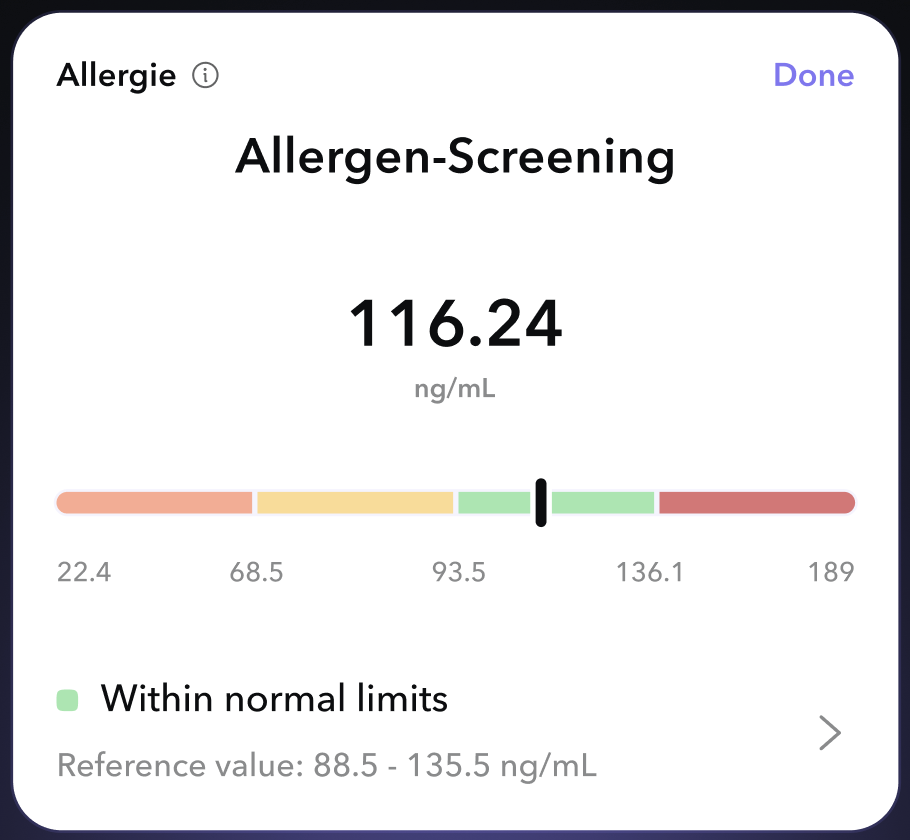
With VATextureKit:
override func layoutSpecThatFits(_ constrainedSize: ASSizeRange) -> ASLayoutSpec {
    Column(cross: .stretch) {
        Row(main: .spaceBetween) {
            Row(spacing: 8, cross: .center) {
                testNameTextNode
                testInfoButtonNode
            }
            testStatusTextNode
        }
        titleTextNode
            .padding(.top(8))
        resultTextNode
            .padding(.top(32))
            .centered(.X)
        resul
