
UAAppReviewManager
UAAppReviewManager is a simple and lightweight App review prompting tool for iOS and Mac App Store apps. It's Appirater all grown up, ready for primetime.
Install / Use
/learn @UrbanApps/UAAppReviewManagerREADME
Looking for a Swift implementation? We rewrote UAAppReviewManager from scratch to create Armchair. UAAppReviewManager isn't going anywhere, but you may want to use Armchair you want to implement a purely swift library into your app. Otherwise, please read on...
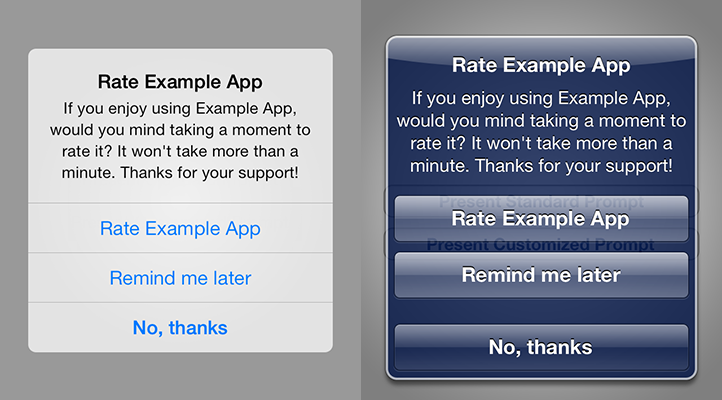
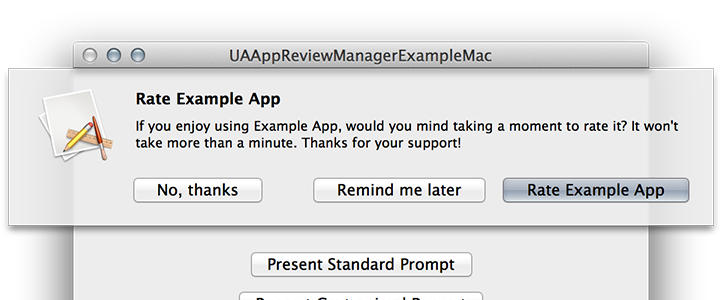
UAAppReviewManager is a simple and lightweight App review prompting tool for iOS and Mac App Store apps. It's Appirater all grown up, ready for primetime.
Why UAAppReviewManager?
The average end-user will only write a review if something is wrong with your App. This leads to an unfairly negative skew in the ratings, when the majority of satisfied customers don’t leave reviews and only the dissatisfied ones do. In order to counter-balance the negatives, UAAppReviewManager prompts the user to write a review, but only after the developer knows they are satisfied. For example, you may only show the popup if the user has been using it for more than a week, and has done at least 5 significant events (the core functionality of your App). The rules are fully customizable for your App and easy to setup.
Here are just a few of the things that make UAAppReviewManager better than the other rating frameworks and repos:
iOS and OS X Support
Many developers publish apps for both iOS and OS X. Out of the box, UAAppReviewManager supports iOS and OS X apps that are sold through the Mac App Store. The API is the same for both with the exception of a few iOS specific methods, described in Usage.
Fully Configurable at Runtime
UAAppReviewManager is fully configurable, even at runtime. This means that the prompt you display can be dynamic, based on the end-user's score or status. The rules that govern how and when it should be shown can all be set the same way, allowing you to have the most control over the presentation and timing of your review prompt.
Default Localizations for 32 Languages
If you choose to use the default UAAppReviewManager strings for your app, you will get the added benefit of localization in 32 languages. Otherwise, customization is easy, and overriding the localization strings is a piece of cake, simply by including your own strings files and letting UAAppReviewManager know.
Prevent Rating Prompts on Different Devices
If your users have the same app, same version installed on two different devices, you really shouldn't pop up the same rating prompt on each one. UAAppReviewManager allows you to optionally keep your user's usage stats in the NSUbiquitousKeyValueStore, or any other store you want to keep track of syncing yourself to prevent dual prompts.
Uses UIApplication/NSApplication Lifecycle Notifications
UAAppReviewManager listens for ApplicationDidLaunch and ApplicationWillEnterForeground notifications. This allows you to worry about your app, and not about tracking in your application delegate methods, so there are fewer lines of code for you to write.
Easy to Setup
It takes only 2 lines of code to get started. UAAppReviewManager is very powerful when digging under the hood, but also very simple to setup for standard configurations.
iTunes Affiliate Codes
If you are an iTunes Affiliate, you can easily setup UAAppReviewManager to use your code and campaign. Full disclosure: If you aren't an iTunes Affiliate, the default code used in the app is the author's. It is better to have somebody's code rather than nobody's, so please leave it at the default setting if you aren't going to set one yourself. Think of it as a tiny tip for creating and open-sourcing UAAppReviewManager.
Ready For Primetime
UAAppReviewManager is clean code, well documented and well organized. It is easy to understand the logic flow and the purpose of each method. It doesn't mix logic up randomly between Class methods and Instance methods. It's API is clean and predictable.
Installation
Installation is made simple with CocoaPods. If you want to do it the old fashioned way, just add UAAppReviewManager.h, UAAppReviewManager.m and the Localization folder into your project.
pod 'UAAppReviewManager'
Then, simply place this line in any file that accesses UAAppReviewManager.
#import <UAAppReviewManager.h>
UAAppReviewManager works on iOS 5.1 and up, and OS X 10.7 and up.
Usage
Simple 2-line Setup
UAAppReviewManager includes sensible defaults as well as reads data from your localized, or unlocalized info.plist to set itself up. While everything is configurable, the only required item to configure is your App Store ID. This call is the same for iOS and Mac apps.
[UAAppReviewManager setAppID:@"12345678"];
Aside from the appID configuration, you also have to let UAAppReviewManager know when it an appropriate time to show a rating prompt.
[UAAppReviewManager showPromptIfNecessary];
That's it to get started. Setting UAAppReviewManager up with these two lines uses the sensible defaults (detailed below) and will present a rating prompt whenever they are met and showPromptIfNecessary is called.
Typical configuration is to show the prompt in application:didFinishLaunchingWithOptions: and applicationWillEnterForeground:, but it can be called from anywhere. There are tons of custom configuration options below that give you the ability to fine tune the setup, block syntax, deep customization and more, but these 2 lines are all you need to get started.
Custom Configuration
Optionally, if you are using significant events in your app to track when the user does something of significance, add this line to any place where this event happens, such as a levelDidFinish method, or userDidUploadPhoto method.
[UAAppReviewManager userDidSignificantEvent:YES];
In order for this to mean anything to UAAppReviewManager, you also have to set the threshold for significant events. Typically, this, and other logic configuration settings, should be done before the appLaunched: call in your Application Delegate
[UAAppReviewManager setSignificantEventsUntilPrompt:5];
As mentioned above, the appID is the only required item to configure. It is used to generate the URL that will link to the page. Most often, this is configured to the App that is currently running, but there may be an instance where you want to set it to another app, such as in an App that reviews other Apps.
+ (NSString *)appID;
+ (void)setAppID:(NSString *)appId;
Display Strings
The appName is used in several places on the review prompt popup. It can be configured here to customize your message without losing any of the default localizations. By default, UAAppReviewManager will read the value from your localized, or unlocalized info.plist, but you can set it specifically if you want.
+ (NSString *)appName;
+ (void)setAppName:(NSString *)appName;
The reviewTitle is the title to use on the review prompt popup. It's default value is a localized "Rate <appName>", but you can set it to anything you want.
+ (NSString *)reviewTitle;
+ (void)setReviewTitle:(NSString *)reviewTitle;
The reviewMessage is the message to use on the review prompt popup. It's default value is a localized "If you enjoy using <appName>, would you mind taking a moment to rate it? It won't take more than a minute. Thanks for your support!", but you can change it specifically if you want. However, if you do change it, you will need to provide your own localization strings as shown farther down below.
+ (NSString *)reviewMessage;
+ (void)setReviewMessage:(NSString *)reviewMessage;
The cancelButtonTitle is the button title to use on the review prompt popup for the "Cancel" action. Its default value is a localized "No, Thanks"
+ (NSString *)cancelButtonTitle;
+ (void)setCancelButtonTitle:(NSString *)cancelButtonTitle;
The rateButtonTitle is the button title to use on the review prompt popup for the "Rate" action. Its default value is a localized "Rate <appName>"
+ (NSString *)rateButtonTitle;
+ (void)setRateButtonTitle:(NSString *)rateButtonTitle;
The remindButtonTitle is the button title to use on the review prompt popup for the "Remind" action. Its default value is a localized "Remind me later"
+ (NSString *)remindButtonTitle;
+ (void)setRemindButtonTitle:(NSString *)remindButtonTitle;
Logic
The daysUntilPrompt configuration determines how many days the users will need to have the same version of your App installed before they will be prompted to rate it. Its default is 30 days.
+ (NSUInteger)daysUntilPrompt;
+ (void)setDaysUntilPrompt:(NSUInteger)daysUntilPrompt;
The usesUntilPrompt configuration determines how many times the user will need to have 'used' the same version of you App before they will be prompted to rate it. Its default is 20 uses.
+ (NSUInteger)usesUntilPrompt;
+ (void)setUsesUntilPrompt:(NSUInteger)usesUntilPrompt;
An example of a 'use' would be if the user launched the app, or brings it to the foreground. UAAppReviewManager keeps track of these internally by listening to UIApplication/NSApplication lifecycle notifications.
As discussed briefly above, the significantEventsUntilPrompt configuration determines how many "significant events" the user will need to have before they will be prompted to rate the App. It defaults to 0 significant events.
+ (NSUInteger)significantEventsUntilPrompt;
+ (void)setSignificantEventsUntilPrompt:(NSInteger)significantEventsUntilPrompt;
A significant event can be anything you want to be in your app. In a telephone app, a significant event might be placing or receiving a call. In a game, it might be beating a level or a boss.
