
Com.unity.toonshader
Unity Toon Shader
Install / Use
/learn @Unity-Technologies/Com.unity.toonshaderREADME
Latest official docs
Unity Toon Shader overview

The Unity Toon Shader (UTS3) is a set of toon shaders designed to meet the needs of creators working on cel-shaded 3D-CG animations.
The Unity Toon Shader is compatible with all render pipelines: the Built-in Render Pipeline, the Universal Render Pipeline (URP), and the High Definition Render Pipeline (HDRP). However, there are some differences in the features supported by different render pipelines. Please refer to Feature Difference for details about each render pipeline.
Unity Toon Shader is the successor to Unity-chan Toon Shader ver 2.0 (UTS2), which was popular for years in games and animations. However, UTS2 was designed solely for the Built-in Render Pipeline, consisted of many different shaders, could not be installed through the Package Manager window, and had a different license from other Unity software.
Features of Unity Toon Shader
In animation production, color specialists specify detailed color designs for every scene. UTS can apply these color specifications as written in the design instructions. UTS allows users to apply specific colors for light and shadow areas regardless of the actual light colors in the scene. This feature is essential for cel-shaded character designs. UTS provides detailed control over whether the directional light color affects materials.
Typical color design instruction example:

- A: Highlight Color
- B: Base Color
- C: 1st Shading Color
- D: 2nd Shading Color
Three basic colors—base color, 1st shading color, and 2nd shading color—play key roles in character design with the Unity Toon Shader. Please refer to Three Color Map and Control Map Settings for more information.
Besides the three basic colors, the Unity Toon Shader provides a wide variety of features such as Highlight, Rim Light, Emission, Angel Ring, Material Capture (MatCap), and some special maps.
To get started with cel-shading, see Getting Started.
Render Pipeline Compatibility
The Unity Toon Shader supports 3D projects across the Built-in Render Pipeline, Universal Render Pipeline (URP), and High Definition Render Pipeline (HDRP).
For 2D projects, starting with Unity 6.3, the Unity Toon Shader partially supports URP by rendering 3D GameObjects in 2D URP scenes.
Feature availability varies between pipelines and between 3D/2D projects.
Please review the feature differences to confirm which features are supported in your target pipeline:
The use of linear color space is strongly recommended.
Table of Contents
- Unity Toon Shader
- Installation
- Getting started
- Inspector Window Settings
- Additional features for HDRP
- Material Converter
- Samples
- Feature Difference
- Known Issues
Post-Cloning Setup on Windows
This repository utilizes symbolic links to share code across multiple projects. On Windows 10 or later, symbolic link creation is restricted by default for regular users, which can lead to issues when working with this repository.
To resolve this, follow the steps below to enable symbolic link creation and configure Git appropriately.
- Open Local Security Policy by typing
secpol.mscon Windows Command Prompt
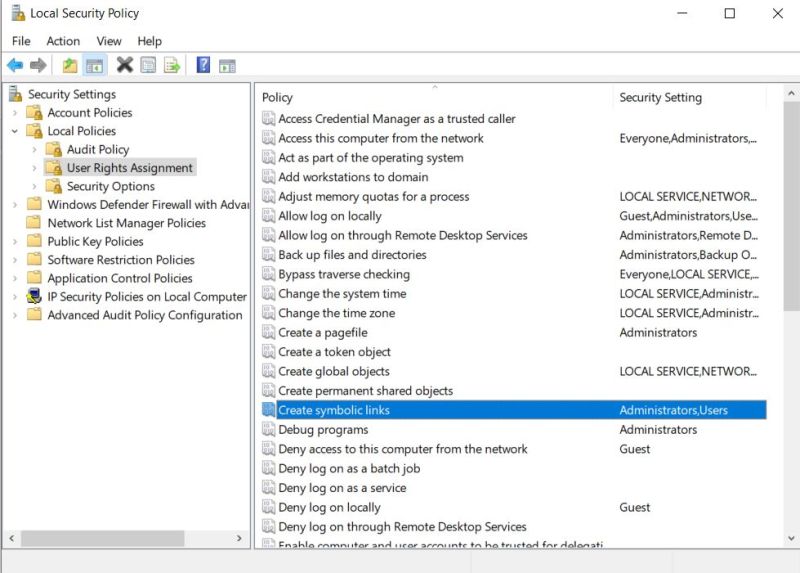
- Under User Rights Assignment, find a policy called Create symbolic links and open it.
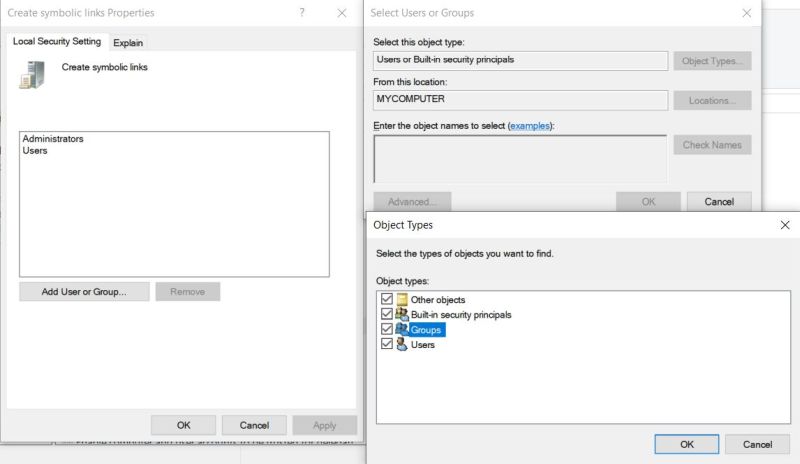
- Click Add User or Group
- Click Object Types
- Make sure Groups is checked and click OK.
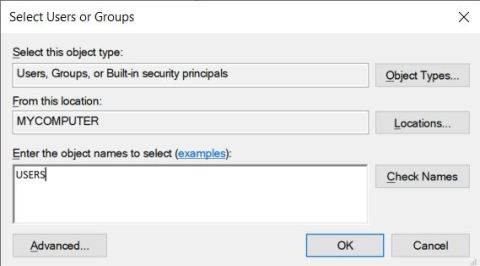
- Type USERS inside the textbox and click on Check Names to verify it, then click OK.
- Configure git to allow symbolic links. For example, by typing the following in Git Bash:
git config --local core.symlinks true
git config --global core.symlinks true
License
- Source Code: Unity Companion License
- Unity-chan Assets: Unity-Chan License
These assets can be located under, but not limited to, the following folder:com.unity.toonshader/Samples~
Auto-generated on Thu Dec 25 09:14:38 UTC 2025
Related Skills
node-connect
338.0kDiagnose OpenClaw node connection and pairing failures for Android, iOS, and macOS companion apps
frontend-design
83.4kCreate distinctive, production-grade frontend interfaces with high design quality. Use this skill when the user asks to build web components, pages, or applications. Generates creative, polished code that avoids generic AI aesthetics.
openai-whisper-api
338.0kTranscribe audio via OpenAI Audio Transcriptions API (Whisper).
commit-push-pr
83.4kCommit, push, and open a PR
