
SensorServer
Android app which let you stream various phone's sensors to websocket clients
Install / Use
/learn @UmerCodez/SensorServerREADME
SensorServer
<img src="https://github.com/umer0586/SensorServer/blob/main/fastlane/metadata/android/en-US/images/icon.png" width="200">






<img src="https://github.com/user-attachments/assets/0f628053-199f-4587-a5b2-034cf027fb99" height="100"> <img src="https://fdroid.gitlab.io/artwork/badge/get-it-on.png" alt="Get it on F-Droid" height="100">
SensorServer transforms Android device into a versatile sensor hub, providing real-time access to its entire array of sensors. It allows multiple Websocket clients to simultaneously connect and retrieve live sensor data.The app exposes all available sensors of the Android device, enabling WebSocket clients to read sensor data related to device position, motion (e.g., accelerometer, gyroscope), environment (e.g., temperature, light, pressure), GPS location, and even touchscreen interactions.
<img src="https://github.com/umer0586/SensorServer/blob/main/fastlane/metadata/android/en-US/images/phoneScreenshots/01.png" width="250" heigth="250"> <img src="https://github.com/umer0586/SensorServer/blob/main/fastlane/metadata/android/en-US/images/phoneScreenshots/02.png" width="250" heigth="250"> <img src="https://github.com/umer0586/SensorServer/blob/main/fastlane/metadata/android/en-US/images/phoneScreenshots/03.png" width="250" heigth="250"> <img src="https://github.com/umer0586/SensorServer/blob/main/fastlane/metadata/android/en-US/images/phoneScreenshots/04.png" width="250" heigth="250"> <img src="https://github.com/umer0586/SensorServer/blob/main/fastlane/metadata/android/en-US/images/phoneScreenshots/05.png" width="250" heigth="250"> <img src="https://github.com/umer0586/SensorServer/blob/main/fastlane/metadata/android/en-US/images/phoneScreenshots/06.png" width="250" heigth="250"> <img src="https://github.com/umer0586/SensorServer/blob/main/fastlane/metadata/android/en-US/images/phoneScreenshots/07.png" width="250" heigth="250">
</div>Other Similar Projects
- For sensor streaming over MQTT check out SensorSpot
- For sensor streaming over UDP check out SensaGram
Since this application functions as a Websocket Server, you will require a Websocket Client API to establish a connection with the application. To obtain a Websocket library for your preferred programming language click here.
Usage
To receive sensor data, Websocket client must connect to the app using following URL.
ws://<ip>:<port>/sensor/connect?type=<sensor type here>
Value for the type parameter can be found by navigating to Available Sensors in the app.
For example
-
For accelerometer
/sensor/connect?type=android.sensor.accelerometer. -
For gyroscope
/sensor/connect?type=android.sensor.gyroscope. -
For step detector
/sensor/connect?type=android.sensor.step_detector -
so on...
Once connected, client will receive sensor data in JSON Array (float type values) through websocket.onMessage.
A snapshot from accelerometer.
{
 "accuracy": 2,
 "timestamp": 3925657519043709,
 "values": [0.31892395,-0.97802734,10.049896]
}
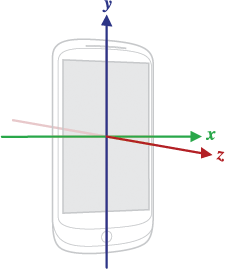
where
| Array Item | Description | | ------------- | ------------- | | values[0] | Acceleration force along the x axis (including gravity) | | values[1] | Acceleration force along the y axis (including gravity) | | values[2] | Acceleration force along the z axis (including gravity) |
And timestamp is the time in nanoseconds at which the event happened
Use JSON parser to get these individual values.
Note : Use following links to know what each value in values array corresponds to
- For motion sensors /topics/sensors/sensors_motion
- For position sensors /topics/sensors/sensors_position
- For Environmental sensors /topics/sensors/sensors_environment
Accessing Camera
To acess camera via websocket client api see WebsocketCAM
Undocumented (mostly QTI) sensors on Android devices
Some Android devices have additional sensors like Coarse Motion Classifier (com.qti.sensor.motion_classifier), Basic Gesture (com.qti.sensor.basic_gestures) etc which are not documented on offical android docs. Please refer to this Blog for corresponding values in values array
Supports multiple connections to multiple sensors simultaneously
Multiple WebSocket clients can connect to a specific type of sensor. For example, by connecting to /sensor/connect?type=android.sensor.accelerometer multiple times, separate connections to the accelerometer sensor are created. Each connected client will receive accelerometer data simultaneously.
Additionally, it is possible to connect to different types of sensors from either the same or different machines. For instance, one WebSocket client object can connect to the accelerometer, while another WebSocket client object can connect to the gyroscope. To view all active connections, you can select the "Connections" navigation button.
Example: Websocket client (Python)
Here is a simple websocket client in python using websocket-client api which receives live data from accelerometer sensor.
import websocket
import json


def on_message(ws, message):
    values = json.loads(message)['values']
    x = values[0]
    y = values[1]
    z = values[2]
    print("x = ", x , "y = ", y , "z = ", z )

def on_error(ws, error):
    print("error occurred ", error)

def on_close(ws, close_code, reason):
    print("connection closed : ", reason)

def on_open(ws):
    print("connected")


def connect(url):
    ws = websocket.WebSocketApp(url,
                              on_open=on_open,
                              on_message=on_message,
                              on_error=on_error,
                              on_close=on_close)

    ws.run_forever()


connect("ws://192.168.0.103:8080/sensor/connect?type=android.sensor.accelerometer")
Your device's IP might be different when you tap start button, so make sure you are using correct IP address at client side
Also see Connecting to Multiple Sensors Using Threading in Python
Connecting To The Server without hardcoding IP Address and Port No
In networks using DHCP (Dynamic Host Configuration Protocol), devices frequently receive different IP addresses upon reconnection, making it impractical to rely on hardcoded network configurations. To address this challenge, the app supports Zero-configuration networking (Zeroconf/mDNS), enabling automatic server discovery on local networks. This feature eliminates the need for clients to hardcode IP addresses and port numbers when connecting to the WebSocket server. When enabled by the app user, the server broadcasts its presence on the network using the service type _websocket._tcp, allowing clients to discover the server automatically. Clients can now implement service discovery to locate the server dynamically, rather than relying on hardcoded network configurations.
See complete python Example at Connecting To the Server Using Service Discovery
Using Multiple Sensors Over single Websocket Connection
You can also connect to multiple sensors over single websocket connection. To use multiple sensors over single websocket connection use following URL.
ws://<ip>:<port>/sensors/connect?types=["<type1>","<type2>","<type3>"...]
By connecting using above URL you will receive JSON response containing sensor data along with a type of sensor. See complete example at Using Multiple Sensors On Single Websocket Connection. Avoid connecting too many sensors over single connection
Reading Touch Screen Data
By connecting to the address ws://<ip>:<port>/touchscreen, clients can receive touch screen events in following JSON formate.
| Key | Value | |:-------:|:-----------------------:| | x | x coordinate of touch | | y | y coordinate of touch | | action | ACTION_MOVE or ACTION_UP or ACTION_DOWN |
"ACTION_DOWN" indicates that
