
AndroidTimeAxis
RecyclerView实现时间轴,支持自定义布局;RecyclerView implement temporal axis and support custom layout
Install / Use
/learn @Tomzem/AndroidTimeAxisREADME
 AndroidTimeAxis
🍎利用RecyclerView实现时间轴,支持自定义布局
使用说明
依赖
Step 1. Add it in your root build.gradle at the end of repositories:
	allprojects {
		repositories {
			...
			maven { url 'https://jitpack.io' }
		}
	}
Step 2. Add the dependency
	dependencies {
	        implementation 'com.github.Tomzem:AndroidTimeAxis:1.0.0'
	}
调用
1.布局文件中只需要一个RecyclerView:
    <android.support.v7.widget.RecyclerView
        android:id="@+id/my_recycler_view"
        android:layout_width="match_parent"
        android:layout_height="match_parent"
        android:scrollbars="horizontal"/>
2.需要继承TimeAxisAdapter重写Adapter:
    public ListAdapter(List<TimeInfo> mDataSource, Context mContext) {
        super(mDataSource, mContext);
    }

     /**
     * @param mDataSource 数据源
     * @param mContext
     * @param resID 自定义item布局
     */
    public ListAdapter(List<TimeInfo> mDataSource, Context mContext, int resID) {
        super(mDataSource, mContext, resID);
    }

     /**
     *  相当于RecyclerView.Adapter的onBindViewHolder方法
     * @param holder
     * @param position
     */
    @Override
    protected void initView(CommonViewHolder holder, int position) {
    }
3.自定义item(可以省略),布局中需要包含TimeAxisView控件:
    <com.caveman.timeaxis.weight.TimeAxisView
        android:id="@+id/tav_line"
        android:layout_width="100dp"
        android:layout_height="match_parent" />
4.将Adapter设置到RecyclerView当中即可:
        mRwList = findViewById(R.id.my_recycler_view);
        timeAdapter = new ListAdapter(data, this, R.layout.list_item);
        LinearLayoutManager linearLayoutManager = new LinearLayoutManager(this);
        linearLayoutManager.setOrientation(LinearLayoutManager.VERTICAL);
        mRwList.setLayoutManager(linearLayoutManager);
        mRwList.setAdapter(timeAdapter);
实际效果
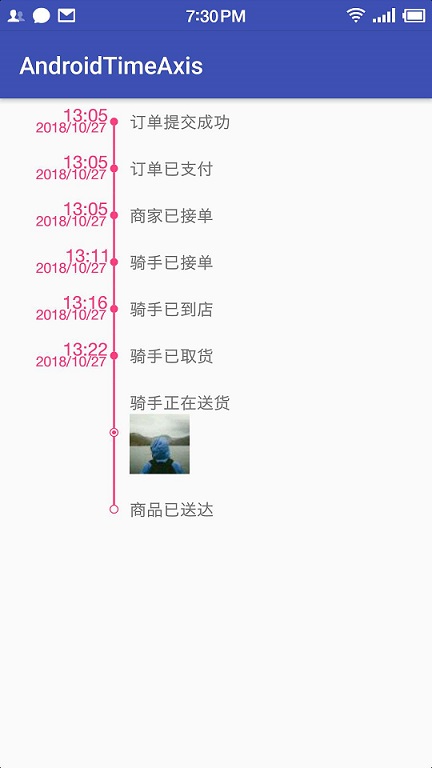
TimeAxisView方法说明
| 方法名称 | 含 义 | | -------- | ----- | | setLineWidth(float width) | 设置时间轴线宽 | | setLineColor(int resourceId) | 设置时间轴线颜色 | | isHeadView(boolean isHead) | 设置是否为第一个节点(自定义Item布局需要) | | isFootView(boolean isFoot) | 设置是否为最后一个节点(自定义Item布局需要) | | setPointColor(int resourceId) | 设置节点颜色 | | setPointRadius(float size) | 设置节点圆半径 | | setCircleShape(int shape) | 设置节点圆类型(SOLID_CIRCLE,HOLLOW_CIRCLE,CENTER_CIRCLE) | | setBigTextSize(float size) | 设置左侧大字尺寸 | | setSmallTextSize(float size) | 设置左侧小字尺寸 | | setSmallText(String text) | 设置左侧小字文本(默认无) | | setBigText(String text) | 设置左侧大字文本(默认无) | | setTextColor(int resourceId) | 设置左侧文本颜色 |
自定义属性
| 属性名称 | 含 义 | | -------- | ----- | | line_width | 设置时间轴线宽 | | line_color | 设置时间轴线颜色 | | point_size | 设置节点圆半径 | | point_color | 设置节点颜色 | | text_color | 设置左侧文本颜色 | | big_text_size | 设置左侧大字尺寸 | | small_text_size | 设置左侧小字尺寸 |
Related Skills
openhue
345.4kControl Philips Hue lights and scenes via the OpenHue CLI.
sag
345.4kElevenLabs text-to-speech with mac-style say UX.
weather
345.4kGet current weather and forecasts via wttr.in or Open-Meteo
tweakcc
1.5kCustomize Claude Code's system prompts, create custom toolsets, input pattern highlighters, themes/thinking verbs/spinners, customize input box & user message styling, support AGENTS.md, unlock private/unreleased features, and much more. Supports both native/npm installs on all platforms.
