
Ts.floatlabelfield
[unmaintained] Wrap implementation of "Float Label Pattern" UX pattern for Titanium.
Install / Use
/learn @TheSmiths-Widgets/Ts.floatlabelfieldREADME
Float label field 

This module for Appcelerator Titanium wraps JVFloatLabeledTextField for iOS (TODO: Android).
Preview
Credits for the concept to Matt D. Smith (@mds), and his original design:
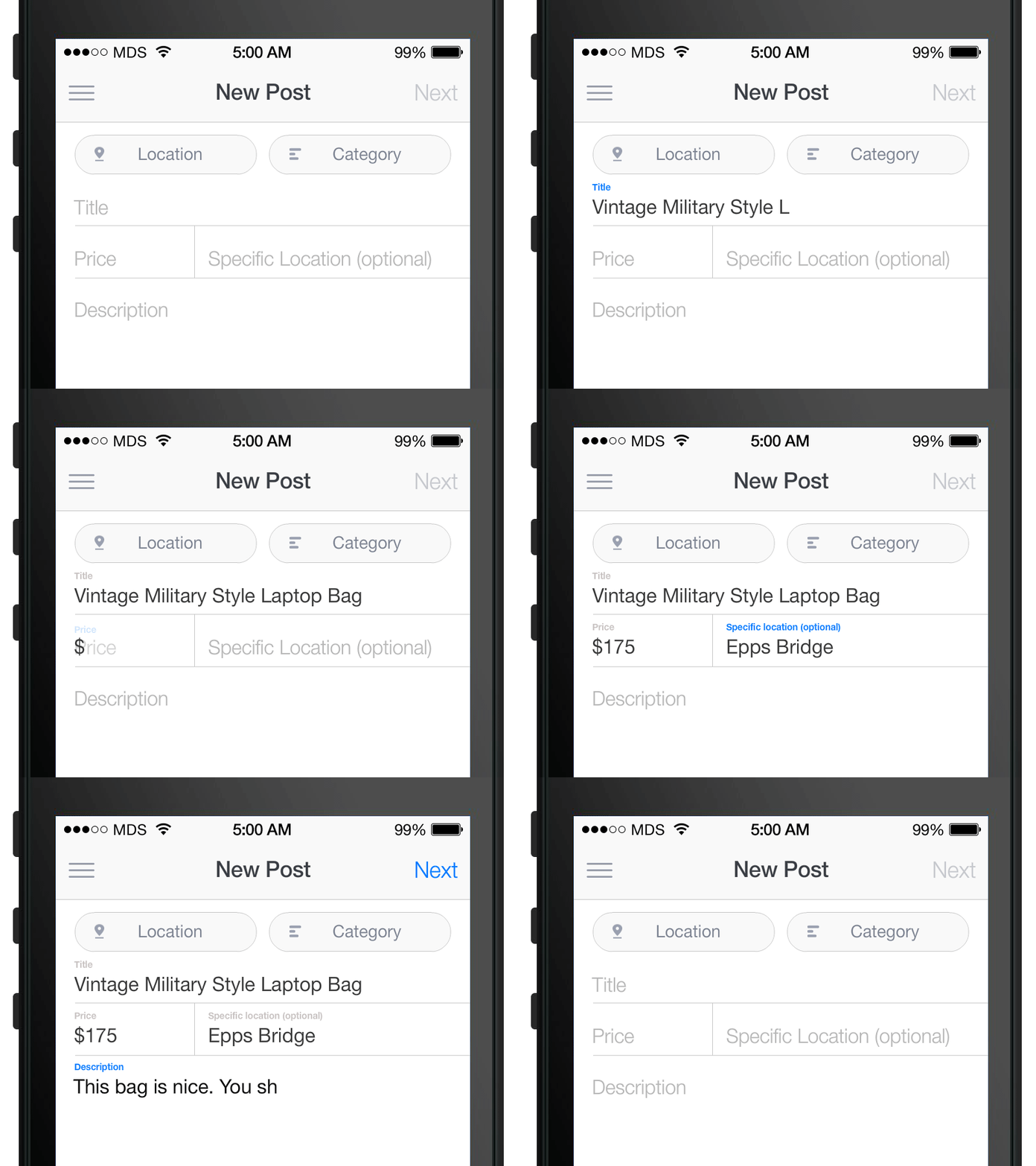 Credits for the iOS implementation to @jverdi.
Quick Start
Get it 
Download this repository or one release and install it:
- In your application's tiapp.xml file, include the following line in your
<modules>tag:
<module platform="ios">ts.floatlabelfield</module>
- Copy the module zip file into your application root directory.
Use it
- Require the module in a view:
<!-- TextField -->
<Module module="ts.floatlabelfield" method="createTextFieldView" id="floatField" />
<!-- TextView -->
<Module module="ts.floatlabelfield" method="createTextViewView" id="floatView" />
Which create a reference in your controller, accessible via: $.floadField
- Or, require it directly in a controller :
var floatlabelfield = require('ts.floatlabelfield').createTextFieldView({ _[PARAMS]_ );
var floatlabelview = require('ts.floatlabelfield').createTextFieldView({ _[PARAMS]_ );
Example:
var flf = require('ts.floatlabelfield');

// open a single window
var win = Ti.UI.createWindow({
    backgroundColor:'white',
    layout: 'vertical'
});

var floatlabelfield = flf.createTextFieldView({
    height: Ti.UI.SIZE,
    width: Ti.UI.SIZE,
    top: 150,
    fontSize: '18dp',
    textColor: '#2c3e50',
    placeholderTextColor: '#8d8d8d',
    placeholderText: "short description",
    floatingLabelFontSize: '12dp',
    floatingLabelTextColor: "#2980b9",
    debug: false
});
win.add(floatlabelfield);

var floatlabelview = flf.createTextViewView({
    height: 150,
    width: 150,
    top: 50,
    fontSize: '10dp',
    textColor: '#2c3e50',
    placeholderTextColor: '#bdc3c7',
    placeholderText: "short description",
    floatingLabelFontSize: '7dp',
    floatingLabelTextColor: "#2980b9",
    debug: false
});
win.add(floatlabelview);
win.open();
Documentation
Properties
You can pass properties during initialization or later:
| Parameter | Type | Description |
| ------------- | --------- | ------------------------- |
| fontSize | int | Size of all texts inside field |
| textColor | String | Color of written text inside field |
| placeholderTextColor | String | Color of placeholder text inside field |
| placeholderText | String | Placeholder text value |
| floatingLabelFontSize | int | Size of the floating label above field |
| floatingLabelTextColor | String | Color of the floating label above field |
| value | String | Value of the field (user input) |
| debug | Bool | Switch module logging on with debug: true |
Public methods
Here is a list of all accessible methods and the associated expected behaviour:
| Method | Description | | ------------- | ------------------------- | | setFontSize | Set fontSize property | | setTextColor | Set textColor property | | setPlaceholderTextColor | Set placeholderTextColor property | | setPlaceholderText | Set placeholderText property | | setFloatingLabelFontSize | Set floatingLabelFontSize property | | setFloatingLabelTextColor | Set floatingLabelTextColor property | | setValue | Set field's value |
| Method | Description | | ------------- | ------------------------- | | getValue | Returns field's value |
Events
You can listen for events by simply adding an event listener:
- In an Alloy view:
<Module module="ts.floatlabelfield" method="createTextFieldView" id="floatField" onChange="onFieldChange" />
- In an Alloy controller:
$.floatField.addEventListener("change", onFieldChange);
You can now bind the change listener in your controller:
function onFieldChange(e) {
    Ti.API.info('Field value changed for ' + e.value);
}
Supported events
Here is a list of all supported events and the associated expected behaviour:
| Event | Description |
| ------------- | ------------------------- |
| change | Triggers when user changes field's value. Contains value. |
TODO / Ideas for improvement
Feel free to improve this widget by forking, submitting pull requests or creating issues.
Here are my ideas:
- Wrap an Android implementation
Changelog
- 1.0 First version
Dependencies
Licences
JVFloatLabeledTextField is licensed under the MIT license.
Appcelerator, Appcelerator Titanium and associated marks and logos are trademarks of Appcelerator, Inc.
Titanium is Copyright (c) 2008-2015 by Appcelerator, Inc. All Rights Reserved.
Titanium is licensed under the Apache Public License (Version 2).
