
LGL
Large Graph Layout
Install / Use
/learn @TheOpteProject/LGLREADME
LGL - Large Graph Layout


All files distributed with LGL fall under the terms of the GNU General Public License, and are copyright (c) 2002, 2003 Alex Adai.
Changes and updates copyright (c) 2004-2022 Barrett Lyon
LGL on the web at: http://www.opte.org/
If you use this in your research, please cite (if possible):
- Lyon, Barrett. "The Opte Project." Mapping the Internet, Self, 2003-2022. http://www.opte.org.
- Adai, Alex T., Shailesh V. Date, Shannon Wieland, and Edward M. Marcotte. “LGL: Creating a Map of Protein Function with an Algorithm for Visualizing Very Large Biological Networks.” Journal of Molecular Biology 340, no. 1 (2004): 179–90. https://doi.org/10.1016/j.jmb.2004.04.047.
Note: Most of the Perl contained in this package is no longer maintained. The Java and C++ components are "mostly" modernized.
Example output
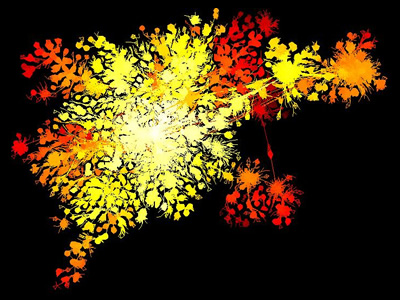
Protein Homology Graph, Edward Marcotte and Alex Adai, MoMA

Internet using traceroute vs BGP in 2003, Barrett Lyon, MoMA
Requirements
A heap of stuff, in no particular order:
- A C++ compiler
- Boost library required (I should have fixed version issues, but I have not future proofed it)
- bgpdump (https://bitbucket.org/ripencc/bgpdump/wiki/Home)
- Also see bgpscanner (Works with threads and is faster than bgpdump)
- https://blog.apnic.net/2018/11/29/new-mrt-bgp-reader-six-times-faster-than-its-predecessors/
- perl (5+, I think)
- Java (openjdk version "11.0.16" 2022-07-19)
- Xserver installed for graphical tools (works well under WSL 2 in Windows)
- Graphical tools also work on anything with Java.
- Python 3 (there are bash scripts lying around as well, but the python scripts are 3x faster)
- Only used for example scripts
Additional reading
- User guide to LGL:
- http://clairemcwhite.github.io/lgl-guide/
- Getting up to speed on Internet routing:
- http://networkingbodges.blogspot.com/2019/04/a-real-full-internet-table-in-lab.html
- https://www.noction.com/blog/as-path-and-as-path-prepending
Installation
Compling LGL C++ components
prompt$ setup.pl -i

This script which does a lot of suspect lifting.
This will compile 2D and 3D versions of LGL and put the resulting binaries in the ./bin directory. Afterwards you can move them whereever you want.
NOTE: setup.pl has been updated to locate boost, however you may need to direct gcc on where to find the includes if the automated detection does not work:
env CPLUS_INCLUDE_PATH=/usr/local/include ./setup.pl -i
Compile Java jar files
Use the gmake Makefile, i.e.
prompt$ make
prompt$ make install # local install in $(PROJECTDIR)/bin
Configure Perl
(If you intend to use these scrips)
You must have the following Perl modules in your @INC path to run LGL:
ParseConfigFile.pm
LGLFormatHandler.pm
These files are in the ./perls directory. You don't have to know anything about these modules, and you won't have to use them directly but lgl.pl will call them.
After all is compiled and done you can run LGL by the driver script lgl.pl as:
prompt$ ./bin/lgl.pl edges_file
but you have to modify the 'tmpdir' variable in lgl.pl. That directory will
hold all the files that LGL outputs, and it must be changed for EACH run.
However, The best way to run LGL is to have setup.pl generate a sample
config file for lgl.pl by running it as
prompt$ ./setup.pl -c conf_file_name
That file (after modification of course) can just be given to lgl.pl for execution as follows:
prompt$ ./bin/lgl.pl -c conf_file_name
The config file itself is documented further, and explains each of the variables to be used. It also provides defaults, so the minimum that MUST be changed are the variables:
tmpdir
inputfile
where tmpdir is the output directory of the LGL run and inputfile is the edge file. inputfile must be a file parsable by LGLFormatHandler.pm This can be just a simple 2 column space delimited file with one edge per line (the 2 vertex ids represent the two columns).
One last change is to ./bin/lgl.pl. A Perl variable $LGLDIR must be set to the root bin directory of all the lgl executables (This might be /where/lgl/was/unpacked/bin ). This var is empty by default, and the program won't run until it is set correctly.
Other files that come with LGL
A list of important files in the perls dir:
genVrml.pl - This generates the VRML code from 3D layout results. Run
genVrml.pl with no args to get the usage.
colorEdgesBasedOnLevel.pl - This generates a simple color file to be given to lglview, that will color your edges based on the level in the heirarchy in layout.
Other files might be included as well, but they are not necessary for LGL. Their documentation will be added here in the near future, or they may not be carried in the future.
lglayout2D
This is the core of LGL and generates the coords file for image generation.
Usage: ./lgl-exparmental-label/bin/lglayout2D [-x InitPositionFile] [-a AnchorsFile] [-t ThreadCount] [-m InitMassFile] [-i IterationMax] [-s] [-r nbhdRadius] [-T timeStep] [-S nodeSizeRadius] [-k casualSpringConstant] [-s specialSpringConstant] [-e] [-l] [-y] [-q EQ Distance] [-u placementDistance] [-E ellipseFactors] [-v placementRadius] [-L] nodeFile.lgl
    -[mx]    A file that has the node id followed by
            the initial values.

        -t      The number of threads to spawn.
                This is capped by the processor count.

        -i      The maximum number of iterations.

        -r      The neighborhood radius for each particle. It
                defines the interaction range for casual (generally
                repulsive) interactions

        -T      The time step for each iteration

        -S      The 'radius' of each node.

        -M      The 'mass' of each node.

        -R      The radius of the outer perim.

        -W      The write interval.

        -z      Root node you want to use.

        -l      Write out the edge level map.

        -e      Output the mst used.

        -O      Use original weights.

        -y      Layout the tree only.

        -I      Don't show layout progress, be quiet (kinda)

        -q      Equilibrium distance.

        -E      Ellipse factors. (Force the layout to be more of an ellipse -E 1x1.2)

        -u      Placement distance is the distance you want
                the next level to be placed with respect to
                the previous level. If this float value is not
                given a formula calculates the placement distance.

        -v      Placement radius is a measure of the placement density

        -L      Place the leafs close by. This applies to trees more than
                graphs. Setting this option will place the child vertices very
                near the parent vertex if all of its children have none themselves.

        -o      Read a previously created coordinates file to start processing level processing. This technique is used for animations.
ImageMaker
A JAVA 2D image output tool.
Generating Static Images using LGLLib.jar
Runtime Example:
java -Djava.awt.headless=true -Xmx20000m -Xms20000m -cp ./LGL-Master/Java/jar/LGLLib.jar ImageMaker.GenerateImages <height> <width> run.lgl run.coords -c run.colors -s 0.01 -l run.labels

-c <colors file>
-s Scale for labels
-l <labels file>
-M x,y (max of x and y to control scale and zoom. Not required)
-m x,y (min of x and y to control scale and zoom. Not required)
-a center (not required, align the mean of the image to the center of the window)
To use the -M and -m features you can get the min and max values from rendering the largest graph in your series. You can use the largest graph's min/max values on the smallest series to keep perspective rather than a fit-to-screen zoom.
Looking at the huge PNG (100k x 100k pixels) java.awt.image.Raster: The maximum width x height has to be less than Integer.MAX_VALUE (2147483647) so the maximum square image is 46340 x 46340. Note also that such images will need a lot of RAM since Java's BufferedImage's pixels are hold in memory.
An example of a larger output would be:
java -Djava.awt.headless=true -Xmx5G -Xms5G -cp ./LGL-Master/Java/jar/LGLLib.jar ImageMaker.GenerateImages 29200 29200 <files...>
LGLView
A JAVA 2D viewer for looking and reviewing .lgl, .coord, .color, and .labels files.
coordinates use LGLLib.jar
java -Xmx2G -Xms2G -cp ./LGL-master/Java/jar/LGLLib.jar Viewer2D.Viewer2D
Shortcuts

LGLView.jar
The full package that combines LGLView and ImageMaker.
Java
Directory and source code of all JAVA programs. See README in the JAVA dir.
File Formats:
(Thank you to Claire McWhite for major parts of this tutorial)
Input format (.lgl)
The input format to LGL is called .ncol, which is just a space separated list of two connected nodes with an optional third column of weight.
$ cat example.lgl
node1 node2 [optional weight]
Key points for formatting the input .ncol

Each line must be unique
A node may connect to many other nodes
A node cannot connect to itself
If a line is B-A, there cannot also be a line A-B
There can’t be blank lines
There can’t be blanks in any c
