
SelectPage
A simple style and powerful selector, including ajax remote data, autocomplete, pagination, tags, i18n and keyboard navigation features
Install / Use
/learn @TerryZ/SelectPageREADME
SelectPage
A simple style and powerful selection jQuery plugin, including ajax remote data, autocomplete, pagination, tags, i18n and keyboard navigation features
<p> <a href="https://travis-ci.org/TerryZ/SelectPage"><img src="https://travis-ci.org/TerryZ/SelectPage.svg?branch=master"></a> <a href="https://www.npmjs.com/package/selectpage"><img src="https://img.shields.io/npm/v/selectpage.svg"></a> <a href="https://app.fossa.io/projects/git%2Bgithub.com%2FTerryZ%2FSelectPage?ref=badge_shield"><img src="https://app.fossa.io/api/projects/git%2Bgithub.com%2FTerryZ%2FSelectPage.svg?type=shield"></a> <a href="https://www.npmjs.com/package/selectpage"><img src="https://img.shields.io/npm/dy/selectpage.svg"></a> <a href="https://mit-license.org/"><img src="https://img.shields.io/badge/license-MIT-brightgreen.svg"></a> <a href="https://www.npmjs.com/package/selectpage"><img src="https://img.shields.io/badge/language-javascript%20%2F%20jquery-blue.svg"></a> <a href="https://996.icu"><img src="https://img.shields.io/badge/link-996.icu-red.svg" alt="996.icu" /></a> </p><br><br><br>
<!-- <br><br><br><br><br> <p align="center"> <a href="https://terryz.github.io/selectpage/" target="_blank"> <img src="https://terryz.github.io/image/logo/SelectPage.png" alt="SelectPage" > </a> </p> <br><br> <p align="center"> A simple style and powerful selection jQuery plugin, <br>including ajax remote data, autocomplete, pagination, tags, i18n and keyboard navigation features </p> <p align="center"> <a href="https://travis-ci.org/TerryZ/SelectPage"><img src="https://travis-ci.org/TerryZ/SelectPage.svg?branch=master"></a> <a href="https://www.npmjs.com/package/selectpage"><img src="https://img.shields.io/npm/v/selectpage.svg"></a> <a href="https://app.fossa.io/projects/git%2Bgithub.com%2FTerryZ%2FSelectPage?ref=badge_shield"><img src="https://app.fossa.io/api/projects/git%2Bgithub.com%2FTerryZ%2FSelectPage.svg?type=shield"></a> <a href="https://www.npmjs.com/package/selectpage"><img src="https://img.shields.io/npm/dy/selectpage.svg"></a> <a href="https://mit-license.org/"><img src="https://img.shields.io/badge/license-MIT-brightgreen.svg"></a> <a href="https://www.npmjs.com/package/selectpage"><img src="https://img.shields.io/badge/language-javascript%20%2F%20jquery-blue.svg"></a> </p> <br><br><br><br><br><br> -->Examples and Documentation
Explorer on
The Vuejs version: v-selectpage

Features
- a jQuery(1.x) plugin
- highly customized
- compatible with no UI framework of the program, but it is recommended to use at least normalize.css
- quick search item by input autocomplete
- use keybord to quick navigate
- multiple select by tag form
- screen edges handle
- custom content render
- i18n supports, provide 6 languages
- server side data supports
Browsers support
| <img src="https://raw.githubusercontent.com/alrra/browser-logos/master/src/edge/edge_48x48.png" alt="IE / Edge" width="24px" height="24px" /></br>IE / Edge | <img src="https://raw.githubusercontent.com/alrra/browser-logos/master/src/firefox/firefox_48x48.png" alt="Firefox" width="24px" height="24px" /></br>Firefox | <img src="https://raw.githubusercontent.com/alrra/browser-logos/master/src/chrome/chrome_48x48.png" alt="Chrome" width="24px" height="24px" /></br>Chrome | <img src="https://raw.githubusercontent.com/alrra/browser-logos/master/src/safari/safari_48x48.png" alt="Safari" width="24px" height="24px" /></br>Safari | <img src="https://raw.githubusercontent.com/alrra/browser-logos/master/src/opera/opera_48x48.png" alt="Opera" width="24px" height="24px" /></br>Opera | | --------- | --------- | --------- | --------- | --------- | | IE8, IE9, IE10, IE11, Edge| Firefox 18+| Chrome 49+| Safari 10+| Opera 36+
Plugin Preview
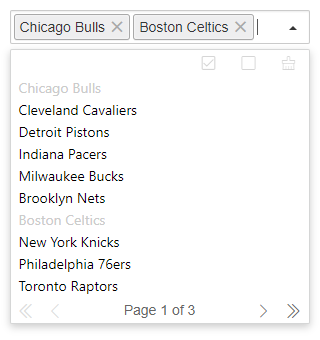
Multiple Selection with Tags form
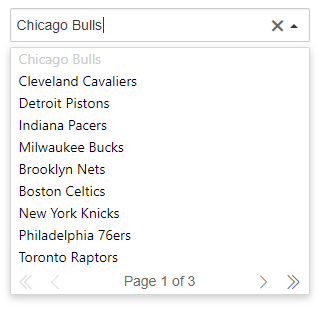
Regular select mode ( single selection )
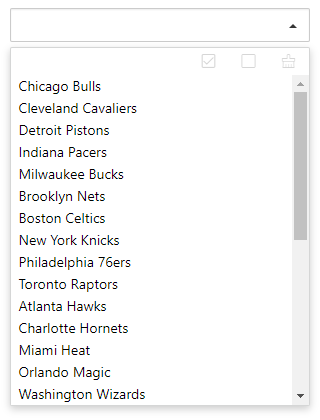
List only ( pagination bar close, disable typing to quick search, select only )
Installation
Download SelectPage plugin zip file by last release, or click me to download SelectPage
or use NPM
npm install selectpage
<a href="https://nodei.co/npm/selectpage/"><img src="https://nodei.co/npm/selectpage.png"></a>
Usage
As you can see in the Demo Page, you will need to include:
- jQuery library (1.10.2+), untest on jquery2.x & 3.x
- The JavaScript file
selectpage.js(or its minified versionselectpage.min.js) - The css file
selectpage.css
Including files
<!-- jQuery library -->
<script type="text/javascript" src="jquery.min.js" ></script>

<link rel="stylesheet" href="selectpage.css" type="text/css">
<script type="text/javascript" src="selectpage.js" ></script>
HTML input element set
the SelectPage plugin just need put a input tag in the page
<input type="text" id="selectpage" >
Javascript init plugin
// defined a array (the server side returned data format was same like that)
// Array[{Object},{...}]
var data = [
  {id: 1, name: 'Chicago Bulls', desc: '芝加哥公牛' },
  {id: 2, name: 'Cleveland Cavaliers', desc: '克里夫兰骑士' },
  {id: 3, name: 'Detroit Pistons', desc: '底特律活塞' },
  {id: 4, name: 'Indiana Pacers', desc: '印第安纳步行者' }
]
// init SelectPage
$('#selectpage').selectPage({
  showField : 'desc',
  keyField : 'id',
  data : data
})
Stargazers over time

Options
The plugin initialize options
data
- type:
string | object - default:
undefined
data source (string:ajax search URL | object:JSON format array)
// serverside request url address
$('#selectpage').selectPage({
  data: 'https://some-site/some-route'
})

// JSON format array
var data = [{a:1,b:2,c:3},{...}]
$('#selectpage').selectPage({
  data: data
})
lang
- type:
string - default:
'cn'
plugin language
| code | language | | ------ | ------ | | cn | chinese | | en | english | | de | german | | es | spanish | | ja | japanse | | pt-br | Brazilian Portuguese |
multiple
- type:
boolean - default:
false
whether it is multi-select mode(use tags mode)
pagination
- type:
boolean - default:
true
paging or not
listSize
- type:
number - default:
10
the list shows the number of items, and the other items are displayed in a scroll bar,it only work on pagination : false
multipleControlbar
- type:
boolean - default:
true
whether to enable the multi-select mode control button area,only work on multiple: true
maxSelectLimit
- type:
number - default:
0
maximum number of selections in multi-select mode,0 is unlimited
selectToCloseList
- type:
boolean - default:
true
is close list after item select,it only work on multiple:true
initRecord
- type:
string - default:
undefined
the initial value of the plugin, The value will match the option.keyField field, and if it matches, it will be automatically selected and highlighted
dbTable
- type:
string - default:
'tbl'
use this parameter to set the corresponding data table name in server side(ajax) mode
keyField
- type:
string - default:
'id'
value field, usually the contents of the field will be automatically saved in the hidden domain
showField
- type:
string - default:
'name'
the result is used to display the name of the attribute
searchField
- type:
string - default:
undefined
query field, set server side query field when data source is server side mode, if not set default use of option.showField
andOr
- type:
string - default:
'AND'
multiple keywords search type ('AND' or 'OR')
orderBy
- type:
string[] - default:
undefined
result data sort type, default use showField specified field
$('#selectpage').selectPage({
  ...
  orderBy : ['id desc'] // use id field sort desc
})
pageSize
- type:
number - default:
10
the number of records per page
params
- type:
function (): object- return
object
- return
- default:
undefined
send request params for server side data source(ajax)
$('#selectpage').selectPage({
  ...
  params : function() {
    return {
      name: 'aa',
      sex: 1
    }
  }
})
formatItem
- type:
function (data: object): string- data
objectrow data object format - return
string
- data
- default:
undefined
list item display content formatting
$('#selectpage').selectPage({
  ...
  formatItem : function(data) {
    return data.a + '(' + data.b + ')'
  }
})
focusDropList
- type:
boolean - default:
true
when input box get focus,drop the list
autoSelectFirst
- type:
boolean - default:
true
whether to automatically select the first item in the list (enter the keyword query mode, use the mouse directly does not trigger)
autoFillResult
- type:
boolean - default:
true
whether to automatically fill the content, if the list item is hig
