
Mars
Mars is a cross-platform network component developed by WeChat.
Install / Use
/learn @Tencent/MarsREADME
Mars



-%20iOS%20%7C%20OS%20X%20%7C%20Android(ndkr20)%20%7C%20Windows(vs2015)%20-brightgreen.svg)
(中文版本请参看这里)
Mars is a cross-platform infrastructure component developed by WeChat Mobile Team. It has been proved to be effective by billions of WeChat users.
- Cross platform, easy to deploy if you are developing multi-platform or multi-business application.
- Suitable for small amount data transmission
- Mobile platform friendly, low power and traffic consumption
- A network solution fit for mobile application
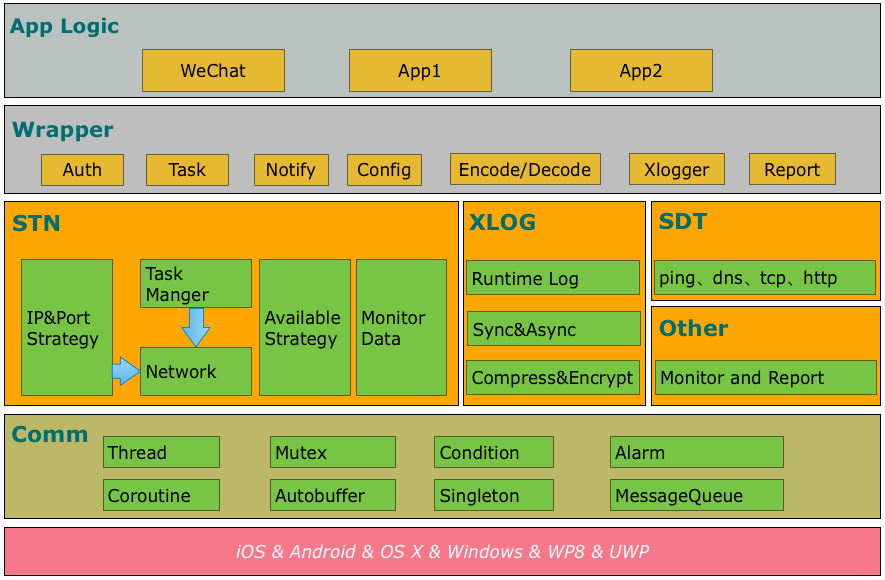
- comm: common library, including socket, thread, message queue, coroutine, etc.
- Xlog: a reliable log component with high-performance.
- SDT: a network detection component.
- STN: a signaling network component, the major part of Mars.
Samples
Start with sample usage here.
Getting started
python scripts only support python3.10 or higher
Choose Android or iOS/OS X or Windows.
<a name="android">Android</a>
You can use either mars-wrapper or mars-core. We recommend you to use mars-wrapper when you just want to build a sample or demo, while mars-core is preferred to be used in your APP.
<a name="wrapper">mars-wrapper</a>
Add dependencies by adding the following lines to your app/build.gradle.
dependencies {
    compile 'com.tencent.mars:mars-wrapper:1.2.5'
}
OR
<a name="core">mars-core</a>
Add dependencies by adding the following lines to your app/build.gradle.
dependencies {
    compile 'com.tencent.mars:mars-core:1.2.5'
}
OR
<a name="">mars-xlog</a>
If you just want to user xlog, add dependencies by adding the following lines to your app/build.gradle. note: xlog is included in mars-core and mars-wrapper.
dependencies {
    compile 'com.tencent.mars:mars-xlog:1.2.5'
}
If you read here, make sure you have added dependencies of mars-wrapper, mars-core or mars-xlog.
<a name="Xlog">Xlog Init</a>
Initialize Xlog when your APP starts. Remember to use an exclusive folder to save the log files, no other files are acceptable in the folder since they would be removed by the cleansing function in Xlog automatically.
When multiple processes is used in your app, make sure that each process owns its exclusive log file.
System.loadLibrary("c++_shared");
System.loadLibrary("marsxlog");

final String SDCARD = Environment.getExternalStorageDirectory().getAbsolutePath();
final String logPath = SDCARD + "/marssample/log";

// this is necessary, or may crash for SIGBUS
final String cachePath = this.getFilesDir() + "/xlog"

//init xlog
Xlog xlog = new Xlog();
Log.setLogImp(xlog);

if (BuildConfig.DEBUG) {
    Log.setConsoleLogOpen(true);
  	Log.appenderOpen(Xlog.LEVEL_DEBUG, Xlog.AppednerModeAsync, "", logPath, logFileName, 0);
} else {
    Log.setConsoleLogOpen(false);
  	Log.appenderOpen(Xlog.LEVEL_INFO, Xlog.AppednerModeAsync, "", logPath, logFileName, 0);
}
Uninitialized Xlog when your app exits
Log.appenderClose();
<a name="STN">STN Init</a>
If you add dependencies of mars-core to your project, you need to initialize and release STN. Initialize STN before you use it
// set callback
AppLogic.setCallBack(stub);
StnLogic.setCallBack(stub);
SdtLogic.setCallBack(stub);

// Initialize the Mars PlatformComm
Mars.init(getApplicationContext(), new Handler(Looper.getMainLooper()));

// Initialize the Mars
StnLogic.setLonglinkSvrAddr(profile.longLinkHost(), profile.longLinkPorts());
StnLogic.setShortlinkSvrAddr(profile.shortLinkPort());
StnLogic.setClientVersion(profile.productID());
Mars.onCreate(true);

BaseEvent.onForeground(true);
StnLogic.makesureLongLinkConnected();
Firstly, you should call the setCallBack interface, and secondly, the Mars.init. Then, to initialize the Mars, there is to need to strictly follow the orders of the four commands. Finally, after Mars are initialized, onForeground and makesureLongLinkConnect can be called.
Destroy STN or exit your app:
Mars.onDestroy();
<a name="even">Event Change</a>
Network change:
BaseEvent.onNetworkChange()
If you add dependencies of mars-wrapper to your project, you just need initialize STN and no need uninitialized.
MarsServiceProxy.init(this, getMainLooper(),null);
No matter which way of dependencies you used, you must pay attention to these.
The state (background or foreground) of the APP is changed:
BaseEvent.onForeground(boolean);
The account of the APP is changed:
StnLogic.reset();
If you want to modify the encryption algorithm of Xlog, the packer/unpacker of longlink/shortlink, or you want to define the other components by yourself, refer here
<a name="apple">iOS/OS X</a>
Compile
python build_ios.py
or
python build_osx.py
- Add mars.framework as a dependency of your project.
- Rename files in mars/libraries/mars_android_sdk/jni with .rewriteme extension to .cc extension.
- Add header files in mars/libraries/mars_android_sdk/jni and source files from step 2 into your project.
<a name="Xlog">Xlog Init</a>
Initialize Xlog when your app starts. Remember to use an exclusive folder to save the log files, no other files are acceptable in the folder since they would be removed by the cleansing function in Xlog automatically.
NSString* logPath = [[NSSearchPathForDirectoriesInDomains(NSDocumentDirectory, NSUserDomainMask, YES) objectAtIndex:0] stringByAppendingString:@"/log"];

// set do not backup for logpath
const char* attrName = "com.apple.MobileBackup";
u_int8_t attrValue = 1;
setxattr([logPath UTF8String], attrName, &attrValue, sizeof(attrValue), 0, 0);

// init xlogger
#if DEBUG
xlogger_SetLevel(kLevelDebug);
appender_set_console_log(true);
#else
xlogger_SetLevel(kLevelInfo);
appender_set_console_log(false);
#endif
XLogConfig config;
config.mode_ = kAppenderAsync;
config.logdir_ = [logPath UTF8String];
config.nameprefix_ = "Test";
config.pub_key_ = "";
config.compress_mode_ = kZlib;
config.compress_level_ = 0;
config.cachedir_ = "";
config.cache_days_ = 0;
appender_open(config);
Close xlog in function "applicationWillTerminate"
appender_close();
<a name="STN">STN Init</a>
Initialize STN before you use it:
- (void)setCallBack {
    mars::stn::SetCallback(mars::stn::StnCallBack::Instance());
    mars::app::SetCallback(mars::app::AppCallBack::Instance());
}

- (void) createMars {
    mars::baseevent::OnCreate();
}

- (void)setClientVersion:(UInt32)clientVersion {
    mars::stn::SetClientVersion(clientVersion);
}

- (void)setShortLinkDebugIP:(NSString *)IP port:(const unsigned short)port {
    std::string ipAddress([IP UTF8String]);
    mars::stn::SetShortlinkSvrAddr(port, ipAddress);
}

- (void)setShortLinkPort:(const unsigned short)port {
    mars::stn::SetShortlinkSvrAddr(port);
}

- (void)setLongLinkAddress:(NSString *)string port:(const unsigned short)port debugIP:(NSString *)IP {
    std::string ipAddress([string UTF8String]);
    std::string debugIP([IP UTF8String]);
    std::vector<uint16_t> ports;
    ports.push_back(port);
    mars::stn::SetLonglinkSvrAddr(ipAddress,ports,debugIP);
}

- (void)setLongLinkAddress:(NSString *)string port:(const unsigned short)port {
    std::string ipAddress([string UTF8String]);
    std::vector<uint16_t> ports;
    ports.push_back(port);
    mars::stn::SetLonglinkSvrAddr(ipAddress,ports);
}

- (void)reportEvent_OnForeground:(BOOL)isForeground {
    mars::baseevent::OnForeground(isForeground);
}

- (void)makesureLongLinkConnect {
    mars::stn::MakesureLonglinkConnected();
}
Firstly, you should call the setCallBack interface, and secondly, the Mars.init. Then, to initialize the Mars, there is to need to strictly follow the orders of the four commands. Finally, after Mars are initialized, onForeground and makesureLongLinkConnect can be called.
If you want to destroy STN or exit App:
- (void)destroyMars {
    mars::baseevent::OnDestroy();
}
<a name="even">Event Change</a>
When the App's state of background or foreground is changed:
- (void)reportEvent_OnForeground:(BOOL)isForeground {
    mars::baseevent::OnForeground(isForeground);
}
Network change:
- (void)reportEvent_OnNetworkChange {
    mars::baseevent::OnNetworkChange();
}
<a name="windows">Windows</a>
Install Visual Studio 2015.
Compile
python build_windows.py
- Add mars.lib as a dependency of your project.
- Rename files in mars/libraries/mars_android_sdk/jni with .rewriteme extension to .cc extension.
- Add header files in mars/libraries/mars_android_sdk/jni and source files from step 2 into your project.
<a name="Xlog">Xlog Init</a>
Initialize Xlog when your app starts. Remember to use an
Related Skills
node-connect
344.1kDiagnose OpenClaw node connection and pairing failures for Android, iOS, and macOS companion apps
frontend-design
96.8kCreate distinctive, production-grade frontend interfaces with high design quality. Use this skill when the user asks to build web components, pages, or applications. Generates creative, polished code that avoids generic AI aesthetics.
openai-whisper-api
344.1kTranscribe audio via OpenAI Audio Transcriptions API (Whisper).
qqbot-media
344.1kQQBot 富媒体收发能力。使用 <qqmedia> 标签,系统根据文件扩展名自动识别类型(图片/语音/视频/文件)。
