
FastUPDI
FastUPDI UPDI Programmer and interface
Install / Use
/learn @TachyonElectronics/FastUPDIREADME
FastUPDI UPDI Programmer & interface
FastUPDI is an implementation of the UPDI protocol which supports speeds of up to 1Mb/s and mass complex operations.
FastUPDI consists of a custom Controller command line program for Windows and a programmer firmware designed to be used on Arduino mega2560 boards.
Supports only NVMv2 UPDI devices (such as AVR-Dx series)
MAKING A CUSTOM PROGRAMMER
- Install the firmware into a supported host device of choice (such as Arduino MEGA) to make it into a programmer. This can be done using Atmel Studio or avrdude command
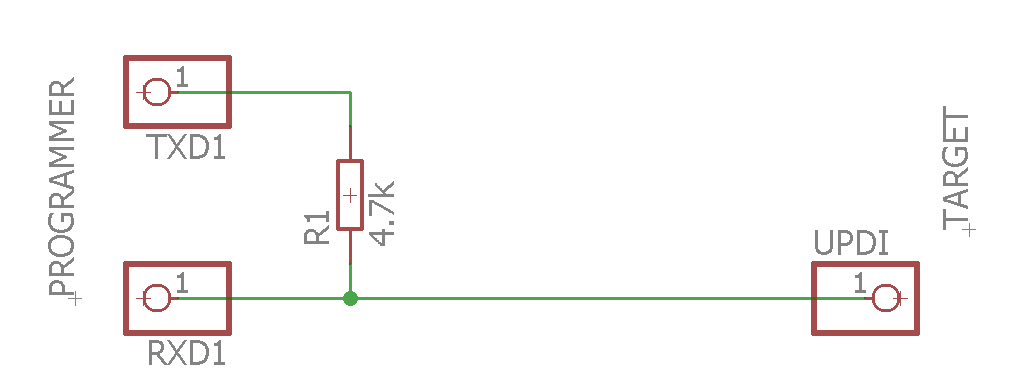
avrdude -C avrdude.conf -p m2560 -P COM5 -c wiring -U flash:w:FastUPDI.hex:i -D - Connect a 4.7k resistor between the UART Tx and Rx pins (on Arduino MEGA - Tx/Rx 1)
- Connect the Rx pin to the target's UPDI line
- Make sure the target is powered with an appropriate voltage (such as 3.3v from Arduino) and connected to a common ground with the programmer
USING THE SOFTWARE
- Edit the config file if needed to add support to your target device.
- Use the included Controller program to interface with the programmer and device:
Use the controller in command line as:
fastupdi [global options] [operation1 [operands] [options]] ... [operation_n [operands] [options]]
- Use
fastupdi -?to view all supported options and operations. - Use
fastupdi -? [-Operation]to view all supported options for a given operation.
NOTE: All arguments (except file names) are CASE SENSITIVE
Basic operations
- Use
-R <source> [output] [options]to read from target and output to file or console - Use
-W <destination> <data> [options]to write to target - Use
-V <source> <template> [options]to verify the target's data against a template - Use
-Efor chip erase
Operands:
<source>and<destination>can be either memory names defined in config or direct hex addresses in format0xHHHHHHHH<data>and<template>can be either filenames or direct hex data bytes in format0xHH[output]can be an output filename or can be omitted in order to output directly to console
For a detailed list of all options, look here
Operation chaining
Up to 255 operations can be chained together and executed in first-to-last order as a single command. This can be used, for example, to quickly program several memories using a single command line command.
Multi-mode
Use the -m global option to enable Multi-mode. The specified operation chain will be repeated after each key press until ESC key is pressed. The UPDI link is closed between each run, which allows the target chip to be replaced. This allows fast programming of large batches of chips/devices
Related Skills
node-connect
346.4kDiagnose OpenClaw node connection and pairing failures for Android, iOS, and macOS companion apps
frontend-design
107.2kCreate distinctive, production-grade frontend interfaces with high design quality. Use this skill when the user asks to build web components, pages, or applications. Generates creative, polished code that avoids generic AI aesthetics.
openai-whisper-api
346.4kTranscribe audio via OpenAI Audio Transcriptions API (Whisper).
qqbot-media
346.4kQQBot 富媒体收发能力。使用 <qqmedia> 标签,系统根据文件扩展名自动识别类型(图片/语音/视频/文件)。
