
Equi7Grid
Definition of the Equi7Grid - a spatial reference optimized for global high-resolution raster data.
Install / Use
/learn @TUW-GEO/Equi7GridREADME
Equi7Grid




The Equi7Grid is a spatial reference system designed to handle efficiently the archiving, processing, and displaying of high resolution raster image data. It supports geo-datacubes holding large volumes of satellite imagery, as it preserves geometric accuracy and minimises data oversampling over global land surfaces to a very low value of 3%.
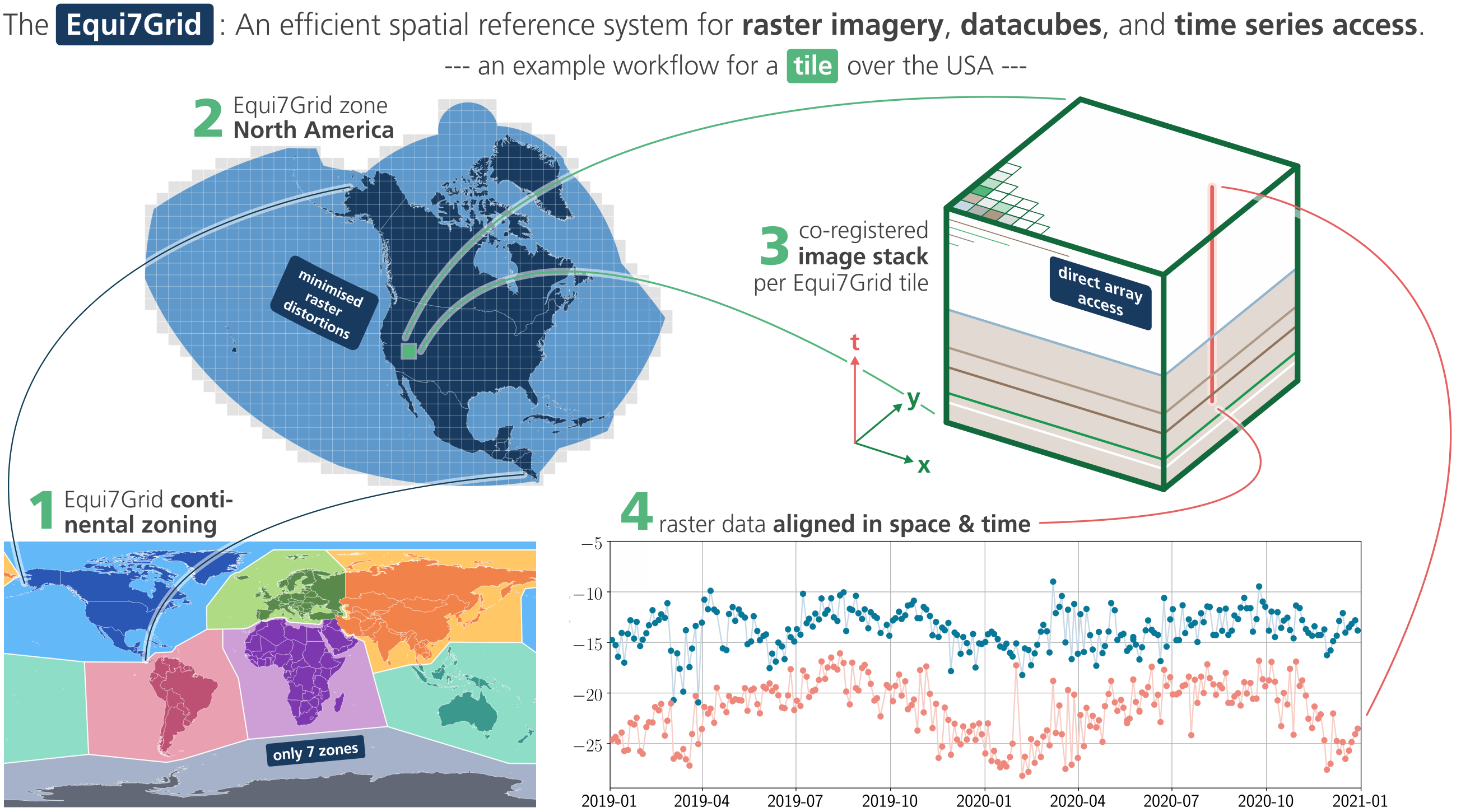
This package contains:
- code for working with the Equi7Grid: how to convert to, how to use the tiling system, how to identify coordinates, etc.
- files defining the contentinal zones, coordinate system, projection parameters, base tilings, etc.
A detailed documentation on the Equi7Grid spatial reference system definition is at
~/docs/doc_files/
and its scientific background is published in this journal article.
This package is a light wrapper around pytileproj, which contains a more generic framework for working with projected grid frameworks and tiling systems. Please also check out its documention in addition to equi7grid's documentation for getting the full picture of all offered functionalities.
Coordinate reference systems
Easiest access to Equi7's seven continental coordinate reference systems (CRSs) is via the EPSG codes:
Africa          AF   EPSG:27701
Antarctica      AN   EPSG:27702
Asia            AS   EPSG:27703
Europe          EU   EPSG:27704
North America   NA   EPSG:27705
Oceania         OC   EPSG:27706
South America   SA   EPSG:27707
For example, when using pyproj>=3.6.1 in python, you can transform coordinates like this:
from pyproj import Transformer
lon, lat = Transformer.from_crs("EPSG:27704", "EPSG:4326", always_xy=True).transform(x, y)
An alternative are PROJ4 strings:
Africa          AF  '+proj=aeqd +lat_0=8.5 +lon_0=21.5 +x_0=5621452.01998 +y_0=5990638.42298 +datum=WGS84 +units=m +no_defs'
Antarctica      AN  '+proj=aeqd +lat_0=-90 +lon_0=0 +x_0=3714266.97719 +y_0=3402016.50625 +datum=WGS84 +units=m +no_defs'
Asia            AS  '+proj=aeqd +lat_0=47 +lon_0=94 +x_0=4340913.84808 +y_0=4812712.92347 +datum=WGS84 +units=m +no_defs'
Europe          EU  '+proj=aeqd +lat_0=53 +lon_0=24 +x_0=5837287.81977 +y_0=2121415.69617 +datum=WGS84 +units=m +no_defs'
North America   NA  '+proj=aeqd +lat_0=52 +lon_0=-97.5 +x_0=8264722.17686 +y_0=4867518.35323 +datum=WGS84 +units=m +no_defs'
Oceania         OC  '+proj=aeqd +lat_0=-19.5 +lon_0=131.5 +x_0=6988408.5356 +y_0=7654884.53733 +datum=WGS84 +units=m +no_defs'
South America   SA  '+proj=aeqd +lat_0=-14 +lon_0=-60.5 +x_0=7257179.23559 +y_0=5592024.44605 +datum=WGS84 +units=m +no_defs'
Installation
This package can be installed from PyPi with:
pip install equi7grid
# or
uv add equi7grid
If you want to use equi7grid's visualisation features, then you can install the required optional dependencies with:
pip install equi7grid[vis]
# or
uv add equi7grid[vis]
If you want to reproject and resample files to the Equi7Grid, then you need to install the warp extension:
pip install equi7grid[warp]
# or
uv add equi7grid[warp]
To include the support for exporting grid definitions (which may be user-defined), use the export extension:
pip install equi7grid[export]
# or
uv add equi7grid[export]
Contribute
We are happy if you want to contribute. Please raise an issue explaining what is missing or if you find a bug. We will also gladly accept pull requests against our master branch for new features or bug fixes.
Development setup
For development you can either use a conda/mamba or uv environment. After that you should be able to run uv run pytest to run the test suite.
uv (recommended)
Here is an example using only uv for creating the environment and managing dependencies.
First, follow the instructions here to install uv or run:
wget -qO- https://astral.sh/uv/install.sh | sh
Next, create your virtual environment with all extras, e.g.:
uv sync --all-extras
or with the dependencies e.g. for the export support:
uv sync --extra=export
mamba
Here is an example using mamba together with uv for managing dependencies.
First, install conda and set the path:
wget "https://github.com/conda-forge/miniforge/releases/latest/download/Miniforge3-$(uname)-$(uname -m).sh" -O miniforge.sh
bash miniforge.sh -b -p $HOME/miniforge
export PATH="$HOME/miniforge/bin:$PATH"
Next, create a virtual environment:
conda create -n equi7grid python=3.12 mamba
conda activate equi7grid
mamba install -c conda-forge uv
Finally, use uv to install all other dependencies and equi7grid itself, e.g.:
uv sync --all-extras
just
The repository uses a Justfile to provide a simple and consistent interface for task orchestration. It groups common development, testing, and release tasks behind short, memorable commands, reducing the need to remember long tool-specific invocations. Most commands are built on top of uv, ensuring fast and reproducible execution.
Install the just binary with uv like so:
uv tool install rust-just
Now you can execute so called recipes with:
just test

# or list all available recipes with
just
News
2026 April:
Official announcement of new Equi7Grid package release (v1.1.1) along with the launch of the Equi7Grid webviewer () and the official Equi7Grid website (). v1.1.1 incorporates all feedback collected from the first review and testing round after the major release v1.0.0.
2026 February:
New major release v1.0.0! 🎉🥳
This release contains a complete refactoring of the whole codebase, including pytileproj, which is the main dependency of equi7grid. All requests and issues raised by the user community were considered resulting in flexible, user-defined pixel samplings and grid tilings and new interfaces to create objects for working with the Equi7Grid.
2025 October:
We’re currently preparing a version 2 of the Equi7Grid and its software. For this, we collect user needs and requests, and develop an modular approach for more flexible options for pixel samplings and grid tilings.
Contributions—whether comments, recommendations, or code—are welcome, and are collected here in the Discussion Section section
2024 May:
For the seven continental Equi7 coordinate systems, the newly available EPSG codes EPSG:27701 - EPSG:27707 are available via
- with
proj>=9.4.0from the generic coordinate transformation software proj (e.g. used within GDAL/OGR>=3.9.0). - with
EPSG>=v11.002from the Geodetic Parameter Dataset of EPSG - with
QGIS>=3.36and its versatile and open geographic information system (link)
Several updates are in the pipeline of this python package:
- interface to the EPSG codes
- updates on the continental zone bordes - streamlining along political delimiters
- flexible tile extents and grid samplings, allowing also user-defined tile extents
- updated interfaces to reprojection methods (e.g. to and from UTM, or LonLat)
Guidelines
If you want to contribute please follow these steps:
- fork the
equi7gridrepository to your account - clone the repository
- make a new feature branch from the
equi7gridmaster branch - add your feature
- please include tests for your contributions in one of the test directories.
We use
pytestso a simple function calledtest_my_featureis enough - submit a pull request to our master branch
Citation

If you use the software in a publication then please cite it using the Zenodo DOI. Be aware that this badge links to the latest package version.
Please select your specific version here to get the DOI of that version. You should normally always use the DOI for the specific version of your record in citations. This is to ensure that other researchers can access the exact research artefact you used for reproducibility.
You can find additional information regarding DOI versioning here.
