
MileStack
面向 Vibe Coding 项目,让开发者和编程 Agent 不必翻找零散文档和历史对话,也能随时掌握进展、接续工作并稳步推进。
Install / Use
claude mcp add SuperYang006 -- npx -y github:SuperYang006/MileStackIf the server publishes to npm under a different name, use that package instead — check the repo README.
MCP Server
Model Context Protocol server
Quality Score
Category
Development & EngineeringSupported Platforms
Tags
Our assessment of MileStack
MileStack scores 75/100 on our quality scale, 3721st of 4,652 Development & Engineering skills we index.
Its MCP Server is 3.2 KB long, well organised into 8 sections with 3 code examples: a solid amount of guidance for an agent.
It has 10 GitHub stars, so there is little community track record yet; judge it on its content.
Maintenance, license and trust
- The repository was last updated 10 days ago, so MileStack is actively maintained.
- It is released under the Apache-2.0 license, a permissive license that allows use, modification and commercial use with attribution.
- Its trust signals score 92/100, with 1 caution from licensing, adoption, age or documentation. These come from repository metadata, not a code audit — read the skill file before letting an agent act on it.
MileStack compared with similar skills
All 4 of these similar skills score higher than MileStack; compare them before choosing.
| Skill | Score | Stars | Updated | Format |
|---|---|---|---|---|
| MileStack (this skill)by SuperYang006 | 75 | 10 | 10d ago | MCP Server |
| Agent-Reachby Panniantong | 100 | 107.4k | today | CLAUDE.md |
| taste-skillby Leonxlnx | 100 | 107.4k | 1d ago | CLAUDE.md |
| headroomby headroomlabs-ai | 100 | 78.5k | today | CLAUDE.md |
| ai-job-searchby ai-job-search-dev | 100 | 68.6k | 1d ago | CLAUDE.md |
Frequently asked questions
- How do I install MileStack?
- Run
claude mcp add SuperYang006 -- npx -y github:SuperYang006/MileStack. The install tabs above show the steps for each supported agent. - Which AI agents does MileStack work with?
- It is written for Claude Code and Claude Desktop, as a MCP Server file. Other agents that read the same format can often use it too.
- Is MileStack safe to use?
- It is Apache-2.0-licensed and scores 92/100 on trust signals. Skills are instructions an agent will follow, so read the file before installing it and do not approve commands you do not understand.
- Is MileStack still maintained?
- The repository was last updated 10 days ago, so MileStack is actively maintained.
Skill content
View source on GitHubMileStack
不用翻找过期的 TODO 和历史对话,也能让开发者与编程 Agent 始终知道项目做到哪了、接下来该做什么。
MileStack 把项目进度和任务上下文统一保存在本地,让开发者与编程 Agent 始终基于同一份项目状态协作。它让每个新会话都能可靠回答三个问题:项目目前进展如何?现在正在做什么?下一步该做什么?
MileStack 目前处于早期 V0 阶段,面向本地开发工作流。项目数据始终保存在你自己的机器上。
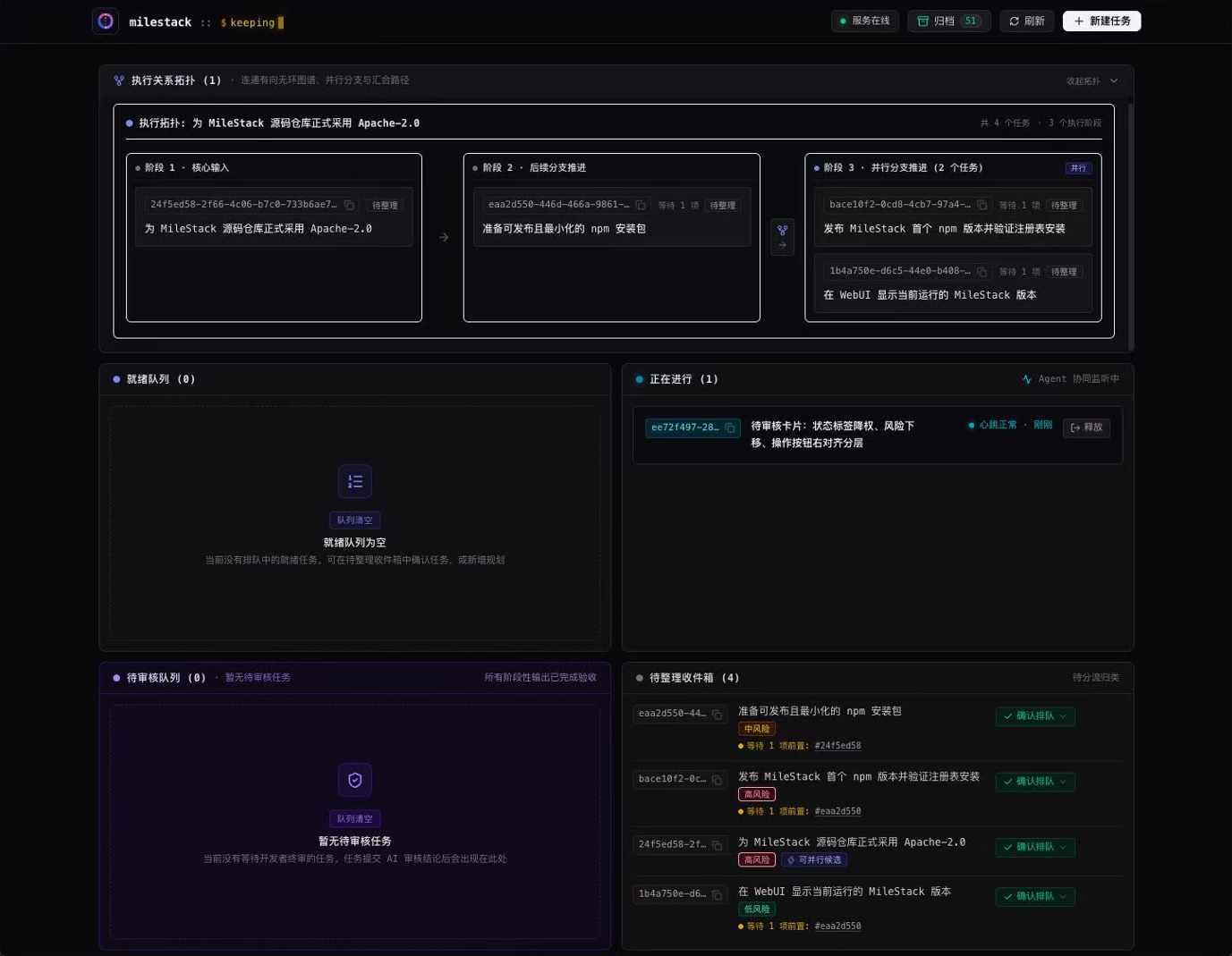
MileStack 解决什么问题
开发者通常会先与擅长深度推理的模型讨论需求和方案,但讨论结论很容易停留在对话里。随着项目在不同会话、模型和开发者之间切换,真实进度又会继续散落到 TODO、计划文档和交接记录中。这些信息很快就会互相矛盾,新的 Agent 必须先重新拼凑项目上下文,开发者也得反复确认哪份计划才是最新的。
MileStack 用一个共享、结构化的事实源代替这些临时进度文档:
- 开发者可以在一个页面看到当前工作、待办顺序、阻塞、审核项和最近完成的任务;
- 编程 Agent 有任务 ID 时直接读取指定任务;没有任务 ID 时通过 MCP 查询项目状态并选择队列中第一个可领取任务,然后建立本轮执行权、记录进展并留下交接信息;
- 任务依赖和执行凭证明确展示哪些工作可以开始,并避免两个会话同时执行同一任务;
- 每轮审核都绑定到确切的 Git commit,高风险工作仍由开发者把关;
- 所有数据都保存在项目本地的 SQLite 数据库中,不需要账号、云服务或远程数据库。
它如何融入开发流程
flowchart LR
    D[开发者与深度推理模型敲定需求和方案] --> T[AI 将共识创建为 MileStack 任务]
    T --> C[开发者确认风险与顺序]
    C --> I[开发者指定任务 ID,或 Agent 读取下一可领取任务]
    I --> W[执行 Agent 建立执行权、实施并提交]
    W --> Q[开发者把任务 ID 发给审核 Agent]
    Q --> R[审核与交接留在 MileStack]
    R --> N[下个会话从最新状态继续]
一个项目通常按下面的闭环推进:
- 开发者与擅长深度推理的模型讨论需求和方案,直到双方确认目标与边界。
- AI 调用 MileStack,将已经确认的结论整理成结构化任务,而不是让开发者逐条手工录入。
- 开发者检查 AI 创建的草稿任务,确认风险、依赖和执行顺序。
- 有任务 ID 时,实施 Agent 直接读取指定任务;没有任务 ID 时,它先查询项目状态,选择
next中第一个runnable = true的任务,再通过start_task建立本轮执行权。 - 实施 Agent 记录阶段成果、阻塞和交接上下文,并以固定 Git commit 提交。
- 开发者将任务 ID 发送给独立审核 Agent;审核 Agent 通过
start_review建立审核权并检查制品。 - 审核结果进入 MileStack,页面和下一个被分派的 Agent 会话随即看到最新状态。
三分钟开始使用
MileStack 需要 Node.js 22 或更高版本,以及请确保项目已初始化为 Git 仓库。
npm install -g milestack

cd /你的项目绝对路径
milestack init --client codex
milestack serve
然后打开 http://127.0.0.1:7331。
如需配置其他支持项目级 MCP 的客户端,可以把 codex 替换为 claude、cursor、grok 或 opencode;也可以重复传入 --client,一次配置多个客户端。AGY(Gemini CLI)使用动态项目发现,需要进行一次手动全局注册,详见用户指南。
最后,在项目根目录的 AGENTS.md 中加入下面这行,让编程 Agent 读取 MileStack 生成的工作流规则:
Before working on tasks, read and follow `.milestack/agent-instructions.md`.
初始化完成后重启编程客户端,并让它在开始工作前先查看 MileStack 项目状态。
你会得到什么
| 能力 | 带来的变化 | | --- | --- | | 统一的项目视图 | 当前任务、下一步、阻塞、草稿箱、待审核和已完成工作不再分散在多份文档里。 | | 跨会话接续 | 新 Agent 会话直接读取结构化任务上下文和语义历史,不必重放旧对话。 | | 感知依赖的队列 | 开发者决定执行顺序,MileStack 明确显示哪些任务现在真正可以开始。 | | 明确的选择与执行权 | Agent 优先处理开发者指定的任务;未指定时按队列选择下一可领取任务,并原子建立执行权。 | | 可审核的交付 | 每轮审核对应一个确切的 Git commit,执行权与审核权彼此分离。 | | 稳定的 Vibe Coding 心流 | 新需求先进入草稿箱,不会突然打断当前任务,当前进度和下一步都被保留下来,可以接着推进。 | | 清楚的多项目切换 | 每个项目都有独立的可视化进度页面,切换项目后也能迅速看清现状并下发任务,不必全靠大脑记忆。 | | 更小的 AI 实现偏差 | AI 将讨论结论整理成包含目标、约束和验收条件的结构化任务,相当于补全并增强了实施提示词,比临时在对话框中描述更完整。 |
支持的使用方式
- Web UI:管理待办队列、草稿箱、阻塞、审核和已完成任务。
- MCP:让编程 Agent 读取指定任务或查询下一可领取任务、建立执行或审核权、更新进度,并提交审核结果。
- CLI:初始化项目、查询状态、启动 MCP 和本地 Web 服务。
- HTTP API:供 Web UI 使用,并与 CLI、MCP 共享同一套任务行为。
目前,MileStack 的初始化流程已适配 Claude Code、Cursor、Grok、Codex、OpenCode 和 AGY;其他支持 MCP 的客户端可参考各自文档手动接入 MileStack。
进一步了解
许可证
MileStack 源码采用 Apache License 2.0 授权。
Related Skills
Agent-Reach
107.4kGive your AI agent eyes to see the entire internet. Read & search Twitter, Reddit, YouTube, GitHub, Bilibili, XiaoHongShu — one CLI, zero API fees.
taste-skill
107.4kAgent skills that give coding agents taste: art direction, reference images and a browser check instead of generic AI pages
headroom
78.5kCompress tool outputs, logs, files, and RAG chunks before they reach the LLM. 20% fewer tokens for coding agents, 60-95% fewer tokens for JSON, same answers. Library, proxy, MCP server.
ai-job-search
68.6kThe job search that runs on your machine. AI job application framework built on Claude Code: evaluate postings, tailor CVs, write cover letters, prep interviews. Fork it and own it.

Languages
Trust signals
From repository metadata: license, adoption, age and documentation. Not a code audit — see the Safety scan above for what the skill file itself contains.