
sugra-api-mcp
Sugra MCP: connector between LLM agents and world data. 1,600+ endpoints from 160+ primary sources across 36 data domains. Published in Anthropic's Connectors Directory for Claude. Also listed in OpenAI's Plugins Directory for ChatGPT and Codex.
Install / Use
claude mcp add Sugra-Systems -- npx -y github:Sugra-Systems/sugra-api-mcpIf the server publishes to npm under a different name, use that package instead — check the repo README.
MCP Server
Model Context Protocol server
Quality Score
Category
AI & Machine LearningSupported Platforms
Our assessment of sugra-api-mcp
sugra-api-mcp scores 75/100 on our quality scale, 846th of 956 AI & Machine Learning skills we index.
Its MCP Server is 31 KB long, well organised into 34 sections with 25 code examples: a thorough specification that gives an agent plenty to work with.
It has 3 GitHub stars, so there is little community track record yet; judge it on its content.
Maintenance, license and trust
- The repository was last updated today, so sugra-api-mcp is actively maintained.
- It is released under the MIT license, a permissive license that allows use, modification and commercial use with attribution.
- Its trust signals score 92/100, with 1 caution from licensing, adoption, age or documentation. These come from repository metadata, not a code audit — read the skill file before letting an agent act on it.
sugra-api-mcp compared with similar skills
All 4 of these similar skills score higher than sugra-api-mcp; compare them before choosing.
| Skill | Score | Stars | Updated | Format |
|---|---|---|---|---|
| sugra-api-mcp (this skill)by Sugra-Systems | 75 | 3 | today | MCP Server |
| claude-memby thedotmack | 100 | 96.6k | today | CLAUDE.md |
| Agent-Reachby Panniantong | 100 | 91.8k | 20d ago | CLAUDE.md |
| Understand-Anythingby Egonex-AI | 100 | 85.4k | 4d ago | CLAUDE.md |
| headroomby headroomlabs-ai | 100 | 74.5k | today | CLAUDE.md |
Frequently asked questions
- How do I install sugra-api-mcp?
- Run
claude mcp add Sugra-Systems -- npx -y github:Sugra-Systems/sugra-api-mcp. The install tabs above show the steps for each supported agent. - Which AI agents does sugra-api-mcp work with?
- It is written for Claude Code, Claude Desktop and OpenAI Codex, as a MCP Server file. Other agents that read the same format can often use it too.
- Is sugra-api-mcp safe to use?
- It is MIT-licensed and scores 92/100 on trust signals. Skills are instructions an agent will follow, so read the file before installing it and do not approve commands you do not understand.
- Is sugra-api-mcp still maintained?
- The repository was last updated today, so sugra-api-mcp is actively maintained.
Skill content
View source on GitHubsugra-api-mcp
<!-- mcp-name: ai.sugra/api-mcp --> <p align="center"> <img src="https://app.sugra.ai/images/brand/sugra-app-icon.svg" alt="sugra.ai" width="112" height="112" /> </p> <p align="center"> <a href="https://pypi.org/project/sugra-api-mcp/"><img src="https://img.shields.io/pypi/v/sugra-api-mcp?label=PyPI&color=F5A623" alt="PyPI"></a> <a href="https://pypi.org/project/sugra-api-mcp/"><img src="https://img.shields.io/pypi/pyversions/sugra-api-mcp?label=Python" alt="Python versions"></a> <a href="https://github.com/Sugra-Systems/sugra-api-mcp/blob/main/LICENSE"><img src="https://img.shields.io/github/license/Sugra-Systems/sugra-api-mcp?label=License" alt="License"></a> <a href="https://smithery.ai/servers/sugra-systems/sugra-api"><img src="https://smithery.ai/badge/sugra-systems/sugra-api" alt="Smithery"></a> </p> <p align="center"> <a href="https://url.sugra.ai/claude"><img src="https://img.shields.io/badge/Add_to_Claude-F5A623?style=for-the-badge" alt="Add to Claude"></a> <a href="https://url.sugra.ai/openai"><img src="https://img.shields.io/badge/Add_to_ChatGPT-F5A623?style=for-the-badge" alt="Add to ChatGPT"></a> </p> <p align="center"> <sub>Published in Anthropic's Connectors Directory. Available in Claude on the web, desktop and mobile, Claude Code and Cowork.</sub><br> <sub>Published in the official OpenAI Plugins Directory. Available for ChatGPT and Codex.</sub> </p>Give any AI agent access to 1,600+ data endpoints across markets, economics, companies, government, news, climate, maritime and entity screening - through one MCP server.
Works with ChatGPT, Claude, Gemini, xAI, Cursor, VS Code and any MCP client.
Official Model Context Protocol server for the Sugra API: one connector, a bundled endpoint catalog, and structured tool results with source attribution on every answer.
See it in action
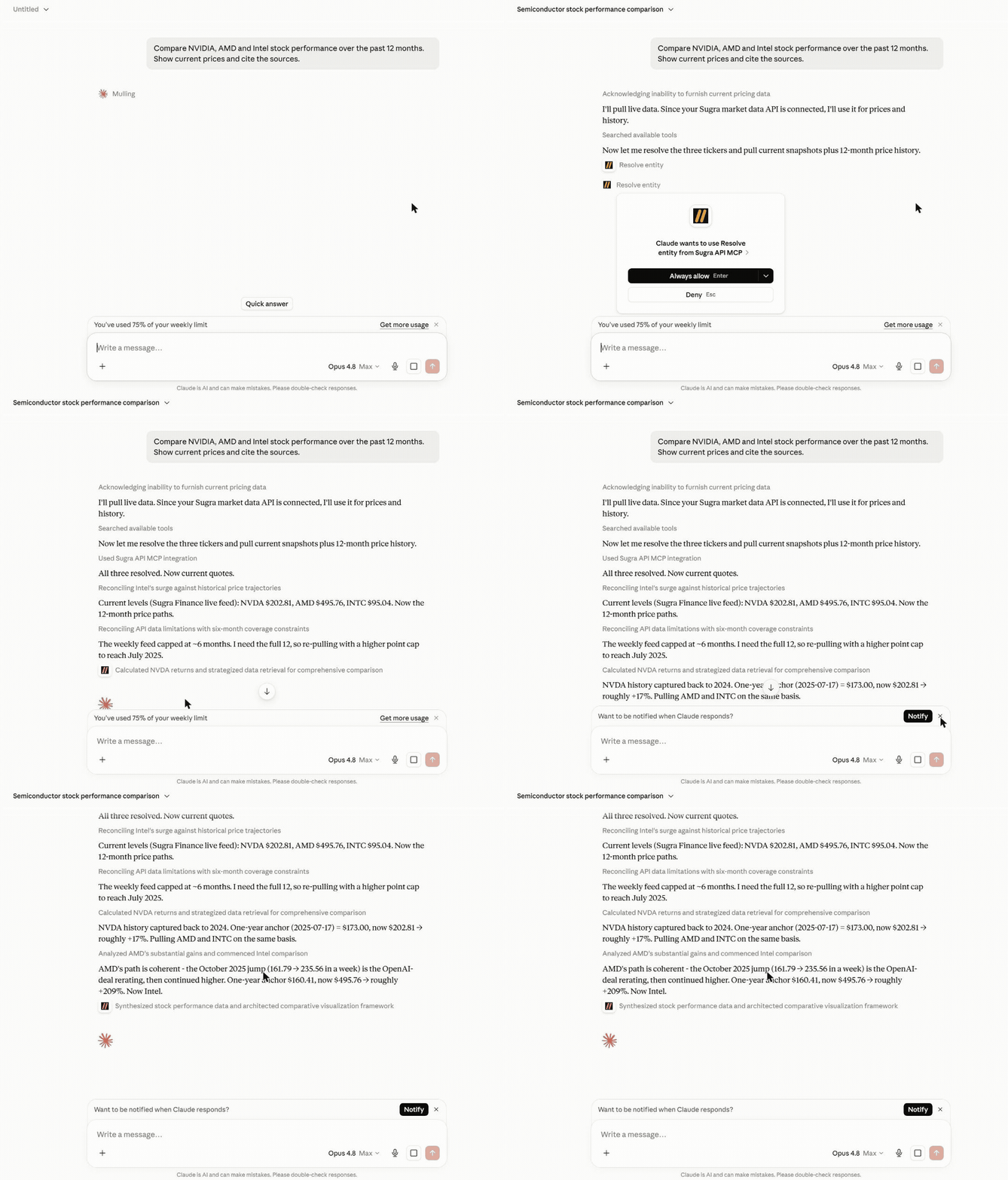
An agent answering a real question end to end - resolving entities, pulling live snapshots and history, and citing the source and freshness on every number:
More examples:
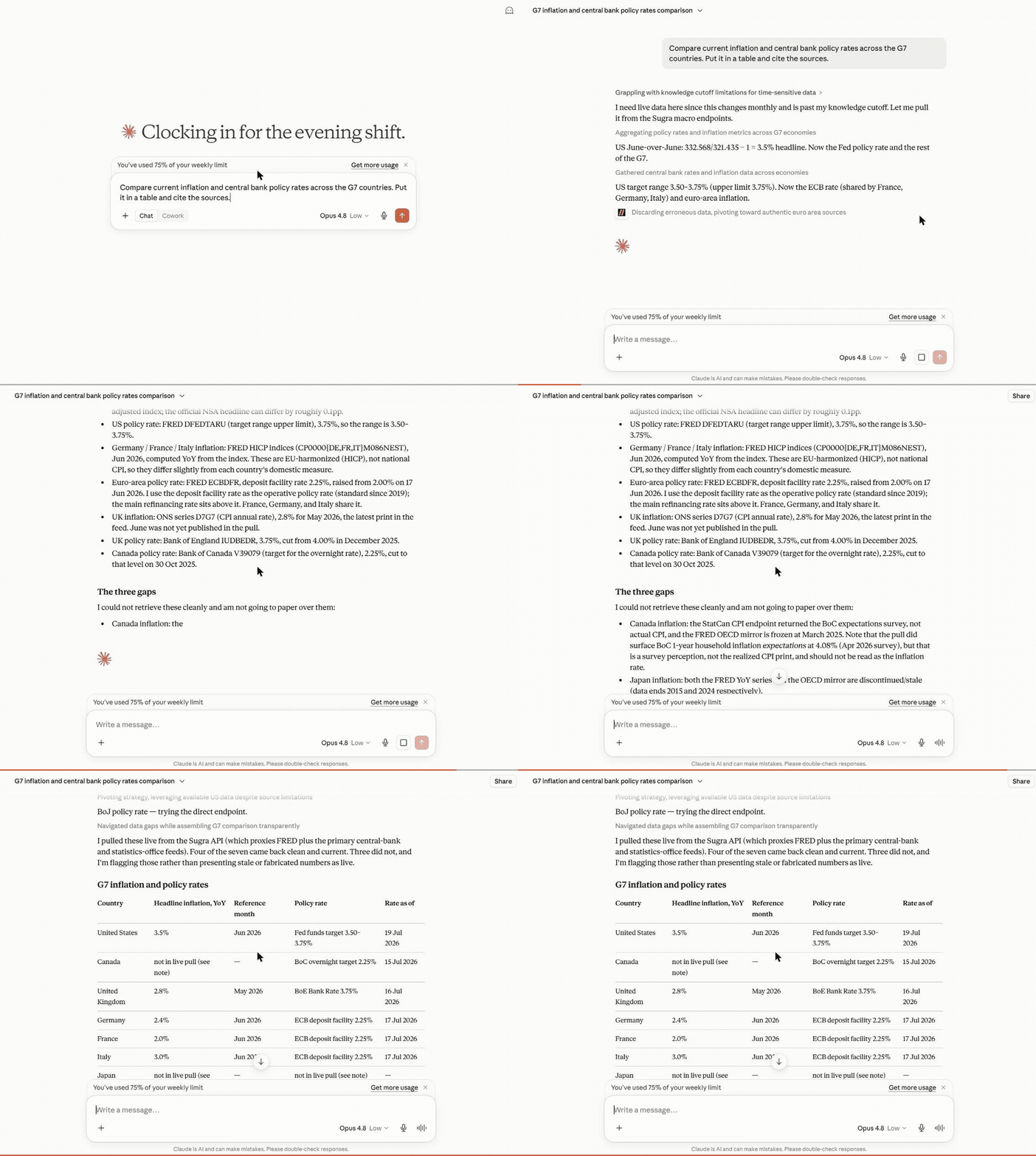
Macro research - one prompt builds a full G7 inflation and policy-rate table, each cell dated and sourced, with the unavailable ones flagged rather than faked:
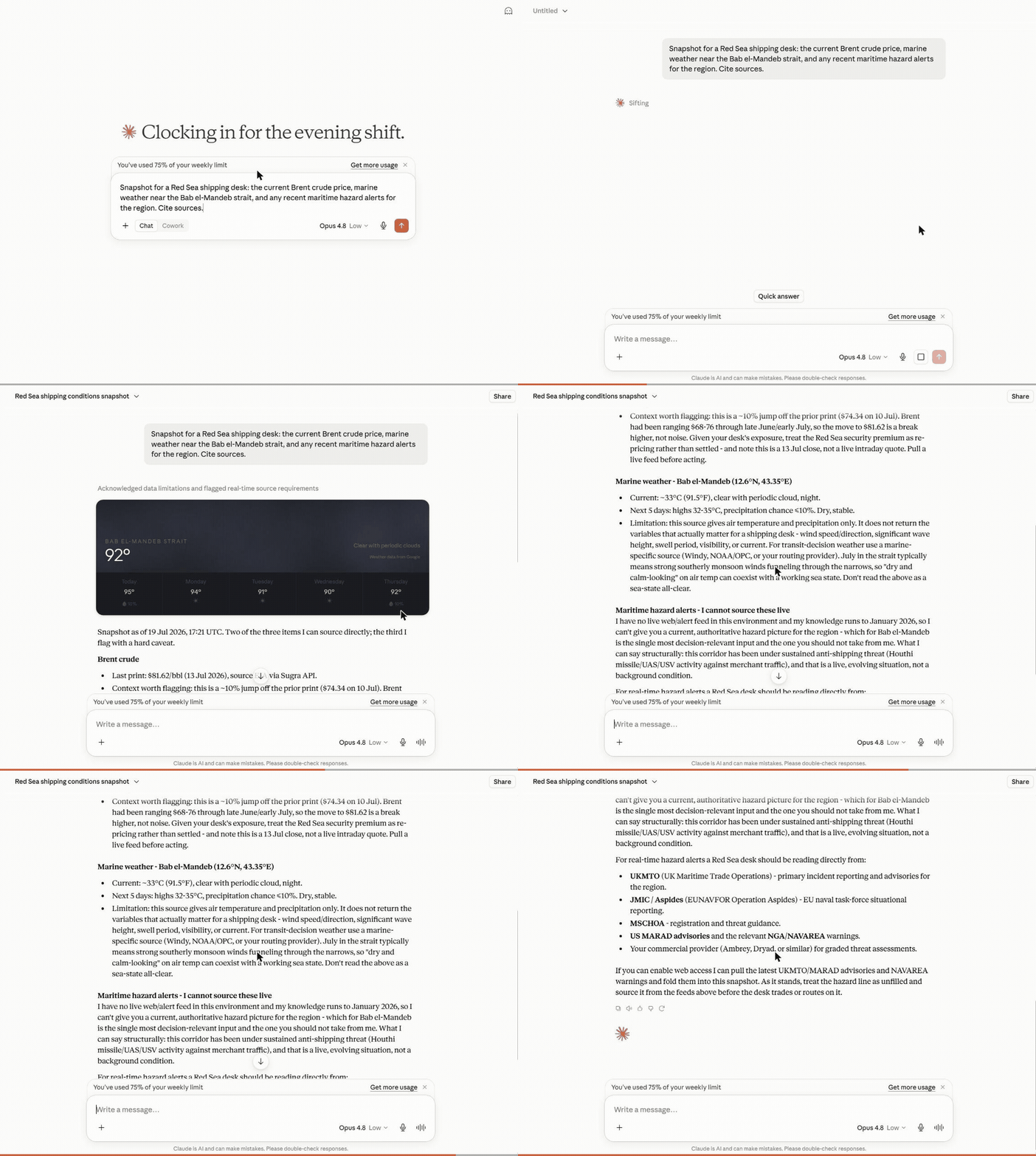
Cross-domain snapshot - Brent crude, marine weather and regional risk pulled together for a shipping desk, each with its source and timestamp:
What a session looks like
Hosted MCP transcript (the three composed tools shown here run on the hosted endpoint). Captured example - wording and figures vary by run and as new BLS data is published:
User: Where does US inflation stand, and how has it trended over the past year?

resolve_entity("US inflation")
  -> macro indicator cpi_us (U.S. Bureau of Labor Statistics)
get_snapshot("cpi_us")
  -> latest reading with freshness, provenance and quota cost
get_timeseries("cpi_us", metric="macro_series", range="1y")
  -> 12 monthly points with an explicit downsampling flag

Agent: US CPI printed 2.9% year over year in the latest release, down from
3.5% twelve months earlier - a steady decline since spring.
Source: U.S. Bureau of Labor Statistics via the Sugra API.
Every tool result carries structured metadata - source attribution, freshness, and rate-limit cost - so agents can cite sources and budget requests instead of guessing.
How it works
flowchart LR
    A["AI agent<br/>(ChatGPT, Claude, Gemini, xAI, IDEs)"] --> B["Sugra MCP<br/>gateway tools, plus agent tools when hosted"]
    B --> C["Sugra API<br/>1,600+ endpoints, 36 data domains"]
    C --> D["160+ primary sources<br/>markets, economics, government,<br/>news, climate, maritime"]
Behind the gateway sits the Sugra API: 160+ primary sources - sovereign statistics agencies, central banks, intergovernmental bodies and more - feeding 1,600+ endpoints across 36 data domains. The server ships a bundled catalog of the full endpoint surface, so discovery (search, describe, toolsets) runs locally without network calls; only actual data requests hit the API.
What agents build with it
The Sugra API skills live in Sugra-Systems/sugra-api-skills. The server serves five of them as MCP resources (sugra://skills/...) from a pinned commit of that repository: resources/read the URI after connect.
Agent skills
These skills teach the catalog loop. They do not add MCP tools. Connect the Sugra MCP server separately (hosted or local). The plugin package for each agent lives in Sugra-Systems/sugra-api-plugins.
Claude Code
/plugin marketplace add Sugra-Systems/sugra-api-plugins
/plugin install sugra-api@sugra-api-plugins
Skills appear as /sugra-api:<skill>, for example /sugra-api:discover-and-call.
Codex
codex plugin marketplace add Sugra-Systems/sugra-api-plugins
codex plugin add sugra-api@sugra-api-plugins
Grok
grok plugin install Sugra-Systems/sugra-api-plugins#xai
Cursor, Gemini CLI and other agents
npx skills add https://mcp.sugra.ai
Or copy the skill folders of sugra-api-skills into the agent's skills directory.
ChatGPT
The skills install from OpenAI's Plugins Directory. The MCP server attaches as a hosted connector at https://mcp.sugra.ai/mcp (permanent alias https://app.sugra.ai/mcp).
Six workflow prompts ship with the server and turn these into one-click flows in clients that surface MCP prompts:
- Market and macro research - "Compare inflation and central bank policy rates across the G7." (
macro_briefing) - Equity snapshots with sources - "Where does NVIDIA stand today - price, profile, and market backdrop?" (
market_snapshot) - Sanctions and compliance screening - "Screen this supplier and resolve its LEI identity." (
sanctions_screening) - Sector comparison - "Energy versus technology: valuations and flows side by side." (
sector_compare) - Climate, maritime and trade intelligence - "Red Sea shipping this week: chokepoint transits, crude price, and weather on the route." (
earth_conditionsplus the transport and commodities catalog) - Source discovery - "What does the catalog offer for fixed income, and from which institutions?" (
source_overview)
Every answer carries source attribution and freshness metadata, so agents cite instead of guessing.
Hosted MCP (recommended)
No install. In Claude, ChatGPT and Codex, add the Sugra API MCP server from a directory:
- Claude (web, desktop, mobile, Claude Code and Cowork): Add to Claude opens the Sugra API MCP server in Anthropic's Connectors Directory; connect it and sign in with your Sugra account. In claude.ai the directory is under Customize > Connectors. Claude Code signed in with a claude.ai account picks the connector up automatically;
/mcplists it. - ChatGPT and Codex: Add to ChatGPT opens the Sugra API MCP server in the OpenAI Plugins Directory.
Any other MCP client, or a manual setup, points at the hosted Streamable HTTP endpoint:
https://mcp.sugra.ai/mcp
- The gateway tools plus the composed agent tools
resolve_entity,get_snapshotandget_timeseries - OAuth sign-in through the Claude and ChatGPT connector flows, or
Authorization: Bearer sugra_xxx_...with an API key - As a custom connector in claude.ai: Customize -> Connectors -> Add custom connector
- In ChatGPT: Settings -> Connectors -> Add MCP server
Already added Sugra to Claude as a custom connector? That connection keeps working and shows under "Custom". Connecting the Sugra API MCP server from the directory as well gives you two connections, so remove the custom one first, then connect from the directory.
Local package
Runs on your machine over stdio (or self-hosted HTTP) with an API key:
pip install sugra-api-mcp
- Eight gateway tools
- stdio for desktop clients and IDEs, Streamable HTTP for self-hosting
- Authenticates with
SUGRA_API_KEY
Get a free API key at app.sugra.ai/register (Free tier: 50 req/day).
Quick start
pip install sugra-api-mcp
export SUGRA_API_KEY=sugra_xxx_...   # free key: app.sugra.ai/register
sugra-api-mcp call quotes_symbol_price --params '{"symbol":"AAPL"}'
The same call through an agent: connect the server to your client (next section) and ask "What is AAPL trading at? Use Sugra." The agent finds quotes_symbol_price in the catalog and calls it with the symbol.
Connect your client
Supported clients:
- Anthropic Claude: Claude Desktop, Claude Code (CLI), claude.ai (web)
- OpenAI GPT: ChatGPT (via MCP connector)
- Google Gemini: Gemini CLI, Gemini Code Assist (VS Code + JetBrains)
- xAI: Remote MCP Tools in xAI SDK and Responses API
- IDEs: VS Code (native), Cursor, Zed, Cline, Continue.dev, Windsurf
- Custom agents: anything built on the Python or TypeScript MCP SDK
Claude Desktop (stdio)
Add to claude_desktop_config.json:
- macOS:
~/Library/Application Support/Claude/claude_desktop_config.json - Windows:
%APPDATA%\Claude\claude_desktop_config.json - Linux: Claude Desktop has no Linux build. On Linux,
pip install sugra-api-mcpand use Claude Code (CLI), an IDE client, or the hosted HTTP endpoint below.
{
  "mcpServers": {
    "sugra": {
      "command": "sugra-api-mcp",
      "env": {
        "SUGRA_API_KEY": "sugr…[redacted]"
      }
    }
  }
}
Restart Claude Desktop. Sugra tools appear in the tools menu.
Claude Code (Anthropic CLI)
Signed in to Claude Code with a claude.ai account? Add to Claude connects the Sugra API MCP server from the Connectors Directory in claude.ai, and it appears in /mcp without any local install. To run the local package instead:
claude mcp add sugra -- sugra-api-mcp
# then set the env var that sugra-api-mcp reads
export SUGRA_API_KEY=sugra_xxx_...
Or edit ~/.claude/config.json manually with the same shape as Claude Desktop above.
To install the skills as a plugin (separate from the MCP server):
/plugin marketplace add Sugra-Systems/sugra-api-plugins
/plugin install sugra-api@sugra-api-plugins
Usage with Gemini CLI
Gemini CLI reads MCP servers from ~/.gemini/settings.json (user scope) or
.gemini/settings.json in the project. For a local stdio install, add:
{
  "mcpServers": {
    "sugra": {
      "command": "sugra-api-mcp",
      "env": {
        "SUGRA_API_KEY": "sugr…[redacted]"
      }
    }
  }
}
If the console script is not on PATH, use "command": "python" with
"args": ["-m", "sugra_api_mcp"] instead. The equivalent Gemini CLI command
is:
gemini mcp add --scope user -e SUGRA_API_KEY=sugr…[redacted] sugra sugra-api-mcp
Or connect to the hosted endpoint without installing the package:
gemini mcp add --scope user --transport http \
  --header "Authorization: Bearer sugra_xxx_yourkey..." \
  sugra https://app.sugra.ai/mcp
Run gemini mcp list to check the connection, then enter /mcp in an
interactive session to inspect the available tools. A local stdio connection
sh
Truncated for display — read the full file on GitHub.
Related Skills
claude-mem
96.6kPersistent Context Across Sessions for Every Agent – Captures everything your agent does during sessions, compresses it with AI, and injects relevant context back into future sessions. Works with Claude Code, OpenClaw, Codex, Gemini, Hermes, Copilot, OpenCode + More
Agent-Reach
91.8kGive your AI agent eyes to see the entire internet. Read & search Twitter, Reddit, YouTube, GitHub, Bilibili, XiaoHongShu — one CLI, zero API fees.
Understand-Anything
85.4kGraphs that teach > graphs that impress. Turn any code into an interactive knowledge graph you can explore, search, and ask questions about. Works with Claude Code, Codex, Cursor, Copilot, Gemini CLI, and more.
headroom
74.5kCompress tool outputs, logs, files, and RAG chunks before they reach the LLM. 20% fewer tokens for coding agents, 60-95% fewer tokens for JSON, same answers. Library, proxy, MCP server.

Languages
Trust signals
From repository metadata: license, adoption, age and documentation. Not a code audit — see the Safety scan above for what the skill file itself contains.