
Gapi
Inspired by Angular intended to provide complex Nodejs Graphql Backend applications with minimum effort.
Install / Use
/learn @Stradivario/GapiREADME
@gapi

Really easy GraphQL API framework build on top of NodeJS inspired by @Angular
Build with @rxdi - reactive Extension Dependency Injection Container working inside Browser and Node
Created to provide complex backend scalable applications with minimum effort.
For questions/issues you can write ticket here
<!-- <p align="center"> -->Starting project for less than 1 minute via Gapi-CLI
<!-- <img width="400" style="margin:0 auto;text-align:center" alt="portfolio_view" src="https://raw.githubusercontent.com/Stradivario/gapi-cli-docs/master/src/assets/images/cli-logo.png"> </p> -->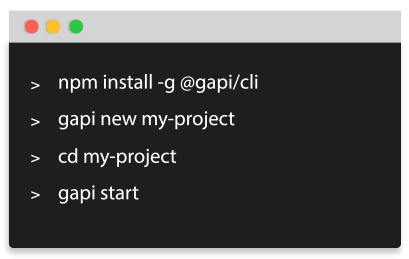
Heroku Ready!

Basic starter project has Heroku Easy Deploy Button!
Amazon ServerLess Ready!
Part of the frameworks and techniques used without which Gapi would not exist :love_letter:
- Inversion of control pattern IOC explanation taken from this article:
IoC Containers are DI frameworks that can work outside of the programming language. In some you can configure which implementations to use in metadata files (e.g. XML) which are less invasive. With some you can do IoC that would normally be impossible like inject an implementation at pointcuts.
-
Pointcuts - aspect-oriented computer programming
Advanced Starter Example and production build
Video Tutorials
Starting tutorial with some explanation
Easy-starter-in-2-mins-installation-with-cli
Advanced-starter-in-2-mins-installation-with-cli
Start gapi a graphql server with Workers advanced(DOCKER)
Start gapi a graphql server with Workers in 2 minutes(DOCKER)
Integrated external modules:
@Gapi-Typescript-Sequelize
@Gapi-Angular-Client
@Gapi-Amqp-PubSub (Internally)
@Gapi-Onesignal-Notifications
@Gapi-Sequelize
@Gapi-voyager
Installation and basic examples:
To install this library, run:
npm install @gapi/core
Simplest Gapi server
import { CoreModule } from '@gapi/core';
import { Controller, Module, Bootstrap } from '@rxdi/core';
import { Query, Type } from '@rxdi/graphql';
import { GraphQLObjectType, GraphQLInt, GraphQLNonNull } from 'graphql';

export const UserType = new GraphQLObjectType({
  name: 'UserType',
  fields: () => ({
    id: {
      type: GraphQLInt,
    },
  }),
});

@Controller()
export class UserQueriesController {
  @Type(UserType)
  @Query({
    id: {
      type: new GraphQLNonNull(GraphQLInt),
    },
  })
  findUser(root, { id }, context): UserType {
    return { id: id };
  }
}

@Module({
  imports: [CoreModule.forRoot()],
  controllers: [UserQueriesController],
})
export class AppModule {}

Bootstrap(AppModule).subscribe();
You need to create tsconfig.json with following content
{
  "compilerOptions": {
    "emitDecoratorMetadata": true,
    "experimentalDecorators": true
  }
}
Execute
ts-node index.ts
Or execute the following command to set these options on runtime:
export TS_NODE_COMPILER_OPTIONS='{"experimentalDecorators": true, "emitDecoratorMetadata": true}' &&
ts-node index.ts --compilerOptions $TS_NODE_COMPILER_OPTIONS
To add configuration click here
Graphql Federation
https://github.com/Stradivario/gapi/tree/master/packages/federation
import { FederationModule } from '@gapi/federation';
import { Bootstrap } from '@rxdi/core';

Bootstrap(
  FederationModule.forRoot({
    port: 4000,
    willSendRequest({ request, context }) {
      request.http.headers.set('authorization', context.headers.authorization);
    },
    serviceList: [
      { name: 'accounts', url: 'http://localhost:9000/graphql' },
      { name: 'products', url: 'http://localhost:9001/graphql' },
    ],
  }),
).subscribe(() => console.log('started'));
Or
import { ApolloServer } from 'apollo-server';
import { ApolloGateway, RemoteGraphQLDataSource } from '@apollo/gateway';

const serviceList = [
  {
    name: 'accounts',
    url: 'http://localhost:9000/graphql',
  },
];

class AuthenticatedDataSource extends RemoteGraphQLDataSource {
  willSendRequest({ request, context }) {
    request.http.headers.set('authorization', context.authorization);
  }
}
const gateway = new ApolloGateway({
  serviceList,
  buildService: ({ url }) => new AuthenticatedDataSource({ url }),
  __exposeQueryPlanExperimental: true,
});

(async () => {
  const server = new ApolloServer({
    gateway,
    engine: false,
    context: ({
      req: {
        headers: { authorization },
      },
    }) => ({ authorization }),
    subscriptions: false,
  });

  const { url } = await server.listen({ port: 4000 });
  console.log(`🚀 Apollo Gateway ready at ${url}`);
})();
With CLI
Next create project using CLI or read above how to bootstrap your custom application
Consuming gapi
First we need to install ts-node and nodemon globally
npm install -g nodemon ts-node
Next install gapi globally using npm
npm install @gapi/cli -g
To skip the following steps creating project and bootstraping from scratch you can type the following command:
It may take 20 seconds because it will install project dependencies.

Basic project
gapi new my-project

Advanced Project
gapi new my-project --advanced

Microservices Project
To create new basic project with microservices from scratch via CLI type:
gapi new my-project --microservices

Serverless Basic Project
To create new basic serverless project without ORM from scratch via CLI type:
gapi new my-project --serverless

Serverless Advanced Project
To create new advanced serverless sequelize project from scratch via CLI type:
gapi new my-project --serverless-sequelize
Enter inside my-project and type:
npm start
Open browser to
http://localhost:9000/altair
Testing
To start developing with testing GAPI uses JEST and @gapi/cli is preconfigurated for your needs! :)
To run single test type:
gapi test
Testing watch mode
Note: You need to start server before running tests
Note: Everytime you make change to server it will restart server and execute tests
Note: To add more tests just create e2e.spec.ts or unit.spec.ts somewhere inside the application
Start the application
gapi start
Execute test with --watch argument
gapi test --watch
You will end up with something like this

Custom logic before testing ( for example creating MOCK users to database before testing)
Create file test.ts inside root/src/test.ts with this content
Everytime you run test with --before argument it will set environment variable BEFORE_HOOK
if (process.env.BEFORE_HOOK) {
  // do something here
}
