
Eepp
eepp is an open source cross-platform game and application development framework heavily focused on the development of rich graphical user interfaces.
Install / Use
/learn @SpartanJ/EeppREADME
eepp - Entropia Engine++
eepp is an open source cross-platform game and application development framework heavily focused on the development of rich graphical user interfaces.





Features
Cross platform functionality
-
Official support for Linux, Windows, macOS, FreeBSD, Haiku, Android and iOS.
-
Exports to HTML5 using emscripten with some minor limitations.
UI Module
-
Base widgets to manage the app/game objects as nodes, with all basic input interaction events ( clicks, keypress, mouser over, focus, etc ).
-
Fully featured UI system, animation support, scaling, rotating, clipping, events, messages, etc.
-
Themes and skins/decorations support.
-
Pixel density support ( scaling of UI elements defined by the pixel density of the screen ).
-
All the basic widgets are implemented ( button, textbox, combobox, inputbox, menu, listbox, scrollbars, etc ).
-
Draw invalidation support. It can be used to make real apps, with low resource usage ( only redraws when is needed ).
-
Layout system similar to Android layouts ( LinearLayout, RelativeLayout, GridLayout ).
-
Advanced features as text selection, copy and paste, and key bindings.
-
Load and style layouts from XMLs
-
Styling with Cascading Style Sheets
Graphics Module
-
Renderers for OpenGL 2 ( fixed-pipeline ), OpenGL 3 ( programmable-pipeline ), OpenGL ES 2, OpenGL ES 1, and OpenGL Core Profile.
-
Batch Renderer ( all the rendering is automatically batched by the engine ).
-
Fonts support ( TrueType, BMFont and XNA Fonts ).
-
Frame Buffer support.
-
Shaders support ( with automatic fixed pipeline shaders to programmable conversor ).
-
Vertex Buffer Object support.
-
Particle System.
-
Extendable Console.
-
Animated Sprites.
-
Texture Atlas support ( automatic creation and update of the texture atlas, editor included ).
-
Clipping Masks ( stencil, scissors, planes )
-
Nine Patch resizable bitmaps support.
-
Primitives drawables.
-
Many image formats supported ( included rasterized SVG ), compressed textures support ( direct upload to the GPU when possible ).
Window Module
-
Backend based module, this means that you can easily create a backend for the window/input handling.
-
Currently supports SDL 2 as backend.
-
Clipboard support.
-
Hardware cursors.
-
Display Manager
-
Joystick support.
Audio Module
- OpenAL audio engine with extendable file format support. Read and write support for OGG and Wav, and read support for MP3 and FLAC.
System Module
-
Provides all the basics stuffs for the full multi-threading support of the library, file formats support for packing, clocks, resource manager, translator, and much more.
-
Virtual File System class ( abstract assets providers into a single virtual file system, abstracting zip files and local file system into one for transparent load of resources, similar to PhysicsFS ).
Core Module
-
Customizable Memory Manager. Used by default in debug mode to track memory leaks.
-
UTF8, UTF-16, UTF-32, Ansi, Wide Char support.
-
String class using UTF-32 chars internally.
-
Debug macros
Math Module
-
General purpose functions and templates ( vector, quad, polygon, etc ).
-
Interpolation classes with easing.
-
Some minor math utilities, include Mersenne Twister random number generator implementation, perlin noise and more.
Network Module
-
Web Requests with HTTP client, with TLS support ( provided by mbedtls or openssl ).
-
Asynchronous HTTP requests.
-
File Transfers with FTP client and FTPS client ( FTP with explicit TLS ).
-
TCP and UDP sockets.
-
HTTP Content-Encoding and Transfer-Encoding support.
-
HTTP Proxy Support.
-
HTTP Compressed response support.
-
Also HTTP resume/continue download support and automatic follow redirects.
Scene Module
-
Node based system for easy management of scenes.
-
Full control of node events ( clicks, mouse over, focus, etc ).
-
Event system.
-
Node Message system.
-
Programmable actions for nodes ( fade, rotate, move, scale, etc ).
Physics Module (optional)
- Full OOP chipmunk physics wrapper.
Maps Module (optional)
-
Tiled Maps with software dynamic lights.
-
Full featured map editor.
Tools
-
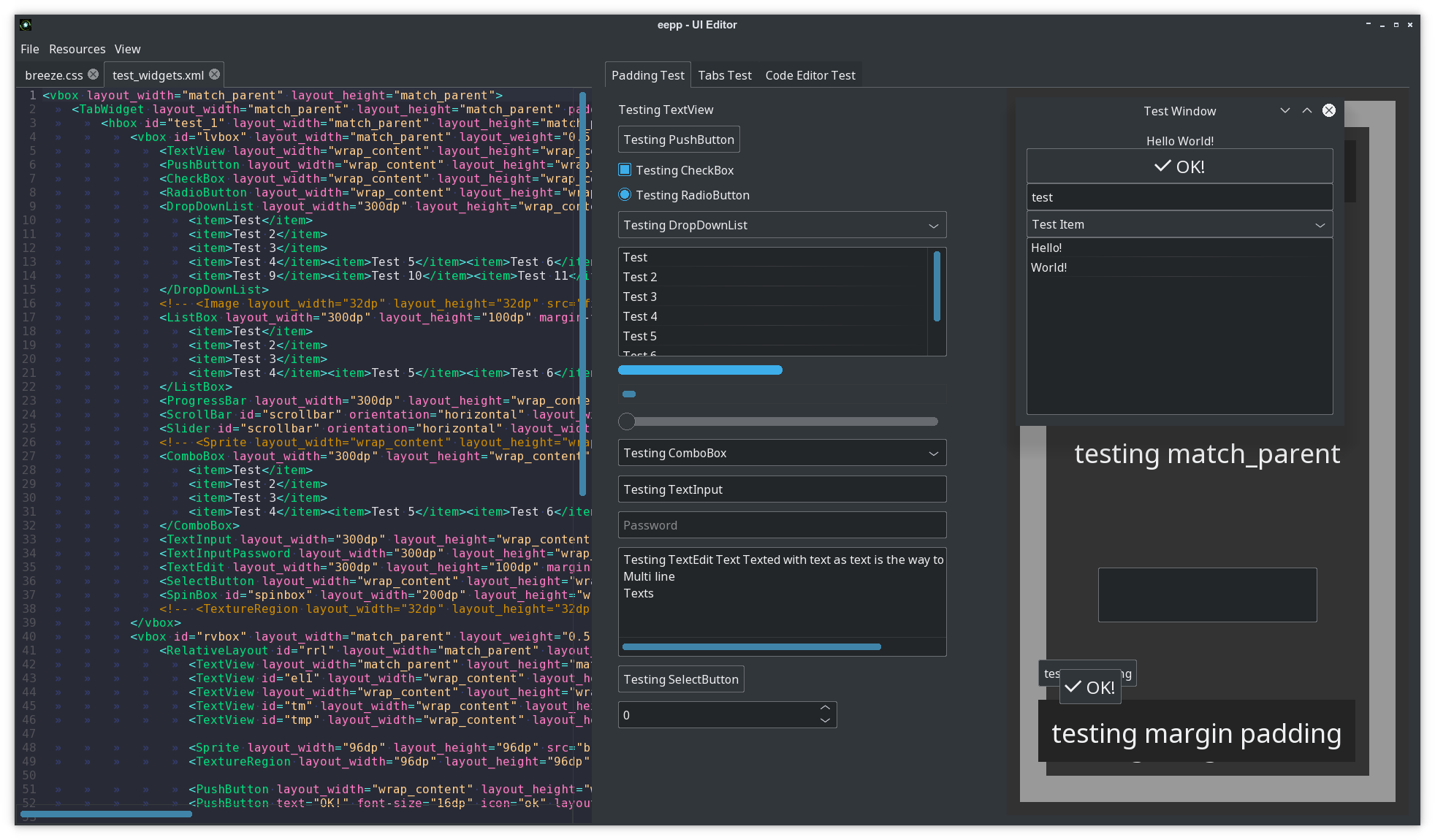
Very simple UI Editor. Load layouts from an XML file and see the changes being made in real time.
-
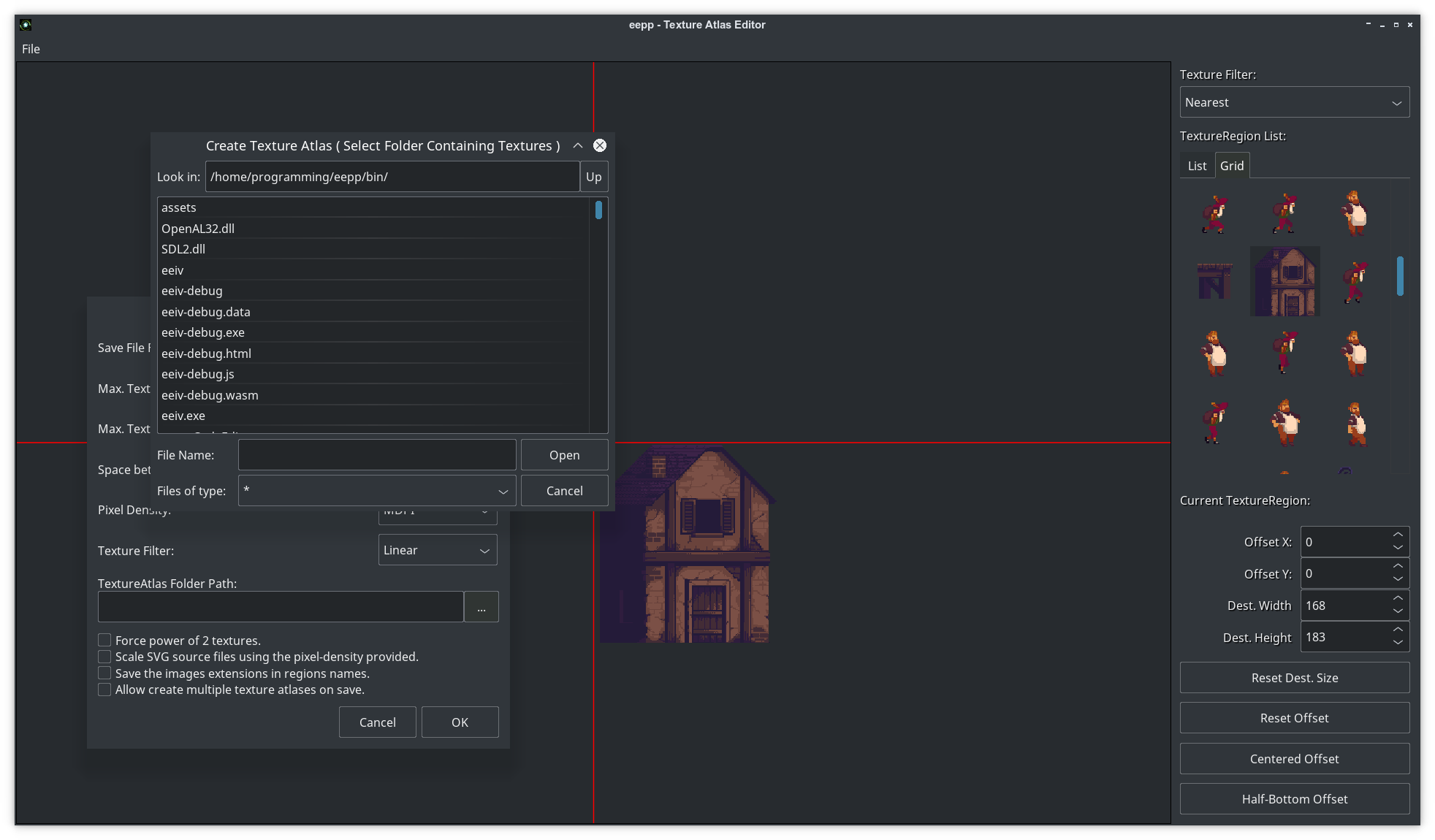
Texture Atlas Editor. A very simple tool to allow the developer to create and edit texture atlases.
-
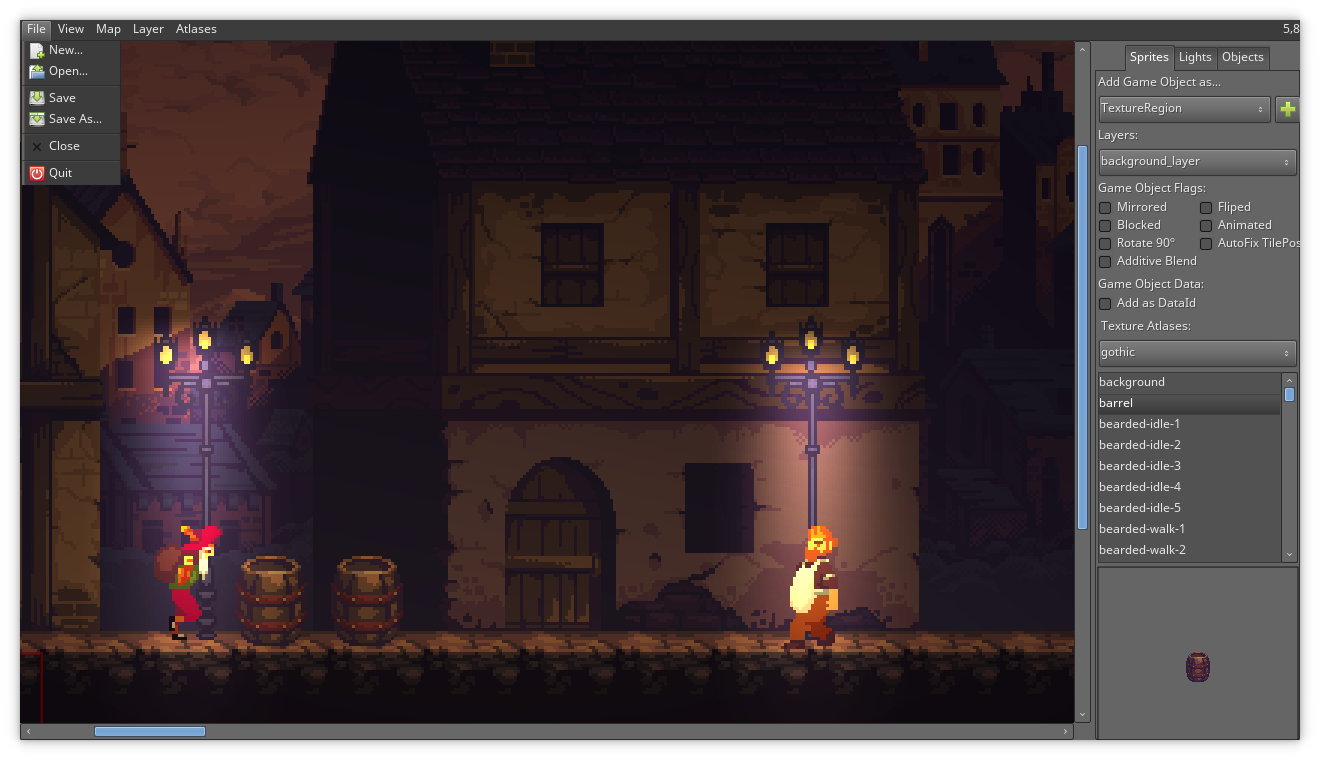
Map Editor: A advanced but simple map editor for the game engine. It lacks several features since I didn't have the time to work on it, this particular tool will probably die in favor of TMX map support in the near future ( but i'm not a fan of TMX maps, so there's no decision for the moment ).
General Features
- Support for multi-threaded resource loading ( textures, sounds, fonts, etc ).
Documentation
Documentation is located here. I'm currently working
on improving it. About 50% of the project is currently documented so still needs
a lot of work. Please check the code examples located in src/examples and you
can also check out the test ( src/test ) and tools ( src/tools ).
I'm putting my efforts on improving the documentation on the UI module since currently is the most important and complex module but lacks of proper documentation. If you have any question you can contact me anytime.
Getting the code
The repository uses git submodules so you'll need to clone the repository and its submodules, in order to achieve this easily you can simply clone with:
git clone --recurse-submodules https://github.com/SpartanJ/eepp.git
UI Screenshots
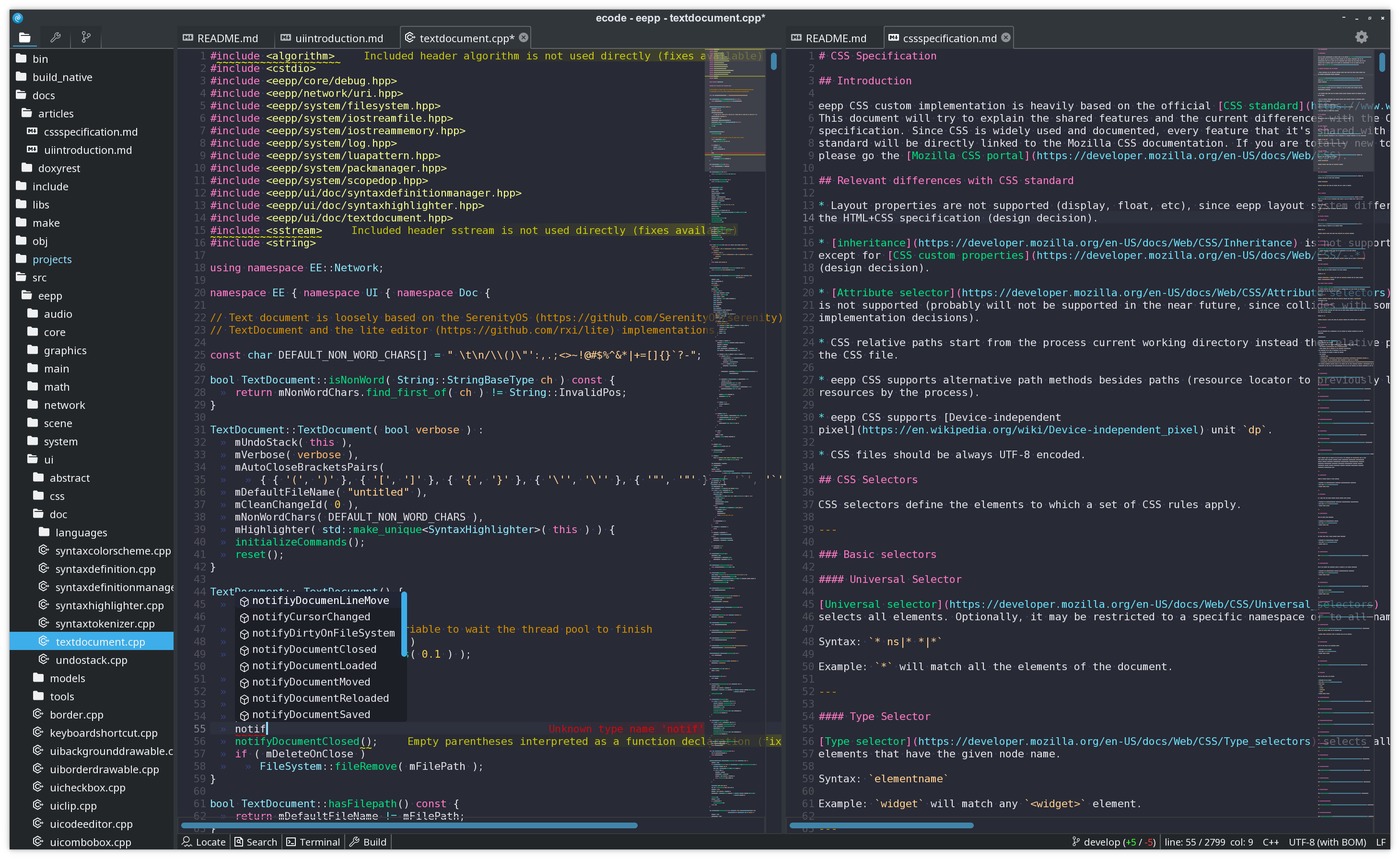
ecode - Code Editor
ecode is a code editor inspired in lite. It's using the newest pure CSS theme based on the default Plasma dark theme: Breeze Dark.
UI Editor
Editor that displays in real-time the changes on any layout and CSS to help speed up the development of user interfaces. In the screenshot is displaying some of the default widgets available in eepp.
Texture Atlas Editor
Small tool, used to create and edit texture atlases.
Map Editor
2D map editor using the default skinned theme (using a single texture atlas with 9-patch images).
UI Layout XML example
It should look really familiar to any Android developer. This is a window with the most basic widgets in a vertical linear layout display.
<window layout_width="300dp" layout_height="300dp" window-flags="default|maximize|shadow">
  <LinearLayout id="testlayout" orientation="vertical" layout_width="match_parent" layout_height="match_parent" layout_margin="8dp">
	<TextView text="Hello World!" gravity="center" layout_gravity="center_horizontal" layout_width="match_parent" layout_height="wrap_content" backgroundColor="black" />
	<PushButton text="OK!" textSize="16dp" icon="ok" gravity="center" layout_gravity="center_horizontal" layout_width="match_parent" layout_height="wrap_content" />
	<Image src="thecircle" layout_width="match_parent" layout_height="32dp" flags="clip" />
	<Sprite src="gn" />
	<TextInput text="test" layout_width="match_parent" layout_height="wrap_content" />
	<DropDownList layout_width="match_parent" layout_height="wrap_content" selectedIndex="0">
	  <item>Test Item</item>
	  <item>@string/test_item</item>
	</DropDownList>
	<ListBox layout_width="match_parent" layout_height="match_parent" layout_weight="1">
	  <item>Hello!</item>
	  <item>World!</item>
	</ListBox>
  </LinearLayout>
</window>
UI introduction can be found here.
UI Widgets with C++ example
How does it look with real code?
UITextView::New()->setText( "Text  on  test  1" )
		 ->setCharacterSize( 12 )
		 ->setLayoutMargin( Rect( 10, 10, 10, 10 ) )
		 ->setLayoutSizePolicy( SizePolicy::MatchParent, SizePolicy::WrapContent )
		 ->setParent( layout );
UI Styling
Element styling can be done with a custom implementation of Cascading Style Sheets, most common CSS2 rules are available, plus several CSS3 rules (some examples: animations, [transitions](https://developer.mozilla.org/en
Related Skills
node-connect
349.2kDiagnose OpenClaw node connection and pairing failures for Android, iOS, and macOS companion apps
frontend-design
109.5kCreate distinctive, production-grade frontend interfaces with high design quality. Use this skill when the user asks to build web components, pages, or applications. Generates creative, polished code that avoids generic AI aesthetics.
openai-whisper-api
349.2kTranscribe audio via OpenAI Audio Transcriptions API (Whisper).
qqbot-media
349.2kQQBot 富媒体收发能力。使用 <qqmedia> 标签,系统根据文件扩展名自动识别类型(图片/语音/视频/文件)。
