
TARS3D
Topologically-Aware Deformation Fields for Single-View 3D Reconstruction (CVPR 2022)
Install / Use
/learn @ShivamDuggal4/TARS3DREADME
TARS: Topologically-Aware Deformation Fields for Single-View 3D Reconstruction (CVPR 2022)
This is the code repository of the paper:
Topologically-Aware Deformation Fields for Single-View 3D Reconstruction
Shivam Duggal, Deepak Pathak
Carnegie Mellon University
CVPR 2022
Table of Contents
Abstract
Overview
Requirements
Datasets
Training & Evaluation
Visualization Scripts
Pre-trained Models
Texture Transfer
Acknowledgemt
Citation
Abstract
<a name="Abstract"></a>
<em>We present a framework for learning 3D object shapes and dense cross-object 3D correspondences from just an unaligned category-specific image collection. The 3D shapes are generated implicitly as deformations to a category-specific signed distance field and are learned in an unsupervised manner solely from unaligned image collections and their poses without any 3D supervision. Generally, image collections on the internet contain several intra-category geometric and topological variations, for example, different chairs can have different topologies, which makes the task of joint shape and correspondence estimation much more challenging. Because of this, prior works either focus on learning each 3D object shape individually without modeling cross-instance correspondences or perform joint shape and correspondence estimation on categories with minimal intra-category topological variations. We overcome these restrictions by learning a topologically-aware implicit deformation field that maps a 3D point in the object space to a higher dimensional point in the category-specific canonical space. At inference time, given a single image, we reconstruct the underlying 3D shape by first implicitly deforming each 3D point in the object space to the learned category-specific canonical space using the topologically-aware deformation field and then reconstructing the 3D shape as a canonical signed distance field. Both canonical shape and deformation field are learned end-to-end in an inverse-graphics fashion using a learned recurrent ray marcher (SRN) as a differentiable rendering module. Our approach, dubbed TARS, achieves state-of-the-art reconstruction fidelity on several datasets: ShapeNet, Pascal3D+, CUB, and Pix3D chairs. </em>
Overview
<a name="Overview"></a>
<ins>Training: Learn 3D + Correspondences from single image collection of a category</ins>
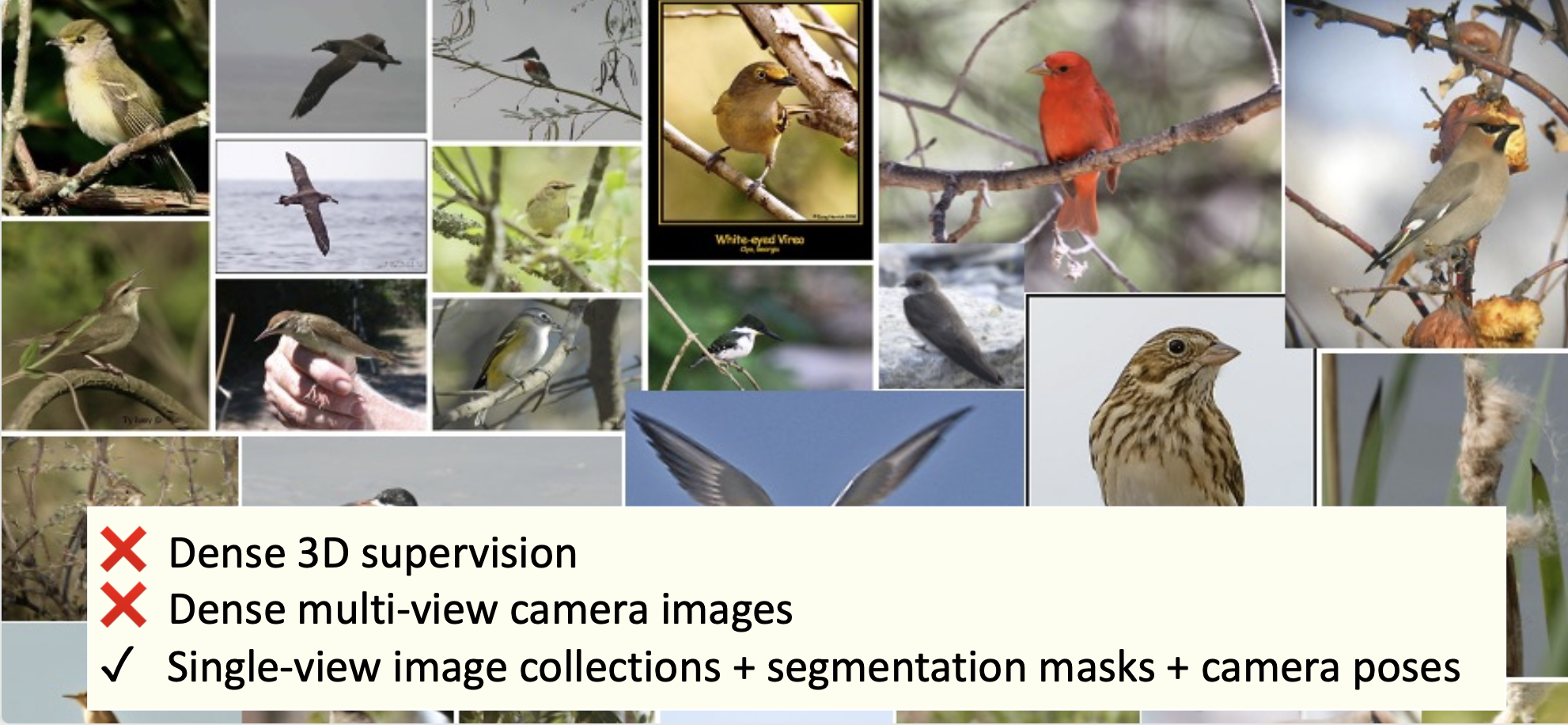
<ins>Inference: 3D Shape + Correspondences just from single image (& mask)</ins>

Requirements
<a name="Requirements"></a>
Please run the following commands to setup the conda environment for running the TARS codebase.
When compiling CUDA code, you may need to set CUDA_HOME.
conda env create --file requirements.yaml python=3.7
conda activate tars-env
cd external/chamfer3D
python3 setup.py install
Datasets
<a name="Datasets"></a>
-
<ins>CUBS-200-2011</ins>: To download the CUBS dataset (including pre-computed SfM poses), please follow the instructions mentioned <ins>here.</ins>
-
<ins>ShapeNet [Chairs, Planes, Cars]</ins>: To download the ShapeNet dataset, please follow the instructions mentioned <ins>here.</ins>
-
<ins>Pascal3D+ [Chairs]</ins>: To download the Pascal3D chairs dataset, please follow the instructions mentioned <ins>here.</ins>
-
<ins>Pix3D [Chairs]</ins>: To download the Pix3D chairs dataset, please refer to Pix3D's <ins>official website.</ins> Some images of the Pix3D chairs dataset are highly occluded/ truncated. We removed such images using the annotated truncation tag associated with each image and also by manual filtering.
For more details on these datasets, please refer to paper appendix section A.1.
Training & Evaluation
<a name="Training&Evaluation"></a>
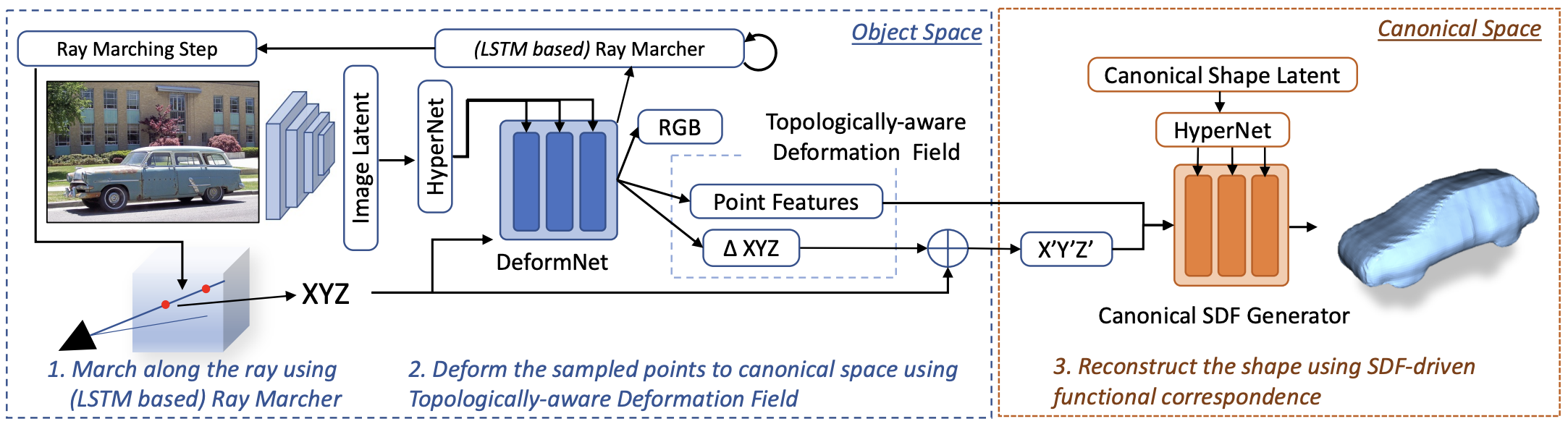
The overall pipeline, as shown below, has three core moduels: (a) SDF Generator, (b) DeformNet, (c) Renderer.
<ins>Training </ins>
<a name="Training"></a>
Run the following steps sequentially to train TARS on your favorite dataset:
-
All training jobs are supported with
visdom visualiation(for 3D visualization of the reconstruction 3D point clouds during training). To use visdom, launch the visdom server in a separate shell / tmux session:visdom -port 9001 --hostname localhost
-
To train TARS on any of the above datasets, the bash scripts provided in
scripts/<dataset_name>need to be the executed in the order mentioned below, where<dataset_name>could beshapenet/chair,shapenet/car,shapenet/airplane,cub,pascal3d/chair,pix3d_pascal3d/chair. -
The whole training procedure is broken into 2 main stages (and two intermediate pre-training stages), executed sequentially:
-
<ins>Pre-training SDF Generator</ins>: In this stage, we fit an MLP (termed as SDF Generator) to predict the signed distance field (SDF) of each 3D point w.r.t. a unit sphere (for which the SDF can be determined analytically). This serves as a good initialization for the SDF Generator which is later used to predict the SDF of arbitrary instances/ shapes.
bash scripts/<dataset_name>/pretrain_sdf_generator.sh -
<ins>Stage 1</ins>: This stage involves training the image encoder, SDF Generator, and the renderer jointly using category-specific image collection (with associated camera poses and silhouettes) as the training data. In this stage, given the input object's single-view image, we first extract a latent embedding using the image encoder. Next, using the image embedding, we directly predict the SDF value of each 3D point in the normalized object space w.r.t the input objects' surface. We train this whole pipeline using rendering-based losses.
bash scripts/<dataset_name>/train_stage_1.sh -
Post Stage 1 training, using the image latent embeddings of all the training instances, we generate a canonical shape latent code (which is later optimized in stage 2) as the mean of all the training instance image latent codes.
bash scripts/<dataset_name>/dump_canonical_shape.sh -
<ins>Pre-training DefomNet</ins>: Pre-training DefomNet: In this stage, we fit an MLP (termed as DeformNet) to map a unit sphere to the learned canonical shape (from stage 1). More precisely, we deform each 3D point from the object space to the canonical space, such that the SDF of the canonical point w.r.t canonical surface is equal to the SDF of the object-space point w.r.t the surface of the unit sphere. Basically, through this, we try to reconstruct a unit sphere by mapping to the canonical shape.
bash scripts/<dataset_name>/pretrain_deformnet.sh -
<ins>Stage 2:</ins> This final training stage involves tuning all the modules: Image Encoder, DeformNet, Canonical Shape Code, SDF Generator, and the Renderer, using category-specific image collection (with associated camera poses and silhouettes) as the training data. Using the image embedding (extracted using the image encoder), we deform each 3D point from the object space to the canonical space. Using the canonical latent encoding and the SDF Generator, we predict the SDF of the deformed point. We train this whole pipeline mainly using rendering-based losses.
bash scripts/<dataset_name>/train_stage_2.sh
-
<ins>Evaluation</ins>
<a name="Evaluation"></a>
Given an input image, we learn the underlying 3D shape as a signed-distance field (SDF). The SDF of the input object is generated by mapping each 3D point (sampled uniformly within a unit cube) to the canonical space (using DeformNet) and then determining the SDF using the Canonical SDF Generator (and the canonical latent code). 3D mesh can then be extracted using marching cubes on the predicted SDF.
bash scripts/<dataset_name>/evaluate.sh
Running the above command will dump the output data (3D mesh and corresponding canonical 3D points) inside output/<dataset_name>/reconstruction_stage_two/<job_name>/dump, where <dataset_name> refers to config parameter: data.dataset and <job_name> refers to config paramrter: name.
The provided evaluation scripts use the shared <ins>pretrained TARS models</ins> for inference. Make sure to download the required pretrained model into pretrained_models directory (inside TARS root directory) before running the corresponding ./evaluate.sh. To use your own trained models, simply replace the --load tag with the path to your model.
Visualization Scripts
<a name="Visualization"></a>
-
We used the python library:
open3dto visualize the reconstructed 3D meshes. This would require connecting to a display (if you are working remotely without a GUI support). -
To create the 3D mesh GIFs as shown in the paper video, we used the python library:
pyvista. -
The visualization scripts are available as interactive jupyter cells in <ins>visualization_scripts/mesh_visualizer.ipynb</ins>. Note you would have to explicitly install pyvista if you want to render GIFs. (`python3 -m
Related Skills
node-connect
349.9kDiagnose OpenClaw node connection and pairing failures for Android, iOS, and macOS companion apps
frontend-design
109.8kCreate distinctive, production-grade frontend interfaces with high design quality. Use this skill when the user asks to build web components, pages, or applications. Generates creative, polished code that avoids generic AI aesthetics.
openai-whisper-api
349.9kTranscribe audio via OpenAI Audio Transcriptions API (Whisper).
qqbot-media
349.9kQQBot 富媒体收发能力。使用 <qqmedia> 标签,系统根据文件扩展名自动识别类型(图片/语音/视频/文件)。
