
Gameshelf
A self-hosted, no-nonsense, read-only file browser built for displaying and downloading local game collections. Point it at your directory to automatically index games, detect cover art, and present a fast, modern UI. No accounts or sign-ups, no databases or phoning home. Because you never had to enter a password to pull a game off the shelf.
Install / Use
/learn @ShannonWetnight/GameshelfREADME
GameShelf 


AI Workflow Notice
Parts of GameShelf are developed with the assistance of AI tools to accelerate boilerplate generation, UI layout, and documentation drafting. All logic, architecture decisions, and final code have been reviewed and curated by the project maintainers. GameShelf is fully open-source (MIT licensed), and all contributors are welcome.
Table of Contents
Overview
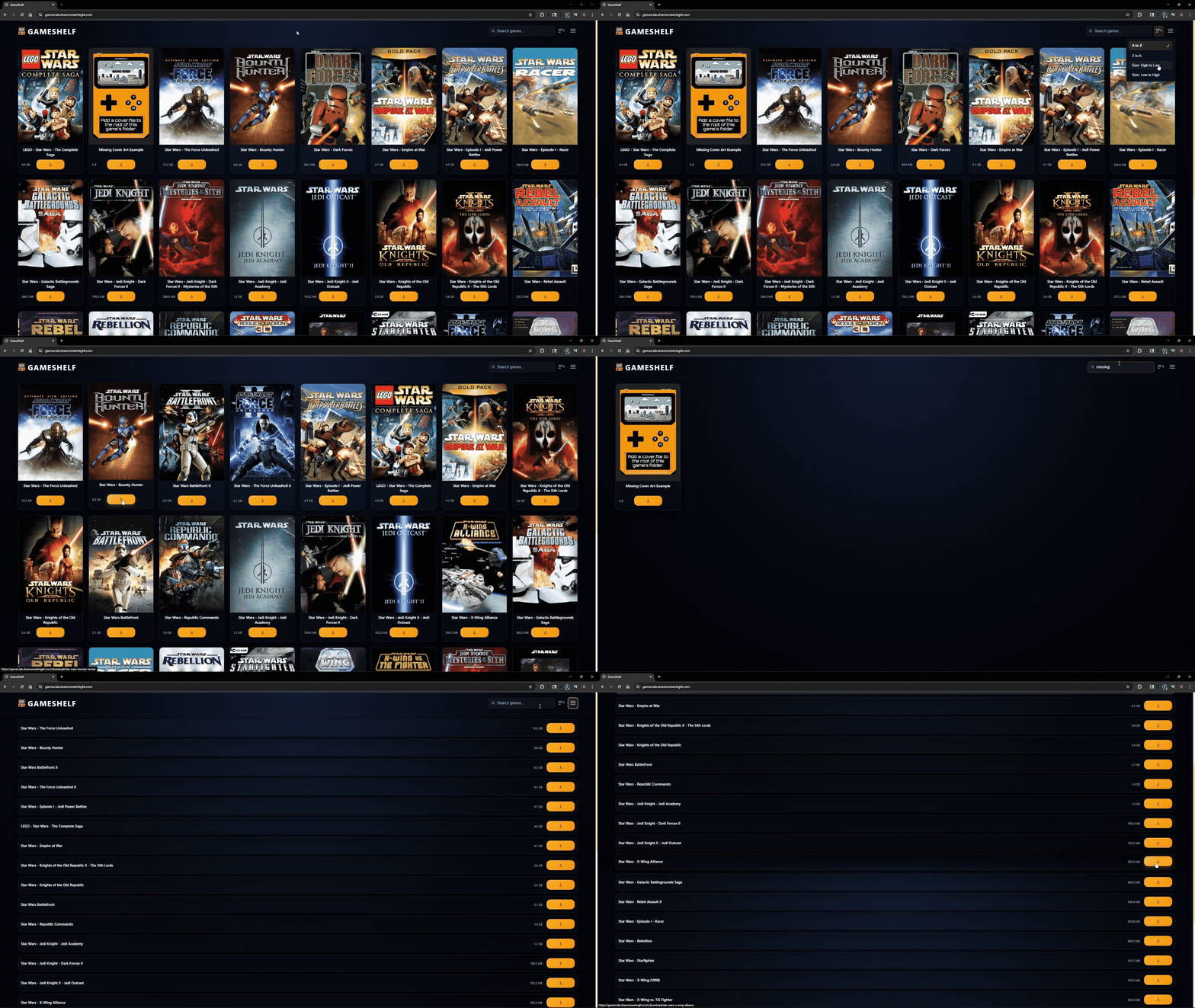
GameShelf is a lightweight, no-nonsense, completely open-source game library designed for offline DRM-free storage collections. Point it at a directory and GameShelf automatically:
- Indexes game folders
- Detects and displays cover art, such as
cover.jpg,folder.png, etc. - Serves a clean, modern UI over your local network
- Provides one-click downloadable ZIP archives on demand
Project Philosophy
GameShelf is designed to provide a straightforward, dependable, read-only LAN-based game library with minimal overhead. It avoids unnecessary dependencies and account systems, allowing you to maintain complete control over your offline collections. The major intended use case for GameShelf is to provide easy access to DRM-free game installers to a small number of local users (eg. 1-10 users in the same house) without the need for 1st/3rd-party installers and account logins. Simply drop your games into a folder, run GameShelf, and enjoy a clean local library.
Features
- Automatic folder indexing
- Local cover art detection
- User-supplied cover art and placeholders while missing
- Instant ZIP downloads of game folders
- Manual and scheduled rescan support
- Zero-config outside of the indexing directory
- Go backend and static web UI
- Easy deployment with Docker or Compose
- Local search and sort functions
- Search keyboard shortcuts (
/to search,Escto clear)
- Search keyboard shortcuts (
Prerequisites
- Docker or
- Docker Compose
- A mountable directory for GameShelf to index
- 10-15 minutes of free time
Quick Start
Docker Run
docker run -d \
  --name gameshelf \
  --restart unless-stopped \
  --security-opt no-new-privileges:true \
  -p 8080:8080 \
  -e GAMESHELF_ROOT=/games \
  -v /path/to/your/library:/games:ro \
  ghcr.io/shannonwetnight/gameshelf:latest
Docker Compose
---
services:
  gameshelf:
    image: ghcr.io/shannonwetnight/gameshelf:latest
    container_name: gameshelf
    restart: unless-stopped
    ports:
      - 8080:8080 # Increment if in-use
    environment:
      # Directory containing indexable folders.
      - GAMESHELF_ROOT=/games
      # Optional: v
      #- GAMESHELF_ADDR=:8080
      # Optional: Set a refresh interval to override library refresh (default unless uncommented: 0) | Options: 1m 1h (replace "1" with desired variable, or "0" without a time denomination to disable auto-refresh)
      #- GAMESHELF_REFRESH_INTERVAL= 12h
    volumes:
      - /path/to/games:/games:ro
    security_opt:
      - no-new-privileges:true
Environment Variables
| Variable | Default | Description |
| ---------------------------- | -------- | ------------------------------------------------------------------------------- |
| GAMESHELF_ROOT | /games | Directory containing indexable folders. |
| GAMESHELF_ADDR | :8080 | Optional: Change GameShelf's default (8080) internal bind address. |
| GAMESHELF_REFRESH_INTERVAL | 0 | Optional: auto-scan interval (1d, 1h,1m, 1s, - 0 disables auto-refresh) |
After successful installation, navigate to GameShelf's IP:8080 address to view the indexed content.
Optional Installation Steps
Reverse Proxy
For ease of use, it is recommended to use a reverse proxy for accessing GameShelf, such as games.mydomain.com. Use the service of your choice to accomplish this. The below configuration is a working example from Traefik.
Traefik Example
http:
  routers:

    gameshelf:
      entryPoints:
        - "https"
      rule: "Host(`games.mydomain.com`)"
      middlewares:
        - default-chain
      tls: {}
      service: gameshelf
services:

    gameshelf:
      loadBalancer:
        servers:
          - url: "http://gameshelf:8086"
        passHostHeader: true
middlewares:

    https-redirectscheme:
      redirectScheme:
        scheme: https
        permanent: true

    default-headers:
      headers:
        frameDeny: true
        browserXssFilter: true
        contentTypeNosniff: true
        forceSTSHeader: true
        stsIncludeSubdomains: true
        stsPreload: true
        stsSeconds: 15552000
        customFrameOptionsValue: SAMEORIGIN
        customRequestHeaders:
          X-Forwarded-Proto: https

    default-chain:
      chain:
        middlewares:
        - https-redirectscheme
        - default-headers
Single Sign-On
You can easily lock GameShelf behind SSO with Authelia, Tinyauth, Authentik, and more, by using forward Auth.
[!NOTE] GameShelf was not created to natively support SSO, user creation, mapping, or profiles. The purpose of GameShelf is to offer a frictionless library of DRM-free games to a local network, typically between 1-10 users in size. Using SSO or branching and adding profile functionality can be done but extends beyond the scope of GameShelf's intended purpose as a frictionless local file distributor.
Cover Art
GameShelf supports custom cover images for any game folder. To add your own artwork, place a cover image in the game’s directory using one of the supported file types:
cover.jpgcover.jpegcover.pngfolder.jpgfolder.jpegfolder.png
[!IMPORTANT] Only the above filenames and extensions are recognized. The file must be located directly inside the game’s root folder (eg.
Star Wars Jedi Knight II - Jedi Outcast > cover.png), not in subdirectories.You must supply GameShelf with your own cover images if you wish to have the game library populated with cover art. If you do not provide GameShelf with cover art, it will use the default fallback image (
placeholder.png) until one is supplied and the page is refreshed/rescanned. Moby Games and GameTDB are two great places to find cover art for your games.
Recommended Resolution
High-quality artwork is recommended. A resolution around 600×900 (3:4) works well; however, GameShelf automatically crops and scales the artwork into a portrait format and ratio of 2:3, so the final appearance will be vertically oriented regardless of the original aspect ratio.
- File size may be a performance factor to consider for libraries that include many games. Consider compressing your high-quality cover art before adding to the root of your game folders to reduce overall cover art file size.
How GameShelf Chooses an Image
When loading a game entry:
- GameShelf checks for
cover.jpg,cover.jpeg,cover.png,folder.jpg,folder.jpeg, andfolder.png. - The first matching file found is used as the game’s cover art.
- If no cover image is provided, GameShelf will fall back to:
- Displaying the
placeholder.pngcover if nothing is available. This allows users to provide artwork simply by placing their own cover.* image into the game’s folder. In a future release,auto-fetch cover artwill be attempted before using theplaceholder.pngcover.
Recommended File Structure
As GameShelf parses folder names from GAMESHELF_ROOT, it is important to properly structure your master games directory. The following folder structure is recommended to keep things simple for GameShelf:
GameDrive
  Games
    Game Example 1
      Installation Files
      cover.png

    Game Example 2
      Installation Files
      cover.png

    Game Example 3
      Installation Files
      Extras
        Patch 1
        Patch 2
      cover.png

    Game Example 4
      Installation Files
      Manuals
        game_example_4_manual.pdf
      cover.png
Usage
- Upload folders to the GameShelf directory (your mounted storage).
- View and/or download zipped folders from the web UI.
Roadmap
View the roadmap for a list of features worth considering for GameShelf.
Responsible Use & Distribution
GameShelf is a general-purpose file indexing and download utility. While it is designed to organize and serve locally stored game files,
Related Skills
feishu-drive
352.9k|
things-mac
352.9kManage Things 3 via the `things` CLI on macOS (add/update projects+todos via URL scheme; read/search/list from the local Things database)
clawhub
352.9kUse the ClawHub CLI to search, install, update, and publish agent skills from clawhub.com
postkit
PostgreSQL-native identity, configuration, metering, and job queues. SQL functions that work with any language or driver
