
Simulator Controller
A virtual AI-based pit crew for Sim Racing. Use the latest GPT technology to create a real life like experience when out on the track.
Install / Use
npx skills add SeriousOldMan/Simulator-ControllerInstalls into whichever agent you are using.
README
Simulator Controller
Simulator Controller is a modular and extendable administration and controller application for Sim Racing. At the core is a comprehensive plugin capable automation framework, which can use almost any external controller hardware, such as Button Boxes, to control typical simulator components such as SimHub, SimFeedback and alike. Beside that, Simulator Controller also comes with several voice chat capable Assistants, which are based on artificial intelligence technologies. The first, a kind of AI Race Engineer, will assist you during your races to keep the hands on the wheel. It will handle all the cumbersome stuff, like preparing a pitstop, take an eye on the weather forecast, calculate damage impact on your lap times, and so on. The second Assistant, an AI Race Strategist, will keep an eye on the overall race situation and will develop and adapt strategies depending on race position, traffic and weather changes. The next Assistant, an AI Race Spotter will watch over your race and will warn you about critical situations with nearby cars, and so on. Last, but not least, an AI Driving Coach will be your invaluable source for information about car handling and everything, you want to know about racing in the real world or in a simulation. And he can coach you to improve your driving skills by giving you valuable instructions while you are on the track.
Beside that, Simulator Controller brings even a bunch of other functionality and features to make the life of all of us virtual racers even more fun and simple. You will find a comprehensive overview of all features later in this document, but first things first...
Donation
If you find this tool useful, please help me with the further development. Any donation contributed will be used only to support the project.

Another possibility is to use Patreon to give me a hug, and as a benefit, you might get access to the public Team Server for your multiplayer endurance races.
Thank you very much for your support!
Download and Installation
Installation is very easy. For first time users I recommand using the automated installer below. But there are different download and installation options available. Please see the complete documentation on Installation & Configuration, where you also will find a quick start guide for new users, for more information.
Antivirus Warnings
The programming language used for building Simulator Controller uses some really nasty tricks to control Windows applications, tricks also used by malware. Therefore, depending on your concrete Antivirus program, you may get some warnings regarding the Simulator Controller applications. I can assure you, that there's nothing about it. But you can read about these issues in the forums of AutoHotkey itself. If your Antivirus programm allows exception rules, please define rules for the Simulator Controller directories (install directory and also the one in the users Documents folder), otherwise you need to have a beer and search for another Simulator Controller tool. Sorry...
If you don't want to use the automated installer (or you can't cause of your Antivirus protection), you can manually install one of the versions below. There are separate download links for the current development build and at least the two latest stable releases. Download one of these builds and unzip it anywhere on your hard disks. Beginnging with Release 3.5.2, you then need to run the "Simulator Tools" application in the Binaries folder. This will guide you through the remaining installation process. For release information, even for a preview on upcoming features in the next stable build, don't miss the Release Notes.
Automated Installer
Simply download and run Simulator Controller.exe (you may have to deactivate your Antivirus or Browser download protection). This small application will connect to the version repository and will download and install the latest version automatically for you. If you want to install a version other than the current one, no problem. This is possible by downloading and installing one of the versions below manually, but consult the documentation beforehand.
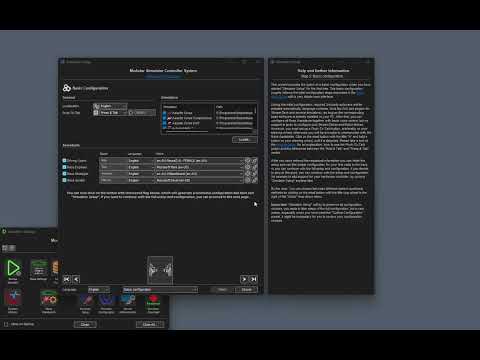
Here is a short video which shows how to configure Simulator Controller for the first time with a few clicks:
Latest release build
7.1.5.0-release (Changes: Optimized handling of modal windows, New suspension dynamics inspector, Caching for large telemetry files, Auto reload of new track maps by Driving Coach, Fixed suspension deflection in IRC telemetry file, Fixed suspension deflection in R3E telemetry file, IBT reader supports suspension deflection, Fixed synchronization of community database, Display lap time in telemtries list, Optimized loading of large telemetry files, Second Monitor Reader supports suspension deflection.)
Please read the Release Notes and - sometimes even, Fixed startup crash in "Strategy Workbench" more important - the release specific Update Notes of this version and all the versions you might have skipped, before installing and using this version.
Earlier release builds
7.1.4.0-release (Changes: Fixed issue analyzer audio feedback for PMR and F125, Fixed loading of issue analyzer settings by the Coach, Full customizeable suspension sample in "Setup Workbench", Fixed transfer of issues to the workarea of "Setup Workbench", Optimized recommendations for bottom out issues in "Setup Workbench", Added suspension deflection to standard telemetry files, Optimized handling of analyzer settings in "Setup Workbench", Increased resolution of telmetry files, Fixed saving of reverted instructions, Fixed hiding of basic page in "Simulator Setup".)
7.1.3.0-release (Changes: External references in the rule engine, Suspension related issues in the issue analyzer, Suspension related issues detected by the Driving Coach, Changed default for data update frequency, Fixed startup crash in "Strategy Workbench".)
Current development build
None for the moment...
Documentation
A very extensive Documentation of more than 700 pages will guide you through the configuration process and will help you to understand the inner concepts and all the functions & features of Simulator Controller. For developers, who want to create their own plugins, a complete Developers Guide & Reference is available as well.
The markdown files, the so to say source code of this documentation Wiki, can be found in the Docs folder.
Video Tutorials
Beside the quite extensive documentation (more than 500 pages - I know, nobody reads documentation these days), we also have a list of video tutorials, which are recordings of live coaching session in our Discord community.
-
Quick start guide - This video shows you how to create your first running configuration with a few clicks.
-
Setup and Configuration - You will learn a lot about the general setup and configuration of the Simulator Controller suite. The Setup Wizard "Simulator Setup" is introduced, but we will also take a look at the low level configuration tool "Simulator Configuration".
-
Managing Button Boxes and Stream Decks - Here we go a lot more into the details how to configure your available hardware controllers like Button Boxes, Stream Decks and Steering Wheels.
-
Voice Control - In this session you will learn the capabilities of voice control, beginning with the simple standard configuration up to a full configuration with individual names, voices and languages for all the different Assistants.
-
Pitstop Automation using Race Engineer - We will take a look at pitstop automation using the Race Engineer. You will learn everything about the necessary configuration and see and hear the Race Engineer in action on the track.
-
Managing Settings - This video gives an introduction into the settings used by the AI Race Assistants and how to manage these settings in the most efficient way.
-
Using Strategy Workbench - In this video we take a walk in "Strategy Workbench", the premium fuel calculator of the Simulator Controller suite. You will also learn, how to use the created strategies in "Team Center" and using the AI Race Assistants.
-
Introduction to Team Races - In this video, all the functionality of the Simulator Controller suite come together to manage and control your team races. You will learn how to setup everything, how to use the services of the Race Assistants during a team race and how to remote control the pitstop settings for the currently driving team mate.
-
[More abo
Related Skills
gh-issues
385.6kFetch GitHub issues, select candidates, spawn background fix agents, open PRs, and optionally process PR review comments.
browser-automation
385.6kUse when controlling web pages with the OpenClaw browser tool, especially multi-step flows, login checks, tab management, or recovery from stale refs/timeouts.
imsg
385.6kUse the imsg CLI from OpenClaw agents for iMessage/SMS DMs, groups, replies, reactions, polls, watching, and private-API actions.
lobster
385.6kLobster executes multi-step workflows with approval checkpoints. Use it when: - User wants a repeatable automation (triage, monitor, sync) - Actions need human approval before executing (send, post, delete) - Multiple tool calls should run as one deterministic operation | User intent | Use Lobster?
