
SeasLog
An effective,fast,stable log extension for PHP.http://pecl.php.net/package/SeasLog http://php.net/SeasLog
Install / Use
/learn @SeasX/SeasLogREADME
SeasLog

An effective,fast,stable log extension for PHP
@author Chitao.Gao [neeke@php.net]
- Synopsis
- Install
- Use age
Synopsis
Why use seaslog
The log journal,which is usually the operate record of the system,software and the application record. Through the analysis of the log,it can facilitate users to understand the operation of the system,software and the application situation. If your application log is rich enough,it can also analyze the previous use’s operation behavior,type ,regional distribution or other more information. The application log also points the multiple levels at the same time, you can easily get the application analysis of health status, timely find problems and quick positioning, and solve the problem, remedy the loss.
The error_log, syslog function which built in PHP is powerful and excellent performance, but due to various defects (error_log have no error level, no fixed format, syslog regardless of module, and mix with system log ), reducing a lot of flexibility , and can't meet the application requirements.
The good news is that there are a number of third-party log class library established to make up for the defects, such as log4php, plog, Analog (of course, there are many applications in the project development of the log class). Of which log4php is the most famous and excellent design, perfect document format , powerful function,which is recommanded.
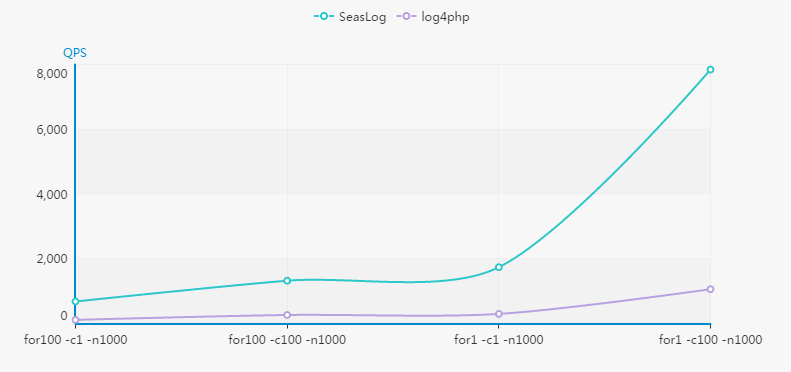
But log4php did very badly in terms of performance, below chart is SeasLog with log4php ab concurrent performance test (test environment: Ubuntu12.04 standalone, I3 CPU, memory16g,hard disk SATA 7200) :
So is there a log of libraries meet the following requirements:
- Modules, classification
- Simple configuration(preferably without configuration)
- Clear log format and easy understanding
- Simple application and well performance
SeasLog just meet these demands.
What is provided at present
- In the PHP project, record the log specification and repidly.
- Configure the default log directory and module
- Specified log directory and capture current configuration
- Preliminary analysis of the early warning framework
- Efficient log buffer and convenient buffer debug
- Follow the PSR-3 log interface specification
- Automatically record error information
- Automatically record abnormal information
- Support Connect the TCP port, send with RFC5424
- Support Connect the UDP port, send with RFC5424
- Support RequestId differentiated requests
- Support for log template customizations
What is the target
- Convenient, standarded log records
- Efficient mass log analysis
- Configurable, multi-channel log warning
Install
Make Install SeasLog
$ /path/to/phpize
$ ./configure --with-php-config=/path/to/php-config
$ make && make install
PECL Install SeasLog
$ pecl install seaslog
Use SeasLog with Windows
Go to PECL/SeasLog and find .dll to install. PECL/SeasLog Windows Dll
seaslog.ini
[SeasLog]
;configuration for php SeasLog module
extension = seaslog.so

;Default Log Base Path
seaslog.default_basepath = "/var/log/www"

;Default log file prefix, for example "app-"  default empty string
seaslog.default_file_prefix = ""

;Default log file datetime separator, for example "-"  default empty string
seaslog.default_file_datetime_separator=""

;Default Logger Path
seaslog.default_logger = "default"

;The DateTime Style.  Default "Y-m-d H:i:s"
seaslog.default_datetime_format = "Y-m-d H:i:s"

;Default Log template.
;Default "%T | %L | %P | %Q | %t | %M"
seaslog.default_template = "%T | %L | %P | %Q | %t | %M"

;Switch use the logger with folder.
;1-Y(Default) 0-N
seaslog.disting_folder = 1

;Switch use the logger with type.
;1-Y 0-N(Default)
seaslog.disting_type = 0

;Switch use the logger with hour.
;1-Y 0-N(Default)
seaslog.disting_by_hour = 0

;Switch use the log buffer with memory.
;1-Y 0-N(Default)
seaslog.use_buffer = 0

;The buffer size
seaslog.buffer_size = 100

;disable buffer in cli
;1-Y 0-N(Default)
seaslog.buffer_disabled_in_cli = 0

;Record logger level.
;0-EMERGENCY 1-ALERT 2-CRITICAL 3-ERROR 4-WARNING 5-NOTICE 6-INFO 7-DEBUG 8-ALL
;Default 8 (All of them).
;
;   Tips: The configuration item has changed since the 1.7.0 version.
;   Before the 1.7.0 version, the smaller the value, the more logs are taken according to the level:
;   0-all 1-debug 2-info 3-notice 4-warning 5-error 6-critical 7-alert 8-emergency
;   Before the 1.7.0 version, Default 0 (All of them).
seaslog.level = 8

;Log function recall depth
;Will affected variable `LineNo` in `%F`
;Default 0
seaslog.recall_depth = 0

;Automatic Record notice with default logger
;1-Y 0-N(Default)
seaslog.trace_notice = 0

;Automatic Record warning with default logger
;1-Y 0-N(Default)
seaslog.trace_warning = 0

;Automatic Record final error with default logger.
;1-Y(Default) 0-N
seaslog.trace_error = 1

;Automatic Record exception with default logger.
;1-Y 0-N(Default)
seaslog.trace_exception = 0

;Switch the Record Log Data Store.
;1File 2TCP 3UDP (Switch default 1)
seaslog.appender = 1

;Record Log Retry Count
;Default 0 (Do Not Retry)
seaslog.appender_retry = 0

;If you use  Record TCP or UDP, configure this remote ip.
;Default "127.0.0.1"
seaslog.remote_host = "127.0.0.1"

;If you use Record TCP or UDP, configure this remote port.
;Default 514
seaslog.remote_port = 514

;If you use Record TCP or UDP, configure this remote timeout.
;Default 1 second
seaslog.remote_timeout = 1

;Trim the \n and \r in log message.
;1-On 0-Off(Default)
seaslog.trim_wrap = 0

;Switch throw SeasLog exception.
;1-On(Default) 0-Off
seaslog.throw_exception = 1

;Switch ignore SeasLog warning.
;1-On(Default) 0-Off
seaslog.ignore_warning = 1

;Switch Performance Tracking 1-On 0-Off(Default)
seaslog.trace_performance = 0

;Performance Tracking Sample Rate Per Thousand.
;10(Default). 10 conceptions per thousand
seaslog.trace_performance_sample_rate = 10

;Performance Tracking Start With Depth Level. 1(Default)
seaslog.trace_performance_start_depth = 1

;Performance Tracking Depth Level. 5(Default)
seaslog.trace_performance_max_depth = 5

;Maximum number of functions per layer in descending order of wall_time for performance tracking.
;Top default top5
seaslog.trace_performance_max_functions_per_depth = 5

;The record threshold of the current request execution time for performance tracking.
;Only when the request execution time is greater than that value.
;1000(ms Default)
seaslog.trace_performance_min_wall_time = 1000

;The record threshold of execution time of each method in performance tracking.
;Only when the execution time of each method is greater than that value.
;10(ms Default)
seaslog.trace_performance_min_function_wall_time = 10
seaslog.disting_folder = 1Switch use Logger DisTing by folder, it’s meaning SeasLog will create the file deistic by folder, and when this configure close SeasLog will create file use underline connect Logger and Time like default_20180211.log.
seaslog.disting_type = 1Switch use Logger DisTing by type, it’s meaning SeasLog will create the file deistic info\warn\error and the other type.
seaslog.disting_by_hour = 1Switch use Logger DisTing by hour. It’s meaning SeasLog will create the file each one hour.
seaslog.use_buffer = 1Switch the configure use_buffer on. The use_buffer switch default off. If switch use_buffer on, SeasLog prerecord the log with memory, and them would be rewritten down into the Data Store by request shutdown or php process exit (PHP RSHUTDOWN or PHP MSHUTDOWN).
seaslog.buffer_size = 100Configure the b
