
OpenSeaChest
Cross platform utilities useful for configuring features and assessing health on SATA, SAS, NVMe, and USB storage devices.
Install / Use
/learn @Seagate/OpenSeaChestREADME
openSeaChest
Cross platform storage device utilities to manage, configure, and read health information for SATA, SAS, NVMe, and USB attached HDDs and SSDs.
Copyright (c) 2014-2026 Seagate Technology LLC and/or its Affiliates, All Rights Reserved







Welcome to the openSeaChest open source project!
openSeaChest is a collection of comprehensive, easy-to-use command line diagnostic tools and programming libraries for storage devices that help you quickly determine the health and status of your storage product. The collection includes several tests that show device information, properties and settings. It includes several tests which may modify the storage product such as power management features or firmware download. It includes various commands to examine the physical media on your storage device. Close to 200 commands and sub-commands are available in the various openSeaChest utilities. These are described in more detail below.
Here is an overview presentation we gave at the Storage Networking Industry Association - Storage Developer Conference 2018 that describes the design architecture for the opensea API and openSeaChest storage resource management utilities:
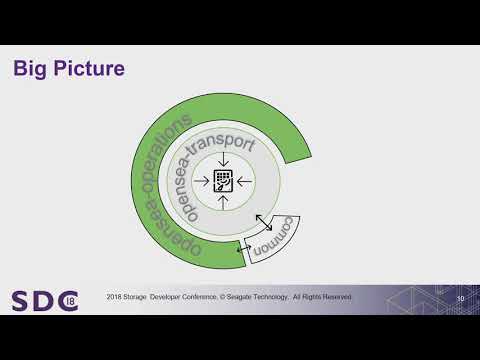
(Note: The openSeaChest team has the utmost respect for the highly regarded sg3_utils, hdparm, sdparm and nvme-cli open source projects. Since this is all pretty low-level stuff, we chose the presentation title "What's better than sg3_utils, hdparm, sdparm?" only to grab the attention of a few extra people attending the SNIA SDC 2018 conference.)
About openSeaChest Command Line Diagnostics
Seagate offers both graphical user interface (GUI) and command line interface (CLI) diagnostic tools for our storage devices. SeaTools for end users is the most popular GUI tools These tools support 15 languages.
openSeaChest diagnostics are command line utilities which are available for expert users. These command line tools assume the user is knowledgeable about running software from the operating system command prompt. CLI tools are in the English language only and use "command line arguments" to define the various tasks and specific devices. openSeaChest diagnostics are available for both Linux and Windows environments.
Linux versions of openSeaChest tools are available as stand alone 32 or 64-bit executables you can copy to your own system. Windows OS versions of openSeaChest diagnostics are also available.
Technical Support for openSeaChest drive utilities is not available. If you have the time to send us some feedback about this software, especially if you notice something we should fix or improve, we would greatly appreciate hearing from you. To report your comments and suggestions, please use the issue reporting feature available in this git repository. Additionally, you can contact us through this email address seaboard @ seagate.com. Please let us know the name and version of the tool you are using.
openSeaChest drive utilities support SATA, SAS, NVMe and USB interface devices. In some cases openSeaChest has successfully recognized PATA and SCSI legacy devices, although the software is not expected to do so.
For a description of all of our tools please see our Wiki. This pages also includes some instructions for those who are new to command line tools to help get you started!
Important Notes
If this is your drive, you should always keep a current backup of your important data.
Many tests and commands are completely data safe, while others will change the drive (like firmware download or data erasure or setting the maximum capacity, etc). Be careful using openSeaChest because some of the features, like the data erasure options, will cause data loss. Some commands, like setting the maximum LBA, may cause existing data on the drive to become inaccessible. Some commands, like disabling the read look ahead buffer, may affect the performance of the drive. Seagate is not responsible for lost user data.
Important note: Many tests in this tool directly reference storage device data sectors, also known as Logical Block Addresses (LBA). Test arguments may require a starting LBA or an LBA range. The predefined variable 'maxLBA' refers to the last sector on the drive. Many older SATA and SAS storage controllers (also known as Host Bus Adapters [HBA]) have a maximum addressable limit of 4294967295 [FFFFh] LBAs hard wired into their design. This equates to 2.1TB using 512 byte sectors. This also means accessing an LBA beyond the 2.1TB limitation either will result in an error or simply the last readable LBA (usually LBA 4294967295 [FFFFh]) depending on the actual hardware. This limitation can have important consequences. For example, if you intended to erase a 4TB drive, then only the first 2TB will actually get erased (or maybe even twice!) and the last 2TB will remain untouched. You should carefully evaluate your system hardware to understand if your storage controllers provide support for greater than 2.1TB.
Note: One gigabyte, or GB, equals one billion bytes when referring to hard drive capacity. This software may use information provided by the operating system to display capacity and volume size. The Windows file system uses a binary calculation for gibibyte or GiB (2^30) which causes the abbreviated size to appear smaller. The total number of bytes on a disk drive divided by the decimal calculation for gigabyte or GB (10^9) shows the expected abbreviated size. See this FAQ for more information http://knowledge.seagate.com/articles/en_US/FAQ/172191en?language=en_US.
Binary Availability
BINARIES and SOURCE CODE files of the openSeaChest open source project have been made available to you under the Mozilla Public License 2.0 (MPL-2.0). The openSeaChest project repository is maintained at https://github.com/Seagate/openSeaChest.
Compiled binary versions of the openSeaChest utilities for various operating systems may be found at openSeaChest Releases.
This collection of storage device utility software is branched (forked) off of
an original utility collection called the Seagate SeaChest Utilities by Seagate
Technology LLC. The original SeaChest Utilities are still available at
www.seagate.com or https://github.com/Seagate/ToolBin/tree/master/SeaChest.
Binary versions are available for Linux or Windows, with the Windows versions
signed by Seagate Technology LLC.
For details on what is different between openSeaChest and SeaChest, see this wiki page.
Repository Availability
With help from various community members across distributions, openSeaChest may be available from within your package manager.

Please be aware this list may not be complete. Seagate is happy to work with community members to help make openSeaChest available in other package repositories as well. Please reach out through an issue and we will do our best to help make it more available when possible.
The libraries
opensea-common - Operating System common operations, not specific to storage standards. Contains functions and defines that are useful to all other libraries.
opensea-transport - Contains standard ATA/SCSI/NVMe functions based on open standards for these command sets. This layer also supports different transporting these commands through operating systems to the storage devices. Code depends on opensea-common.
opensea-operations - Contains common use cases for operations to be performed on a storage device. This layer encapsulates the nuances of each command set (ATA/SCSI) and operating systems
Related Skills
node-connect
329.0kDiagnose OpenClaw node connection and pairing failures for Android, iOS, and macOS companion apps
frontend-design
81.1kCreate distinctive, production-grade frontend interfaces with high design quality. Use this skill when the user asks to build web components, pages, or applications. Generates creative, polished code that avoids generic AI aesthetics.
openai-whisper-api
329.0kTranscribe audio via OpenAI Audio Transcriptions API (Whisper).
commit-push-pr
81.1kCommit, push, and open a PR
