
HASmartThermostat
Smart Thermostat with PID controller for HomeAssistant
Install / Use
/learn @ScratMan/HASmartThermostatREADME

<a href="https://www.buymeacoffee.com/scratman" target="_blank"><img src="https://cdn.buymeacoffee.com/buttons/default-orange.png" alt="Buy Me A Coffee" height="41" width="174"></a>
HASmartThermostat
Smart Thermostat with PID controller for Home Assistant
Create a virtual thermostat with accurate and reactive temperature control through PID controller. Principle of the PID controller. Any heater or air conditioner unit with ON/OFF switch or pilot wire can be controlled using a pulse width modulation that depends on the temperature error and its variation over time.
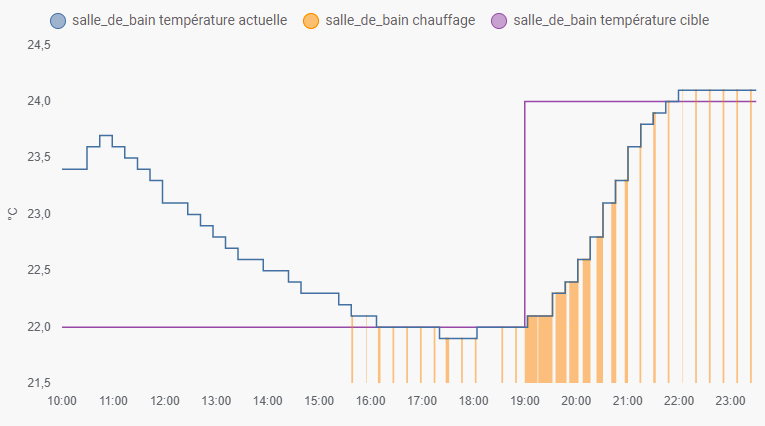
Installation:
I recommend using HACS for easier installation.
Install using HACS:
Go to HACS, select Integrations, click the three dots menu and select
"Custom repositories". Add the path to the Github repository in the first field, select Integration
as category and click Add. Once back in integrations panel, click the Install button on the Smart
Thermostat PID card to install.
Set up the smart thermostat and have fun.
Manual installation:
- Go to <conf-dir> default /homeassistant/.homeassistant/ (it's where your configuration.yaml is)
- Create <conf-dir>/custom_components/ directory if it does not already exist
- Copy the smart_thermostat folder into <conf-dir>/custom_components/
- Set up the smart_thermostat and have fun
Configuration:
The smart thermostat can be added to Home Assistant after installation by adding a climate section to your configuration.yaml file.
Configuration examples:
configuration.yaml
climate:
  - platform: smart_thermostat
    name: Smart Thermostat Single ON/OFF Heater Example
    unique_id: smart_thermostat_single_on_off_heat_example
    heater: switch.on_off_heater
    target_sensor: sensor.ambient_temperature
    min_temp: 7
    max_temp: 28
    ac_mode: False
    target_temp: 19
    keep_alive:
      seconds: 60
    away_temp: 14
    kp: 50
    ki: 0.01
    kd: 2000
    pwm: 00:15:00
climate:
  - platform: smart_thermostat
    name: Smart Thermostat Multiple Valves Example
    unique_id: smart_thermostat_m_valve_example
    heater:
      - valve.radiator_valve_1
      - valve.radiator_valve_2
      - valve.radiator_valve_3
    target_sensor: sensor.ambient_temperature
    min_temp: 7
    max_temp: 28
    ac_mode: False
    target_temp: 19
    keep_alive:
      seconds: 60
    away_temp: 14
    kp: 5
    ki: 0.01
    kd: 500
    output_min: 0
    output_max: 99
    pwm: 0
Usage:
The target sensor measures the ambient temperature while the heater switch controls an ON/OFF
heating system.
The PID controller computes the amount of time the heater should remain ON over the PWM period to
reach the temperature set point, in example with PWM set to 15 minutes, if output is 100% the
heater will be kept on for the next 15 minutes PWM period. If PID output is 33%, the heater will be
switched ON for 5 minutes only.
By default, the PID controller will be called each time the target sensor is updated. When using main powered sensor with high sampling rate, the sampling_period parameter should be used to slow down the PID controller refresh rate.
By adjusting the Kp, Ki and Kd gains, you can tune the system response to your liking. You can find many tutorials for guidance on the web. Here are a few useful links:
- PID Tuning for on/off gas boiler, thanks to @nistvan86
- PID Control made easy
- Practical PID Process Dynamics with Proportional Pressure Controllers
- PID Tuner
- PID development blog from Brett Beauregard
- PID controller explained
To make it quick and simple:
- Kp gain adjusts the proportional part of the error compensation. Higher values means stronger reaction to error. Increase the value for faster rise time.
- Ki gain adjusts the integral part. Integral compensates the residual error when temperature settles in a cumulative way. The longer the temperature remains below the set point, the higher the integral compensation will be. If your system settles below the set point, increase the Ki value. If it settles over the set point, decrease the Ki value.
- Kd gain adjusts the derivative part of the compensation. Derivative compensates the inertia of the system. If the sensor temperature increases quickly between two samples, the PID will decrease the PWM level accordingly to limit the overshoot.

PID output value is the weighted sum of the control terms:
error = target_temp - current_temperature
di = temperature change between last two samples
dt = time elapsed between last two samples
P = Kp * error
I = last_I + (Ki * error * dt)
D = -(Kd * di) / dt
output = P + I + D
Output is then limited to 0% to 100% range to control the PWM.
Outdoor temperature compensation
Optionally, when an outdoor temperature sensor entity is provided and ke is set, the thermostat can
automatically compensate building losses based on the difference between target temperature and
outdoor temperature. An external component E is added to the PID output:
E = Ke * (target_temp - outdoor_temp)
output = P + I + D + E
Output is then limited to 0% to 100% range to control the PWM.
The Ke gain depends on the insulation of the building, on recent buildings with good insulation, a
gain of 0.6 is recommended. This compensation will act like the integral of the PID, but with
faster response time, so the integral will be more stable.
Autotune (not always working, not recommended to use):
You can use the autotune feature to find some working PID parameters.
Add the autotune: parameter with the desired tuning rule, and optionally set the noiseband and
lookback duration if the default 2 hours doesn't match your HVAC system bandwidth.
Restart Home Assistant to start the thermostat in autotune mode and set the desired temperature on
the thermostat. The autotuner will then start analyzing your heating system, measure the sampling
rate of the sensor, control the heater switch and monitor the temperature changes.
Wait for the autotune to finish by checking the autotune_status attribute for success. The Kp, Ki
and Kd gains will then be computed and set according to the selected rule and the thermostat
switches to PID.
The Kp, Ki and Kd gains are also computed using the other rules, and all values are shown in the
Home Assistant log like this: "Smart thermostat PID Autotuner output with ziegler-nichols rule:
Kp=######, Ki=######, Kd=######".
You should then save for reference the gains computed by the autotuner for future testing.
Warning: The thermostat set point can't be changed once the autotuner has started monitoring the temperature. The temperature regulation will work as a basic hysteresis thermostat based on set point and noise band. If your heating system and temperature monitoring is slow, reducing the noise band will reduce the temperature oscillations around the set point. If the sampling rate of your temperature sensor is too fast (few seconds) or noisy (frequent temperature changes) increase the noise band for system stability.
Warning: The autotuner result is saved in the entity attributes and restored after Home
Assistant is restarted.
However, it is recommended to save the new gains in the YAML configuration file to keep it in case
of Home Assistant database's is corrupted.
Services
Services can be used in Home Assistant to configure the thermostat.
The following services are available:
Set PID gains: smart_thermostat.set_pid_gain
Use this service to adjust the PID gains without requiring a restart of Home
Assistant. Values are saved to Home Assistant database and restored after a restart.
Please consider saving the final gain parameters in YAML configuration file when satisfied to keep
it safe in case of database corruption.
Optional parameters : kp, ki and kd, as float.
Example:
service: smart_thermostat.set_pid_gain
data:
  kp: 11.8
  ki: 0.00878
target:
  entity_id: climate.smart_thermostat_example
Set PID mode: smart_thermostat.set_pid_mode
Use this service to set the PID mode to either 'auto' or 'off'.
When in auto, the PID will modulate the heating based on temperature value and variation. When in
off, the PID output will be 0% if temperature is above the set point, and 100% if temperature is
below the set point.
Mode is saved to Home Assistant database and restored after a restart.
Required parameter : mode as a string in ['auto', 'off'].
Example:
service: smart_thermostat.set_pid_mode
data:
  mode: 'off'
target:
  entity_id: climate.smart_thermostat_example
Set preset modes temperatures: smart_thermostat.set_preset_temp
Use this service to set the temperatures for the preset modes. It can be adjusted
for all preset modes, if a preset mode is not enabled through YAML, it will be enabled. You can use
any preset temp parameter available in smart thermostat settings.
Please note the value will then be saved in the entity's state in database and restored after
restarting Home Assistant, ignoring values in YAML. Use the disable options to remove active
presets.
Example:
service: smart_thermostat.set_preset_temp
data:
  away_temp: 14.6
  boost_temp: 22.5
  home_temp_disable: true
targ
