
Keras.NET
Keras.NET is a high-level neural networks API for C# and F#, with Python Binding and capable of running on top of TensorFlow, CNTK, or Theano.
Install / Use
/learn @SciSharp/Keras.NETREADME
 <a href="http://scisharpstack.org"><img src="https://github.com/SciSharp/SciSharp/blob/master/art/scisharp_badge.png" width="200" height="200" align="right" /></a>
Keras.NET is a high-level neural networks API for C# and F# via a Python binding and capable of running on top of TensorFlow, CNTK, or Theano. It was developed with a focus on enabling fast experimentation. Being able to go from idea to result with the least possible delay is key to doing good research.
Use Keras if you need a deep learning library that:
-
Allows for easy and fast prototyping (through user friendliness, modularity, and extensibility).
-
Supports both convolutional networks and recurrent networks, as well as combinations of the two.
-
Runs seamlessly on CPU and GPU.
Keras.NET is using:
Prerequisite
-
Python 3.7 or 3.8, Link: https://www.python.org/downloads/
-
Install keras, numpy and one of the backends (Tensorflow/CNTK/Theano). Keras is now bundled with Tensorflow 2.0, so the easiest way to install Keras and Tensorflow at the same time is to simply install Tensorflow 2.0.
Nuget
Install from nuget: https://www.nuget.org/packages/Keras.NET
dotnet add package Keras.NET
Example with XOR sample (C#)
//Load train data
NDarray x = np.array(new float[,] { { 0, 0 }, { 0, 1 }, { 1, 0 }, { 1, 1 } });
NDarray y = np.array(new float[] { 0, 1, 1, 0 });

//Build sequential model
var model = new Sequential();
model.Add(new Dense(32, activation: "relu", input_shape: new Shape(2)));
model.Add(new Dense(64, activation: "relu"));
model.Add(new Dense(1, activation: "sigmoid"));

//Compile and train
model.Compile(optimizer:"sgd", loss:"binary_crossentropy", metrics: new string[] { "accuracy" });
model.Fit(x, y, batch_size: 2, epochs: 1000, verbose: 1);

//Save model and weights
string json = model.ToJson();
File.WriteAllText("model.json", json);
model.SaveWeight("model.h5");

//Load model and weight
var loaded_model = Sequential.ModelFromJson(File.ReadAllText("model.json"));
loaded_model.LoadWeight("model.h5");
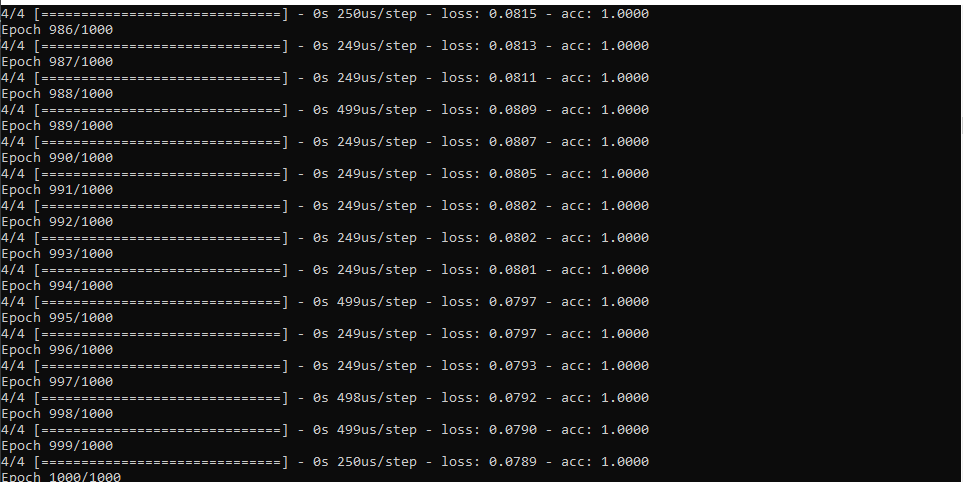
Output:
MNIST CNN Example (C#)
Python example taken from: https://keras.io/examples/mnist_cnn/
int batch_size = 128;
int num_classes = 10;
int epochs = 12;

// input image dimensions
int img_rows = 28, img_cols = 28;

Shape input_shape = null;

// the data, split between train and test sets
var ((x_train, y_train), (x_test, y_test)) = MNIST.LoadData();

if(Backend.ImageDataFormat() == "channels_first")
{
    x_train = x_train.reshape(x_train.shape[0], 1, img_rows, img_cols);
    x_test = x_test.reshape(x_test.shape[0], 1, img_rows, img_cols);
    input_shape = (1, img_rows, img_cols);
}
else
{
    x_train = x_train.reshape(x_train.shape[0], img_rows, img_cols, 1);
    x_test = x_test.reshape(x_test.shape[0], img_rows, img_cols, 1);
    input_shape = (img_rows, img_cols, 1);
}

x_train = x_train.astype(np.float32);
x_test = x_test.astype(np.float32);
x_train /= 255;
x_test /= 255;
Console.WriteLine($"x_train shape: {x_train.shape}");
Console.WriteLine($"{x_train.shape[0]} train samples");
Console.WriteLine($"{x_test.shape[0]} test samples");

// convert class vectors to binary class matrices
y_train = Util.ToCategorical(y_train, num_classes);
y_test = Util.ToCategorical(y_test, num_classes);

// Build CNN model
var model = new Sequential();
model.Add(new Conv2D(32, kernel_size: (3, 3).ToTuple(),
                        activation: "relu",
                        input_shape: input_shape));
model.Add(new Conv2D(64, (3, 3).ToTuple(), activation: "relu"));
model.Add(new MaxPooling2D(pool_size: (2, 2).ToTuple()));
model.Add(new Dropout(0.25));
model.Add(new Flatten());
model.Add(new Dense(128, activation: "relu"));
model.Add(new Dropout(0.5));
model.Add(new Dense(num_classes, activation: "softmax"));

model.Compile(loss: "categorical_crossentropy",
    optimizer: new Adadelta(), metrics: new string[] { "accuracy" });

model.Fit(x_train, y_train,
            batch_size: batch_size,
            epochs: epochs,
            verbose: 1,
            validation_data: new NDarray[] { x_test, y_test });
var score = model.Evaluate(x_test, y_test, verbose: 0);
Console.WriteLine($"Test loss: {score[0]}");
Console.WriteLine($"Test accuracy: {score[1]}");
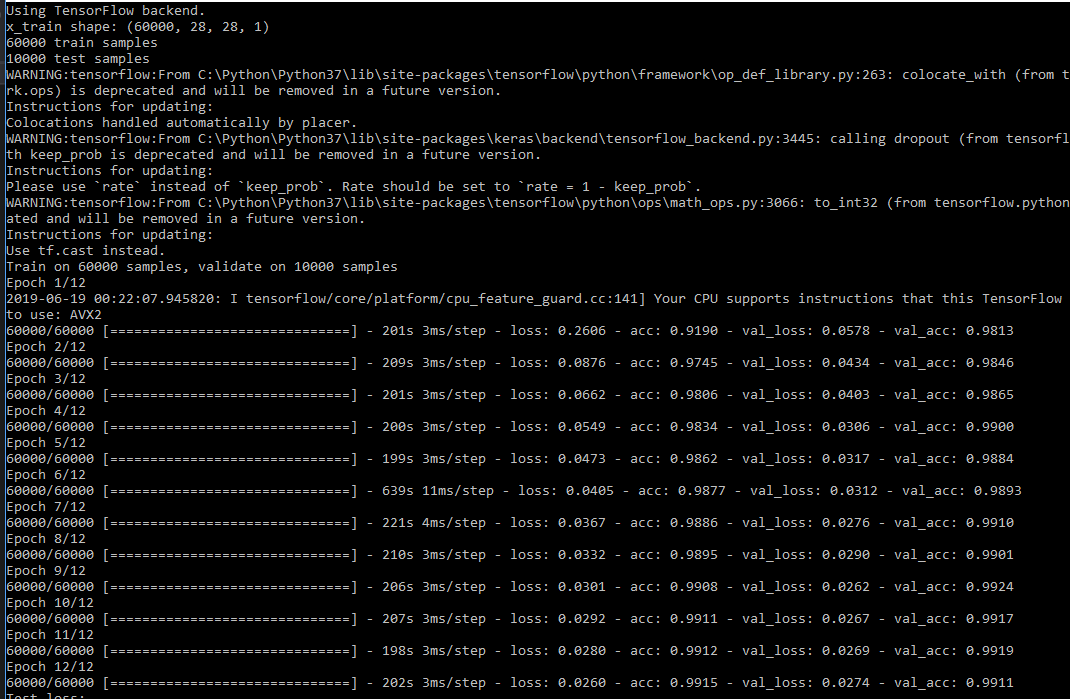
Output
Reached 98% accuracy within 3 epoches.
Documentation
https://scisharp.github.io/Keras.NET/

Related Skills
YC-Killer
2.7kA library of enterprise-grade AI agents designed to democratize artificial intelligence and provide free, open-source alternatives to overvalued Y Combinator startups. If you are excited about democratizing AI access & AI agents, please star ⭐️ this repository and use the link in the readme to join our open source AI research team.
API
A learning and reflection platform designed to cultivate clarity, resilience, and antifragile thinking in an uncertain world.
best-practices-researcher
The most comprehensive Claude Code skills registry | Web Search: https://skills-registry-web.vercel.app
groundhog
398Groundhog's primary purpose is to teach people how Cursor and all these other coding agents work under the hood. If you understand how these coding assistants work from first principles, then you can drive these tools harder (or perhaps make your own!).
