
SaveNetNeutralityBot
A Net Neutrality Campaign Bot to add to your Twitter account.
Install / Use
/learn @Save-The-Net/SaveNetNeutralityBotREADME
Join The Battle to Save The Net!
Help Keep the Internet Free and Open, Turn Your Twitter Acccount Into a Net Neutrality Campaign Bot
#SaveTheNetBot
Let's Save Our Internet from turning into this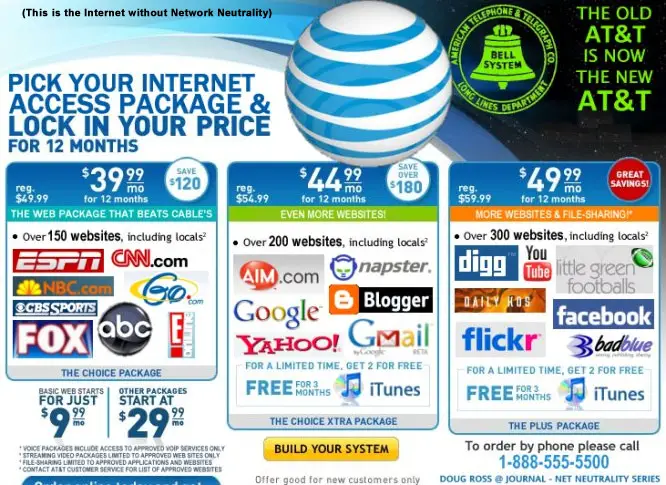
CrashOverride and I setup this weekend planning to make an Twitter bot army to inform everyone what disolving Net Neutrality will do to our beloved internet. Twitter bots are free to make, and using aws Lambda as your server gives you 1 million free requests a month. After that it's still only 20 ¢ per million. Twitter's tweet limit is 15 tweets every 15 minutes. So we figured we could get about 15 million+ tweets out informing and campaigning to keep Net Netruality. We don't know if it will be enough, or do anything, but we have to try. Being new to bot making, we quickly found out that our bots got shut down quickly. Twitter's automation kept flagging our bots. We hit the stumbing block and we weren't sure how'd we keep any bot alive long enough for it to be worth the effort of deploying it. We decided to finally read Twitter's rules regarding bots. Apparently tweeting at people who aren't your followers is no no if do it to may times as a bot, you can no longer post as a bot. We weren't sure how to get around this in order to get the word out. Then an idea hit us, what if we turned our personal Twitter accounts into bots?
The accounts have been established for years, so using them to tweet and encourage activism seem like the solution. Not quite the scale we were hoping for, but maybe we could get some retweets, or maybe we can get our friends to do it too?! Twitter bots are pretty much free with an aws account. If we wrote a bot that was easily configurable, we could share it with our friends who could also tweet to their friends. Next step seemed obvious, let's put out a basic campaign bot that tweets about Net Neutrality, tweets links to Battle for the Net, the December 7th Protests, gofccyourself.com, retweet trending tweets concerning #NetNeutrality, and rally calls for activism. We'd make it as easily configurable as possible, and try to write the best documentation to help even the most junior programmer with a credit card a chance to the launch a Net Neutrality Campaign Bot to help save the Net! This is that attempt, we hope you'll join us and help accomplish our goal. Hack the Planet!
Let's Get Setup!
- Features
- Tech Stack
- Setting Up Your Twitter Bot
- Install Node
- Install Serverless
- Install and Configure Git
- OK Let's Wire It Up!
- AWS Setup
- Activate the Bot
- The Plan
- Coming Features
<a name="features"></a>
Features
- Searches for hashtags related to Net Neutrality and retweets them
- Tweets links to activism for Net Neutrality
- Tweets out media about Net Neutrality
<a name="tech"></a>
Tech Stack
Don't worry if you haven't used some of these technologies or services before. All of your commands and steps should be included in this read me.
- NodeJS
- AWS Lambda
- Serverless Framework
- Python (for awscli to run, no Python will be needed for the bot)
- awscli (to deploy your bot)
<a name="twit-bot"></a>
Setting Up Your Twitter Bot
Login into your twitter account. After you login go to https://apps.twitter.com then click on the button that says Create New App. On the next screen you'll be prompted to name your app, give it a description, and it's website. Then name your app and just use your twitter profile url as your website. Hit confirm and there you go. Your account now has a bot. Inside your bot's setting click on the Keys and Access Tokens tab. Here you'll find your Consumer Key (API Key) and Consumer Secret (API Secret) keys. On the same page under this section you'll see a button that creates your Access Tokens. Press it. This creates your Access Token and Access Token Secret keys, you'll need these and your Consumer keys for the bot.
<a name="node"></a>
Install Node
If don't already have NodeJS installed, go here to download and install. To verify installation open your terminal and type node -v. If a version is displayed the installation was a success. Do the same with npm with npm -v.
<a name="serverless"></a>
Install Serverless
Inside you terminal type npm i -g serverless. Serverless is a framework we'll use to help us deploy and manage our lambda function controlling the bot. They have great documentation.
<a name="git"></a>
Install and Configure Git
If cloning The super easy way way below you can skip this step.
Install Git. Then inside your terminal do this and that.
If this is your first time using Git it can be a little tricky at first, but you'll only need to know basic commands to setup the bot. For more information about Git here's an easy to read cheat sheet for all the common Git commands you'll need, which isn't many.
<a name="wire"></a>
OK Let's Wire It Up!
Clone this repository one of three ways. The super easy way, click on the Clone or download button and select Download Zip. The easy way, click on the Clone or download button and copy the https url. Then in your terminal type git clone <project-url>. Clone it down with ssh.
Once you have the project on your machine, navigate to it in your terminal and type npm install.
Take your Consumer Key, Cosumer Secret, Access Token, and Access Token Secret and enter them in the temp.twit.config.js file. Then rename that same you entered your keys into, to twit.config.js. If you're using a repo make sure it's still on the .gitignore file because you do not want to commit that info.
Open the manifest.yml file. This controls how aws handles your lambda function. At around line 74 you'll see this line rate: rate(60 minutes). This controls how often your lambda will wake up and execute.
There's only two other files you need to worry about, handler.js and tweets.js. handler.js allows you to set how many tweets you'd like to send every time the bot wakes up. There are instructions in the commments. tweeets.js is where all the tweets the bot will us are stored. Feel free to add whatever tweets you'd like. Their variable names are pretty self-explanatory.
Now in your terminal if you type npm start the bot should execute locally and you'll see several success messages. Once we get setup with AWS you can launch this puppy!
<a name="aws"></a>
AWS Setup
Sweet! Now we're working locally. Let's take this bot live. First get an aws account setup, and then install the awscli.
Sign up for AWS.
Next, if you don't have python, you'll need to install python in order to install awscli. You won't need to know any python to deploy this bot, the awscli runs on it. Type pip --version to verify installation.
After python has be successfully installed, you can use python's package manager to install awscli by typing pip install awscli in your terminal. After that you'll need configure it following these instructions. Here is serverless's documenation on setting up credentials.
After this is done you're ready for deployment!
<a name="activate"></a>
Activate the Bot
Once you're ready, open your terminal and type npm run deploy. Your bot with be deployed to aws's Lambda and will wake up and perform it's function on the intervals set in the serverless.yml file. You've now successfully launched your own Net Neutrality campaign bot!
<a name="the-plan"></a>
The Plan
Now that your bot is working, go to your lambda's settings in your browser and temporarily disable it's trigger. Keep the bot ready to launch. The first wave begins at 6:00 A.M. EST, the second should follow at 5:30 A.M. MST, and third at 10:00 A.M. WST. In theory no account is violating terms of service, because you only contacting your followers and have long term base build by being a Twitter user. This bot will help you solidify your stance for Net Neutrality. There's no reason to fear that your account will get banned from twitter either! The worst case scenario is that your bot is no longer able to tweet. You can still tweet through your app or browser. Our goal with this bot is to gain visiblity for Net Neutrality while following Twitter's terms and services.
<a name="soon"></a>
Functions Coming Soon
- Sync Tweeting support at Key Figures
- Crawl through followers asking if they've contacted Congress today
