PiPicoRFID
Code and modified library to Read/Write data in MIFARE RFID Cards and Tokens using Raspberry Pi Pico Microcontroller and MFRC522 Module. Written in MicroPython.
Install / Use
/learn @Saket-Upadhyay/PiPicoRFIDREADME
PiPicoRFID
 Code and modified library to Read/Write data in MIFARE RFID Cards and Tokens using Raspberry Pi Pico Microcontroller and MFRC522 Module. Written in MicroPython.
Pinout
Raspberry Pi Pico
 SRC:https://datasheets.raspberrypi.com/pico/Pico-R3-A4-Pinout.pdf
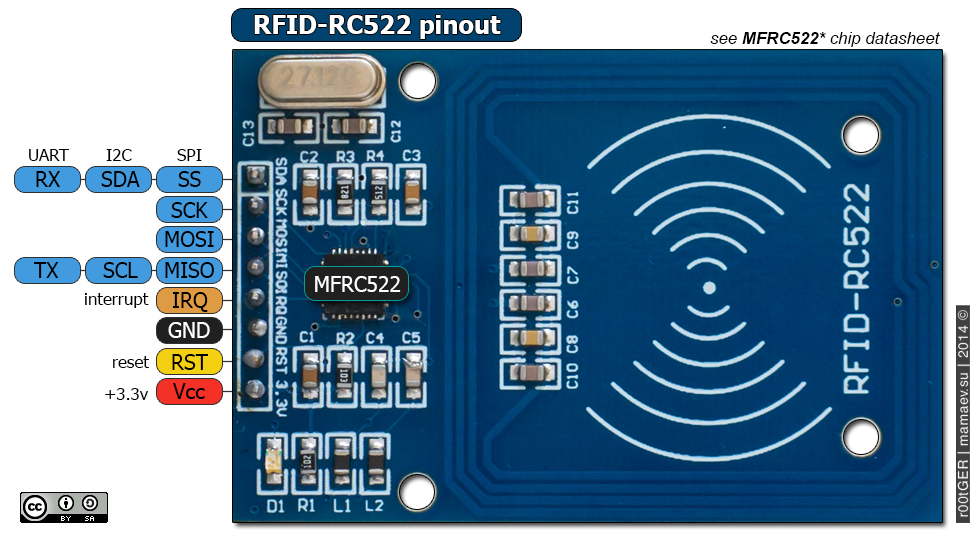
RC522 RFID Module
 SRC:https://microcontrollerslab.com/wp-content/uploads/2020/01/RC522-RFID-CARD-READERS-Pinout.png
Hardware Connection (RC522 to Pico)
| RC522 RFID Reader Module | Raspberry Pi Pico | |-------------------------------------|------------------------------| | VCC | 3.3V | | RST | GP0 | | GND | GND | | IRQ | Not connected | | MISO | GP4 | | MOSI | GP3 | | SCK | GP2 | | SDA | GP1 |
Set-up MicroPython in Pico
To set-up Pico with micropython READ THIS PDF
source : https://datasheets.raspberrypi.com/pico/raspberry-pi-pico-python-sdk.pdf (27 May 2022, 20:10 IST)
Modules
Run the modules via minicom or other serial interface. serial interface on Pico will interact with MicroPython To learn how to communicate with MicroPython of Pico in Windows using WSL, read THIS ARTICLE.
readRFID
This module is used to read data from RFID card, to use
import readRFID
readRFID.RUN()
writeRFID
This module will write 16bytes of data at address 0x08, this can be changed at -
stat = rdr.write(8, b"\x44\xFF\x4d\x6f\xFF\x47\xFF\x49\x6d\x6d\x55\xFF\x73\x4a\x44\x65")
Then run the module -
import writeRFID
writeRFID.RUN()
KeyGen
PS PiPicoRFID\src> python3 .\KeyGen.py
Key : RYhpNkAgIpBmbrL9
HexData to Write : "\x52\x59\x68\x70\x4e\x6b\x41\x67\x49\x70\x42\x6d\x62\x72\x4c\x39"
SampleRFIDScanner
import SampleRFIDScanner
SampleRFIDScanner.RUN()
CloneCardData
import CloneCardData
CloneCardData.RUN()